What is OCR: what is ocr and how it converts documents
At its heart, Optical Character Recognition (OCR) is a technology that lets computers read. It takes images—like a scanned document, a PDF, or even a photo of a receipt—and converts the text within them into machine-readable data you can actually edit, search, and analyze.
Think of it like this: a scanner creates a picture of a document, but your computer just sees a bunch of pixels. OCR is the magic that looks at that picture, recognizes the shapes as letters and numbers, and types it all out for you, instantly.
Why Does OCR Matter?
Ever felt like you're drowning in paperwork? Imagine a stack of invoices on your desk, each one needing to be manually entered into a spreadsheet. It's slow, mind-numbing work, and it's a perfect recipe for typos.
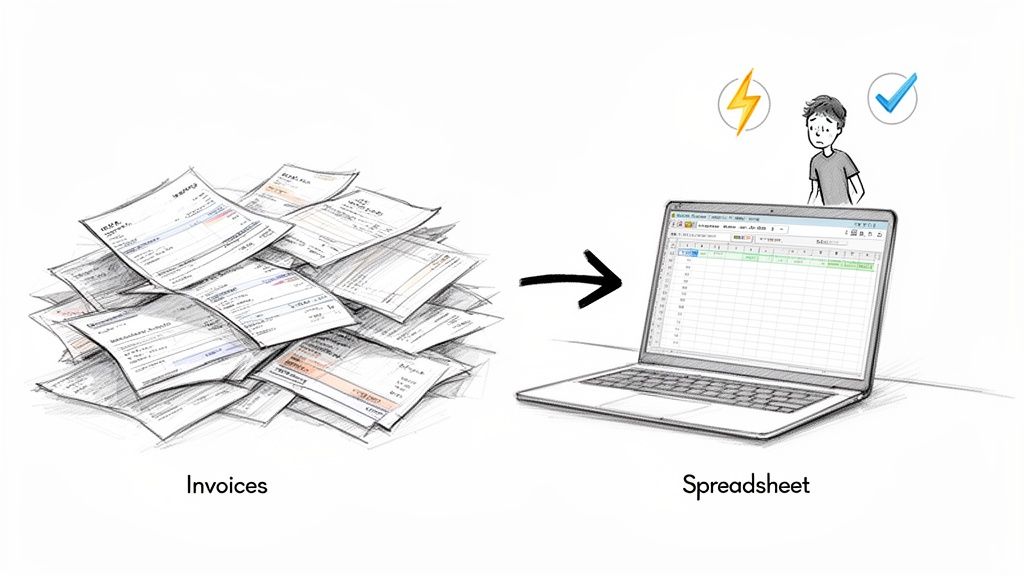
That tedious bottleneck is exactly what OCR was built to eliminate. It acts as a bridge, turning static, "dumb" images of text into living, usable data. This single step frees up your team from the soul-crushing routine of manual data entry. Instead of someone spending hours typing in line items from vendor invoices, the software handles it in a matter of seconds.
This isn't just about saving a little time. It fundamentally changes how a business can interact with its own information.
The Real-World Impact of OCR
When data is freed from the prison of a static document, it becomes something you can actually work with. This is a game-changer for any company that values speed and accuracy. By automating that first, crucial step of data capture, OCR helps teams:
- Move Faster: Suddenly, invoice payment cycles shrink from weeks to days. Customer onboarding gets a massive speed boost. Contract reviews are done in minutes, not hours.
- Get More Accurate Data: Automation cuts out the simple human errors—a misplaced decimal, a typo in a name—that always sneak into manual entry. This leads to cleaner, more reliable data across the board.
- Make Information Accessible: Got cabinets full of old records? OCR can help digitize, index, and make thousands of pages instantly searchable with a simple keyword.
The real purpose of OCR isn't just to see text in an image; it's to understand it. By turning a picture of words into actual data, it sets the stage for smarter operations and more powerful automation.
At the end of the day, getting a handle on what is OCR is the first step. It's the foundational layer for more sophisticated processes, like intelligent document processing, which not only reads the text but also understands what it means and where it belongs. By solving the universal headache of dealing with documents, OCR lets you spend your time analyzing information instead of just collecting it.
If you're interested in taking that next step beyond simple text extraction, you can learn more about intelligent document processing in our detailed guide.
From Telegraph Wires to AI: The Surprising History of OCR
The story of Optical Character Recognition isn't a modern tech tale; it's a century-long mission to solve one of the oldest problems in business: paper. The journey started long before computers, with a clever invention designed to let machines read what only humans could.
It all began way back in 1914. Picture a world filled with printed documents, where the telegraph was king. A physicist named Emanuel Goldberg created the first-ever device that could read characters and convert them straight into telegraph code. This was the spark. Goldberg continued his work into the 1930s with his "Statistical Machine," which used optical recognition to search microfilm archives—a concept so forward-thinking that IBM eventually acquired it.
Becoming a Business Essential
OCR really started to find its footing in the 1950s, when industries like banking and postal services jumped on board. Suddenly, machines were reading standardized fonts to automate check processing and sort mail, cutting down on manual work and speeding everything up.
A huge step forward came in 1959 when IBM's 1287 OCR machine became the first to commercially read handwritten numbers. For anyone in finance drowning in handwritten ledgers and checks, this was a game-changer. Still, there was a big catch: these early systems were picky and could only read specific, pre-programmed fonts.
The real breakthrough came in 1974 with Ray Kurzweil’s invention of the first omni-font OCR system. This was the moment machines finally learned to read almost any font without needing to be taught first, opening the door for businesses buried under all kinds of different paperwork.
The AI Era: Making OCR Truly Smart
The 1990s brought more flexibility with support for different fonts and languages, but the biggest transformation was just around the corner. When Artificial Intelligence and machine learning entered the picture in the 2000s, OCR got a massive upgrade. It could now understand context, fix its own mistakes, and make sense of the messy, real-world documents that older systems choked on.
Today’s OCR is light-years ahead of its early ancestors. When Google released its Tesseract 4.0 engine in 2018, it used deep learning to dramatically improve how well it could read even blurry or low-quality scans. This is why modern tools can now handle the complex documents businesses actually use, like multi-page vendor proposals or mixed-format commission reports. With the OCR market expected to hit USD 43.69 billion by 2032, it’s clear that its job as the engine for business data extraction is more important than ever. You can dig deeper into OCR's past and how it shapes its future on Idenfo.com.
From a simple machine sending telegraph code to a sophisticated AI algorithm, OCR’s history has always been about solving practical problems. Every single step has moved us closer to a world where information isn't locked away on a piece of paper, but is free, accessible, and ready to be used.
How OCR Technology Actually Works
So, how does OCR actually pull this off? It’s not a single magic trick but a surprisingly logical, three-part process that turns a picture of a document into usable digital text. I like to think of it as a highly trained digital assistant who first tidies up their workspace, then carefully reads the document, and finally proofreads their own work.
This entire workflow breaks down into three core stages: image preprocessing (the cleanup), character recognition (the reading), and post-processing (the final check). Each step is crucial for getting a clean, accurate result at the end.
The technology has come a long way. This visual shows the key moments in OCR's history, from its early telegraph-inspired roots to the sophisticated AI we use today.
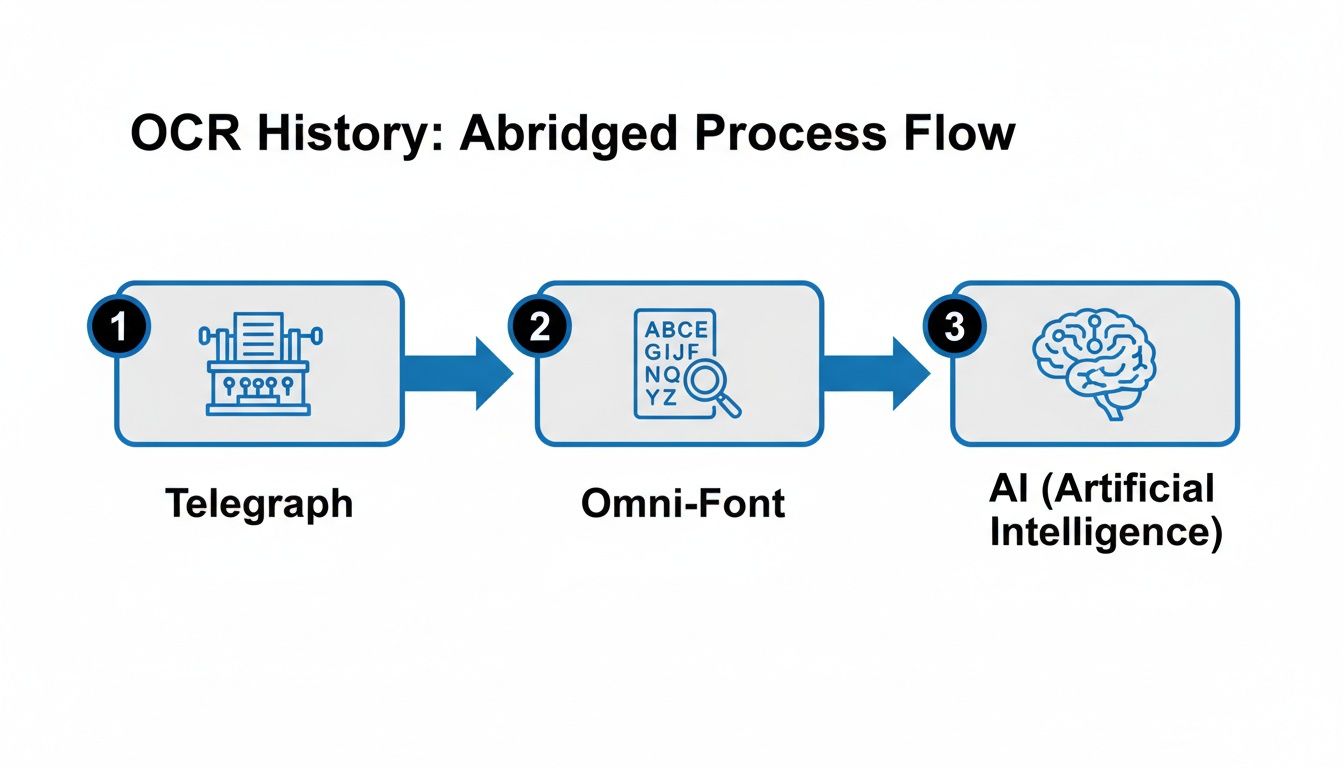
You can see how each innovation laid the groundwork for the next, making the technology faster, more accurate, and far more useful for businesses.
Stage 1: Image Preprocessing
Before a single character can be identified, the software has to clean up the image. This "preprocessing" step is arguably the most important one. Why? Because the quality of the cleanup directly determines how accurately the text will be recognized later. Trying to read a messy, low-quality scan is like reading a book in a dark room—you’re going to make mistakes.
The software runs through a few key cleanup jobs to get the document ready:
- Deskewing: Scanned documents are almost never perfectly straight. This step digitally rotates the image so the lines of text are perfectly horizontal, which makes them much easier for the software to follow.
- Binarization: The image gets converted to a simple black-and-white version. This step strips out any shadows, color variations, or funky background textures, leaving just high-contrast characters that stand out clearly.
- Noise Removal: This gets rid of the digital gunk—random pixels, little specks from a dirty scanner, or blurry edges around the letters. The goal is to make sure the software is only looking at the characters themselves.
Think of it like clearing your desk before you start working. When you remove all the clutter, the real task becomes much easier to tackle.
Stage 2: Character Recognition
With a clean image ready to go, the real work begins. This is the part where the software actually figures out what each letter, number, and symbol is. OCR engines typically use two main methods to get this done, often working together.
The first is called Pattern Matching. The software holds a massive library of different fonts and character shapes. It looks at a character from the document and tries to find the closest match in its library. It’s a bit like a digital matching game, finding the pre-stored shape that best fits what it sees.
The second, more modern approach is Feature Detection. Instead of trying to match the whole character at once, the software breaks it down into its basic parts: straight lines, curves, loops, and intersections. It then identifies the character based on this collection of features. For example, it knows a "P" is a vertical line with a closed loop on top. This technique is far more powerful because it can handle a huge variety of fonts and even handwriting.
Stage 3: Post-Processing and Output
Okay, the characters have been recognized, but the job isn’t done. The raw text that comes out of the recognition stage can still have errors or be just a jumble of words. The final stage, post-processing, is like an intelligent proofreader that cleans things up.
This is where modern AI really shines. Instead of just spitting out a string of text, the system uses language models to check for spelling, grammar, and context. For example, if the OCR misreads "invoice" as "invo1ce," the AI can see that doesn't make sense and correct it based on the surrounding words.
This last step turns a simple data dump into structured, reliable information. It makes sure the text is not only accurate but also properly formatted and ready to be used right away. This final polish is what makes the difference between basic OCR and truly intelligent data extraction.
For a deeper dive into practical applications, check out our guide on how to convert a PDF to text.
Beyond Basic Text: The Different Types of OCR
It’s easy to think of OCR as one single thing, but that’s like saying all vehicles are cars. In reality, the world of document recognition is full of specialized tools, each designed for a specific job. Using the right one is the difference between getting clean, reliable data and a jumbled mess.
Think of it this way: you wouldn't use a sledgehammer to hang a picture frame. The same principle applies here. Standard OCR is perfect for clean, printed text, but it’s the wrong tool for deciphering a doctor’s handwritten notes or tallying a multiple-choice survey. That's where its specialized cousins come in.
H3: OCR for Printed Text
This is the classic form of the technology, the one most people are familiar with. It's built to convert machine-printed characters—the kind you see in books, business letters, and standard invoices—into digital, editable text. When it's fed a clear, high-quality document with a common font, its accuracy is fantastic.
Its job is simple and direct: character-for-character translation. It sees the shape of an "A" and spits out an "A." This makes it incredibly useful for digitizing old archives, turning printed reports into searchable PDFs, or making scanned contracts editable in a Word doc.
H3: Intelligent Character Recognition for Handwriting
So, what happens when you need to read handwritten notes scribbled in the margins of a form? That's a job for Intelligent Character Recognition (ICR). ICR is the handwriting specialist, trained to make sense of the wild variations in human writing.
Unlike the predictable, uniform shapes of printed fonts, handwriting is fluid, messy, and inconsistent from person to person. ICR gets around this by using advanced machine learning models to look at the context of a word to predict the most likely character, even if the penmanship is sloppy.
ICR is what makes it possible to automatically process handwritten applications, signed consent forms, and customer surveys with open-ended feedback. It's not always as perfect as standard OCR, but its ability to tackle unstructured human input is a game-changer.
H3: Optical Mark Recognition for Marks and Bubbles
Remember filling out a multiple-choice exam or a customer satisfaction survey by bubbling in circles? The technology that reads those forms is Optical Mark Recognition (OMR). It doesn't actually read characters at all. Instead, it just looks for the presence or absence of a mark in a specific spot on the page.
OMR is purpose-built for one thing: capturing data from pre-defined fields with lightning speed and accuracy. It’s the engine that powers:
- Voting Ballots: Quickly tallying votes by detecting filled-in ovals.
- Standardized Tests: Grading thousands of exams by seeing which bubbles are marked.
- Surveys and Questionnaires: Compiling feedback from simple checkbox responses.
Because it’s only looking for marks, OMR isn't as flexible as OCR, but for structured forms, its speed and precision are unbeatable.
H3: The Next Step: Intelligent Document Processing
While OCR, ICR, and OMR are all great at reading, they don’t really understand what they're reading. That's the crucial gap that Intelligent Document Processing (IDP) fills. IDP is the next evolution, combining these recognition tools with AI to figure out the meaning and context behind the data.
For example, an OCR tool might pull the number "$1,450.75" from an invoice, but an IDP platform knows this is the "Total Amount Due" because of where it is on the page and the words around it. It can tell the difference between a "shipping date" and an "invoice date," something basic OCR can't do.
To make these distinctions clearer, here’s a simple breakdown of how these technologies compare.
H3: Comparison of Data Recognition Technologies
| Technology Type | What It Recognizes | Common Business Use Case |
|---|---|---|
| OCR | Machine-printed text and numbers | Digitizing printed contracts and articles |
| ICR | Handwritten or cursive script | Processing handwritten insurance claim forms |
| OMR | Filled-in bubbles, boxes, or marks | Tallying survey responses or test scores |
| IDP | Text, context, and document structure | Extracting line items from vendor invoices |
At the end of the day, knowing these differences helps you see what's truly possible with modern automation. The goal isn't just to copy text from a page anymore; it's to intelligently pull out the right information and structure it into data you can actually use.
Real-World Business Wins with OCR
Knowing the theory behind OCR is one thing, but seeing it in action is what really makes it click. This technology is the quiet hero behind some major efficiency boosts in businesses everywhere, turning mind-numbing manual work into a smooth, automated process.
Let's dig into a few real-world scenarios to see how different teams are using OCR to work smarter, not harder.
Speeding Up Payments for Accounting Teams
Anyone in accounting knows the pain of invoice processing. Manually typing data from piles of vendor invoices is a slow grind and a recipe for mistakes. One wrong keystroke can mess up a due date or payment amount, leading to late fees and unhappy vendors.
This is where OCR shines. An invoice comes in as a PDF, and the software immediately gets to work, reading and pulling out all the important bits—invoice number, vendor name, amount due, and even individual line items. That data flows directly into the accounting system without anyone having to lift a finger.
The impact is huge. The entire payment cycle gets a massive speed boost. What used to take days or even weeks of manual work can now be wrapped up in a few hours. This doesn't just help avoid late fees; it often lets companies grab early payment discounts, turning a tedious chore into a money-saver.
Ensuring Compliance for Insurance Brokers
Insurance policies are dense documents, loaded with jargon, coverage limits, and tricky exclusion clauses. For brokers, manually pulling key details from these contracts is a high-stakes game. Miss one detail, and you could be looking at a serious compliance breach or a misjudged risk.
OCR-powered tools completely change the game. The software scans the entire policy, trained to find and extract specific information like policy numbers, premium amounts, effective dates, and coverage specifics. All this data is then neatly organized and ready for review.
By automating this process, insurance firms can check policy data against compliance rules in a fraction of the time. In some cases, this has been shown to slash human error by over 90%, ensuring accuracy and freeing up skilled brokers to focus on clients instead of paperwork.
Simplifying Reports for Manufacturers Reps
If you're a manufacturers' rep, you probably get commission statements from multiple vendors, and none of them look the same. Trying to stitch all that information together into one clear report is a monthly headache of copying and pasting data into a master spreadsheet.
OCR acts like a universal translator here. A rep can feed it ten different statements—some are clean PDFs, others are grainy scans—and the technology pulls out the key numbers from each one, no matter the layout. It grabs the vendor name, sales figures, and commission earned, then standardizes it all.
This allows reps to see their total earnings in a single report, and it only takes a few minutes. It gets rid of reconciliation errors and gives them an instant, clear picture of their performance for better financial planning. These kinds of wins are common across many intelligent automation use cases, where OCR is the crucial first step.
Empowering Smart Decisions in Procurement
Procurement teams live and breathe vendor proposals. But when every proposal has a different format, comparing them side-by-side means hours of manual data entry just to see who's offering the best deal.
With OCR, that whole process becomes automated. The software scans each proposal and pulls out the exact data points needed for a fair comparison, such as:
- Unit pricing and bulk discounts
- Payment terms and delivery timelines
- Warranty information and service agreements
All that extracted data lands in a single, organized table, making an apples-to-apples comparison instant. Teams can now make informed decisions in minutes instead of hours, helping them negotiate better deals and choose the right vendor with total confidence.
Why OCR Alone Is Not Enough
Understanding how OCR works shows you just how powerful it is, but it also shines a light on a major limitation many businesses miss. Just pulling text off a document is only half the job. The real goal is to get useful information you can actually act on, and basic OCR on its own can't quite get you there.
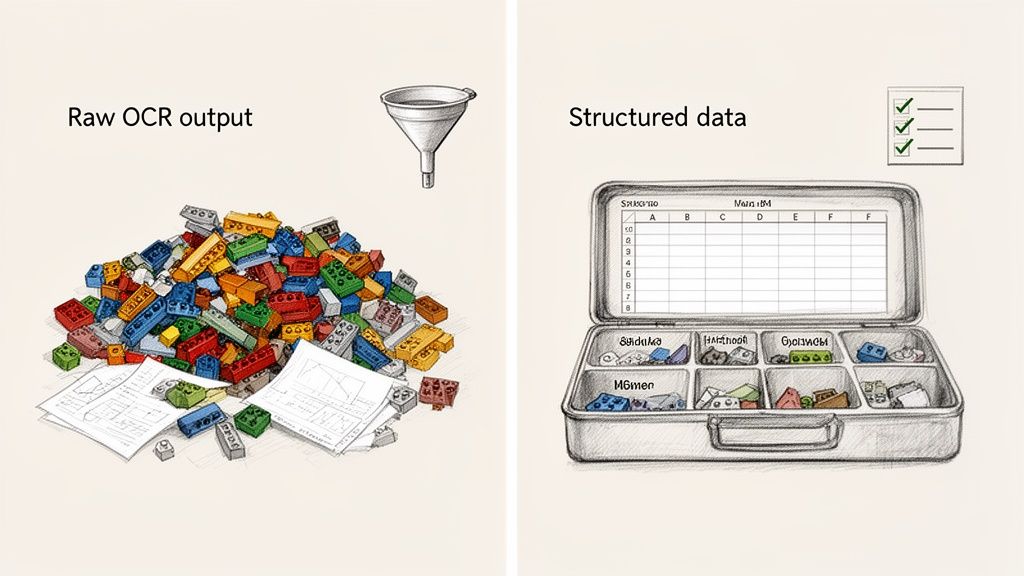
Imagine a standard OCR tool as a well-meaning but totally disorganized assistant. Hand it an invoice, and it will dutifully read every single character—the vendor's name, each line item, all the dates, the final total. But it will hand it all back to you as one long, jumbled block of text. It's like dumping the entire contents of a filing cabinet onto your desk. Sure, all the information is there, but good luck finding what you need in that mess.
This raw output, often called a "wall of text," just creates another manual task for your team: sifting through the chaos to find and label the specific data points they actually need.
From Raw Text to Structured Data
This is where you have to understand the difference between text extraction and data extraction. One gives you words; the other gives you answers. To make OCR a truly valuable business tool, you need an intelligent layer on top that understands the document's layout and context.
This smarter next step is what we call parsing or structural analysis. It doesn't just read the words; it understands how they relate to each other. It knows that the number next to the words "Invoice #" is, in fact, the invoice number, and that a dollar amount at the bottom right of the page is probably the grand total.
The LEGO Analogy:
- Basic OCR is like getting a giant, unsorted pile of LEGO bricks. You have all the pieces, but no clue how they're supposed to fit together.
- Intelligent Parsing is like getting a proper LEGO kit. The pieces are sorted by color and size, and it comes with instructions telling you exactly what each piece is for.
This second step is what turns that messy jumble of text into a clean, spreadsheet-ready table where every piece of data is in the right column, ready for analysis.
Why Context Is Everything
A document’s meaning comes from more than just the words on the page—its layout is a language all its own. The location of information is a huge clue to what that information represents. Basic OCR completely ignores these visual cues, but an intelligent system uses them to build context.
For example, think about these two identical dates on an invoice:
- 05/20/2024 appearing next to "Date:" is the Invoice Date.
- 05/20/2024 appearing next to "Ship By:" is the Shipping Date.
A basic OCR tool just sees the same date twice. An intelligent parsing platform, on the other hand, understands they are two completely different things because it reads the labels next to them. This contextual awareness is the difference between having raw data and having real business intelligence. Our guide on automatic document processing dives deeper into how this technology changes the game for business workflows.
Ultimately, OCR is the foundational engine that makes automated data entry possible, but it’s the structural analysis that makes it practical. By combining these technologies, modern platforms like DocParseMagic close the gap, delivering clean, reliable data that teams can use right away—no manual clean-up required.
Frequently Asked Questions About OCR
As you start to think about what OCR is and how it might fit into your business, a few practical questions naturally pop up. Getting straight answers to these common queries can help you grasp the real-world value—and the limitations—of this technology.
Let's tackle some of the most common questions we hear about Optical Character Recognition.
How Accurate Is OCR Technology?
On a perfect, high-quality, clearly printed document, modern OCR tools can hit over 99% accuracy. But that's a best-case scenario. In the real world, things like poor scan quality, crumpled paper, or funky fonts can drop that number. Messy or handwritten documents are especially tough for a standard OCR engine to read correctly.
This is exactly why the best platforms don't just stop at basic text recognition. They add an AI-powered validation layer on top that acts like a human proofreader. These systems double-check the output, fix common errors, and flag anything that looks fishy, making sure the final data is clean enough for your most important business tasks.
Can OCR Read Handwriting?
Yes, but it's not actually OCR doing the heavy lifting. That job belongs to a more specialized technology called Intelligent Character Recognition (ICR). While standard OCR is a pro at deciphering machine-printed text, ICR is trained with sophisticated machine learning models to understand the wild variations and unique quirks of human handwriting.
ICR works best when it has some context, like deciphering handwriting on a structured form. Think about filling in a name, address, or date on a new customer application or a patient intake sheet—that's where ICR shines.
The simplest way to remember it is: OCR handles machine print, while ICR tackles human script. Knowing which one you need helps you pick the right tool for the job.
Is OCR The Same As Document Automation?
Not quite. It’s better to think of OCR as a critical ingredient in the much larger recipe of document automation.
- OCR is the specific step that turns a picture of a document into raw, machine-readable text.
- Document Automation is the entire end-to-end process. It uses OCR to first get the text, then intelligently identifies, structures, and validates the important information (like an invoice number or a policy start date), and finally sends that clean, structured data into your other business systems.
True automation isn't just about getting the words off the page; it's about turning them into useful, structured information that can actually run your workflows.
Ready to stop wrestling with messy text dumps and start getting clean, structured data from your business documents? DocParseMagic combines powerful OCR with intelligent parsing to turn chaotic files into analysis-ready spreadsheets in minutes. Sign up for free and see how it works.