What is Intelligent Automation? A Practical Guide to Smarter Workflows
Intelligent Automation (IA) is what happens when you give traditional automation a brain. It’s the difference between a robot that can only follow a strict, pre-set list of instructions and one that can think, learn, and adapt on the fly.
From Simple Robots to Thinking Teammates
If you've worked with basic automation before, you're likely familiar with Robotic Process Automation (RPA). Think of RPA as a pair of "digital hands." It’s fantastic at highly repetitive, predictable jobs, like copying data from one system and pasting it into another.
The problem? It’s rigid. If a field in a form moves or a website layout changes even slightly, the whole process breaks. It does exactly what it's told, and nothing more. This is where the “intelligent” part of Intelligent Automation comes into play.
IA adds a "digital brain" to those "digital hands." It combines the tireless consistency of RPA with the thinking power of AI, creating a system that doesn't just blindly follow rules but actually understands the context of its work.
What Makes Automation "Intelligent"
The real game-changer is how IA handles unstructured, messy information—the kind of stuff businesses run on every day. While basic automation needs data to be perfectly clean and organized, IA is built to make sense of the chaos. If you're looking to understand the core technologies involved, there are great resources that explore AI automation in more detail.
This added intelligence allows the system to:
- Read and understand documents: It can pull key information from invoices, contracts, or emails, even when the layout is different every time.
- Learn as it goes: Using machine learning, it gets smarter and more accurate with every task it completes.
- Make smart judgments: It can spot anomalies, flag potential errors for review, or decide the next best step on its own.
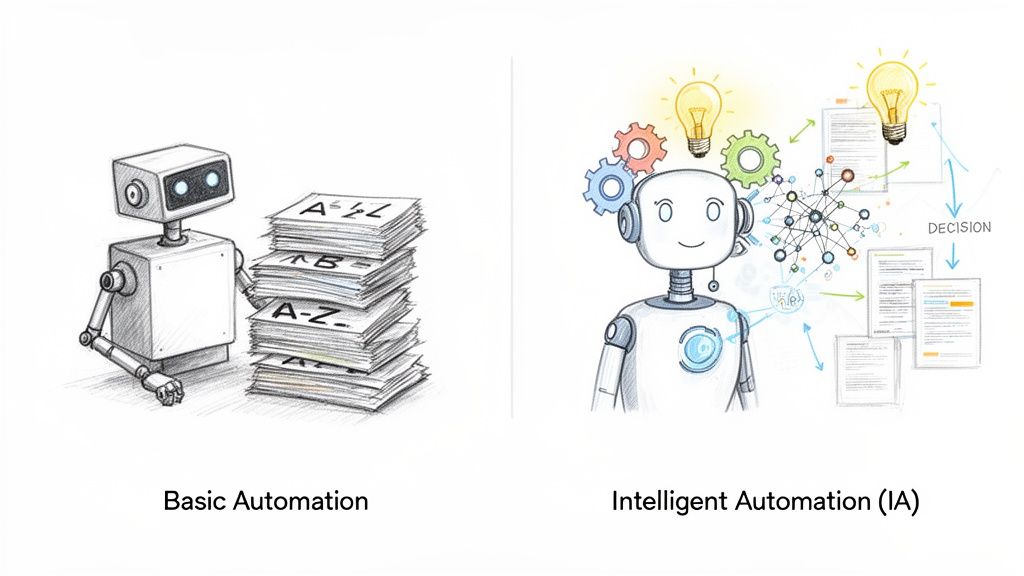
To really see the difference, let’s look at a quick comparison.
Intelligent Automation vs Traditional Automation
This table breaks down how Intelligent Automation builds on what traditional RPA can do.
| Capability | Traditional Automation (RPA) | Intelligent Automation (IA) |
|---|---|---|
| Data Handling | Requires structured data (spreadsheets, databases) | Handles unstructured data (PDFs, emails, images) |
| Process Type | Rule-based and repetitive tasks | Judgment-based, dynamic workflows |
| Adaptability | Rigid; breaks with process changes | Flexible; adapts to variations and learns over time |
| Decision Making | Follows pre-programmed "if-then" logic | Makes predictive decisions and handles exceptions |
| Example Task | Copy-pasting data from a fixed-format report | Extracting data from variable-format invoices |
Essentially, where a traditional bot would stop, an intelligent one keeps going.
Imagine you're processing vendor invoices. A basic RPA bot might be programmed to grab the total amount from the bottom right corner of every PDF. But what if one invoice puts the total at the top? The bot fails.
An IA-powered system, on the other hand, can read the entire document, identify the words "Grand Total" or "Amount Due," and find the correct number no matter where it is on the page. It can then validate it against a purchase order and route it for approval—mimicking the entire thought process of an accounts payable expert.
This ability to manage complexity and unpredictability is what truly defines what is intelligent automation. It moves automation beyond being a simple task-doer and turns it into a digital team member that can handle entire workflows from start to finish.
The Core Technologies Driving Intelligent Automation
Intelligent Automation isn’t just one single piece of software. It’s more like a highly skilled team where different technologies work together to get the job done. Think of it as a pit crew for your business processes—each member has a very specific, crucial role. On their own, they're useful, but together, they can handle incredibly complex work that would normally need a human touch.
To really get what makes Intelligent Automation so powerful, you need to understand how these different parts fit together. Let's look at the three key technologies that put the "intelligence" into this automation.
Robotic Process Automation: The Digital Hands
The foundation of any IA setup is Robotic Process Automation (RPA). As we’ve mentioned, RPA bots are the "digital hands" of the operation. They are the workhorses, built to execute repetitive, rules-based tasks across your different software applications.
An RPA bot can do what a person does—click buttons, open files, copy data from a spreadsheet, and paste it into a CRM. They are fantastic at moving structured information around with perfect accuracy and speed. But by itself, RPA is a bit rigid; it can only follow a pre-set script and struggles when anything unexpected happens.
Artificial Intelligence and Machine Learning: The Cognitive Engine
This is where the real brainpower comes into play. Artificial Intelligence (AI), and its key component Machine Learning (ML), act as the cognitive engine. If RPA gives you the hands to do the work, AI and ML provide the ability to think, reason, and get smarter over time.
This thinking layer is what allows the system to go beyond simple “if-then” rules. Instead of just blindly following a script, the AI can:
- Spot patterns: It can find trends and connections in your data that a person might easily miss.
- Make smart predictions: Using past data, it can forecast outcomes or suggest the right next step.
- Improve with experience: ML algorithms learn from every document they process and every decision they make. This means they get more accurate and efficient with each cycle.
For instance, when processing invoices, an ML model can learn to flag a potentially fraudulent bill by spotting tiny details that don’t look right, even if it’s never seen that exact type of fraud before.
This ability to learn on the job is what truly sets IA apart. You don't have to manually program it for every single exception or variation. The system adapts, which makes it perfect for handling the messy, unpredictable nature of real-world business documents.
Natural Language Processing: The Language Expert
The final piece of the puzzle is Natural Language Processing (NLP), a field of AI that gives software the ability to understand human language. Think of NLP as the "language expert" on the team, translating between human communication and machine instructions. So much of business runs on unstructured data locked away in emails, reports, and contracts.
NLP is what unlocks that information. It enables the system to read and understand text, including:
- Information Extraction: Pulling out specific details, like a policy number from a contract or a due date from an invoice.
- Sentiment Analysis: Figuring out the tone of a customer email—are they happy, or are they frustrated?
- Language Translation: Automatically processing documents in different languages without needing someone to translate them first.
When these three technologies—RPA, AI/ML, and NLP—are combined, you get a seamless and powerful workflow. For any business that deals with paperwork, this is the heart of intelligent document processing, a major application of IA. An RPA bot might open an email and download a PDF, but it's the NLP and ML that actually read the document, understand what it is, and decide what to do next.
How IA Solves Real-World Document Challenges
All this talk about technology is great, but let’s get down to what really matters: How does intelligent automation fix the frustrating, day-to-day document problems we all face? This is where the theory becomes reality. Let's look at a few common scenarios where IA is making a huge difference.
Think of it this way: the core technologies in IA work together like a team. RPA provides the “hands” to perform tasks, NLP acts as the “eyes and ears” to read and understand, and AI is the “brain” that makes decisions.
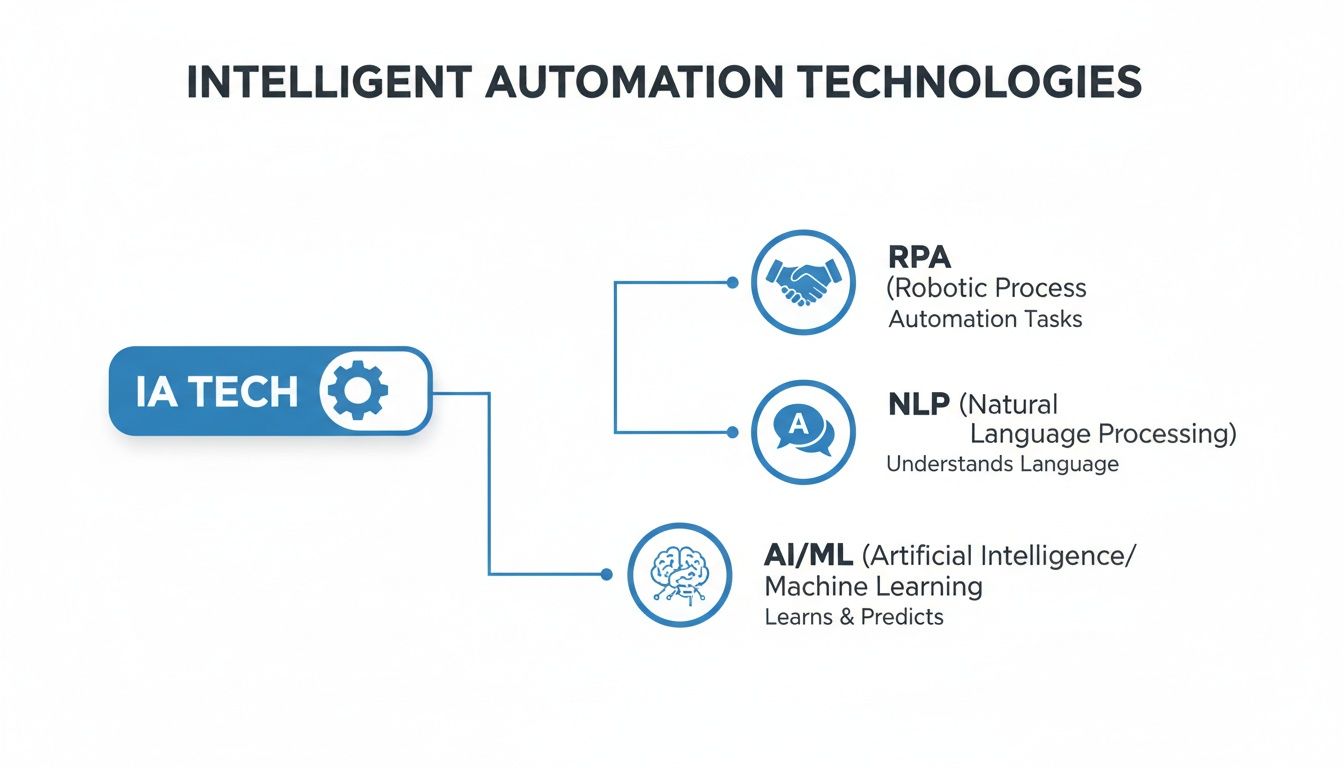
When you combine them, you can tackle complex document challenges that a simple bot could never handle on its own.
Automating Invoice and Purchase Order Matching
Anyone in an accounting department knows the soul-crushing task of the “three-way match.” You have to manually compare an invoice, a purchase order (PO), and a delivery receipt to make sure every single detail lines up before you can approve a payment. It's repetitive, tedious, and a breeding ground for human error.
An IA system flips this entire workflow on its head.
- Ingestion: The system watches an inbox for new invoices. When one arrives, the bot downloads the PDF and uses its AI and NLP to start reading.
- Extraction: It’s smart enough to find and pull out the key information—invoice number, vendor name, line items, and the total amount—no matter how different each vendor's layout is.
- Cross-Referencing: Next, it logs into your accounting or ERP system to find the matching PO and delivery note.
- Validation: Finally, it does the three-way match. If the numbers, quantities, and terms all check out, the invoice gets sent straight for payment. If something’s off, it flags the problem and alerts the right person to take a look.
This doesn’t just save a few minutes; it saves hundreds of hours while drastically cutting down on errors. A recent study highlighted that 82% of businesses still get paper invoices, creating a massive manual bottleneck that IA is perfectly designed to clear.
This is a textbook example of an automated document workflow that gets your finance experts out of the data-entry weeds so they can focus on work that actually requires their brainpower.
Extracting Details from Insurance Policies
Imagine being an insurance broker. You’re drowning in policy documents from dozens of different carriers, each with its own unique format. Trying to find and compare specific details like coverage limits, premiums, or effective dates is a monumental chore. It's slow, boring, and a single mistake could be incredibly costly.
Intelligent automation completely changes the game here. An IA tool can take a folder stuffed with hundreds of different policy documents and make sense of it all.
- The AI first identifies what kind of document it’s looking at—an auto policy, a homeowner’s declaration, or a liability certificate.
- The NLP component then reads the document like a human would, locating the exact data points you need, regardless of where they are on the page.
- From there, the system pulls out all that information and neatly organizes it into a spreadsheet or database for easy analysis.
A task that once took a team days of painstaking manual work can now be done in a matter of minutes. This means brokers can answer client questions faster, compare quotes more accurately, and stay on top of compliance with far less effort.
Consolidating Complex Commission Statements
If you work in sales ops or for a manufacturer, you’ve probably felt the pain of calculating commissions. Your team gets statements from all kinds of partners and vendors, and each one is a mess of different formats, product codes, and payout rules. Trying to merge all that data into one clean report for payroll is a recipe for a massive headache.
This is another perfect job for intelligent automation. A sales manager can just upload a whole batch of commission statements—PDFs, Excel files, even scanned images. The IA system reads each one, pulls out the key figures like sales totals and commission rates, and standardizes it all into a single, unified report.
Suddenly, you have one source of truth. The errors are gone, the manual work is eliminated, and you get a crystal-clear picture of sales performance across the board.
Why the Intelligent Automation Market Is Growing
You’re hearing a lot about intelligent automation lately, and for good reason. This isn't just another buzzword making the rounds; it's a real change in how businesses operate and compete. We're seeing a clear shift away from old-school manual processes toward smarter, more resilient ways of getting work done.
The numbers back this up in a big way. Persistence Market Research predicts the global intelligent automation market will hit US$12.6 billion in 2026. From there, it’s expected to more than double to US$25.8 billion by 2033, growing at a steady 10.8% each year. This boom is happening because companies are realizing they can trade tedious, error-prone tasks for smart systems that process complex documents with incredible accuracy. If you want to dig into the data yourself, you can read more about the intelligent automation market trends on persistencemarketresearch.com.
Advanced Automation Is No Longer Just for the Big Guys
Not long ago, this kind of sophisticated automation was only accessible to huge corporations with massive budgets and big IT teams. If you wanted a system to read invoices or pull data from contracts, you were looking at a major investment, custom coding, and a small army of specialized engineers. This kept most small and mid-sized businesses (SMBs) on the sidelines, stuck with manual work.
That’s all changing. The rise of no-code and low-code platforms, like DocParseMagic, has completely leveled the playing field. These tools make intelligent automation available—and affordable—for just about anyone.
No-code platforms give you a visual, drag-and-drop interface to build powerful automation workflows. You don't need to be a developer anymore to teach a machine how to read a document and grab the information you need.
This accessibility is what’s really lighting a fire under the market. Now, a small accounting firm can automate its invoice processing just as easily as a Fortune 500 company. A mid-sized insurance agency can extract policy details without a seven-figure budget. The power is being put directly into the hands of the people who actually do the work.
Driving Real Business Results
At the end of the day, the market is exploding because intelligent automation delivers results you can see and measure. Businesses aren't jumping on this because it’s trendy; they're doing it because it flat-out works. And the benefits are about much more than just saving a little time.
- Serious Cost Savings: When you automate manual data entry, you slash labor costs. You also get rid of the expensive mistakes people inevitably make, which add up faster than you’d think.
- A Huge Boost in Efficiency: Work that used to take a team days can now be done in minutes. This lets your people handle more volume without you having to hire more staff, freeing them up for work that actually requires their expertise.
- Stronger, More Resilient Operations: Automating key processes makes your business less fragile and less dependent on specific people. It creates a more predictable and stable operation that can handle sudden workload spikes or other disruptions without skipping a beat.
North America is currently leading the charge, projected to hold about 40% of the market share in 2026. This is mostly thanks to its solid tech infrastructure and regulatory pressures in fields like finance and healthcare, which demand accurate and traceable processes. As other parts of the world catch on, the demand for what is intelligent automation is only going to grow stronger.
Your Roadmap to Implementing Intelligent Automation
Thinking about intelligent automation can bring to mind massive, complex IT projects. But getting started doesn't have to be that way. The smartest approach is to start small, find a quick win, and build momentum from there.
The trick is to avoid trying to automate everything at once. Instead, hunt for the low-hanging fruit—those repetitive, high-volume tasks that chip away at your team’s focus and morale day after day.
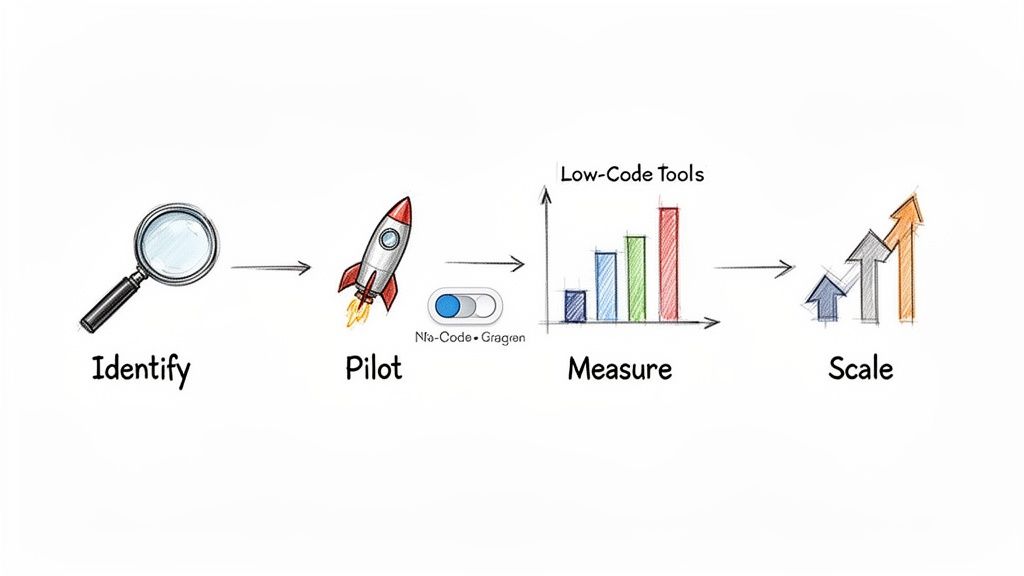
Step 1: Identify High-Impact Opportunities
Your first move is to find the perfect starting point. You're looking for a process where automation can deliver a fast, undeniable win that gets everyone excited about what's next.
So, what does a great first project look like?
- High Volume and Repetitive: Think about work that happens over and over, like keying in hundreds of invoices or calculating commission payouts every month.
- Prone to Human Error: Any workflow where a simple typo can cause a cascade of problems—from payment mistakes to compliance flags—is a prime candidate.
- Based on Digital Documents: If the process kicks off with a PDF, email, or spreadsheet, that’s a strong sign it’s ready for intelligent automation.
- Consumes Significant Manual Hours: A task that eats up 5-10 hours of someone's week is an ideal target. Automating it gives them that time back for work that really matters.
A perfect example? An accounting team that manually enters data from 50 vendor invoices each week. It's a clear-cut process with consistent volume and a huge potential for time savings.
Step 2: Launch a Small Pilot Project
Once you’ve zeroed in on your target process, it’s time to run a small-scale pilot. This is where modern, no-code tools really shine. You don't need a huge budget or months of development; you can use a platform like DocParseMagic to get a working solution up and running in a single afternoon.
The pilot’s objective is simple: prove that automation works for your specific problem. Just grab a small, representative batch of documents—maybe 20 invoices or 10 insurance policies—and see how the new workflow handles them.
This pilot phase is your secret weapon. It’s not about building a flawless system right out of the gate. It’s about showing real value, fast. A pilot that saves even a few hours of work is tangible proof that this technology is worth investing in.
Getting familiar with the different workflow automation software platforms is a good idea. Many are built to be user-friendly, letting you dive in without having to write a single line of code.
Step 3: Measure and Optimize the Results
As your pilot runs, you need to track its impact. After all, you can't improve what you don't measure. These key performance indicators (KPIs) are how you’ll build the business case for your efforts.
Focus on straightforward, powerful metrics:
- Time Saved: Tally up the hours of manual work you've eliminated. If you automate a task that took 10 hours a week, you’ve just reclaimed over 500 hours in a year.
- Error Reduction: Compare the rate of data entry mistakes before and after automation. Seeing your error rate drop from 5% to less than 1% is a huge win.
- Processing Speed: Clock the time it takes to get from start to finish. If you can take invoice processing from three days down to three minutes, that’s a game-changer for cash flow and vendor relationships.
These numbers transform abstract benefits into a rock-solid business case. To see how these small wins contribute to a bigger picture, take a look at our guide on digital transformation for small business.
Step 4: Scale Your Success
With a successful pilot and clear, positive metrics in hand, you've earned the credibility to expand. Share your results with other departments—show them the hours saved, the errors prevented, and the speed gained.
Soon enough, the accounts payable team's success story will get the sales team thinking about automating their commission reports, or the legal team will see an opportunity to extract data from contracts. This is how you create a culture of automation, one small victory at a time, until it becomes a real competitive edge for the entire business.
Measuring Your Success with Intelligent Automation
So, you’ve made the leap to intelligent automation. Now for the big question: how do you prove it was the right move? To get buy-in and show real value, you have to move past saying you "improved efficiency." The proof is in the numbers—the hard data that demonstrates a clear return on your investment.
When you switch from manual processing to an automated workflow, you create tangible results that are easy to track. These aren't just metrics for an IT report; they're the language that shows the entire organization just how valuable your efforts are.
Key Metrics to Track Your IA Success
When you roll out an intelligent automation solution, especially for document-heavy work, you’ll want to zero in on a few core key performance indicators (KPIs). These numbers tell a powerful story about the impact on your day-to-day operations.
-
Process Velocity: How much faster does a task get done? That’s process velocity. If it used to take three days to get an invoice approved and now it takes three minutes, you’ve made a huge leap. Faster turnaround times directly improve cash flow and make your vendors happier.
-
Cost Reduction: This one is straightforward. Calculate what you're saving from both reduced manual effort and fewer errors. Tally up the hours your team gets back from mind-numbing data entry and multiply that by their hourly cost. And don't forget the "soft" savings from dodging costly mistakes like overpayments or compliance penalties.
-
Data Accuracy: Before you automate, get a baseline for your manual data entry error rate—it's typically between 1% and 5%. Once your IA system is running, measure it again. Seeing that number drop to near-zero is a massive win for data integrity and a powerful testament to the system's reliability.
These metrics aren't just abstract figures on a dashboard. They represent real-world gains: reclaimed time, lower risk, and a business that just runs better.
Think about this: a mid-sized manufacturing firm automated just 20 hours of manual commission statement reconciliation per week. By eliminating data entry mistakes and freeing up their sales ops team for more important work, they calculated a 300% ROI in only six months.
That kind of specific, data-backed success story is what turns a small pilot project into a company-wide standard.
The Financial Sector Proves IA's Value
Nowhere is the impact of IA more obvious than in financial services. In fact, the banking, financial services, and insurance (BFSI) sector is where intelligent automation really hits its stride, and it's expected to account for 35% of the global market share by 2026. Why? Because the industry is drowning in manual reviews for fraud detection, compliance, and customer service—all areas where IA excels.
The broader market for intelligent process automation is projected to climb from USD 17.88 billion in 2026 to USD 37.54 billion by 2031, a surge driven by its ability to finally tackle unstructured data like scanned invoices and loan applications. You can dig deeper into this trend by reading the full research about intelligent automation's market trajectory.
This is precisely why document-parsing platforms like DocParseMagic are becoming indispensable. For accounting teams buried in invoices or brokers trying to extract policy details, these tools are the foundation for building fast and accurate workflows.
By tracking the right KPIs, you stop talking about hypotheticals and start showing exactly what is intelligent automation in terms of undeniable value. The data will prove it’s not just another tool for saving time—it’s a strategic asset for building a more efficient, accurate, and resilient business.
A Few Lingering Questions About Intelligent Automation
Even after diving into the details, a few questions almost always pop up. It's completely normal—wrapping your head around this technology takes a moment. Let's clear the air on some of the most common points of confusion.
A big one is whether intelligent automation is just a fancy new name for AI. They’re definitely related, but they are not the same thing.
Think of Artificial Intelligence as the engine—a powerful set of algorithms built for learning and reasoning. Intelligent Automation, on the other hand, is the entire vehicle. It takes that AI engine, bolts on process automation tools like RPA, and builds a complete system designed to handle a business task from start to finish.
Is It Difficult to Implement?
In the past, the honest answer was yes. Getting this kind of automation off the ground often meant hiring a team of developers and securing a massive budget. It was a huge undertaking that was simply out of reach for most companies.
Thankfully, that’s no longer the case.
The game has completely changed with the rise of modern no-code platforms. These tools offer simple, visual drag-and-drop interfaces, which means you don't need a programming background to build a smart workflow. The people who actually understand the business processes can now create their own automation, making IA both accessible and affordable for nearly any organization.
Intelligent automation is less about replacing people and more about augmenting their abilities. It’s a tool that takes over the monotonous, repetitive parts of a job so your team can focus on creative problem-solving and strategic work—the things humans do best.
What Kind of Data Can It Handle?
People also get stuck on what kind of information intelligent automation can actually process. While basic automation falls apart without perfectly structured data, IA was built for the messy reality of the business world.
It's designed to handle both:
- Structured Data: The neat, tidy information you find in spreadsheets and databases.
- Unstructured Data: The chaotic stuff that makes up 80% of business information, like PDFs, emails, scanned forms, and images.
This ability to understand unstructured data is what makes IA so effective. It can read an invoice from a new vendor, extract key terms from an insurance policy, or pull details from a customer email just like a person would—no manual data entry required.
Ready to stop wasting time on manual document entry? DocParseMagic turns your messy invoices, statements, and reports into clean, organized spreadsheets in minutes. Sign up for free and see how easily you can automate your workflows.