Automated Document Workflow Your Guide to Smarter Business
An automated document workflow is like a digital assembly line for your company’s paperwork. It's a system designed to shuttle documents—invoices, contracts, you name it—through every necessary step without needing someone to manually push them along. It takes your team from being document handlers to workflow supervisors.
What Is an Automated Document Workflow
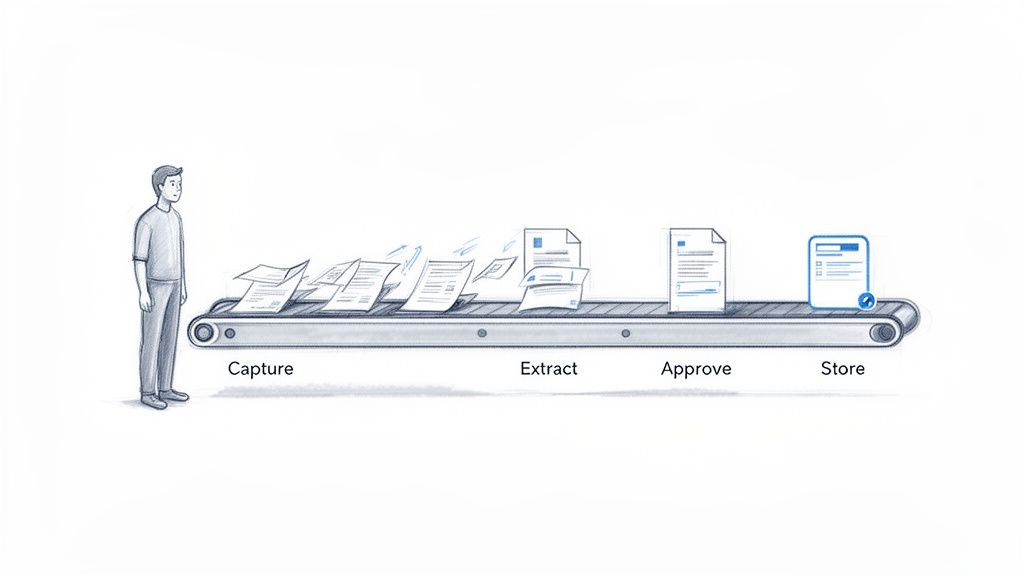
Picture the old-school journey of an invoice. It lands in an inbox, gets printed out or saved, and then someone has to painstakingly type its details into a spreadsheet. From there, it’s emailed to a manager for approval, who might be swamped and let it sit for days. If it gets approved, it moves to accounting for payment and is finally filed away—maybe in a digital folder, maybe in a dusty cabinet. Every single step is a potential bottleneck or point of failure.
An automated document workflow gets rid of all that manual chaos. Instead of relying on human memory and a messy trail of emails, it uses smart, rule-based logic to move documents from one stage to the next, all on its own. It’s the difference between a bucket brigade, where water gets spilled at every hand-off, and a modern pipeline that delivers it instantly and without a single drop lost.
This shift isn’t just about moving faster; it's about fundamentally rethinking how work gets done. The global workflow automation market is expected to reach a massive $29,945.2 million by 2026, growing at a steady clip of 16.6% each year. This boom is happening because companies get it—an estimated 70% of organizations are already using document workflows to get ahead. You can discover more about this market surge and how it’s changing the game.
The Old Way Versus the New Way
The difference between manual and automated processes couldn't be more dramatic. Manual workflows are reactive—nothing moves until someone remembers to forward an email or hunt down a signature. Automated workflows are proactive. The system itself makes sure tasks are assigned, reminders go out, and nothing ever falls through the cracks.
By automating these tedious, repetitive tasks, teams reclaim valuable time. Studies show that automation can boost productivity by 21% and save an average of 8 hours per employee every week.
This isn't just idle time. It's time that used to be wasted on low-impact work like data entry or chasing approvals. Now, employees can put their energy into things that really matter, like analyzing financial reports, negotiating better deals with vendors, or improving customer relationships. The workflow runs in the background, freeing your team to focus on growing the business.
To really nail down the differences, a side-by-side comparison makes it crystal clear.
Manual Vs Automated Workflows at a Glance
The table below breaks down exactly how these two approaches stack up against each other across key business aspects.
| Aspect | Manual Workflow | Automated Workflow |
|---|---|---|
| Process | Relies on email, spreadsheets, and memory. | Uses a centralized platform with rule-based steps. |
| Speed | Slow and unpredictable, with frequent delays. | Fast, consistent, and trackable from start to finish. |
| Accuracy | Prone to human errors like typos and missed steps. | High accuracy with automated data validation. |
| Visibility | Opaque; difficult to know a document's status. | Transparent with a real-time audit trail for every action. |
| Cost | High hidden costs from wasted time and errors. | Lower operational costs and higher productivity. |
In the end, bringing in an automated document workflow is about building a smarter, more resilient, and more efficient operation. It's a foundational move for any company that wants to scale up without getting buried under a mountain of paperwork.
How Automated Document Workflows Actually Work
Think of an automated document workflow as a super-efficient digital mailroom. Instead of paper piling up and people manually sorting everything, this system uses technology to catch, read, check, and route information—all without a single human touch. It’s a clean, predictable process that breaks down into five distinct stages that flow together perfectly.
This sequence turns a chaotic manual process into a structured, reliable system. Let's walk through what happens to a common business document, a vendor invoice, as it moves through each of these five critical phases.
Stage 1: Document Capture
First things first: the document has to get into the system. Manually, that means someone opens an email, downloads an attachment, and maybe even prints the thing out. An automated workflow, on the other hand, can pull in documents from just about anywhere, acting like a universal inbox for all your company’s paperwork.
This capture process is multi-channel and completely hands-off. You can set it up to:
- Monitor specific email inboxes: It can automatically grab attachments from an address like
ap@company.com. - Watch shared network folders: As soon as a file is scanned or saved to a designated folder, the system picks it up.
- Connect to other apps: It can pull documents directly from cloud storage or other business software you already use.
For our invoice example, the workflow spots a new email from a vendor in the accounts payable inbox, grabs the attached PDF, and pulls it into the system. The process has officially begun.
Stage 2: Parsing and Data Extraction
Once the document is inside, the real magic starts. This is where the system acts like a hyper-intelligent assistant that reads the document for you. Using technologies like Optical Character Recognition (OCR) and AI, the workflow scans the invoice to find and pull out the key pieces of information.
Instead of a human manually keying data into a spreadsheet, the system intelligently identifies and extracts specific fields, such as:
- Invoice Number
- Vendor Name
- Due Date
- Total Amount
- Line Item Details (quantity, description, price)
This extraction is the heart of the automation. It takes unstructured data trapped in a PDF and turns it into structured, usable information the system can actually do something with. Getting this right is crucial, as it eliminates the kind of human error that costs businesses an average of $40 to $60 to fix for every incorrect document. You can get a much deeper look into the tech behind this by reading our guide on what is intelligent document processing.
Stage 3: Automated Validation
Okay, so the data has been pulled. But the workflow doesn't just take it at face value. The next stage is validation, where the system cross-references the information against your own business rules. Think of it as an instant, automated fact-checker that makes sure everything is correct before it goes any further.
This validation step is where an automated document workflow truly shines. It’s not just about moving a file from A to B; it's about making intelligent decisions based on the content of that file.
For our invoice, the system might run a few checks:
- PO Matching: Does the invoice total line up with the amount on the original purchase order?
- Vendor Verification: Is this company in our approved vendor list?
- Duplicate Check: Have we already processed an invoice with this exact number and amount?
If it all checks out, the document moves on. If not, it gets automatically flagged for a person to review, stopping a bad payment before it can happen.
Stage 4: Smart Routing
After the invoice is validated, it needs to get to the right person for approval. Manually, this means forwarding an email and hoping for the best. An automated workflow, however, uses smart routing logic to send the document to the correct stakeholder in an instant.
The routing rules can be as simple or complex as you need. For example, our invoice might be routed based on its total amount:
- Invoices under $1,000 are automatically approved for payment.
- Invoices between $1,000 and $5,000 go to the department manager for a sign-off.
- Invoices over $5,000 need approval from both the department manager and the CFO.
The system handles all of it—sending notifications, tracking who has approved what, and even nudging managers who haven't responded in time.
Stage 5: Secure Archiving
Finally, once the invoice is approved and paid, the workflow has one last job: archiving it securely. The document, along with a complete audit trail—who approved it, when they did it, and what data was extracted—is stored in a secure, searchable digital repository. This gets rid of physical filing cabinets and makes finding any document for an audit or a quick question a matter of seconds. It's compliance and peace of mind, all rolled into one.
The Real-World Benefits of Automating Documents
It’s one thing to understand the mechanics of an automated document workflow, but it’s another thing entirely to see the tangible impact it has on your business. Let’s be clear: this isn't just about swapping out an old process for a new one. It's about fundamentally improving your bottom line. These benefits ripple across your entire organization, empowering teams and driving real, measurable growth.
To get a feel for this, take a look at the typical journey a document takes from the moment it enters your business to its final resting place in an archive.
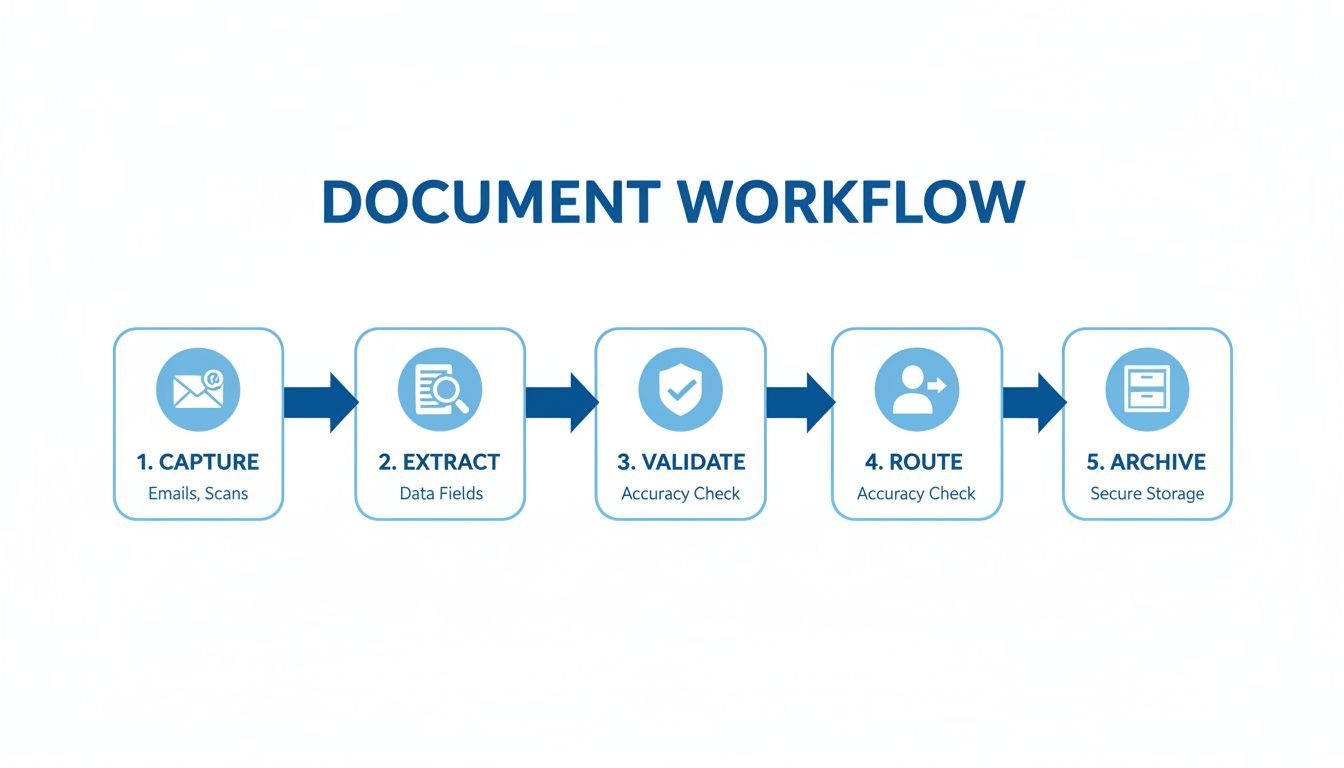
What you're seeing is a smooth, hands-off journey for information. Every manual touchpoint—every minute spent waiting or re-typing—is replaced by an efficient, rule-based action.
Major Efficiency Gains
The first thing you’ll notice after automating your document workflow is the incredible speed. Manual processing is slow. It’s full of delays—waiting for someone to reply to an email, hunting down a signature, or just painstakingly re-keying data from a PDF into another system. Automation just gets rid of those bottlenecks.
Picture your accounting team at month-end. Instead of drowning in a sea of invoices, an automated system can grab them, pull out the important data, and send them for approval in minutes. This means you close the books faster, vendors get paid on time, and your financial reports are suddenly much more accurate and timely.
Automation fundamentally changes what your team can handle. We've seen businesses cut their document processing times by as much as 90%. That translates directly to faster decision-making and better cash flow.
This newfound speed lets your business grow without having to constantly hire more people for administrative work. You can scale up your operations, confident that your core processes won't buckle under the pressure.
Drastically Reduced Errors
Let’s face it, people make mistakes. But in business, those little mistakes can be incredibly expensive. A single typo on an invoice or a misplaced decimal point can lead to overpayments, compliance headaches, and frustrated vendors. Manual data entry is almost always the culprit.
An automated workflow takes human error out of the equation. Smart data extraction pulls information with a high degree of precision, and validation rules instantly check it against your existing records, like purchase orders or client databases. This catches problems before they snowball. For example, the system can immediately flag a duplicate invoice or one that’s over the approved budget, stopping financial leaks in their tracks.
Enhanced Security and Compliance
In the old manual world, your documents are surprisingly vulnerable. A sensitive contract left on a printer, a confidential HR file saved to the wrong folder, or an invoice lost in a crowded inbox are all serious security risks. And when the auditors come knocking, trying to prove compliance by digging through messy file cabinets is a nightmare.
Automation creates a secure, centralized digital home for your documents.
- Access Control: You get to decide exactly who can see, edit, or approve certain documents. Sensitive information stays that way—sensitive.
- Complete Audit Trails: Every single action, from the moment a document is received to its final approval, is automatically logged. This creates a rock-solid, unchangeable record that makes audits straightforward.
- Secure Storage: Documents are archived in an encrypted repository, protecting them from prying eyes while ensuring you can find what you need in seconds.
Empowered and Strategic Teams
Maybe the most profound benefit is what happens to your people. When your team is no longer bogged down by tedious, mind-numbing tasks like data entry and chasing approvals, their jobs change for the better. They can finally shift their energy from low-value admin work to high-impact projects that move the needle.
Your HR manager can spend more time on talent development instead of shuffling paperwork. A procurement specialist can analyze supplier performance instead of manually comparing proposals. In fact, research shows that in document-heavy fields, automation can free up 8 hours per week for each employee and boost overall productivity by 21%. You can dig deeper into these document management statistics to see the broader impact.
That reclaimed time is a massive asset, reinvested directly into activities that actually grow your business.
Your Step-by-Step Implementation Guide
Jumping into an automated document workflow doesn't mean you have to orchestrate a massive, company-wide overhaul. The best, most successful projects I've seen always start small, focusing on solving one real problem at a time. This five-step roadmap is built for managers, not IT wizards, to help you build momentum and get some quick wins on the board.
Think of it less like building a skyscraper and more like laying one perfect row of bricks. You start with a solid foundation, make sure everything is level, and then build on that success. This approach makes automation feel a lot more accessible, manageable, and far less intimidating for any team.
Step 1: Pinpoint Your Biggest Document Bottleneck
Before you automate a single thing, you have to know where the real pain is. Don't try to boil the ocean by tackling every process at once. Instead, put on your detective hat and find the one workflow that causes the most frequent headaches, delays, and frustration.
What are the usual suspects?
- Invoice Processing: Is your accounts payable team drowning in paperwork, constantly chasing approvals or manually typing data from vendor invoices?
- Employee Onboarding: Does new hire paperwork get lost in email chains, delaying a new team member's access to critical systems?
- Contract Approvals: Do sales contracts get stuck in limbo for days waiting for legal review, putting important deals at risk?
Pick the one process where a fix would bring the most immediate, visible relief. That's your pilot project.
Step 2: Map Your Current Manual Process
Okay, you’ve picked your target. Now you need to understand it inside and out—you can't fix a process you can't see. Grab a whiteboard or a simple flowchart tool and map out every single step of the current manual workflow, from the moment a document arrives to the moment it's filed away.
Be brutally honest here. Who touches the document? Where does it sit waiting for an approval? How is data copied from one system to another? Laying it all out visually is often an eye-opening experience that reveals just how much time is wasted. For many, this exercise shines a light on the hidden costs of challenges of manual data entry.
This map becomes your blueprint for automation. Every manual handoff, data entry point, and delay is an opportunity just waiting to be seized.
Step 3: Choose the Right No-Code Tools
With your process mapped out, it's time to find the right technology. Years ago, this meant shelling out for expensive, complex systems that required a dedicated IT team to manage. Today, a new wave of no-code and low-code tools puts incredible power directly into the hands of business users.
The secret is to assemble a simple "stack" of tools that play well together. You don’t need one giant, monolithic platform to do everything; you need a few specialized tools that are great at their specific jobs.
For instance, a powerful and agile workflow could look something like this:
- Intake: A dedicated email inbox or a shared cloud folder where documents first arrive.
- Data Extraction: A platform like DocParseMagic to automatically read documents and pull out the key information you need, no templates required.
- Workflow Orchestration: A tool like Zapier or Make to build rules and automatically pass data between your apps.
- Storage: A secure cloud spot like Google Drive or SharePoint where final documents are archived.
Step 4: Launch a Small Pilot Project
Time for action. Using the workflow you mapped and the tools you selected, automate that one process. Set up the system to handle the document from capture to completion, but start with a small, controlled group of users or documents. This pilot project is your real-world test drive.
This stage is all about learning. You’ll quickly see what works and what needs a little tweaking. The goal isn't perfection on day one; it's to create a working automated workflow that is demonstrably better than the old way of doing things. That small victory builds crucial confidence and momentum.
Step 5: Measure, Refine, and Scale
Once your pilot is up and running, it’s time to prove its worth. Track key performance indicators (KPIs) to show the real-world value of your new automated workflow. You’ll want to look at metrics like:
- Processing Time: How much faster are documents getting done from start to finish?
- Error Rate: By how much has the number of data entry mistakes dropped?
- Team Hours Saved: How much time has been freed up for more important, strategic work?
Use this hard data to fine-tune the process. Once you’ve optimized your pilot, you can confidently roll it out to the rest of the department. From there, you have a proven model you can apply to the next bottleneck on your list, repeating this five-step cycle to drive improvements across the entire organization.
To help you stay on track, here's a simple checklist to guide you through each phase.
Your 5-Step Implementation Checklist
This table breaks down the entire process into actionable steps, helping you track your progress from initial analysis to full-scale deployment.
| Step | Key Action | Success Metric |
|---|---|---|
| 1. Pinpoint Bottleneck | Identify the single most painful manual document process. | A clearly defined problem statement and a chosen pilot project. |
| 2. Map Current Process | Create a visual flowchart of the existing manual workflow. | A complete map showing all handoffs, delays, and data entry. |
| 3. Choose Tools | Select a no-code stack (e.g., DocParseMagic, Zapier, Google Drive). | A selected and configured set of tools ready for the pilot. |
| 4. Launch Pilot | Automate the chosen process for a small, controlled group. | A functional automated workflow that processes documents successfully. |
| 5. Measure & Scale | Track KPIs, refine the workflow, and then expand its use. | Measurable improvements in speed, accuracy, and efficiency. |
By following these steps, you build a solid foundation for automation that delivers tangible results, making it easier to get buy-in for future projects.
How DocParseMagic Fits In (And Why It's a Game-Changer)
If your automated workflow is a high-performance car, then the data extraction stage is its engine. It’s the part that does the heavy lifting, turning messy documents into clean fuel—the actionable data your business runs on. This is where a specialized tool like DocParseMagic doesn't just improve your workflow; it completely redefines it.
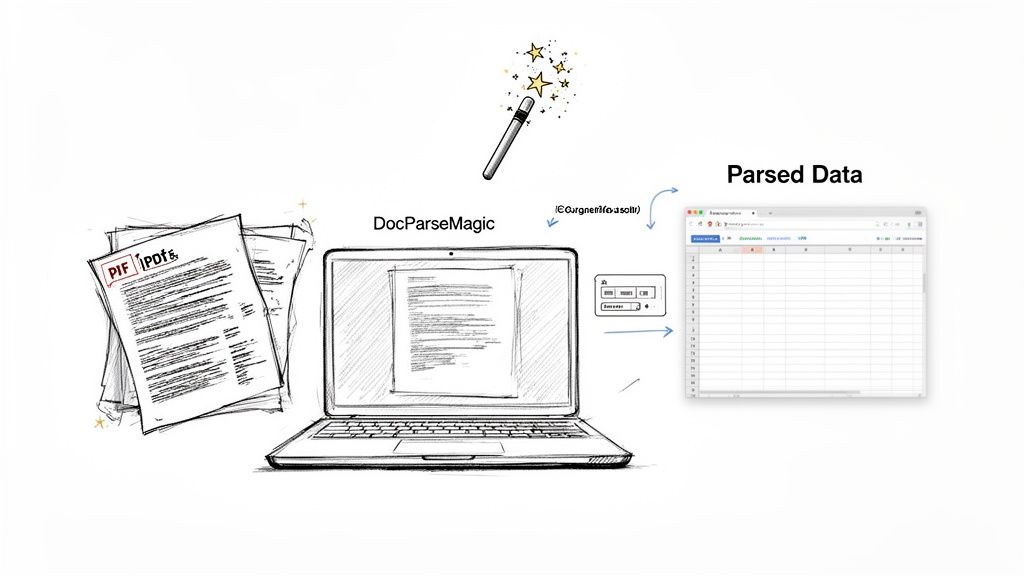
Look at the image above. It perfectly captures what the tool does: it takes a raw PDF invoice and, in seconds, transforms it into a perfectly structured table ready for your spreadsheet. No more squinting at screens and typing numbers.
The Problem with Old-School Templates
Most traditional automation tools are built on a fragile foundation: rigid templates. You have to meticulously draw boxes and tell the software exactly where to find the invoice number or total amount for every single vendor. It works, but only until a vendor changes their invoice layout. Then the template breaks, your workflow stops dead, and it's back to the drawing board.
DocParseMagic throws that entire frustrating process out the window. It uses AI to understand the meaning of a document, not just the placement of the text.
- No Templates Required: It intelligently figures out what an invoice number, a line item, or a due date is, no matter where it appears on the page.
- Handles the Tough Stuff: It accurately pulls data from complex, multi-page tables that make other tools stumble.
- Instant Conversion: It turns PDFs, scans, and even phone pictures directly into clean CSV or Excel files you can actually use.
This no-template approach is a huge relief for anyone in finance, insurance, or procurement who gets buried under documents from dozens, if not hundreds, of different sources.
Powering Your Workflow with True Intelligence
This technology is at the heart of a field called Intelligent Document Processing (IDP). IDP is the backbone of any modern automated document workflow, and it’s growing fast. The market is expected to jump from $14.16 billion in 2026 to a massive $91.02 billion by 2034.
Where’s all that growth coming from? Mostly from finance and accounting teams, who make up 45.57% of the market as they race to automate invoice processing. With tools like DocParseMagic, companies are cutting their document processing time by up to 90%. You can dig into the full research on IDP market trends to see just how big this shift is.
Think back to the implementation roadmap. DocParseMagic fits right into the "Choose the Right Tools" step. It’s the specialized engine that handles the most difficult part—the data extraction—freeing up your other workflow tools to do what they do best, like routing and approvals.
Picture your procurement team trying to compare a dozen vendor proposals. Instead of someone spending a day manually building a spreadsheet, they can just upload all the PDFs. A few minutes later, they have a single, organized table comparing the terms, pricing, and timelines from every single vendor.
Get Started in Minutes
The best way to grasp the impact is to see it for yourself. We built DocParseMagic to be incredibly straightforward, so you can set up a powerful extraction process without writing a single line of code.
You can sign up for free and get enough credits to process your first batch of documents right away. There’s no credit card required to get started, so you can test it on your own real-world invoices or reports and see the results firsthand.
Ready to put an end to manual data entry for good? Check out the features and get started with DocParseMagic today.
Common Implementation Mistakes to Avoid
Jumping into document automation is exciting, and the potential payoff is huge. But I've seen a few common missteps trip up even the most well-intentioned teams. It's usually not the tech that fails; it's a small oversight in strategy that snowballs.
Let's walk through the big ones so you can steer clear of them.
The single biggest mistake? Trying to automate a process that’s already a mess. Automation is an accelerator. If you have a smooth, logical process, automation will make it lightning-fast. But if your process is clunky and confusing, you’ll just create a high-speed disaster.
Automating a Broken Process
Think about a manual invoice approval that bounces between five different people, with no one quite sure who owns the final sign-off. If you just build a digital version of that same convoluted path, you haven't solved anything. You've just made a bad process move faster.
Before you touch any software, grab a whiteboard and map out your current workflow. Be ruthless. Ask your team, "Why do we really do this step?" If the answer is just, "Well, that's how we've always done it," you've found a prime candidate for the chopping block.
A quick story: A mid-sized company I know of automated their expense reporting, faithfully recreating every one of the ten confusing steps they did by hand. The result was predictable. Employees were still frustrated, but now the finance team was buried under a mountain of bad digital data coming in faster than ever.
The Golden Rule: Simplify first, then automate. Trim the fat from your manual process before you even start looking at tools. A lean workflow is the perfect foundation for great automation.
Choosing the Wrong Technology
Another classic blunder is picking a tool that’s a total mismatch for the job. It goes both ways.
Some companies get sold on a massive, enterprise-grade system that takes months to set up, when a simple, focused tool could have solved their problem in a single afternoon. On the other end of the spectrum, trying to use a basic data entry tool for a complex task—like processing thousands of invoices in wildly different formats—will just lead to headaches and manual workarounds.
A quick story: A small accounting firm bought a pricey, all-in-one platform just to pull data from simple invoices. The team was completely overwhelmed by features they didn't need and eventually went back to typing everything in by hand. The expensive software just sat there, collecting digital dust.
Forgetting About Your Team
This last one is the most important. You can build the most elegant, efficient workflow imaginable, but if your team doesn't get it, doesn't trust it, or doesn't see how it makes their lives easier, it's doomed.
Adoption doesn't just happen. It takes good training, clear communication, and answering the "what's in it for me?" question for every single person. The moment you show someone how this new system gets rid of the most boring, repetitive part of their day, you’ve created a champion, not a roadblock.
Got Questions? We've Got Answers
Even with the clearest roadmap, it's natural to have a few questions before you dive into automating your document workflows. Let's tackle some of the most common ones we hear from business leaders just like you.
What’s the Real Cost of Automating Document Workflows?
This is often the first question, and the answer is: it varies. You've got everything from massive, custom-built enterprise systems to lean, no-code platforms. The best way to think about it isn't the upfront cost, but the Return on Investment (ROI).
Modern tools like DocParseMagic have changed the game with pay-as-you-go pricing that scales with your document volume. This makes automation affordable for teams of any size. When you factor in the hours saved and expensive manual errors eliminated, most businesses find the system pays for itself in just a few months.
Do I Need a Big IT Team to Make This Happen?
Not anymore. Ten years ago, a project like this would have been a huge IT undertaking. Today's no-code and low-code platforms are built for the people actually doing the work.
If you’re a manager in finance, HR, or operations, you can now build and manage your own automated workflows. The interfaces are visual and intuitive, so you can get everything running without writing a single line of code.
How Secure is an Automated Document Workflow?
This is a big one, and the answer is a resounding yes. Top-tier platforms are built with security at their core, using things like end-to-end data encryption to keep your information safe. They also stay compliant with major standards like SOC 2 and GDPR.
Here's something to consider: automation often makes you more secure. It gets rid of vulnerable paper trails and random digital files stored on different computers. Instead, you get a central, controlled system with a clear digital audit trail for every single document, drastically cutting the risk of lost files or someone seeing something they shouldn't.
What Kinds of Documents Can We Actually Automate?
Just about any document with a consistent layout is a perfect fit. This covers most of the paperwork that slows down your core operations.
Think about what crosses your desk every day:
- Finance & Accounting: Invoices, purchase orders, receipts, and bank statements.
- Insurance: Claims submissions, policy applications, and ACORD forms.
- HR & Legal: Onboarding paperwork, employment contracts, and NDAs.
Today's AI-powered tools are incredibly flexible. They can pull data from clean PDFs, scanned documents, and even photos snapped on a phone, so you can capture information from anywhere it originates.
Ready to stop the manual data entry grind and build a smarter workflow? DocParseMagic gives you the power to extract data accurately in minutes. Get started with your free credits today.