Digital Transformation for Small Business Your 2026 Growth Roadmap
When people hear the term digital transformation, they often think it’s some complicated, expensive overhaul reserved for big corporations. It’s not. For a small business, it’s simply about using smart technology to work better, not harder.
This isn't about chasing every new app or gadget. It's about finding the bottlenecks in your business—the time-sucking, repetitive tasks—and replacing them with something faster and more reliable. Think of it as a strategic upgrade, not a complete teardown.
What Digital Transformation Really Looks Like
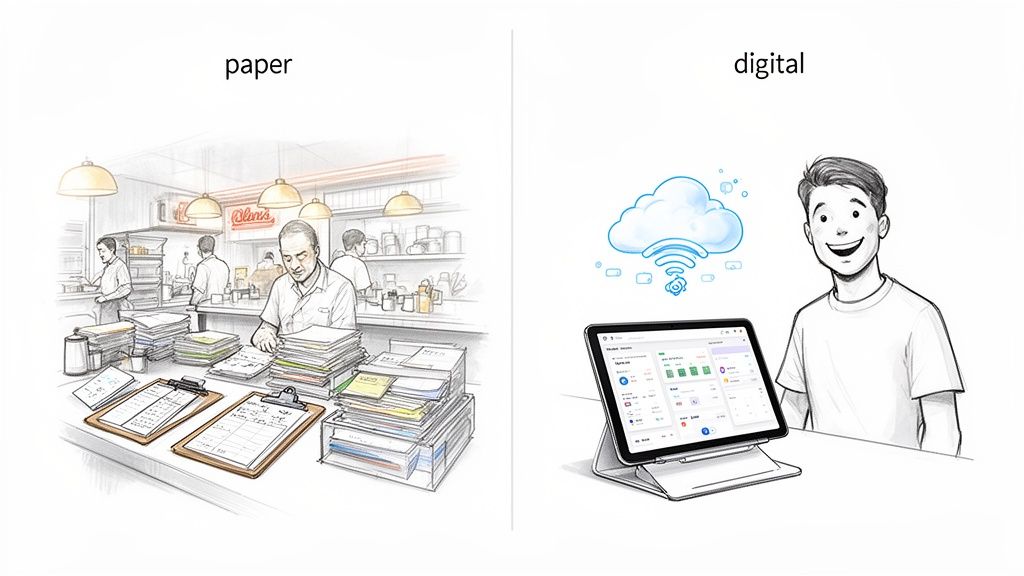
Let's ditch the buzzwords and get practical. Imagine a classic neighborhood diner. For decades, the staff scribbled orders on paper pads, tallied bills by hand, and kept track of inventory on a dusty clipboard. It got the job done, but it was slow and full of little mistakes that added up.
A digital transformation for that diner isn't about installing robots. It's about getting a modern Point-of-Sale (POS) system. Suddenly, orders zap directly to the kitchen, checks are perfect every time, and the system tracks every ingredient sold. The owner isn't guessing anymore; they know which dishes are hits, when to order more bacon, and that Tuesday mornings are surprisingly busy.
The core business—making great food—hasn't changed. But the tools they use have made the entire operation smarter, smoother, and more profitable.
Trading Manual Work for a Competitive Edge
This same idea applies to your business, whether you're in accounting, insurance, or construction. Digital transformation is about making targeted fixes that have a real impact on your day-to-day. It’s about finding where your team is getting bogged down and giving them a digital tool to break free.
A huge one for most small businesses is paperwork. It's not uncommon for an accounting clerk to spend 15-20 hours a week just typing numbers from invoices into a spreadsheet. That’s half a workweek spent on a task that’s not just tedious, but also a breeding ground for typos and missed due dates.
This is where you see the immediate payoff. By introducing a simple automation tool that can read those invoices and pull the data out for you, that 20-hour-a-week slog can shrink to just a few minutes a day. That’s the kind of practical change we’re talking about.
The Three Big Goals
Ultimately, any digital tool you adopt should serve one of these three clear purposes. If it doesn’t, you don’t need it.
- Make Your Operations More Efficient: The goal here is to cut out the busywork and speed things up. An insurance agency that automates data extraction from policy documents can onboard a new client in hours instead of days.
- Give Your Customers a Better Experience: Happy customers stick around. When a procurement team uses software to quickly analyze vendor quotes, they can approve purchases faster, which keeps internal projects moving and everyone happy.
- Help You Make Smarter Decisions: Good data leads to good decisions. That diner owner using a POS system isn't just guessing about staffing anymore; they can look at the data, see the Friday night rush is real, and schedule an extra server.
The secret is to start small. Don't try to digitize your entire company at once. Pick one painful, high-impact problem—like processing invoices or reconciling sales commissions—and solve it first. A quick win proves the value, builds confidence, and makes the whole journey feel much less intimidating.
Why Sticking to Pen and Paper Is Costing You More Than You Think
It’s comfortable to stick with what you know—the familiar rhythm of manual data entry, paper invoices, and overflowing filing cabinets. But that comfort comes with a steep, often hidden, price tag. It’s like running a delivery service with a stack of paper maps while everyone else is using Waze. Sure, you might get to your destination, but you’re guaranteed to be slower, less efficient, and more likely to make a wrong turn.
When you’re stuck in analog mode, bottlenecks become a part of daily life. Your finance team might spend half their week just keying in invoice details by hand—a tedious process that’s a breeding ground for typos, missed due dates, and even costly duplicate payments. Your procurement manager is probably drowning in a sea of PDF quotes, struggling to compare options and potentially overspending as a result.
These little inefficiencies don't just stay little. They pile up, creating friction that slows down your entire operation. Your team gets bogged down in mind-numbing tasks instead of focusing on the work that actually brings in revenue. All the while, your competitors are using simple digital tools to serve customers faster and make smarter, data-driven decisions.
The Hard Numbers Behind Going Digital
Adopting new technology isn't just about looking modern; it's about getting a tangible return on your investment. These aren't vague, abstract benefits—they're measurable gains you can see in your bank account.
Take a simple vendor invoice. Processed manually, it can take days of printing, chasing down signatures, and typing numbers into a spreadsheet. With a bit of workflow automation, that entire cycle can be crunched down to a few minutes.
Suddenly, your finance team isn't just entering data. They have time to analyze spending, forecast cash flow, and find ways to save money. They transform from clerks into strategic partners, directly boosting your company’s financial stability.
The real cost of staying analog isn't what you spend on paper and ink. It's the missed opportunities—the growth you could have had, the efficiencies you gave up, and the talented employees you burned out on work a machine could do in seconds.
Turning Data into a Competitive Edge
Imagine having instant access to accurate information. Instead of digging through files for weeks to build a report, you could compare supplier costs in real-time, see which products are actually making you money, or adjust inventory based on sales data from this morning.
This kind of agility is a massive competitive advantage. It lets you pivot quickly when the market shifts, fine-tune your operations for better profit margins, and deliver a better customer experience with faster turnarounds and fewer mistakes.
This isn't just a trend for big corporations anymore. It's quickly becoming the baseline for staying in business. In fact, a staggering 96% of small and medium-sized businesses in the U.S. plan to adopt new tech like AI by 2026. For accounting teams buried in messy invoices, tools that automatically read and sort document data are a game-changer. They can turn a scanned PDF into clean, organized data in moments, saving hundreds of hours of manual work a year. Discover more insights on SMB digital trends.
A Tale of Two Businesses
Picture two small construction companies. The first, Analog Builders, does everything on paper. Change orders are scribbled on notepads, invoices arrive in the mail, and the owner spends every evening trying to reconcile costs in a messy spreadsheet. Information is scattered, approvals crawl along, and project delays are just part of the job.
Now consider Digital Constructors. They use a simple project management app. Subcontractors upload invoices to a shared portal, change orders get approved instantly on a smartphone, and all project finances are tracked in one central place. The result? Projects finish on schedule, budgets are crystal clear, and the team spends its time building, not pushing paper.
This contrast gets to the heart of the choice every small business is facing. Digital adoption is not a luxury; it's a fundamental part of staying competitive. And with tools being more affordable and user-friendly than ever, it's no longer a massive overhaul—it's a series of small, smart upgrades that deliver a huge impact.
Overcoming the Hurdles of Going Digital
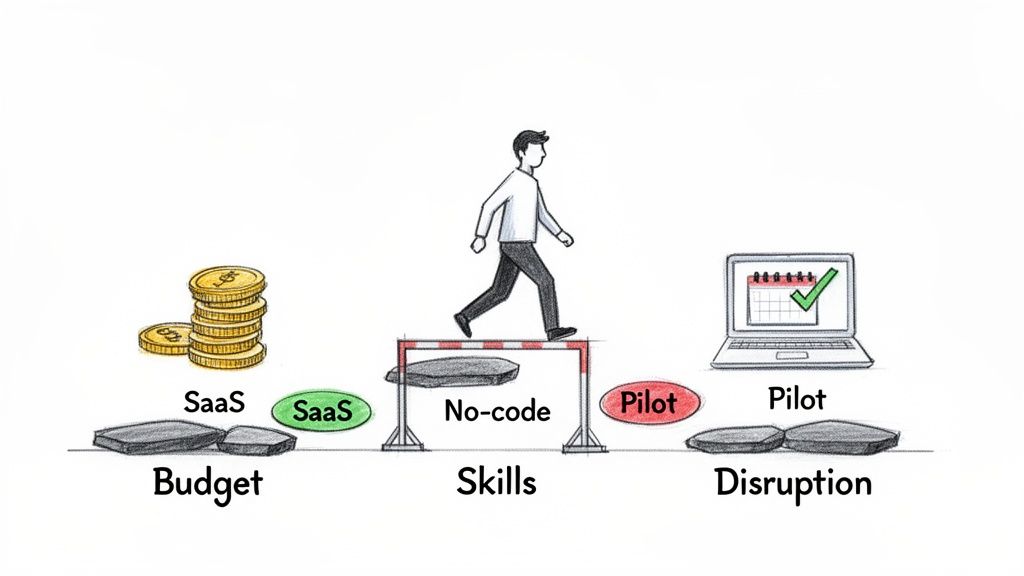
The idea of a digital upgrade sounds great, but let’s be honest—for most small business owners, it also brings up some very real fears. The path forward can feel blocked by three major hurdles: towering costs, the assumption you need a team of tech experts, and the risk of messing up your day-to-day operations. It’s easy to feel stuck.
The good news? Those hurdles are a lot smaller than they look. Modern technology is no longer just for the big guys. Today’s tools are built with small businesses in mind, offering flexible and affordable ways to tackle each of these concerns head-on. You don't need a massive budget or an in-house IT department to make a real difference.
Tackling the Budget Barrier
The biggest myth out there is that going digital requires a huge upfront investment. A decade ago, that was absolutely true. You had to buy expensive software licenses and your own servers, a cost that was simply a non-starter for most small businesses. Thankfully, that world is long gone.
The rise of Software-as-a-Service (SaaS) has completely changed the game. Instead of a massive capital expense, you pay a predictable monthly or annual fee. Many platforms, like DocParseMagic, even use a credit-based system, so you literally only pay for what you use. It's a "pay-as-you-go" model for powerful business tools.
This approach gives you two huge advantages:
- Low-Risk Entry: You can test a tool with a free trial or a small, inexpensive plan without committing thousands of dollars.
- Scalability: As your business grows, your plan can grow right along with you. No need to overbuy for a future you haven't reached yet.
Closing the Skills Gap with No-Code
The next big worry is the "people" problem. Do you need to hire developers or technical specialists? For a small business, adding that kind of overhead is often out of the question. This is where no-code platforms become your secret weapon.
These tools are designed for regular business users, not programmers. They use simple drag-and-drop interfaces that let your existing team—the people who already know your processes inside and out—build powerful automations. Think about it: your accountant, who knows the invoice approval workflow better than anyone, can now build an automated system for it without writing a single line of code.
This empowers your current staff, turning their deep operational knowledge into a real competitive advantage. They don’t need to become tech experts; they just need tools that let them solve their own problems.
"The aim of digital transformation is not to become a tech company, but to become a better business by using technology. The most successful shifts focus on solving a single, painful problem first to prove the value and build momentum."
Avoiding Disruption with a Phased Approach
Finally, there’s the legitimate fear of disrupting the very business you’re trying to run. The solution here is to think small to win big. Don't try to overhaul everything at once. Instead, take it one step at a time, focusing on scoring quick, measurable wins.
Start by identifying one department or even a single, highly repetitive task that’s causing the most friction. Maybe your finance team spends hours manually keying in invoice data. Perfect. Start there. Launch a small pilot project with just that team to automate that one process.
The data shows this is the smart way to go. In 2021, only 35% of companies globally actually met their digital transformation goals. A big reason for this low success rate is trying to do too much, too soon. A focused pilot—like automating document processing to cut down on manual work—delivers a clear and immediate return, making it much easier to get everyone on board for the next step. You can dig into these digital transformation findings for more detail.
This approach minimizes risk, proves the technology’s value with hard numbers, and builds confidence across the company. A single successful pilot project is the best argument you can make for continuing your digital journey.
Your Phased Roadmap to Digital Success
Trying to overhaul your entire business at once is a recipe for disaster. It feels like trying to boil the ocean. The real secret is to start small, focusing on one thing you can fix right now. A smart, phased approach turns a massive project into a series of manageable steps, giving you quick wins that build the momentum you need for bigger changes.
Think of it like renovating a house. You wouldn’t tear down all the walls at once. You’d start with one room—probably the one that gives you the most headaches, like that ancient kitchen. By focusing your energy there, you see immediate results, learn a few things, and get the confidence to tackle the rest of the house. That same logic works perfectly for your business operations.
Phase 1: Find Your Biggest Bottleneck
The first step isn't about buying fancy software. It's about finding the biggest point of friction in your daily operations. Where is your team burning the most time on mind-numbing, repetitive tasks? For a lot of small businesses, the answer is usually buried under a mountain of paperwork.
Look for a process that is:
- Highly Repetitive: Something your team does over and over, every single day or week.
- Time-Consuming: A task that just eats up hours of manual effort.
- Prone to Errors: Where a simple typo can lead to real costs or headaches.
For most companies, manual invoice processing is the perfect culprit. It checks all those boxes. Your only goal in this phase is to pinpoint that one high-impact problem and imagine what success would look like if you could actually fix it.
Phase 2: Launch a Small Pilot Project
Once you’ve found your target, it’s time to test a solution on a very small scale. This isn’t about rolling out a new system to the whole company. It’s about running a controlled experiment with a small, focused group to prove the idea works and to measure the real-world results.
Here’s how to do it:
- Select a Tool: Find a user-friendly, no-code platform that offers a free trial. This lets you experiment without spending a dime.
- Assemble a Small Team: Grab one or two people who feel the pain the most. If you’re tackling invoices, bring in your accounting clerk. Their buy-in is everything.
- Define a Clear Goal: Set a simple, measurable target. For example, "Cut the time spent on manual invoice data entry by 90% over a two-week period."
- Measure Everything: You need to track the "before" and "after." How many hours did the task take before the tool? How many minutes does it take now? This data becomes your most powerful argument for moving forward.
This pilot phase is all about creating your proof of concept. The goal is to get undeniable evidence that this new digital way is faster, cheaper, and more accurate than the old manual way. If you're curious how to pull this off without any coding, you might be interested in seeing how no-code automation is a perfect fit for these kinds of pilot projects.
Phase 3: Scale and Integrate Your Wins
With a successful pilot in the bag, you now have the hard data and the success story you need to justify a wider rollout. The ROI isn't a guess anymore—it's a proven fact based on your own team's experience. This is where you scale that success.
The final phase is about expanding the solution to the rest of the team and then looking for ways to connect it to your other systems. For instance, after automating invoice parsing, the next logical move is to integrate that tool with your accounting software. This creates a seamless flow of information from the document right into your financial records, no hands required.
As you plan this journey, having a clear digital transformation roadmap is crucial for outlining the steps and keeping everyone on the same page.
This methodical expansion builds on your first win, creating a ripple effect of efficiency across the business. The global digital transformation market is projected to hit an incredible $14,847.91 billion by 2034, and small businesses in the U.S. are a huge part of that, expanding at a 20.62% CAGR. This explosive growth is being driven by nimble companies using affordable tools to score quick wins in areas like workflow automation—which is exactly what this phased approach delivers.
Let’s Look at Some Real-World Scenarios Where Automation Wins
Theory is one thing, but seeing digital transformation in action is where it really clicks. Let’s walk through the day-to-day work of four different professionals to see how one automation tool can completely change their workweek. These stories aren't about fancy tech; they're about trading frustrating manual work for smarter, more efficient processes.
The simple, repeatable roadmap that makes these transformations happen looks like this.
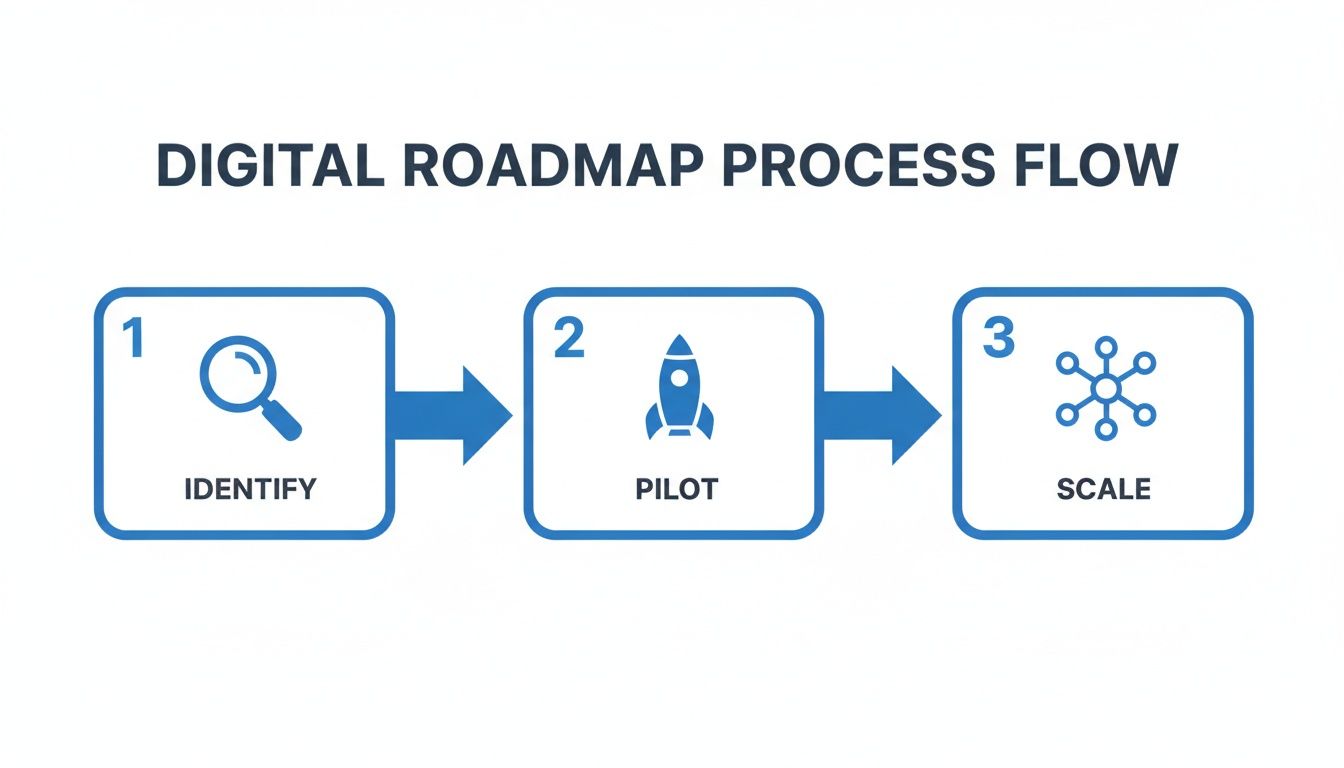
It’s all about finding the pain point, testing a solution on a small scale, and then rolling it out once you know it works.
From Data Entry to Data Detective
Meet Sarah, an accounting clerk at a growing logistics company. Her Mondays were a nightmare. She’d spend the entire day—and often part of Tuesday—just typing data from dozens of vendor invoices into their accounting software. That’s 15 hours a week of pure, mind-numbing data entry.
Typos were bound to happen, which led to delayed payments and angry calls from suppliers. Even worse, she once accidentally paid a $2,500 duplicate invoice because it got lost in the shuffle.
After Automation: Sarah now uses a document automation tool. She just drags a folder of scanned invoices into the platform, and in minutes, all the key data is pulled out—invoice numbers, due dates, line items, you name it. Her 15-hour task now takes less than one hour, and most of that is just a quick final review. The system even flags potential duplicates, turning her from a data entry clerk into a data detective who spots problems before they happen. This is a perfect example of how financial reporting automation can clean up the month-end close and deliver clearer insights.
Simplifying Complex Vendor Comparisons
Next up is David, a procurement manager sourcing materials for a new product line. He just got ten detailed proposals from different vendors, and of course, each one is in a unique PDF format. His old process was to print everything, grab a highlighter, and manually build a spreadsheet to compare pricing, delivery times, and warranties. It was a three-day ordeal of squinting at the fine print, and he always had that nagging feeling he missed something important.
After Automation: Now, David uploads all ten PDFs at once. The tool instantly extracts the specific data points he cares about and organizes them into a single, clean spreadsheet. In under 30 minutes, he has a perfectly aligned, side-by-side comparison of every vendor. He can sort by price or delivery date in a click, helping him make a faster, more confident decision that saves the company thousands.
The goal isn't just to do the old process faster. It's to unlock a new level of accuracy and analysis that was impossible with manual methods. Automation gives you the clarity to make better strategic choices.
Accelerating Insurance Client Onboarding
Consider Maria, who runs a small insurance brokerage. Onboarding a new commercial client used to be a week-long paper chase. She had to manually dig through pages of a new client's existing policies just to pull out coverage limits, premiums, and effective dates. This data entry bottleneck slowed down the whole quoting process, and sometimes she’d lose the client to a faster competitor.
After Automation: Today, Maria’s team simply uploads the client’s policy documents. An intelligent processing tool reads the text and instantly pulls out all the critical data into a structured format. What once took days of reading and typing is now done in about 20 minutes. Her team can generate accurate quotes the same day, which has seriously improved their close rate and given them a much better customer experience. If this sounds familiar, you can learn more about how automatic document processing works in industries like insurance.
Untangling Commission Statements
Finally, let’s talk about Tom, an operations manager for a company with multiple sales partners. Every partner sent their commission statements in a different format—some were clean Excel files, others were messy PDFs. Tom spent two full days every month trying to consolidate this data to reconcile payments and track performance. The process was so clunky that his reports were always a month behind.
After Automation: Tom set up a simple workflow. All commission statements now go to a dedicated email address, which automatically forwards them to his parsing tool. The system extracts the sales data from every single format and funnels it into a master dashboard. He can now reconcile payments and see how his partners are doing in just a few hours, giving him a real-time view of his sales channels.
Choosing Your Ideal Technology Partner
Picking the right technology partner for your business can feel like navigating a minefield. The market is absolutely flooded with tools, and they all promise the moon. But what works for a giant corporation is often a terrible fit for a small business. Your goal is to find a solution that helps you today, not something that requires a dedicated IT department to run.
Think of it like buying a vehicle for your business. You wouldn't buy a massive 18-wheeler to make a few local deliveries; you'd get a nimble, efficient van that's easy to drive. The same logic applies to your software. The best tools for small businesses are simple, solve a very specific problem incredibly well, and don't bury you in features you'll never touch.
Focus on practical benefits that give you an immediate win. It's easy to get distracted by flashy demos and complex features. Instead, use a simple checklist to cut through the noise and evaluate potential partners on what actually matters for your team and your bottom line.
Your SMB Tech Checklist
When you're looking at a new tool, run it through these four non-negotiable filters. If it doesn't tick every single box, it’s probably not the right solution for your small business.
-
No-Code and Truly Intuitive: Can your team—the people who actually do the work—start using it without needing a week of training? The best tools empower your existing staff. Look for simple drag-and-drop interfaces, not command lines and complicated setup menus.
-
Scalable Pay-As-You-Go Pricing: Does the cost scale with you, not ahead of you? Find flexible subscription models or credit-based systems. This means you avoid locking up cash in a huge upfront investment and only pay for what you genuinely use.
-
Immediate Value with Zero Setup: Can you sign up for a free trial and see it work in minutes? A good partner is confident enough to let you test-drive their product and prove its value right away. Steer clear of any tool that requires a long sales cycle or a complicated installation just to try it out.
-
Responsive and Human Support: When you hit a snag—and you will—can you get a real person on the line quickly to help you solve it? Solid, accessible support isn't a "nice-to-have"; it's a dealbreaker.
By focusing on simplicity, scalability, and immediate impact, you shift from just "buying software" to choosing a true operational partner. This approach ensures your digital transformation for small business is built on practical, cost-effective tools that deliver real results from day one.
You can learn more about finding the right tools by exploring options for document management software for small business that are built specifically with this checklist in mind.
Let's Tackle Those Lingering Questions
When small business owners hear "digital transformation," a few practical questions always pop up. Thoughts about cost, complexity, and how long it takes to see a real difference are completely normal. Let's clear the air on the most common concerns.
What's This Really Going to Cost Me?
You can push those thoughts of massive, five-figure software projects right out of your head. Modern technology isn't built that way anymore. Many of the best tools on the market are affordable, scalable, and don't require a huge upfront investment.
Think about credit-based pricing, for example. Instead of a hefty flat fee, you just pay for what you actually use—almost like a pre-paid phone plan for your business processes. This lets you test the waters, prove the value with a small task, and then scale up as you grow. Your costs stay directly in line with your usage.
Do I Need to Hire a Tech Whiz?
Nope, not at all. The beauty of today's technology is the rise of no-code platforms. These tools are designed for regular business people, not developers. If you can drag and drop, you can build a powerful automated workflow.
This puts the power right back into the hands of your team—the people who actually know your processes inside and out. Your accountant can set up an invoice approval system, or your operations manager can automate commission reports. No coding degree required.
The best modern tools empower your current employees, turning their deep operational knowledge into a direct asset for improving the business.
How Fast Will I Actually See Results?
The return on your investment (ROI) isn't some far-off dream. With the right focus, it can happen almost instantly. You don't have to wait months to see the benefits. Pick one repetitive, time-sucking task to automate, and you can see a clear return in the very first week.
Take invoice data entry, for instance. Automating that process can easily save an employee 10-15 hours of tedious manual work right off the bat. That's a measurable win in saved time and fewer errors, justifying the small cost and building the confidence to take the next step.
Ready to see how fast you can get a return on automation? DocParseMagic turns your messiest documents into clean, usable data in minutes. Start your free trial and get credits to automate your first workflow today.