Unlocking Efficiency with Warehouse Automation Software
At its core, warehouse automation software is the central nervous system of a modern logistics operation. Think of it as the digital brain that connects and directs all the moving parts—from robotic arms and autonomous carts to the scanners in your employees' hands.
It’s what turns a chaotic, manual warehouse into a finely tuned, efficient machine, making sure every task happens exactly when and where it should. In today’s world of on-demand everything, this kind of system is no longer just a nice-to-have.
What Is Warehouse Automation Software?
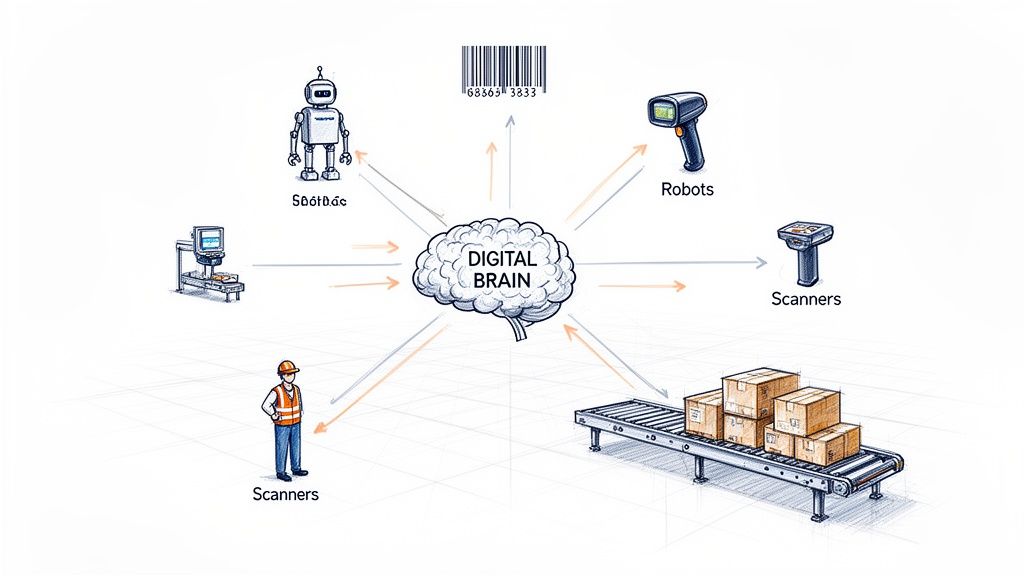
Imagine an orchestra. You have all the instruments—the robots, conveyors, scanners, and your team members. Each one has a specific job to do. Warehouse automation software is the conductor, waving the baton to make sure every instrument plays its part at the perfect moment.
Without that conductor, you just have a room full of noise. Pickers wander down inefficient aisles, inventory counts are a guessing game, and getting orders out the door is painfully slow. The software provides the real-time instructions and clear visibility needed to direct every single action with precision.
The Core Function of Automation Software
At its heart, this software is the bridge between digital information (like a customer placing an order online) and physical action (an employee or robot picking that exact item off a shelf). It ties all your separate systems together into one cohesive whole, creating a single source of truth for everything happening on the floor.
Its main jobs include:
- Directing Hardware: It tells autonomous mobile robots (AMRs), automated storage systems (AS/RS), and conveyor belts exactly where to go and what to do.
- Managing Inventory: It provides a live, moment-by-moment view of stock levels as items are received, put away, picked, and shipped out.
- Optimizing Workflows: The software constantly calculates the fastest, most efficient routes for pickers and the smartest way to sequence tasks.
- Processing Data: It instantly captures information from barcode scanners and RFID tags, killing manual data entry and the human errors that come with it.
This centralized control is a fundamental shift from the old way of doing things, where different departments and systems rarely talked to each other. Understanding the basics of industrial controls automation helps put these warehouse-specific systems into a broader context.
To really see the value, it helps to look at the specific pain points these systems are built to eliminate.
Key Problems Solved by Warehouse Automation Software
This table breaks down common warehouse headaches and shows exactly how automation software provides the cure.
| Traditional Warehouse Challenge | How Automation Software Solves It | Primary Business Impact |
|---|---|---|
| High Labor Costs & Shortages | Automates repetitive tasks like picking, sorting, and putaway, reducing reliance on manual labor for grunt work. | Lowers operational expenses and mitigates the impact of a tight labor market. |
| Frequent Human Error | Replaces manual data entry with barcode/RFID scanning and directs workers with precise, system-generated instructions. | Drastically reduces costly mistakes in picking, shipping, and inventory counts. |
| Slow Order Fulfillment | Optimizes picking paths, coordinates robot and human workflows, and synchronizes tasks for maximum speed. | Increases throughput, shortens the order-to-ship cycle, and meets customer demands for fast delivery. |
| Poor Inventory Visibility | Provides a real-time, 100% accurate view of stock levels and locations across the entire facility. | Prevents stockouts and overstocking, improves forecasting, and eliminates time wasted searching for items. |
| Inefficient Use of Space | Enables high-density storage solutions (like AS/RS) and optimizes slotting to maximize existing square footage. | Defers or eliminates the need for costly facility expansions. |
By directly addressing these fundamental challenges, the software delivers a clear and measurable return on investment.
Why It Matters More Than Ever
The pressure for faster, flawless fulfillment isn't going away. E-commerce has completely changed customer expectations, putting a massive strain on supply chains that still rely on old-school, manual processes.
Warehouse automation software is no longer a luxury for giant corporations. It’s a fundamental tool for any business that needs to control inventory, slash operating costs, and keep customers happy with speed and accuracy.
The market numbers back this up. The global warehouse automation market is expected to skyrocket from USD 25.27 billion in 2025 to a staggering USD 107.36 billion by 2035. This explosive growth shows just how essential these technologies have become for survival and success.
By taking over the repetitive, physically draining tasks, this software frees up your team to focus on more valuable work like quality control, problem-solving, and process improvement. It's a win for productivity and for your people.
The Core Components of Your Automation System
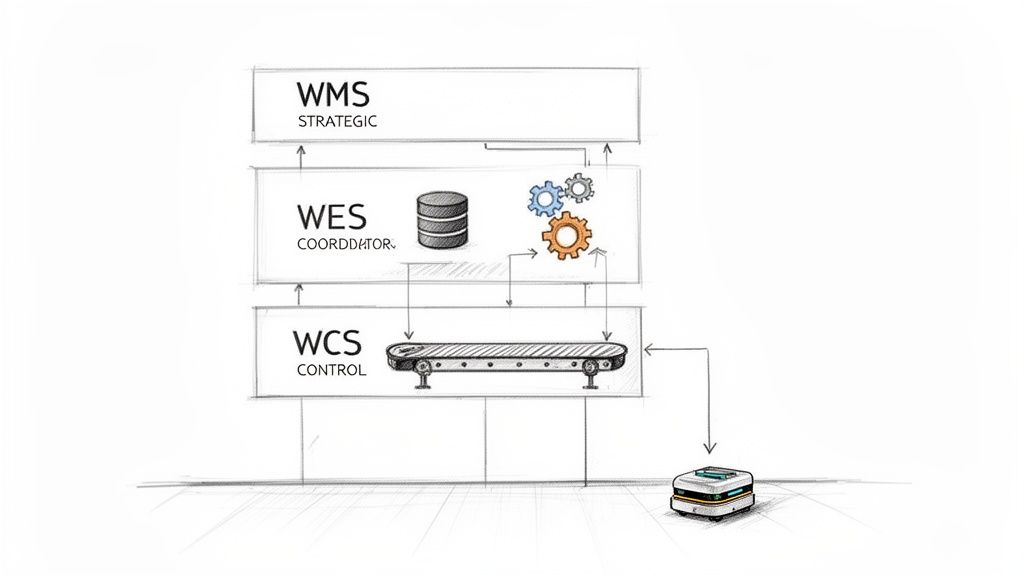
Think of warehouse automation software not as one single program, but as a team of specialists working in perfect sync. Each has a specific job, and together they run everything from long-term strategy down to the split-second timing of a conveyor belt. It's a lot like a command hierarchy.
At the top, you have the big-picture strategist. Below that, you have the managers coordinating the day-to-day workflow. Finally, you have the frontline crew—both people and robots—who execute the tasks on the floor. Let's meet the key players.
The Warehouse Management System (WMS)
The Warehouse Management System (WMS) is the brain of the whole operation. It doesn't get bogged down in the tiny details of how a robot gets from A to B. Instead, it’s focused on the "what" and the "why." The WMS is your master ledger, tracking every single item you own, where it is, and its current status.
When an order drops, the WMS is the first to know. It orchestrates the entire fulfillment process, directs how inventory is received and put away, and keeps a detailed record of every product’s journey through your facility. Think of it as the general manager, responsible for all assets and planning.
The Warehouse Control System (WCS)
If the WMS is the strategic brain, the Warehouse Control System (WCS) is the nervous system that actually moves the muscles. Its entire purpose is to manage the real-time activity of your physical equipment—conveyors, sorters, carousels, you name it.
The WCS takes high-level commands from the WMS (like "move these 10 totes to packing") and translates them into direct, mechanical instructions that the hardware understands. It operates in a world of seconds and milliseconds, making sure all the machinery plays nicely together. This specialization is key; it lets the WMS focus on inventory and orders while the WCS handles the high-speed traffic control on the floor.
The Warehouse Execution System (WES)
A Warehouse Execution System (WES) is the smart, adaptable middle manager that connects the high-level WMS with the ground-level WCS. A WMS might release a huge batch of orders for picking, but the WES looks at what's happening on the floor right now and figures out the most efficient way to get it all done.
It intelligently sequences and assigns tasks, balancing the workload between your team and your robots to prevent bottlenecks. If one picking zone gets slammed, a WES can instantly reroute an associate or a robot to a different area, optimizing the flow of work on the fly.
The WES is what gives your operation real agility. It merges the big-picture knowledge of a WMS with the real-time control of a WCS, making smart, minute-by-minute decisions that push your throughput to the max.
Unifying the System
These three systems are the core software stack, but a truly modern automated warehouse relies on two other critical components to tie everything together:
- Robotics Control Software: Autonomous Mobile Robots (AMRs) and other robotic gear run on their own specialized fleet management software. This system connects to the WES to get its assignments, navigate the warehouse without collisions, and coordinate its movements with other bots. This is a massive field—the North American market for AGV/AMR software and hardware is expected to hit $5 billion by 2026.
- Data Capture Systems: This is the software that drives your barcode scanners, RFID readers, and vision systems. These are the "eyes and ears" of your warehouse, constantly feeding real-time data back to the WMS. A perfect example is streamlining the receiving dock. Instead of manually keying in data from invoices and bills of lading, modern systems can automatically read and digitize those documents, killing a major source of errors right at the source. To see how this technology works, check out our guide on what intelligent document processing is.
Calculating the Real Business Benefits and ROI
So, let's get down to what really matters: how does this software actually help your business? Beyond the fancy features and technical jargon, an investment in warehouse automation software should deliver a clear, measurable return. The goal isn't just to bolt on new tech; it's to build a smarter, more profitable operation from the ground up.
Think of it this way: automation targets the biggest money pits and headaches in your warehouse. By taking over repetitive tasks and ensuring your data is rock-solid, the software directly attacks high costs and operational risks. Let's break down where you'll see the biggest impact and how you can start to calculate the potential ROI for your own business.
Slashing High Labor Costs
Right off the bat, you’ll see a massive impact on labor expenses. In a traditional warehouse, your team spends a huge chunk of their day just walking. They walk to pick, walk to put away, walk to find things. Automation completely changes that dynamic.
- Drastically Reduced Travel: The software can dispatch robots to bring goods to a stationary picker or map out the most efficient route for a human worker. This alone can cut down unproductive travel time by up to 70%.
- Faster Onboarding: When tasks are directed by the system, new hires can get up to speed in a few hours, not weeks. That means less time and money spent on training.
- Massive Productivity Gains: Each employee can simply get more done. With automation handling the legwork, they can pick, pack, and ship far more orders per hour, letting you scale your volume without ballooning your payroll.
This isn’t about replacing your team; it's about making their jobs better. When software and robots handle the physically demanding and repetitive work, your people are freed up to focus on things that require a human touch—like quality control, managing exceptions, and solving customer problems.
Achieving Near-Perfect Order Accuracy
Shipping mistakes are absolute profit killers. One wrong item kicks off a costly chain reaction: you're paying for return shipping, the labor to restock the item, customer service time, and you risk losing that customer forever. Warehouse automation software is built to virtually eliminate human error.
A typical manual warehouse might hit 95-97% accuracy. That sounds pretty good, but think about what that 3-5% error rate really costs you across thousands of orders. Automated systems, on the other hand, consistently hit 99.9% accuracy or better.
Let that sink in. For a company shipping 1,000 orders a day, moving from 97% to 99.9% accuracy prevents over 7,500 shipping errors every single year. That’s a direct boost to your bottom line and your brand’s reputation.
How does it work? The system replaces guesswork with certainty. Simple barcode or RFID scans at every step confirm that the right item is in the right box, going to the right customer, every single time.
Improving Inventory Turnover and Cash Flow
Holding onto inventory you don't need is like setting piles of cash on fire. Poor visibility means you're tying up working capital in stock that just sits there. Warehouse automation software gives you a perfect, real-time picture of every single item you own, which unlocks huge financial advantages.
With that kind of precision, you can:
- Cut Down on Safety Stock: When you trust your inventory numbers completely, you don't need to keep as much "just-in-case" inventory on hand. That frees up cash for other parts of the business.
- Avoid Stockouts: Real-time data and smart analytics help you reorder at exactly the right time, so you stop losing sales because an item is out of stock.
- Use Your Space Better: The software helps you organize your products for maximum density, which can help you delay or even avoid a costly move to a larger facility.
When you improve your inventory turnover, you’re converting your products back into cash faster. This strengthens the financial core of your entire operation. A great starting point for calculating your own ROI is to simply add up what you spend annually on labor inefficiencies, shipping errors, and carrying excess inventory. That number is your baseline—it's the cost that a good warehouse automation software solution can help you erase.
Your Step-by-Step Implementation Roadmap
Putting warehouse automation software in place isn't like installing a new app on your phone. It’s more like building a new highway through a busy city. You need a solid blueprint that maps out every on-ramp, exit, and intersection to keep things moving smoothly. Without one, even the best tech can create bottlenecks and costly traffic jams.
This phased approach breaks down the project into manageable stages, guiding you from the initial idea to a fully optimized operation. Following these steps helps you sidestep common pitfalls and ensures your investment actually pays off.
Phase 1: Define Your Objectives and Analyze Workflows
Before you even glance at a software demo, you have to define what "winning" looks like for your business. Are you trying to slash your order cycle time by 50%? Or is the main goal to hit 99.9% order accuracy? Get specific and set clear, measurable targets.
With your goals in hand, it’s time to do a deep dive into your current workflows. Walk the warehouse floor. I mean, really walk it. Map out every single step from receiving and putaway to picking, packing, and shipping. Find the exact pain points—where do delays happen, where do mistakes creep in, and which tasks are eating up the most labor hours? This analysis is your treasure map, pointing directly to where automation will make the biggest difference.
Phase 2: Select Your Software Vendor
Now that you know exactly what you need, you can start looking at vendors. This is about more than just comparing features on a checklist; you’re picking a long-term partner. Create a shortlist of contenders and schedule demos that force them to show you how their system would handle your specific workflows, not just a generic canned presentation.
Here's what you should be looking for:
- Integration Capabilities: Can the software talk to your existing ERP, accounting, and e-commerce platforms without a hitch? A system that can't connect with your other tools just creates new problems.
- Scalability: Will this platform grow with you, or will you outgrow it in two years? Make sure it can handle your projected order volume for at least the next five years.
- User Experience: Is the interface actually easy to use? A clunky system that’s a pain to learn will kill your team's adoption rate and sink your efficiency gains.
- Support and Training: What kind of help will you get during and after the rollout? A strong partnership with your vendor is crucial for success long after the go-live date.
Phase 3: Plan Data Migration and a Phased Rollout
Your existing data—inventory, orders, SKUs—is the lifeblood of your new system. And it needs to be clean. Before you move a single byte of data, take the time to scrub it. Get rid of duplicates, fix errors, and standardize your formats. Trust me, dumping messy data into a shiny new system is a recipe for disaster.
Instead of a "big bang" launch where you flip the switch overnight, go with a phased rollout. You could start with just one process, like receiving, or automate a single zone of the warehouse first. This approach minimizes disruption, lets your team learn in a more controlled environment, and helps you work out the kinks on a smaller scale.
A phased implementation is like a series of small, manageable wins. It builds your team's confidence, lowers the operational risk, and ensures each part of the system is running perfectly before you move on to the next.
This infographic shows how a well-planned system delivers benefits across your entire operation.
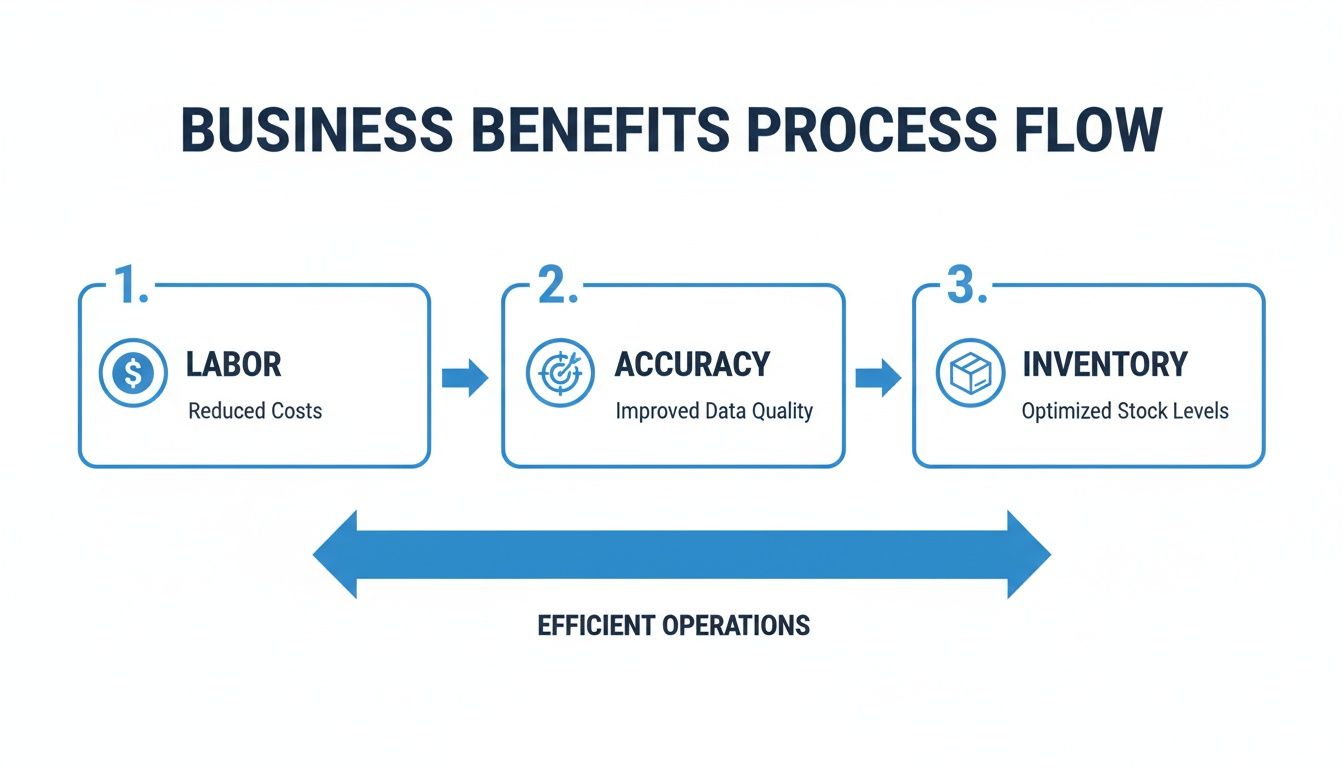
It clearly illustrates how the right software directly boosts labor efficiency, order accuracy, and inventory management, creating a much smoother business.
Phase 4: Train Your Team and Go Live
Finally, training is absolutely non-negotiable. One of the biggest mistakes companies make is underestimating how much time and effort it takes to get everyone comfortable with the new system. This means everyone, from the folks on the floor to the managers in the office.
Run hands-on training sessions, create clear cheat sheets and guides, and designate a few "super users" who can be the go-to experts for their colleagues. The same ideas apply whether you're automating warehouse picking or financial reporting. To see how these principles work elsewhere, you can explore strategies for successful document workflow automation. Once your team is ready and your phased rollout is complete, it's time for the official go-live.
How to Choose the Right Automation Software
Picking the right warehouse automation software is a huge decision. Think of it like choosing the architect for your company's new headquarters—you're not just buying a product, you're investing in the very foundation of your operations for years to come. The right choice can unlock incredible growth, but the wrong one can saddle you with expensive problems and stunt your potential.
This isn't about falling for a slick demo or jumping at the lowest price tag. A truly successful partnership comes from finding a solution that molds to your unique workflows, plays nicely with the technology you already have, and is ready to grow with you. It all starts with asking the right questions.
Evaluate Core Technical Capabilities
Before you get caught up in flashy features, you have to make sure the software can handle the technical nuts and bolts of your warehouse. The single most important factor? Its ability to talk to your other systems.
- Integration Power: Does it have ready-to-go connectors for your ERP, e-commerce site, and accounting software? Or at least a solid API to make it happen? A system that can't communicate is a non-starter.
- Scalability for Growth: Think about where your business will be in five years. Can the software handle double your current order volume without breaking a sweat? You need a platform that can scale up without forcing you into a costly and disruptive overhaul.
- Hardware Agnosticism: Are you being locked into a specific brand of robots, scanners, or printers? The best platforms are flexible, letting you choose the best hardware for the job, both now and in the future.
These technical pillars ensure the software will act as the central nervous system for your entire operation, not just another piece of isolated tech.
Look Beyond the Sticker Price
That initial quote you get for the software is just the tip of the iceberg. To understand the real financial impact, you need to look at the Total Cost of Ownership (TCO).
The true cost of any software isn't what you pay for the license, but what it costs to implement, maintain, and adapt over its entire lifecycle. Hidden fees for support, customization, and essential updates can quickly dwarf the initial price.
To get the full story, you have to dig into these costs:
- Implementation and Training Fees: These can be significant, covering everything from migrating your data to getting your team trained up on the new system.
- Ongoing Support and Maintenance: What's the annual bill for technical support, security patches, and routine updates? Don't get caught off guard.
- Customization and Future Modules: What happens when you need to add a new feature down the line? Understand the pricing for future needs now to avoid costly surprises later.
Prioritize Usability and Vendor Support
Let's be honest—the most powerful software in the world is useless if your team hates using it. A clunky, confusing interface will tank adoption rates and wipe out any hope of efficiency gains. When you're watching a demo, make them show you the day-to-day tasks your team actually performs. The system should feel natural and make their jobs easier, not add another layer of frustration.
Finally, vet the vendor’s support team. When something inevitably goes wrong during your busiest season, you need a partner who will pick up the phone and solve the problem. Ask for customer references and find out their average response times. As you size up your options, it's a good idea to research the broader landscape of Top Industrial Automation Companies to get a sense of who the reputable and stable players are.
Software Vendor Evaluation Checklist
Choosing a vendor is a complex process. This checklist can help you structure your evaluation and compare different solutions on a level playing field, ensuring you cover all the critical bases before making a final decision.
| Evaluation Criterion | Key Questions to Ask | Importance (High/Medium/Low) |
|---|---|---|
| Core Functionality | Does the software meet 100% of our must-have operational needs right out of the box? | High |
| Integration Capabilities | Can it connect seamlessly with our existing ERP, e-commerce, and shipping platforms? | High |
| Scalability & Performance | Can the system handle our projected five-year growth in order volume and SKU count? | High |
| Hardware Compatibility | Are we locked into a specific hardware vendor, or can we choose our own devices? | Medium |
| User Experience (UX) | Is the interface intuitive for our warehouse staff? How steep is the learning curve? | High |
| Total Cost of Ownership | What are the total costs over 3-5 years, including support, maintenance, and updates? | High |
| Vendor Support & SLA | What are the guaranteed response times? What do current customers say about their support? | High |
| Implementation Roadmap | What is the vendor's typical implementation timeline? Who will manage the project? | Medium |
| Security & Compliance | Does the platform meet our industry's security and data compliance standards (e.g., GDPR, SOC 2)? | Medium |
| Vendor Reputation | Is the vendor financially stable? What is their track record and reputation in the industry? | Medium |
Using a structured checklist like this prevents critical details from falling through the cracks. It forces a disciplined comparison and helps ensure the partner you choose is the right one for the long haul.
Real-World Examples of Automation in Action
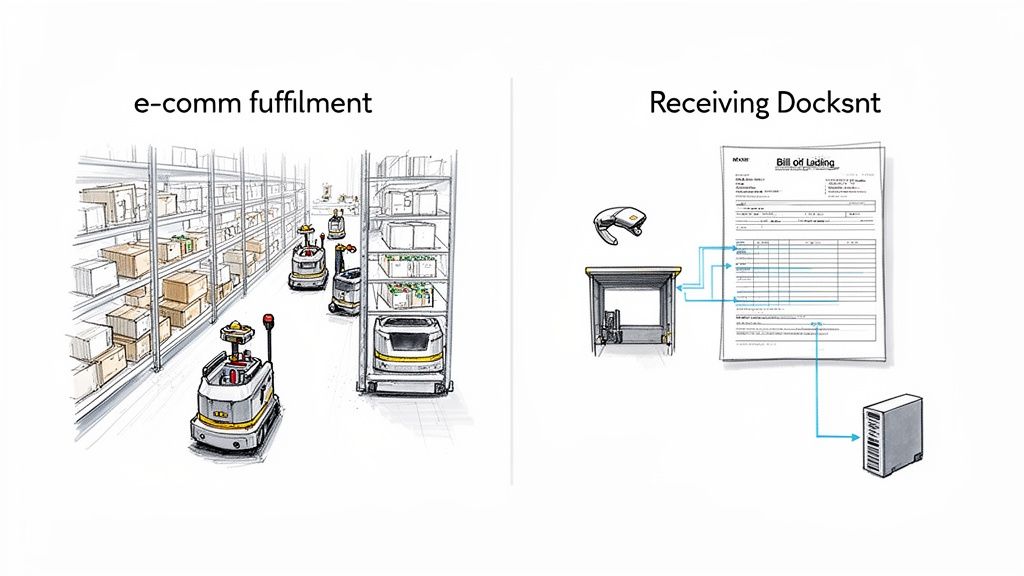
The theory is great, but seeing warehouse automation software solve real problems on the ground is what really matters. These systems aren't just for giant corporations anymore. They're tackling everyday challenges for all kinds of businesses, from busy e-commerce operations to specialized third-party logistics (3PL) providers.
Think about an e-commerce fulfillment center trying to keep up with same-day shipping demands. The right software can direct a fleet of autonomous mobile robots (AMRs) that bring entire shelves of products directly to a human picker. This "goods-to-person" approach eliminates miles of walking, sending pick rates through the roof and making those tight delivery deadlines achievable.
This shift is being fueled by the massive growth in online shopping. In fact, the warehouse robotics market is expected to jump from $7.35 billion in 2026 to an incredible $25.41 billion by 2034. E-commerce is the main driver, projected to account for over 47% of that market as companies like Amazon and DHL continue to expand their robot fleets. You can see more details on this explosive growth in the full warehouse robotics market report.
Transforming the Receiving Dock
One of the most impactful—and often forgotten—areas for automation is the receiving dock. This is a classic bottleneck. It gets bogged down by paperwork like bills of lading and packing slips, where someone has to manually find, read, and punch every piece of information into a computer. It's slow work and a recipe for typos that can mess up your entire inventory.
Automation completely flips the script on this process.
- Intelligent Document Processing: The moment a shipment arrives, the software scans the paperwork using AI-powered optical character recognition (OCR).
- Automated Data Extraction: It doesn't just see the text; it understands the context. It pulls out key details like PO numbers, SKU quantities, and supplier names automatically.
- Instant System Updates: That accurate data is then pushed directly into the Warehouse Management System (WMS) and the company’s ERP. Just like that, the new inventory is ready to be sold.
This one change sends positive ripples through the entire operation. It gets rid of tedious manual labor, speeds up the putaway process, and gives other departments like accounting instant visibility into what’s just arrived. To see how this fits into the broader operational flow, check out this guide to automation in the supply chain.
Precision for Third-Party Logistics
Now, picture a 3PL provider juggling inventory for a dozen different clients under one roof. Keeping every client’s stock perfectly separate and tracked is absolutely critical. Without a powerful WMS, that level of complexity would be pure chaos.
A 3PL’s reputation is built on trust and accuracy. Warehouse automation software is the tool that delivers on that promise, providing client-specific inventory tracking, billing, and reporting with flawless precision.
The software essentially creates virtual walls in the warehouse. It assigns unique rules and workflows to each client’s products, tracking every single touchpoint. This guarantees that Client A’s inventory never gets mixed up with Client B’s. For a 3PL, this isn't just about efficiency; it's a major competitive advantage that allows them to offer tailored services and give their clients the accurate, detailed reports they demand.
Answering Your Top Questions About Warehouse Automation Software
As you start exploring warehouse automation software, you'll naturally have some questions. It's a big topic, and it's easy to get lost in the details. Let's break down some of the most common questions we hear from managers, finance teams, and operators on the floor.
Is This Technology Only for Huge Companies?
Not at all. While the news often highlights massive, fully automated warehouses, that's not the whole story anymore. The game has completely changed with the rise of cloud-based software (SaaS) and Robotics-as-a-Service (RaaS) models.
These options remove the need for a huge upfront investment in hardware and servers. Instead, you get access to powerful tools through a subscription, with scalable pricing that fits your budget. This means you can start small—maybe just with better inventory tracking or a smarter picking system—and add more capabilities as your business grows.
How Does This Software Actually Talk to My ERP?
This is a critical question, and the short answer is: it's designed to. A good warehouse automation platform doesn’t operate on an island. It’s built to be the central hub of your operations, and that means communicating seamlessly with your other business systems.
Most leading platforms come with pre-built connectors for major ERP and accounting systems like NetSuite, SAP, or QuickBooks. For everything else, they offer robust APIs. This ensures all your critical data—inventory counts, order updates, shipping details—syncs automatically. You end up with one source of truth for the entire company, finally putting an end to manual data entry and conflicting reports.
The whole point of modern warehouse automation software is to connect everything. It ensures that everyone, from the forklift operator to the CFO, is looking at the same accurate, real-time information.
What's a Realistic Timeline for Getting This Up and Running?
The timeline really depends on the scope of your project. If you're implementing a fairly standard Warehouse Management System (WMS) in a single, smaller facility, you could be looking at a 3 to 6-month timeframe.
However, for a larger-scale project that includes robotics, custom workflows, and multiple integrations, it’s more realistic to plan for 9 to 18 months. The key to hitting your target date isn't just about the technology; it's about the process. The projects that succeed have three things in common:
- A Detailed Project Plan: Every single stage, task, and deadline is mapped out from the start.
- Clear, Measurable Goals: Everyone knows exactly what success looks like.
- A Strong Partnership: You and your implementation partner are in constant communication.
A well-managed project, big or small, will always deliver a faster return on your investment and a much smoother transition for your team.
Ready to stop wrestling with manual data entry and speed up your entire workflow? DocParseMagic pulls clean, usable data from messy documents like invoices and bills of lading in just minutes. Get started for free at DocParseMagic.