Structuring Unstructured Data A Practical Guide
Let's be honest, most of the information that runs your business is a complete mess. It’s trapped in PDFs, emails, images, and Word documents—what we call unstructured data. The process of structuring it is essentially about taming that chaos. It's about taking all that messy, hard-to-read information and neatly organizing it into a clean, predictable format, like a spreadsheet.
Think of it as turning a mountain of digital paperwork into clean rows and columns that you can actually sort, analyze, and use to make smart decisions. This isn’t a trivial task; it’s the key to unlocking the value hidden in a staggering 80-90% of all business documents.
The Hidden Costs of Document Chaos
Picture a finance manager, eyes glazed over, drowning in a sea of PDF invoices, Word proposals, and scanned receipts. This is the daily reality of unstructured data. It’s the digital lifeblood of the company, but it actively resists being analyzed. Every document contains vital information—invoice totals, contract terms, customer details—but it's all locked away, inaccessible to the very tools you rely on for decisions.

This mess isn't just an annoyance; it’s a real, tangible cost. The fallout from leaving this data untouched creates operational friction and squanders opportunities across the entire organization. Without a solid way to structure unstructured data, teams get stuck in a loop of repetitive, low-value work.
Wasted Hours and Hidden Inefficiencies
The most obvious hit is to your team's time. Manually typing data from a vendor invoice or copying policy details from a PDF isn't just mind-numbing—it's a massive productivity killer. Your people are losing countless hours to copy-pasting, double-checking, and fixing information that a machine could process in a blink.
This manual grind is also ripe for human error. One misplaced decimal point on a financial report can lead to overpayments, compliance headaches, or flawed forecasts. These small slip-ups pile up, creating serious financial and operational risks over time.
Unstructured data isn't just a technical problem; it's a business bottleneck. It traps valuable insights, slows down processes, and forces skilled professionals to spend their time on monotonous data entry instead of strategic analysis.
The scale of this problem is huge. The global market for unstructured data solutions hit USD 35.12 billion and is on track to explode to USD 156.27 billion by 2034. This isn't just tech hype; it shows a very real, urgent need for businesses to turn their document chaos into assets. You can explore more about these market dynamics to see just how critical this field is becoming.
To make the difference crystal clear, let's break down the two types of data side-by-side.
Unstructured Vs Structured Data At a Glance
| Characteristic | Unstructured Data (The Problem) | Structured Data (The Goal) |
|---|---|---|
| Format | No predefined model; varies wildly (PDF, text, email). | Highly organized in a rigid format (e.g., SQL database, Excel). |
| Searchability | Difficult and slow to search for specific information. | Easy and fast to query and filter. |
| Analysis | Requires advanced tools (NLP, ML) to analyze. | Ready for standard analysis tools (BI dashboards, spreadsheets). |
| Example | The body of an email or the text in a scanned invoice. | A customer's name and address in a CRM database. |
Getting from the "problem" column to the "goal" column is where the magic happens.
Opportunities Buried in Your Files
Beyond the obvious costs, your unstructured files are hiding a goldmine of strategic insights. Critical trends, competitor intel, and customer feedback are often buried deep within documents like:
- Vendor Invoices: Uncovering spending patterns and giving you leverage for negotiation.
- Insurance Policies: Spotting coverage gaps or areas where you're overpaying.
- Customer Emails: Highlighting common complaints and brilliant product ideas.
- Proposals and Contracts: Containing the key terms that make or break your profitability.
As long as this information stays messy and unstructured, it’s invisible. You can't analyze what you can't measure. By finally structuring this data, you build the foundation for real business intelligence, turning your everyday documents into a powerful competitive advantage.
How Data Structuring Actually Works
Turning a messy pile of documents into clean, usable data might feel like magic, but it’s really just a repeatable process driven by smart technology. At its heart, structuring unstructured data is all about teaching a computer to read and understand information the way a person would—only much, much faster.
Think of it like this: you have two different people sorting a stack of invoices.
The first person is a stickler for the rules. You give them a checklist: "The invoice number is always a 7-digit number starting with 'INV-' and it’s always in the top right corner." This is a rule-based system. As long as every single invoice fits that mold, this method is flawless.
The second person has been processing invoices for years. They don't need a rigid checklist because they've seen it all. They just know what an invoice number looks like, even if it’s in a different spot or format. This is a machine learning (ML) model. It learns from experience and recognizes patterns, even with new variations.
These two fundamental ideas—following strict rules and recognizing flexible patterns—are how modern data structuring gets done.
The Technologies That Power It
To make these approaches a reality, a few key technologies do the heavy lifting behind the scenes. Think of them as specialized tools in a data expert’s toolkit, each with a specific job.
One of the most powerful is Natural Language Processing (NLP). This is the branch of AI that gives computers the ability to make sense of human language. When a system uses NLP to read an insurance policy, it isn’t just scanning text. It’s actually identifying key concepts like policyholder names, coverage limits, and effective dates.
Another critical piece of the puzzle is data parsing. If NLP helps figure out the meaning of the words, parsing is all about breaking down the document's structure. For instance, a good parser can take a single line of text with an address and neatly split it into separate fields for the street, city, state, and zip code. If you want to go a bit deeper, you can learn more about what data parsing is and see how it works.
When you put these technologies together, you get a powerful engine for pulling structured data out of just about any document.
Choosing the Right Method for the Job
So, which approach is better—strict rules or flexible machine learning? The truth is, it completely depends on your documents. Neither one is a silver bullet; they’re just suited for different challenges.
A rule-based approach is your best bet when your documents are consistent and predictable.
- Best for: Standardized forms, simple logs, or any document where the data you need is always in the same place.
- Advantage: It’s incredibly precise. If the document follows the rule, you get the right data every time.
- Limitation: It’s brittle. The moment a document deviates from the expected format—even slightly—the whole process can break.
A machine learning approach is the clear winner when you’re dealing with variety and unpredictability.
- Best for: Invoices from hundreds of different vendors, legal contracts with unique clauses, or any document set where layouts and language change.
- Advantage: It’s adaptable. It can handle variations it has never seen before by recognizing the context and patterns it has learned.
- Limitation: It needs a good amount of data to learn from and might not hit 100% accuracy on its own without a bit of human oversight.
The smartest systems today, like DocParseMagic, don't force you to choose. They blend these techniques, using machine learning to handle the messy, real-world variety while letting you add simple rules to fine-tune the results for maximum accuracy. This hybrid approach delivers the best of both worlds: the flexibility of AI and the precision of rules.
Your Data Assembly Line: From Mess to Meaning
Turning a chaotic pile of documents into a clean, analysis-ready dataset isn't a single magic trick. It's a process, a series of deliberate steps. The best way to think about it is like a factory assembly line. Raw, messy materials go in one end, and a polished, valuable product comes out the other.
Each station along this pipeline has a specific job to do, refining the data bit by bit until it's ready for you to use.
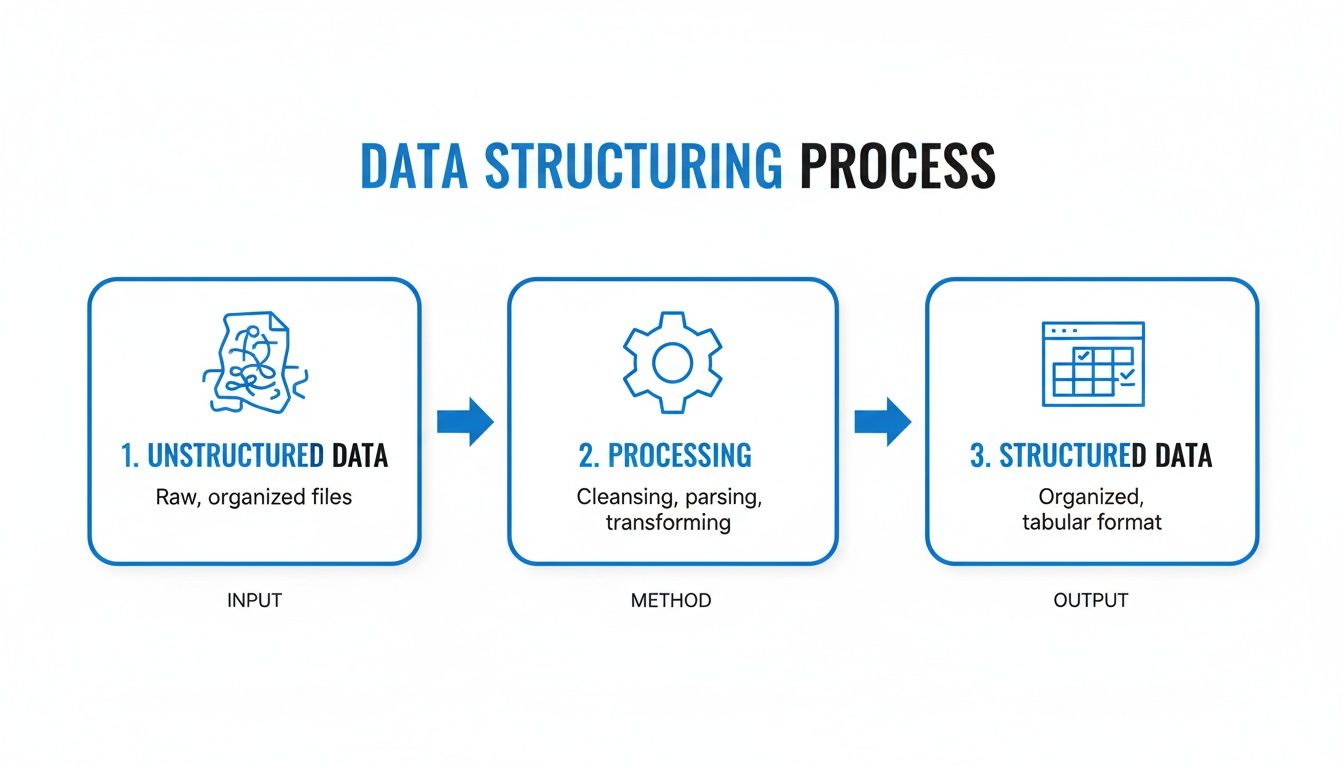
This flow shows how a dedicated process can turn raw potential into a structured, actionable asset. Let's walk through each stage of this assembly line to see exactly how it works.
Stage 1: Ingestion
Everything kicks off with ingestion, which is just a fancy way of saying "getting your raw materials onto the factory floor." This first step is all about collecting and loading the different unstructured files you need to process.
These documents can come from anywhere—PDFs attached to emails, shared folders full of Word docs, or even photos of receipts snapped on a phone. A good ingestion system needs to handle this variety without a fuss, smoothly feeding everything into the pipeline.
Stage 2: Extraction
Once the documents are in, the extraction stage begins. This is where the real work happens: lifting specific pieces of information right off the page. Here, specialized tools, often powered by AI, scan each document to identify and pull out the data points you actually care about.
For an invoice, this means finding and grabbing the:
- Invoice number
- Vendor name
- Total amount due
- Details for each line item
Think of this step as a skilled worker on the assembly line, spotting and picking out the essential components from a much larger unit. It's a crucial, focused task.
The sheer scale of this can be staggering. Most large companies are sitting on more than 5 petabytes (PB) of unstructured data, which makes up a whopping 80-90% of their total information. Trying to pull value from that digital mountain by hand is simply impossible. This is why automated pipelines are so critical for any modern business.
Stage 3: Normalization
After extraction, the data is usually a bit of a mess. The normalization stage is all about cleaning it up and making sure every piece of information conforms to a standard format. It’s like ensuring all the parts on the assembly line are the same size and shape before they get put together.
For example, normalization would:
- Convert all dates to a single format (like YYYY-MM-DD).
- Standardize currency symbols (ensuring all totals are in USD, for instance).
- Fix common abbreviations (changing "St." to "Street").
This consistency is what makes accurate analysis possible down the road.
Stage 4: Validation and Enrichment
Next up, the data moves to validation. This is your quality control step, where the system checks the extracted information for obvious errors or weird outliers. It might flag an invoice total that doesn't add up or spot a policy number that just doesn't look right.
Right after validation comes enrichment, which adds missing context. If an invoice only has a vendor's name, the system could automatically pull in their address and tax ID from a master database. This makes the final dataset far more complete and useful.
Think of this stage as the final inspection and detailing. It doesn't just ensure quality; it adds features that make the final product more valuable, turning raw data into a truly comprehensive business asset.
Stage 5: Loading
The final stage is loading. Once the data is extracted, cleaned, validated, and enriched, it’s delivered to its final destination. This is where the polished, finished product rolls off the assembly line, ready to be put to work.
Typically, this structured data is loaded into a system where it can be easily accessed and analyzed, such as:
- A spreadsheet like Excel or Google Sheets
- A business intelligence (BI) tool
- An accounting or ERP system
This last step completes the journey from a messy document to organized, actionable information. To see how these stages come together in a real-world workflow, take a look at our detailed guide on automated document processing.
Real-World Examples: Putting Structured Data to Work
Theory is great, but seeing how data structuring solves real business headaches is where it all clicks. It’s the difference between reading a recipe and actually tasting the meal. The magic isn't in the process itself but in what it empowers teams to do.
Let's step out of the abstract and look at three common scenarios where businesses are drowning in documents. In each case, we’ll see a clear before-and-after picture, showing the move from tedious manual work to fast, automated insight.
Taming the Invoice Tsunami for Accounting Teams
The accounts payable department is often the epicenter of document chaos. Picture an accounting clerk on a Monday morning, staring at an inbox overflowing with PDF invoices from dozens of vendors. Every single invoice has a different layout, with the invoice number, due date, and line items tucked away in different spots.
The "Before" Picture:
- Mind-Numbing Manual Entry: The clerk has to open each PDF, hunt for the right information, and manually type it all into the accounting system.
- Prone to Costly Errors: This kind of repetitive data entry is a breeding ground for typos. A misplaced decimal or a wrong vendor code can lead to payment nightmares and reconciliation headaches.
- A Massive Time Sink: Processing just one invoice can take several minutes. When you multiply that by hundreds or thousands a month, you've got a serious bottleneck.
The "After" Picture: Now, imagine they use an automated data structuring tool. The clerk just uploads the whole batch of invoices, and the system gets to work.
- Hands-Free Extraction: Invoice numbers, vendor names, line items, and totals are pulled out accurately and organized into neat, structured columns in an instant.
- Error Rates Plummet: Automation takes human error out of the equation, ensuring the data is clean right from the start.
- Payments Get Supercharged: Invoices are processed in seconds, not minutes. This means the team can finally start catching early payment discounts and keep vendors happy.
Suddenly, the accounting team is freed from being data entry clerks and can focus on being strategic financial managers.
Unlocking Insights from Insurance Policies
Next, think about an insurance brokerage trying to compare commercial property policies for a client. They’re juggling dense, multi-page PDFs from several carriers. Each one uses its own jargon and format to describe coverage limits, deductibles, and exclusions, making a true side-by-side comparison feel impossible.
The "Before" Picture:
- A Painstaking Manual Review: An agent has to read every single policy line by line, highlighting key terms and manually plugging them into a comparison spreadsheet.
- High Risk of Misinterpretation: Complex legal language is tricky. A small misinterpretation could leave a client with a huge, unexpected gap in their coverage.
- Hours of Unbillable Work: All this manual analysis eats up hours that could be spent advising clients or bringing in new business.
By structuring the data, the broker can instantly compare what really matters—turning a static document into a dynamic dataset and ensuring their client gets the best possible coverage.
Streamlining Procurement with Proposal Analysis
Finally, let's look at a procurement manager evaluating proposals for a new piece of equipment. They've received complex Word documents and PDFs from multiple vendors, each outlining different pricing, timelines, and warranty terms.
The "Before" Picture:
- Manual Spreadsheet Hell: The manager is stuck building a massive spreadsheet, trying to copy and paste terms from each proposal to create some kind of apples-to-apples comparison.
- Hidden Details Get Missed: It’s far too easy to overlook critical details buried deep in the text, like specific payment terms or service exclusions that could have big financial implications down the road.
This is a huge deal in financial services, where data accuracy is non-negotiable. The financial sector is expected to lead the unstructured data management market simply because it has to process a staggering volume of invoices, statements, and filings. With up to 90% of its data being unstructured, a single error in structuring this information can trigger a costly audit. You can discover more insights about financial data trends and see exactly why the industry is investing so heavily in getting this right.
By automatically structuring vendor proposals, a procurement team can instantly compare key terms side-by-side. This allows them to identify the true best-value offer, not just the lowest price, leading to smarter purchasing decisions and better long-term partnerships.
The No-Code Way to Automate Document Processing
Knowing the theory behind structuring data is one thing. Actually doing it without a dedicated IT team used to be next to impossible. The old way involved custom scripts, clunky software, and specialized developers, creating a huge roadblock for the very people drowning in paperwork.
This is where modern tools completely change the game.
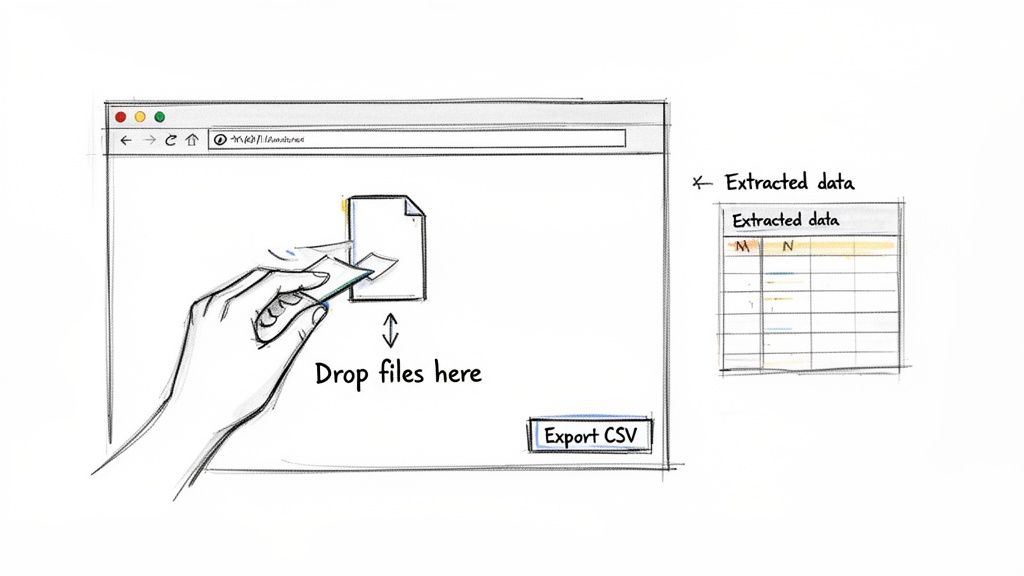
A no-code platform like DocParseMagic takes that entire data assembly line we just walked through and puts it on autopilot. It’s built for the people on the front lines—the accountant, the broker, the operations manager—who just need clean data without having to write a single line of code.
From Drag-and-Drop to Ready-to-Use Data
The whole process is designed to be incredibly simple. Instead of fighting with complicated setups, you just drag and drop your files right into the platform. You can throw in a mix of PDFs, scanned images, Word documents, or even photos of receipts snapped on a phone.
Once your files are uploaded, the AI gets to work. It scans each document, figures out what information you care about, and pulls it out cleanly. The platform takes care of all the tedious extraction, normalization, and validation steps for you, turning a messy pile of files into a perfectly organized spreadsheet.
That means you can finally say goodbye to the soul-crushing task of manual copy-pasting. All those hours spent re-typing invoice details or policy numbers are suddenly back in your day, freeing up your team for the work that actually matters.
A no-code tool makes structuring unstructured data something anyone can do. It puts powerful AI directly into the hands of business users, removing the technical bottleneck and delivering results right away.
Solving Real Pain Points for Your Team
This move from manual to automated processing isn't just about saving time; it's about solving the daily headaches that come with document-heavy jobs. It helps eliminate costly errors and opens up new ways to be efficient. For a closer look at this idea, check out our guide on what no-code automation is and how it all works.
Think about the immediate difference it makes:
- For Accountants: No more mind-numbing invoice entry. This leads to faster payment cycles, fewer data entry mistakes, and a real chance to grab early payment discounts that were previously missed.
- For Insurance Brokers: Instantly pull key terms, coverage limits, and premiums from dozens of different policy documents. This makes it possible to create faster, more accurate client comparisons and risk reports.
- For Operations Managers: Get all your data from different sources—like vendor proposals or shipping notices—into one standard format. This gives you a clear, consistent view of your operations without all the spreadsheet chaos.
Manual Processing Vs DocParseMagic
The table below shows just how different the two approaches are. It's not just a minor improvement; it's a fundamental shift in how work gets done.
| Task | Manual Method | With DocParseMagic |
|---|---|---|
| Data Entry | Hours of manual copy-pasting per week | Seconds per document with drag-and-drop |
| Accuracy Rate | Error-prone, often 95-98% accuracy | Consistently 99%+ accuracy with AI validation |
| Processing Speed | 5-10 minutes per document | 10-30 seconds per document |
| Scalability | Limited by team size and burnout | Easily handles thousands of documents daily |
| Audit Trail | Difficult to track changes and versions | Full digital log of all actions and versions |
This direct approach to structuring unstructured data provides an immediate and obvious return on your investment. By slashing the hours spent on manual work and preventing expensive mistakes, a tool like DocParseMagic quickly pays for itself. It turns a frustrating bottleneck into a smooth, efficient workflow.
Your Smart Start Implementation Checklist
Jumping into the world of structuring unstructured data doesn't mean you have to launch a massive, company-wide project overnight. The best, most successful initiatives always start small. They pick one high-impact problem, prove the concept, and show value right away. This checklist is your road map for launching a smart, low-risk pilot project.
Think of it as a focused experiment. You’re not trying to boil the ocean; you're just trying to solve one of your most painful document headaches and score a quick win.
Identify Your Most Painful Workflow
First things first: where does the document chaos hurt the most? Is your accounts payable team drowning in vendor invoices, manually keying in data for hours every week? Maybe the procurement team is falling behind because they can't compare complex proposals fast enough.
Pick one specific, painful workflow. It should be something that’s both a huge time-sink and a magnet for human error. By zeroing in on a real, measurable business problem, you make it much easier to see a clear return on your effort.
Gather a Small Batch of Samples
Next, round up a few sample documents from that workflow. You don't need a mountain of them. A small batch of 15-20 documents is usually perfect to get the ball rolling. Just make sure the samples represent the variety you see in the real world.
For instance, if you're tackling invoices, grab a few from different vendors to capture all the different layouts and formats. This small but diverse set becomes the perfect testbed for whatever solution you try.
This step is more than just collecting files—it’s about defining the scope of your initial challenge. A well-chosen sample set means you're testing a solution against the actual complexity your team faces every single day.
Define Your Critical Data Fields
With your documents ready, sit down and decide what information you absolutely have to pull out. You don’t need to extract every last word. Just focus on the critical data points that are essential for the business process.
For an invoice, that list might look like this:
- Invoice Number
- Vendor Name
- Total Amount
- Due Date
Keeping this list tight and focused is the secret. It simplifies everything and ensures you get the most important information quickly and accurately.
Choose the Right Tool and Test It
Now it’s time to pick your weapon of choice. For a pilot like this, a no-code platform like DocParseMagic is a great fit because you can get up and running without begging for help from IT. Most of these tools offer a free trial, so you can test the waters with zero risk.
Upload your sample documents and see how well the tool extracts the critical fields you identified. This hands-on test will give you a real feel for how powerful—and how easy—the tool is to use.
Measure the Impact
Finally, it's time to measure your success. How long did it take to process the documents automatically versus doing it the old-fashioned way? How many errors did you eliminate?
Quantifying these improvements, even on this small scale, gives you a powerful story to tell. It’s the kind of hard evidence that builds a rock-solid business case for rolling out automation to other parts of the company.
Frequently Asked Questions
When you're wading into the world of data structuring, a few questions always seem to pop up. Let's tackle some of the most common ones to clear things up.
What’s the Difference Between Data Parsing and Data Extraction?
It's a great question, and the distinction is key. Think about reading a recipe from a cookbook.
Data extraction is like pulling out all the bits of text—"1 cup flour," "2 eggs," "350°F." You've grabbed the raw information from the page, but it’s just a list of words and numbers.
Data parsing, on the other hand, is about understanding what that information means. It's knowing that "1 cup" is the quantity for the ingredient "flour." Parsing connects the dots, organizing the raw text into neat, labeled fields like ingredient_name and ingredient_quantity. A good modern tool does both seamlessly, so you just get perfectly structured data at the end.
Do I Need a Developer to Use a No-Code Tool?
Not at all—and that’s the whole point! The beauty of a no-code platform is that it’s built for everyone, not just engineers. In the past, structuring messy data from documents was a job for the IT department, often requiring custom code and a lot of back-and-forth.
With a modern visual tool, the process is incredibly straightforward. You upload your files, and the AI does the heavy lifting of identifying, extracting, and organizing the data. If you can handle a spreadsheet, you’ve got all the skills you need.
The goal of no-code is to empower the people who actually work with the data. It puts powerful AI into the hands of business users, allowing teams to solve their own problems without waiting in line for technical help. This speeds everything up and makes sure the people who know the data best are the ones improving the process.
How Can I Measure the ROI of Structuring Our Data?
Calculating the return on investment (ROI) is actually more direct than you might expect. It really boils down to two things you can easily track: time savings and error reduction. Both have a real dollar value attached to them.
Here's a simple way to think about it:
- Calculate Time Savings: First, figure out how many hours your team spends on manual data entry every week. Multiply that by their average hourly cost. That’s your weekly labor cost for this one task.
- Estimate Error Costs: Next, think about the financial hit from common mistakes. This could be anything from overpaying an invoice, missing an early payment discount, or even facing compliance fines because of bad data.
- Compare Before and After: An automation tool gives you all those hours back and practically eliminates those costly errors. Often, saving just a few hours of manual work a month is enough to cover the cost of the tool, turning a major operational headache into a real advantage.
Seeing the ROI spelled out this clearly makes it much easier to build a business case for automating your document workflows.
Ready to stop wasting time on manual data entry? DocParseMagic turns your messy documents into clean, analysis-ready spreadsheets in minutes. Try it for free and see how much time you can save.