Your Guide to Flawless PDF to JSON Data Extraction
Converting a PDF to JSON is all about pulling structured data out of a fixed, visual document and putting it into a flexible, machine-readable format. This is a huge deal for automating workflows, but trying to do it by hand is a recipe for disaster—it's slow, expensive, and riddled with errors.
Why Manual PDF Data Entry Is a Losing Game
Let's get real. Manually copying and pasting data from PDFs isn't just a task; it's a bottleneck that actively slows your business down. If you're in accounting, insurance, or procurement, you know this pain firsthand. It's the daily grind of wrestling with invoices, policy documents, and complicated vendor proposals.
The hours just vanish. But it’s not just about wasted time—it’s about the very real cost of human error. A single misplaced digit on an invoice can create a ripple effect: delayed payments, frustrated vendors, and hours of detective work trying to find the mistake.
The Hidden Costs of Copy-Paste Culture
Think about a procurement team trying to compare a dozen vendor proposals. Each one is a PDF with its own unique layout for pricing tables, delivery timelines, and contract terms. Manually typing all that into a spreadsheet to compare options is not only mind-numbing, but it’s a process where one tiny mistake could lead you to pick the wrong supplier.
This manual approach quietly drains your resources in a few key ways:
- Wasted Payroll: You're paying skilled people to do low-value, repetitive data entry.
- Lost Opportunities: Every hour spent on data entry is an hour not spent on strategy, negotiating better deals, or building client relationships.
- The Price of Errors: Fixing mistakes costs real money, from small corrections to major compliance headaches.
To get around these inefficiencies, many businesses are finally looking to smarter solutions, like an instant data scraper or other automation tools. These can handle the extraction automatically, giving your team their time back.
When "Good Enough" Accuracy Isn't Good Enough
The numbers here are pretty stark. Even with the most diligent teams, traditional data entry for complex documents like multi-page invoices or scanned bank statements rarely breaks 80-85% accuracy. That gap forces managers to spend hours on manual verification, and in high-volume departments, error rates can climb as high as 15-20%.
A 2025 industry analysis found that a mid-sized procurement team handling just 5,000 PDFs a year could lose over 2,000 man-hours on data entry and corrections. At average salaries, that's a $100,000 productivity loss. You can dig into similar findings on Extend.ai to see the full financial picture.
The fundamental problem is that PDFs were built for printers, not databases. They're designed to look good on a screen or on paper, with no regard for the underlying data structure. Your team is forced to be the human bridge between a static image and your systems.
This old-school process just doesn't scale. As your business grows, the document floodgates open wider. You can't just keep hiring more people to copy and paste. Moving from manual work to an automated pdf to json workflow isn't a luxury anymore—it's essential for staying competitive. It's how you reclaim thousands of hours, slash error rates, and let your team focus on the work that actually matters.
How to Convert PDF to JSON with a No-Code Workflow
If you've ever been stuck manually copying and pasting information from PDFs, you know how mind-numbing and error-prone it is. It’s a huge time-suck and a drain on resources. The good news? You don't need to be a developer or write any code to escape that grind.
Modern no-code tools like DocParseMagic are built for exactly this problem. They let business users—not programmers—turn the tedious job of converting a PDF to JSON into a simple drag-and-drop workflow. This means you can get straight to using clean, structured data from your documents, whether they're perfectly formatted digital PDFs or blurry photos of a paper form.
The old way of doing things is a fast track to headaches. It’s a slow, expensive, and mistake-filled cycle that automation was born to fix.
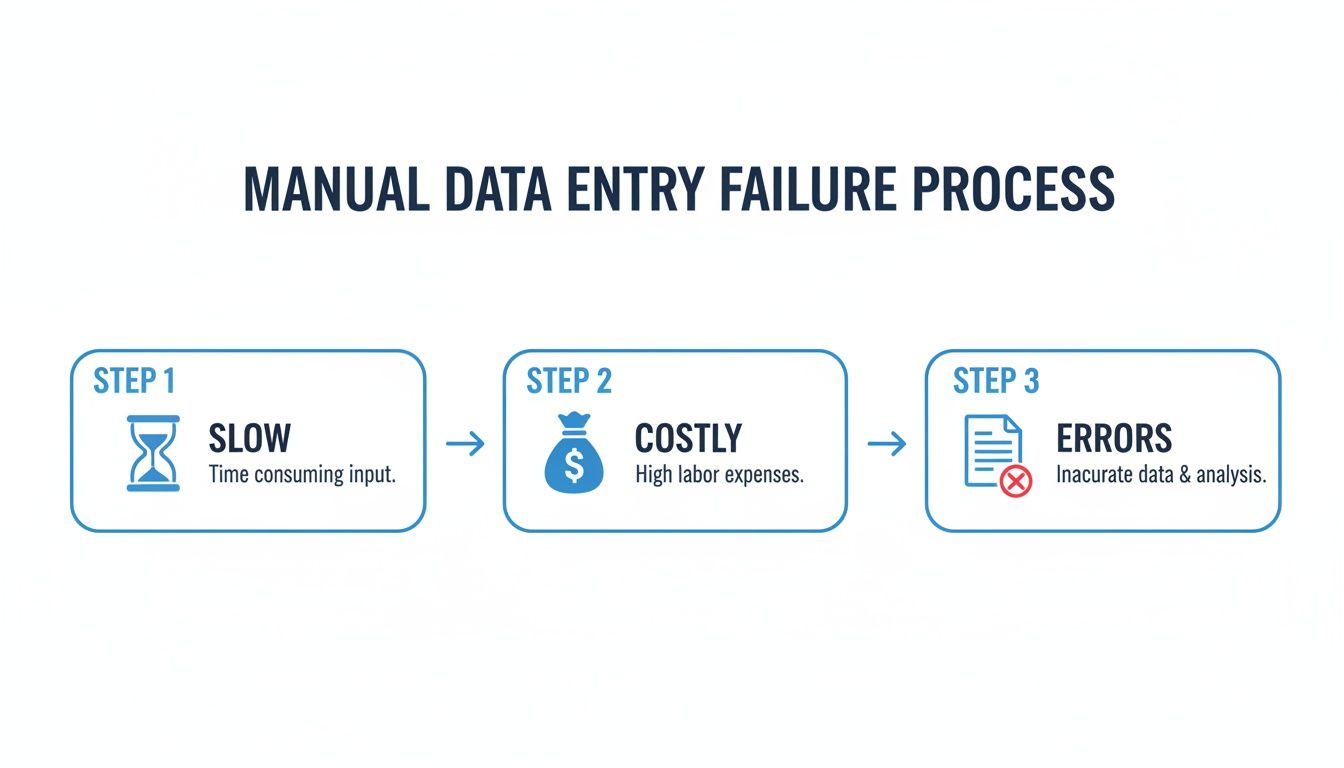
You can see right away how manual work burns through time and money, all while creating the kinds of errors that automation is designed to prevent.
Getting Started with a No-Code Tool
The real strength of a tool like DocParseMagic is its simplicity and intelligence. Older tools forced you to create rigid templates for every document layout, which would break the second a supplier changed their invoice format. Modern platforms use AI to understand a document’s structure on its own.
This means the tool can spot key-value pairs (like "Invoice Number: 12345"), tables, and other data points no matter where they are on the page.
Think of it this way: you’re a project manager for a construction company. Every day, you get a flood of lien waivers and change orders from different subcontractors, each with their own unique PDF format. With a no-code tool, you just upload them all. The platform instantly pulls the key details—contractor names, dates, amounts—and organizes them into a consistent JSON output you can actually use.
This is a big deal, especially as the intelligent document processing market grows. With ongoing skilled labor shortages, the efficiency gains are massive. Some high-volume businesses see an ROI of 300-500% in the first year alone. DocParseMagic is right in the middle of this shift, offering a simple credit-based pricing model (one credit per doc) that makes it easy to get started.
A Practical No-Code Conversion Workflow
The beauty of this approach is how straightforward it is. Everything happens right in your web browser, so there's no software to install or complicated settings to configure.
Your workflow will look something like this:
- First, you upload your documents. Just drag and drop your PDF files into the platform. You can do a single file, a batch of 100 at once, or even a mix of PDFs and images like JPEGs or PNGs.
- Next, the AI gets to work. Once uploaded, the platform reads the document, figures out its structure, and pulls out the important information. It's smart enough to tell the difference between a header, the line items in a table, and the final total at the bottom.
- Then, you give it a quick review. For most standard documents, the extraction is spot-on. But you always get a chance to look over the extracted data and make tiny adjustments. The best part is that this quick feedback helps the model get even smarter for next time.
- Finally, you download your data. With a single click, you get a clean, well-formatted JSON file, ready to be plugged into whatever system you use.
The key takeaway here is the freedom from "template training." Unlike old-school systems that made you manually draw boxes around every data field for each new layout, modern AI-driven tools adapt to variations automatically. This alone saves a massive amount of setup and maintenance time.
If you’re new to the concept, you might want to check out our guide on what is no-code automation. It’s all about empowering you to solve real business problems without ever touching a line of code. The immediate benefit is speed, turning a task that once took hours into something you can get done in minutes.
Choosing the Right PDF to JSON Conversion Method
So you need to get data out of a PDF and into JSON. The first question I always ask is: what's the real-world goal here? The best approach for a finance team buried in thousands of vendor invoices looks completely different from a developer building a one-off script for a personal project.
There’s no magic bullet, only the right tool for your specific job. Your decision will boil down to a classic trade-off between speed, control, accuracy, and cost. Let’s break down the three main paths you can take: no-code platforms, developer libraries, and specialized APIs.
No-Code Platforms for Speed and Simplicity
If you need results now and don't want to touch a line of code, a no-code platform is your best bet. Tools like DocParseMagic are built for exactly this scenario. You can literally drag and drop a folder of PDFs—even messy scanned ones—and let an AI engine figure out what’s what.
This approach is a game-changer for:
- Business Teams: Think of accounting, HR, or operations departments that can get up and running in minutes, not months.
- High-Volume, Mixed Documents: When you’re dealing with invoices or forms from hundreds of different vendors, a smart AI that adapts to new layouts is crucial. A template-based system would just break.
- Fast ROI: The time you save on manual data entry is immediate. The cost of a subscription is often a fraction of the labor costs it replaces.
The biggest win here is the sheer speed. Instead of scoping out a development project that could take weeks, you can have structured JSON data flowing in just a few minutes.
Developer Libraries for Custom Control
For developers who want to get their hands dirty, a coding library offers the ultimate level of control. The Python ecosystem is especially rich here, with fantastic tools like PyMuPDF for extracting raw text and Camelot for parsing tables. These give you the power to build a conversion pipeline from the ground up.
This path makes sense when your project requires:
- Deep Integration: You need to embed the extraction logic directly inside a custom application.
- Total Customization: You're dealing with a bizarre, non-standard document layout that requires very specific, hand-crafted rules.
- Zero Subscription Cost: The libraries themselves are almost always open-source and free.
But be warned: "free" can be misleading. While the software doesn't cost anything, the development hours are a very real expense. Building a parser that's robust enough to handle the messiness of real-world documents is a significant undertaking, often taking months of work and continuous maintenance.
Specialized Parser APIs for a Hybrid Approach
What if you're a developer who needs the accuracy of a sophisticated AI but doesn't have time to build the entire engine from scratch? This is where specialized APIs come in. They do the heavy lifting for you—you send a PDF file to an endpoint, and you get clean, structured JSON back.
This hybrid model is perfect for development teams that want to move fast while retaining the flexibility of a custom-coded solution. It lets you integrate powerful data extraction into your app with just a few API calls. The main trade-off is the recurring cost, as these services are typically billed on a subscription or per-document basis.
Comparison of PDF to JSON Conversion Methods
To help you visualize the trade-offs, here’s a quick breakdown of how these three methods stack up against each other.
| Method | Best For | Ease of Use | Accuracy (Complex Docs) | Setup Time |
|---|---|---|---|---|
| No-Code Platform | Business Users, Rapid Automation | Very Easy | High | Minutes |
| Developer Library | Custom Apps, Full Control | Hard | Varies | Weeks/Months |
| Specialized API | Devs Needing Speed & Accuracy | Moderate | High | Hours/Days |
Ultimately, your choice will depend heavily on the complexity and volume of the documents you're working with. If you're dealing with scanned files, low-quality images, or PDFs with complex tables, you'll need a solution with top-notch Optical Character Recognition (OCR).
To get a better handle on this, take a look at our guide on PDF OCR, which explains how the technology turns a simple image of text into machine-readable data. For most business situations where time is money and accuracy is non-negotiable, a no-code platform offers the straightest line to getting valuable data out of your documents and into your workflow.
Advanced Strategies for High-Accuracy Data Extraction
Pulling simple text from a clean, digitally-born PDF is one thing. But what happens when you’re staring down a blurry scanned invoice, a dense financial report with tables inside of tables, or a mountain of vendor proposals, each with its own unique layout? This is where basic conversion tools completely miss the mark, leaving you with a mess of wrong or missing data.
Getting high-accuracy results isn't just about reading text; it's about understanding the document's context and structure.
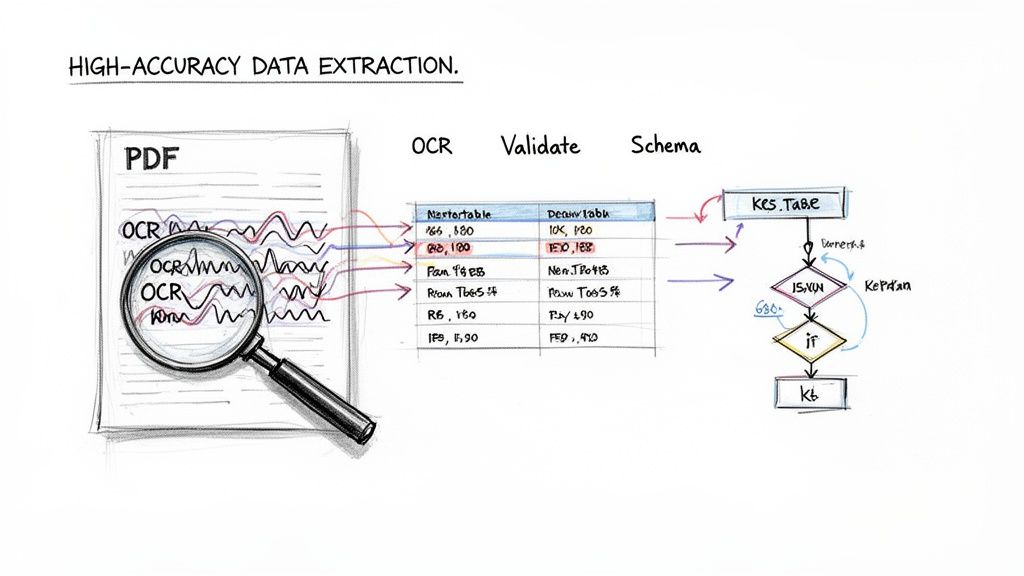
The first and biggest hurdle is often the PDF itself. So many business documents aren't created digitally—they're scans, or sometimes even just a photo snapped on a phone. This is where Optical Character Recognition (OCR) becomes your most important tool.
OCR technology looks at an image of a document and translates the pixels it sees back into actual text characters. The AI-powered OCR we have today is incredibly powerful. It can make sense of low-light photos, crooked pages, and even documents with coffee stains, turning a once-useless image into a source of clean data.
When you're dealing with an "inbox overflowing with PDFs," you need more than just OCR. Many businesses turn to Auto extraction systems that build sophisticated OCR right into their core workflow.
Tackling Complex Tables and Line Items
I've seen more pdf to json projects get derailed by tables than anything else. A simple table with perfect gridlines might seem easy, but real-world documents are rarely that cooperative.
You'll run into tricky situations all the time:
- Nested Tables: Think of a financial statement where a single row in the main table contains its own separate sub-table.
- Merged Cells: Headers that span across several columns will trip up any parser that’s only looking for a simple grid.
- Multi-Line Descriptions: An invoice line item often has a description that wraps onto two or three lines. A basic tool might read this as three separate items.
This is where advanced platforms like DocParseMagic shine. They use AI to analyze the document's visual layout, not just the text. The system understands the relationships between cells, headers, and rows, allowing it to piece the table back together correctly in the JSON output, no matter how messy the original was.
Mapping Data to a Custom JSON Schema
Getting the data out is only half the job. For that data to be useful, it needs to fit the exact structure your applications are built to handle. This is where you define a JSON schema. Think of a schema as a blueprint for your data, telling the system what to name each field (e.g., "invoice_id") and what type of data to expect (e.g., a number or a date).
You could manually reformat every piece of data to fit your schema, but that’s a slow, soul-crushing task that’s begging for errors. A much better way is to use a tool that lets you map the extracted fields directly. For instance, you can simply tell the system that the text it finds next to "Invoice #" in the PDF should always go into the "invoiceId" field in your JSON. The best tools can even look at a document and suggest a schema for you automatically.
The real magic happens when you combine OCR, intelligent table extraction, and schema mapping into a single workflow. You can take a messy, unstructured PDF and get a clean, predictable, and immediately usable JSON object out the other side. This is a complete game-changer for anyone in loan processing, procurement, or logistics.
The Critical Role of Validation and Post-Processing
Even with the best AI, you need a final sanity check to ensure the data is perfect. This post-processing step can be automated to catch common mistakes before bad data ever pollutes your database.
Good validation routines always include a few key checks:
- Data Type Verification: Making sure a field that’s supposed to be a number doesn't contain text, or that a date is in the right format.
- Reconciliation: For financial documents, this is crucial. The system should automatically check if the sum of all line items plus tax actually equals the grand total. If not, it can flag the document for a human to review.
- Pattern Matching: Using regular expressions to check that fields like phone numbers, emails, or postal codes look the way they’re supposed to.
Industries like insurance and manufacturing are drowning in unstructured PDFs—from vendor proposals to complex policy documents—that can bring automation to a halt. We've seen how modern AI-powered converters solve this by combining OCR with large language models to decipher these tricky layouts. This approach creates structured outputs that can slash manual data entry errors by up to 90%.
How to Integrate JSON Data into Your Business Workflows
Getting your data out of a PDF and into clean JSON is a great start, but it's not the finish line. The real magic happens when you connect that structured data to the software that runs your business. This is where you go from a simple file conversion to true, hands-off automation.
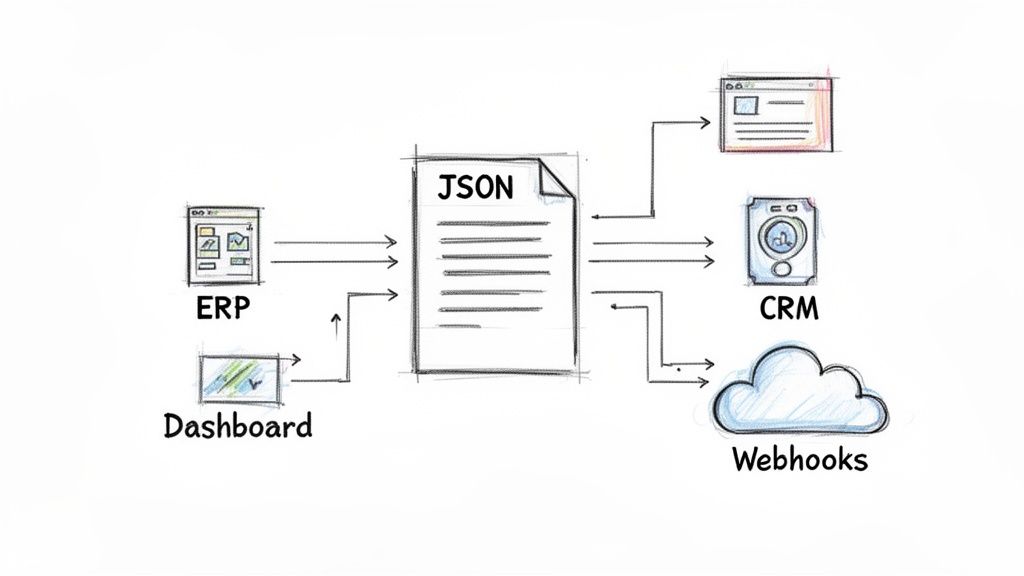
Just think about the possibilities. Instead of someone on your accounting team manually typing invoice details into your ERP, the JSON data can flow directly into platforms like QuickBooks or SAP. This simple change eliminates typos, gets bills paid faster, and frees up your team for more important work.
This is a game-changer in fields like finance. Loan processors who have to wade through PDF income statements and asset proofs know that one tiny mistake can derail an entire application. I've seen AI-powered parsers, like the technology over at Parsio.io, completely transform this process by turning messy PDFs into clean JSON ready for a database. Teams often report saving up to 80% of the time they used to spend on these repetitive tasks.
Real-World Integration Scenarios
Let's break down how this actually looks for different teams. Once you have a reliable stream of structured data, the applications are practically endless.
-
Procurement Teams: Imagine automatically pulling pricing, delivery terms, and product specs from a dozen different vendor proposals. The data flows right into a central dashboard, giving you an instant, side-by-side comparison to negotiate better deals and make faster decisions.
-
Insurance Agencies: A new policy document lands in your inbox as a PDF. The details—like the policyholder's name, coverage amounts, and effective dates—are automatically extracted and used to create a new client record in your CRM. No more manual data entry means fewer errors and a much smoother client onboarding experience.
-
Manufacturing Reps: Commission statements are notoriously complicated and come in all shapes and sizes. By converting them to JSON, reps can automatically pull their sales data from different manufacturers into a single spreadsheet. This makes it incredibly easy to track earnings and spot any discrepancies.
The key is to stop thinking of your JSON output as just a file. Treat it like a message. It's a structured piece of information that tells your other systems what to do next. This is the foundation of a truly automated document workflow.
Common Integration Methods
Connecting your parsed data to other business systems might sound highly technical, but modern tools have made it surprisingly straightforward. You don't always need a developer to build these bridges.
Here are a few of the most popular ways to get your data flowing:
-
Webhooks: This is a simple and powerful method. Many platforms can immediately "push" the JSON data to a specific URL (a webhook) as soon as it's extracted. It’s a great way to feed data into custom applications or other cloud services in real time.
-
Integration Platforms (like Zapier): Tools like Zapier, Make, or Workato are the ultimate connectors. They act as translators between thousands of different apps. You can build a workflow that says, "When DocParseMagic extracts an invoice, take the
total_amountandvendor_nameand create a new bill in QuickBooks Online." -
Direct API Calls: For more custom setups, you can use the JSON data to make direct API calls to your internal software. A developer can write a quick script that takes the structured data and posts it directly to your ERP, CRM, or any other system with an API.
By exploring these methods, you turn a simple PDF to JSON conversion into a full-blown automation engine. If you're ready to go deeper, our guide to an automated document workflow offers even more strategies.
Common Questions About PDF to JSON Conversion
Diving into PDF to JSON conversion can feel like opening a can of worms. Suddenly, you're hit with a barrage of technical terms and tools, and it's tough to know where to even begin. I've been there, and I've helped countless teams navigate this exact process.
Let's cut through the noise. Here are the real-world questions that pop up time and again, along with the straightforward answers you need to get your project on the right track.
How Do I Handle Password-Protected PDFs?
This is the first major roadblock most people hit. You get an important bank statement or a critical vendor contract, but it’s locked down. Your shiny new conversion tool just throws an error, and your whole workflow grinds to a halt. It’s incredibly frustrating.
How you tackle this really depends on your scale.
- For just a few files: Don't overthink it. The easiest thing to do is open the PDF with the password, save a new version without protection, and then upload that new file to your tool. Simple and effective.
- For automated workflows: Manually entering passwords for hundreds of files is a non-starter. This is where you need a more advanced platform. Look for a service that lets you supply the password via an API call. This allows the tool to unlock and process the document automatically, without anyone having to touch it.
If you work in finance or legal, where password protection is the norm, make sure any tool you consider has this capability baked in from the start.
Is My Data Secure During Conversion?
This isn't just a question; it's a deal-breaker. When you're handling sensitive information—think financial records, employee PII, or confidential client agreements—you absolutely have to know your data is safe. Uploading a document to a third-party cloud service can feel like a leap of faith.
Your first step should always be to vet a provider's security posture. Look for non-negotiable basics like end-to-end encryption, which protects your data both on its way to their servers and while it's stored there. Reputable companies will also be transparent about their compliance with standards like GDPR and SOC 2.
I can't stress this enough: always read the security and privacy policy before you upload a single sensitive document. A trustworthy partner will be upfront about how they protect your data. If they aren't, walk away.
What Is the Difference Between Standard and AI-Powered OCR?
This is a huge point of confusion, but getting it right is crucial. OCR, or Optical Character Recognition, is what turns a picture of text (like a scanned PDF) into actual text characters your computer can read. But there’s a massive difference in how it's done.
-
Standard OCR is basically a digital transcriptionist. It reads characters and words but has zero understanding of the context. It might see the word "Total:" and the number "100.00" on a page, but it has no idea that they belong together as a label and a value.
-
AI-Powered OCR is much smarter. It uses machine learning to understand the document's structure and meaning. It recognizes that "Total:" is the label for the amount "$100.00," even if they're in different columns or on opposite sides of the page. This is what allows it to correctly pull data from messy tables and unstructured layouts where standard OCR just gives up.
This leap in capability is why the document automation market is set to explode, projected to hit $5.2 billion by 2027. The engine behind this growth is AI-driven PDF to JSON conversion that actually works, enabling smooth connections to ERPs and CRMs. As insights from Extend.ai show, modern AI tools are a game-changer for accuracy.
What if My PDF Layout Is Incredibly Complex?
Ah, the nightmare PDF. We’ve all seen them. Documents with multiple columns, tables nested inside other tables, and important data points scattered all over the page. These are the files that break basic parsers and cause hours of manual data entry.
If you regularly deal with these kinds of documents, a template-free, AI-driven solution is your only real option. Tools like DocParseMagic were built for this kind of chaos. Instead of forcing you to define a rigid template that shatters the moment a layout changes, they analyze the document visually—much like a person would.
This allows the AI to correctly identify and extract data from even the most convoluted layouts. For any business dealing with invoices, purchase orders, or reports from hundreds of different vendors, this adaptability is the key to successful automation.
Ready to stop wrestling with messy documents? DocParseMagic turns your most complicated PDFs into clean, structured data in minutes. Stop the manual copy-paste and start automating your workflow today. Get started for free at https://docparsemagic.com.