Your Guide to PDF Data Extraction Software
PDF data extraction software is the key to unlocking the information trapped inside your business documents. It’s a smart tool that automatically reads files like invoices, sales orders, and reports, pulls out specific details like names or totals, and neatly organizes that data into a usable format, like a spreadsheet. The result? Countless hours of manual work are simply eliminated.
What Is PDF Data Extraction Software and Why You Need It
Every day, your business is flooded with documents—invoices from vendors, contracts from clients, commission statements for your sales team, and purchase orders from customers. Each one is packed with critical data, but getting that information into your systems is a slow, manual grind that’s incredibly prone to human error.
This is where PDF data extraction software comes in. Think of it as a digital assistant that never gets tired, never needs a coffee break, and never makes a typo. It intelligently scans your PDFs, identifies the exact information you need, and pulls it out with perfect accuracy.
But this isn't just about copying and pasting text. The software is smart enough to understand the context of the data it's reading.
It learns that the numbers next to "Invoice #" are, in fact, an invoice number and not a phone number. It knows how to read a table of line items and capture each row correctly. This is the kind of intelligence that turns a mountain of messy documents into clear, actionable data.
Going Beyond Simple Copy and Paste
At its core, this technology is all about automating those repetitive, low-value tasks that drain your team's energy and time. When you put a good tool in place, you free your people from the drudgery of data entry so they can focus on work that actually moves the needle—like analyzing trends, talking to customers, or developing new strategies.
To see how this fits into the bigger picture, it helps to understand what document automation is and the broader benefits it offers.
This growing need for smarter document processing is fueling a massive market expansion. The global PDF editor software market, a category that includes data extraction, was valued at USD 5.54 billion in 2026. It's now projected to skyrocket to an incredible USD 24.7 billion by 2035. This growth is largely driven by companies going digital and the explosion of remote work, with 74% of enterprises investing in these tools to support their distributed teams. You can dive into the full market analysis in the complete Business Research Insights report.
Key Benefits for Your Business
Bringing this kind of software into your company isn't just a tech upgrade; it’s a strategic move that pays off in real, measurable ways. Here are a few of the biggest advantages:
- Drastically Reduced Errors: Automation gets rid of the typos and transposed numbers that plague manual data entry. Your data becomes clean, reliable, and trustworthy.
- Increased Team Productivity: Your team gets its time back. Instead of keying in data, they can focus on higher-value work like analysis, planning, and customer service.
- Faster Business Processes: Workflows that used to drag on for days—like processing invoices or onboarding a new client—can now be done in minutes. Your entire operation gets faster.
- Improved Data Accessibility: Information that was once locked away in static PDF files becomes structured, searchable, and ready to use in all your other business systems.
How Modern PDF Data Extraction Actually Works
So, how does a piece of software look at a static PDF and pull out clean, usable data? The easiest way to picture it is by thinking of the software as having two parts: a set of “eyes” and a “brain.” This duo doesn't just see the text on the page; it actually understands what it means.
The whole process turns a locked-down document into something your other business systems can instantly work with.
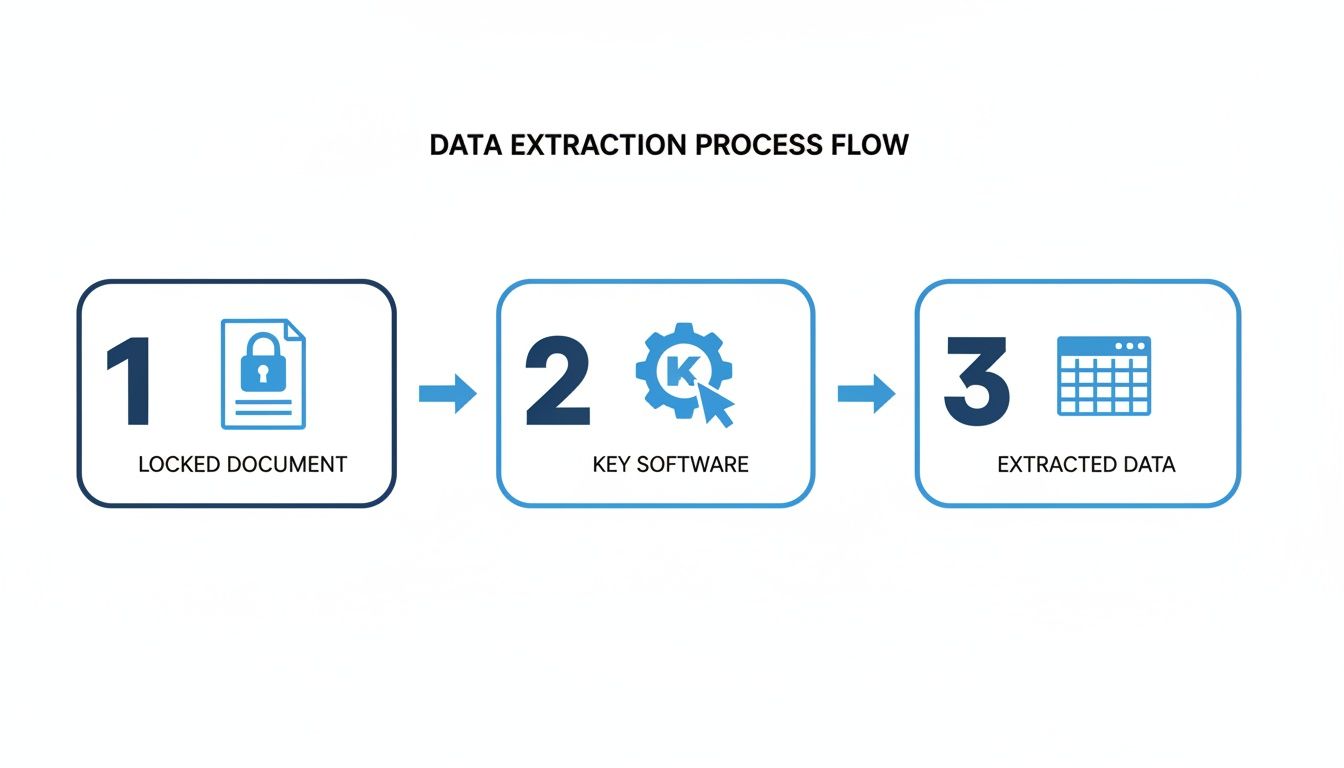
Essentially, the software acts as a translator, converting jumbled information into a valuable, organized asset.
Step 1: The Eyes of the Software
It all starts with a technology called Optical Character Recognition (OCR). This is the software’s eyes. Its job is to scan a document and turn images of text into actual, machine-readable characters. This works whether you have a PDF that was born digital or a crumpled receipt you scanned with your phone.
Without OCR, a scanned PDF is just a flat picture. Your computer sees pixels, not words or numbers. OCR is the critical first step that analyzes those pixels, recognizes the shapes of letters, and creates a digital text layer for the "brain" to work on.
Step 2: The Brain of the Software
Once the text is readable, the software's "brain" kicks in. This is where modern AI and machine learning step up to figure out the context behind the words—a process often called parsing or intelligent document processing.
Think about an invoice. The OCR process might read the text "123-456-7890" and "INV-9876." A simple tool wouldn't have a clue what to do with them.
But an AI-powered brain gets it. It sees the label "Phone:" and knows the numbers next to it are a phone number. It spots "Invoice No." and correctly identifies the invoice ID. It does this by looking at the entire document's layout, keywords, and structure—just like a person would. If you want to dive deeper into how this works, check out our guide on what is intelligent document processing.
The real magic of modern pdf data extraction software is its ability to learn without needing rigid, pre-programmed rules. It doesn’t just hunt for keywords; it understands the relationships between different pieces of data.
The Old Way vs. The New AI-Powered Way
Not long ago, setting this all up was a massive headache. Older systems, often relying on something called Zonal OCR, forced you to manually create a template for every single document layout you worked with.
Template-Based Extraction (The Old Way):
- Totally Rigid: You had to literally draw a box on a sample invoice and tell the software, "The invoice number always goes here."
- Constant Breakdowns: If a vendor moved the logo or added a new column, your template would break, and the extraction would fail. It was a maintenance nightmare.
- Impossible to Scale: For any business dealing with documents from hundreds of different suppliers or clients, this approach just wasn't practical.
What really changed the game was the new generation of AI-powered tools. These platforms don't need hand-holding. They come with pre-trained AI models that already know what invoices, purchase orders, and contracts are supposed to look like.
AI-Powered Extraction (The New Way):
- No Templates Needed: The AI is smart enough to find the "Total Amount" or "Due Date," no matter where it is on the page.
- Incredibly Flexible: It can handle thousands of different layouts, formats, and even languages right out of the box.
- Built for Everyone: These are no-code platforms. Anyone on your team—not just a developer—can upload a document and get structured data back in seconds.
This shift from rigid templates to flexible AI makes powerful automation accessible to any business, turning what used to be a complex IT project into a simple, effective tool for getting work done.
5 Essential Features Your Data Extraction Software Must Have
When you start looking for PDF data extraction software, the market can feel crowded. Every tool promises the moon, but what features actually matter for your day-to-day work? The key is to ignore the marketing fluff and focus on the capabilities that will genuinely save your team time and cut down on costly errors.
Let’s walk through the non-negotiable features that separate a truly helpful tool from one that just adds another layer of complexity.
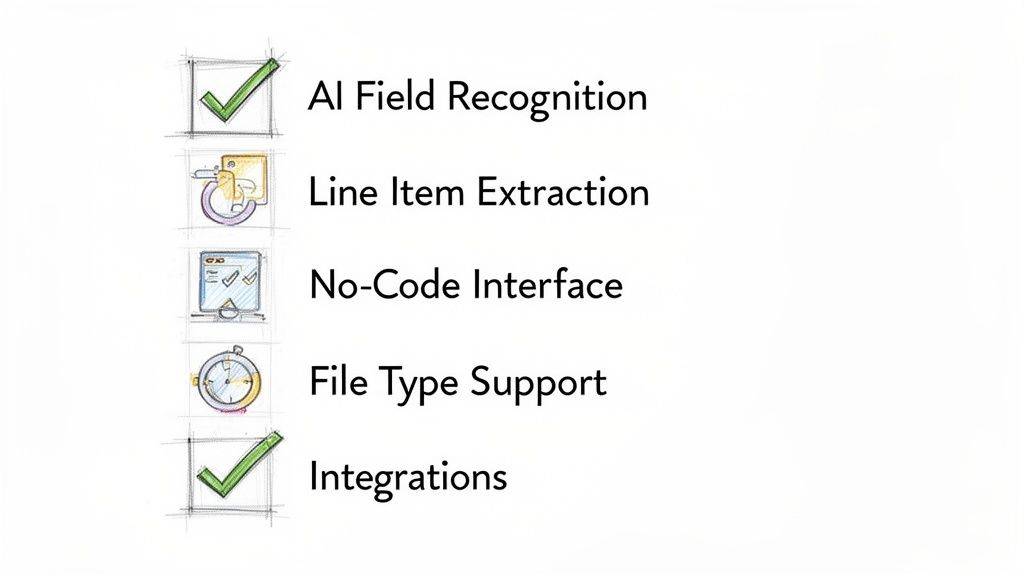
These are the capabilities that deliver real-world results from day one.
The Must-Have Features
Before you even think about advanced bells and whistles, make sure any software you’re considering has these fundamentals locked down. Without them, you’ll spend more time fighting the system than benefiting from it.
-
AI-Powered Field Recognition: This is the magic ingredient. Instead of you manually creating templates for every single vendor invoice, the software should be smart enough to find key information on its own. It instantly spots fields like "Invoice Number," "Due Date," or "Total Amount," no matter how the document is formatted. This is what makes a tool immediately useful, not a project that needs weeks of setup.
-
Detailed Line Item Extraction: For departments like accounting, procurement, or logistics, just grabbing the invoice total is not enough. You need software that can dive into the tables and pull out every single line item—the product description, quantity, unit price, and SKU. This is absolutely critical for accurate job costing, inventory updates, and purchase order reconciliation.
-
A True No-Code Interface: The people who benefit most from this software are usually not developers. They’re your accounts payable clerks, insurance processors, and operations staff. A no-code interface means they can run the entire show—uploading documents, verifying data, and making adjustments—without ever needing to call the IT department or write a single line of code.
Getting More Granular: Essential vs. Advanced Features
As you evaluate different tools, you'll notice that some features are essential for basic functionality, while others are geared toward more complex, large-scale automation. Understanding the difference helps you choose a tool that fits your needs now and can grow with you later.
Here’s a simple breakdown of what’s a must-have versus what’s a nice-to-have.
| Feature Category | Must-Have Feature | Why It's Essential | Advanced (Nice-to-Have) Feature |
|---|---|---|---|
| Data Recognition | AI-Powered Field Detection: Automatically finds common fields (invoice number, date, total) on any document layout. | It eliminates the need for manual template creation for every new document, saving immense setup time. | AI-Powered Validation Rules: The system not only extracts data but also cross-references it (e.g., checks if line items add up to the total). |
| Table Handling | Basic Line Item Extraction: Pulls all rows and columns from simple tables within a document. | This is fundamental for processing invoices, purchase orders, and packing slips. | Multi-Page & Nested Table Extraction: Can handle complex tables that span multiple pages or contain tables within tables. |
| User Experience | No-Code Workflow Builder: Allows non-technical users to set up and manage extraction rules with a drag-and-drop interface. | It empowers the actual users of the data, reducing reliance on IT and speeding up implementation. | Human-in-the-Loop Workflow: Automatically flags low-confidence extractions for quick manual review and approval within the app. |
| Integrations | Cloud Storage & Spreadsheet Sync: Direct connections to Google Drive, Dropbox, Google Sheets, and Excel. | These are the most common destinations for extracted data, enabling immediate use and sharing. | Native ERP/Accounting Integrations: Pre-built, two-way connections to systems like QuickBooks, Xero, SAP, or NetSuite for full process automation. |
Having a clear picture of these feature tiers prevents you from either overpaying for capabilities you don't need or choosing a tool that you'll outgrow in six months. The "must-haves" solve the immediate problem, while the "nice-to-haves" are what enable true, end-to-end automation.
Features That Make It All Work Together
Beyond the core extraction engine, a couple of other capabilities are crucial for making sure the software actually works in a real business environment.
First, the tool has to be flexible with file types. Your vendors and clients won’t always send you perfectly formatted, text-based PDFs.
Your software must be able to handle a variety of file types, including native PDFs, scanned PDFs, JPEGs, and PNGs. A tool that can only read perfect PDFs will fail the moment someone sends you a photo of a receipt taken with their phone.
This adaptability is what makes a tool reliable in the real world. Just as important is what happens after the data is pulled.
Seamless Integrations: Getting data out of a PDF is only step one. The real value comes from getting that information into the systems you use to run your business, without anyone having to manually copy and paste it. Look for software that easily connects to your existing tools, whether through pre-built integrations or simple webhooks. Common destinations include:
- Accounting Software: QuickBooks, Xero
- ERP Systems: NetSuite, SAP
- Cloud Storage: Google Drive, Dropbox
- Spreadsheets: Google Sheets, Excel
This is the final piece of the puzzle. It closes the loop, creating a smooth, automated flow of information from a static document all the way into your active business systems. If you're curious, you can find a good overview of different data extraction tools and the connections they offer. By prioritizing these essential features, you’ll find a solution that doesn’t just work—it makes your whole operation run better.
Real-World Use Cases Transforming Industries
All the features in the world don't mean much until you see how they solve real problems. So, let's get practical. Let's look at how PDF data extraction software is actually changing the game for teams on the ground, swapping hours of manual work for smart automation.
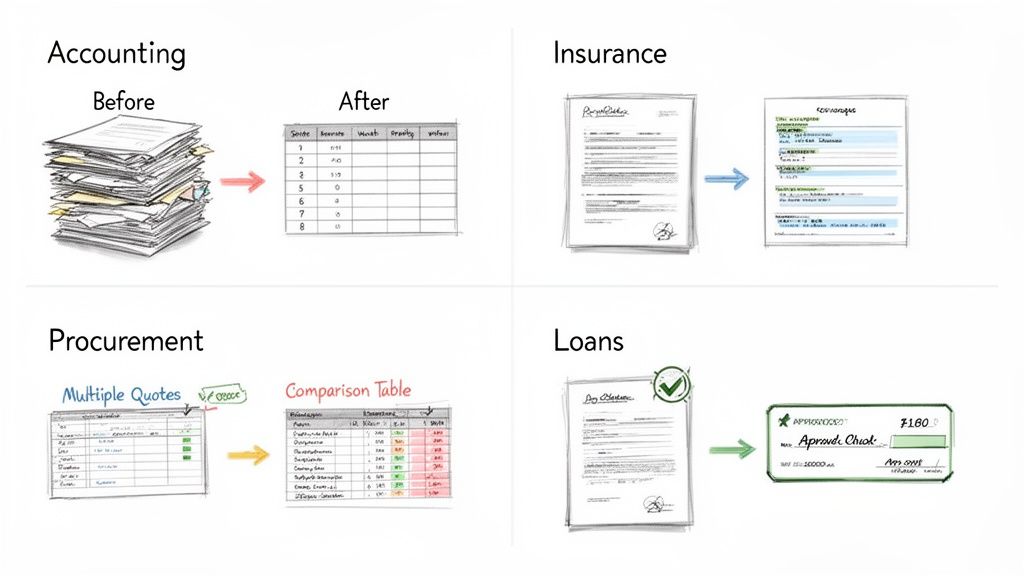
This is where the magic happens—turning messy stacks of paper and PDFs into clean, usable data.
And this isn't just a small, niche trend. The need to digitize is fueling massive growth. The market for this kind of software was valued at USD 1.5 billion in 2024 and is on track to hit USD 3.99 billion by 2032, growing at a solid 9.8% each year. The banking, financial services, and insurance (BFSI) sectors are leading the way, since for them, accurate data is a strict regulatory requirement, not just a nice-to-have.
Accounting and Finance Teams
If there’s one department that feels the pain of manual data entry, it’s accounting. Think about the accounts payable (AP) team at the end of the month, staring down a mountain of vendor invoices in every imaginable format. This is where tools like automated invoice processing software make a huge difference.
-
Before: An AP clerk is stuck manually typing data from hundreds of PDF invoices into the accounting system. They're hunting for invoice numbers, due dates, and line-item details. It’s slow, mind-numbing work, and every typo is a potential payment error waiting to happen.
-
After: The same clerk now just uploads the whole batch of invoices. The software reads them all, pulls the key information, and gets the structured data ready for their ERP or a spreadsheet. A task that once took a week is now done in under an hour, with data accuracy soaring past 99%.
Insurance Agencies and Carriers
The insurance world runs on paper—or at least, on documents. We're talking claims forms, ACORD forms, loss run reports, and declaration pages. Getting the right information quickly is everything for underwriting, renewals, and just keeping clients happy.
Before, an insurance pro might spend 20 minutes digging through one policy document just to find premium amounts, coverage limits, and effective dates. With modern software, they can process dozens of those same documents in that amount of time.
This means they can generate quotes faster, answer client questions on the spot, and free up underwriters from tedious administrative work.
Procurement and Sourcing Departments
Procurement teams live in a world of comparisons. Their job is to get the best value, which means poring over countless vendor quotes and proposals, all structured differently.
-
Before: A procurement manager is building a comparison spreadsheet by hand. They’re copying and pasting pricing, delivery schedules, and payment terms from one PDF after another. It’s a slow, painstaking process that makes it tough to get a clear, apples-to-apples view.
-
After: Now, the manager uploads all the quotes at once. The software instantly extracts the critical data—unit prices, total costs, terms—and organizes it all into a single, clean table. A job that used to take hours is now done in five minutes, allowing for immediate side-by-side analysis.
Loan Processing and Underwriting
In lending, speed and accuracy are everything. Loan processors have to verify an applicant's entire financial life by pulling data from bank statements, pay stubs, and tax forms.
Before: A loan officer manually sifts through these documents, searching for income figures and account balances. Every minute spent on data entry is a delay for the applicant and a bottleneck in the approval workflow.
After: All the applicant's financial documents are fed into the extraction tool. It intelligently finds the key numbers and automatically populates the loan origination system. This doesn't just speed up the final decision—it drastically cuts down the risk of human error in a heavily regulated process.
From accounting to insurance and everywhere in between, the story is the same. PDF data extraction software is a practical tool that turns document chaos into clean, actionable data. It breaks down operational bottlenecks and lets your skilled people get back to the strategic work that actually grows the business.
How to Choose and Implement Your First Data Extraction Tool
Jumping into automation can feel like a huge leap, but it doesn't have to be. Getting started with PDF data extraction software is actually quite simple when you have a plan. The secret is to start small, get a quick win, and build from there.
Choosing the right tool isn't about getting lost in technical specs or flashy demos. It's about asking a few smart questions that get straight to what matters for your business.
Key Questions to Ask Vendors
Before you sign anything, make sure you get solid answers to these questions. Think of this as your pre-flight checklist.
- How do you charge? You want to see flexible, pay-as-you-go pricing. Modern tools often charge per document or have a monthly plan based on how much you use, which means you can avoid a massive upfront cost.
- What's your real-world accuracy? Ask what kind of accuracy they can promise for your specific documents. A good tool should hit over 99% on clean files and have a simple way for you to double-check the data from fuzzy scans.
- What happens when I need help? You will inevitably hit a snag. Find out how their support team works. Do they offer chat, email, or phone? More importantly, what’s their typical response time?
The single most important part of your evaluation is the free trial. Never, ever buy this kind of software without testing it on your own documents first. A tool might look flawless on a vendor’s perfect sample files, but the real test is how it handles the messy, skewed, and varied invoices you deal with every day.
A free trial shows you the truth. You’ll see right away if it can read your layouts and pull the data you need before you spend a penny. Platforms like DocParseMagic even give you free credits just for this, so you can test their tech with zero risk.
Your Low-Risk Implementation Plan
Once you’ve picked a tool, fight the urge to automate your entire company overnight. That’s a recipe for a complex, expensive, and high-stakes project. Instead, take a phased approach designed for a fast, visible victory.
Step 1: Target One High-Pain Workflow Pick a single process that’s painfully manual, repetitive, and eats up a lot of time. For most companies, the obvious choice is accounts payable invoice processing. It’s a universal headache with a clear, easy-to-measure outcome.
Step 2: Start Small and Measure Everything For one month, just focus on that single workflow. Track exactly how much time your team spends manually keying in data from those documents. Then, turn on the software and measure again.
- Before Automation: Log the total hours spent per week on manual data entry.
- After Automation: Measure the new time, which should now mostly be a quick final review.
Step 3: Build Your Business Case Armed with this data, you can make an undeniable case for expanding. A simple report showing you cut the time spent on invoice processing by 70-80% is more powerful than any sales pitch. You can walk into your boss's office and show a clear return on investment.
This strategy proves you don't need a six-figure budget or a massive IT project to start automating. By tackling one problem and proving the value, you build momentum and support to go after bigger challenges across the organization.
The Future of Document Automation and What It Means for You
If you think pdf data extraction software is just about ditching manual data entry, you're only seeing part of the picture. The real game-changer isn't just pulling text off a page faster; it's about making that data smart, reliable, and ready to use without constant human babysitting.
This is where the industry is moving—toward something we call cognitive automation.
Imagine your software doesn't just read an invoice total. Instead, it instantly compares that total to the vendor's past invoices and flags it as unusually high. Or picture it validating a new customer's shipping address against a live database, all in the background. That's the direction we're headed, thanks to breakthroughs in Artificial Intelligence (AI) Software Development.
From Data Puller to Decision Maker
The next wave of these tools is all about teaching the software to "think." Instead of acting like a simple data courier that just moves information from point A to point B, the software will start working more like a junior analyst, handling tasks that used to require human judgment.
Here's what that looks like in practice:
- Automated Data Validation: The tool will automatically check extracted data against your other business systems (like your CRM or ERP) to confirm everything is accurate before it's saved.
- Anomaly Detection: By learning what's "normal" for your documents, the system can spot anything that looks out of place—a sudden price hike, a mismatched PO number—and flag it for review, helping you catch errors and potential fraud early.
- Intelligent Routing: Based on the data it understands, the software can make basic decisions. It might automatically approve a standard, low-value purchase order but route a complex, high-value insurance claim directly to a senior adjuster.
What This Means for Your Business
For you, this all means that getting a solid data extraction tool in place today is your first step toward a much smarter, more automated future. The market certainly reflects this trend. The data extraction industry is expected to explode, reaching USD 28.48 billion by 2035 on the back of a 16.54% CAGR from 2025. This growth is almost entirely fueled by AI and the ongoing need for better digital tools, as detailed in the full Market Research Future report.
By adopting this technology now, you’re doing more than just solving today's data entry headaches. You are building the foundation for a future where your team is free from tedious administrative work and can finally focus on the strategic projects that actually grow the business.
This shift puts a level of operational power once reserved for giant corporations into the hands of small and mid-sized businesses. The tools are getting smarter, easier to use, and are quickly becoming essential for anyone who wants to stay competitive.
Frequently Asked Questions About PDF Data Extraction
It's natural to have a few questions before you jump into a new piece of software. Let's tackle some of the most common ones we hear about getting started with PDF data extraction.
Is This Software Difficult to Set Up?
Not anymore. The days of needing a whole IT team and months of coding are thankfully behind us. Modern platforms are built for the people who will actually use them—not just developers.
Most of the no-code tools available today let you get going in a matter of minutes. You can often just upload a few of your typical documents, and the AI gets to work figuring out what's what. You don't have to build clunky templates or write a single line of code to see it in action.
How Accurate Is the Data Extraction?
This is the big one, and for good reason. Top-tier software that uses modern AI and OCR can hit accuracy rates above 99% on clear, well-structured documents. But let's be realistic—not every document you get is going to be perfect.
That's where the best tools really shine. They're smart enough to flag data they're not totally sure about, especially from blurry scans or grainy photos. They’ll then queue up these low-confidence fields for a quick human review. This simple validation step ensures the final data is 100% reliable for critical work like accounting or compliance checks.
The goal is always to produce 'audit-ready' accuracy. The information isn't just pulled quickly; it's trustworthy enough to go straight into your financial systems without a second thought.
What Does PDF Data Extraction Software Cost?
The pricing has become a lot more user-friendly. Forget the huge, upfront license fees that were standard with older, clunky systems. Today's tools are much more accessible. You'll typically find flexible options like:
- Per-document pricing: You literally just pay for what you use.
- Monthly subscriptions: These are usually tiered based on how many documents you expect to process each month.
This model opens the door for small and mid-sized businesses to automate their workflows. You can start with one specific need, see the return, and then scale up as you find more ways to put the software to work.
Can It Handle Invoices with Different Layouts?
Absolutely. In fact, this is one of the biggest wins of using modern AI. Older, template-based systems were incredibly fragile; if a vendor so much as moved their logo, the whole process would break.
AI doesn't rely on a rigid map. It understands context, just like a person would. It knows to look for a field labeled "Total Amount" or "Invoice #" no matter where it appears on the page. This flexibility is a game-changer for any company that deals with documents from dozens or hundreds of different suppliers. Your workflow keeps running smoothly, no matter how many new layouts you throw at it.
Ready to see how easily you can turn your messy documents into clean, structured data? DocParseMagic offers a no-code platform that lets you extract information from invoices, reports, and more in just minutes. Sign up for your free trial and start automating today.