A Guide to Processing Any PDF Bank Statement
Think of a PDF bank statement as the official, unchangeable financial diary for your business. It's a digital snapshot of every single transaction—every deposit, withdrawal, and fee—over a specific time, delivered by your bank in the universally recognized PDF format.
What Is a PDF Bank Statement and Why Does It Matter?
Trying to run a business without clear financial records is like trying to build a house without a blueprint. You might have all the right materials, but the result is going to be a mess. A PDF bank statement is that financial blueprint. It’s the official story of your company's financial health, detailing every dollar that came in and every dollar that went out.
This format isn't popular by accident. It’s a direct result of the worldwide shift to digital banking. As we moved from paper mail to online portals, banks needed a secure, reliable way to deliver financial documents. The PDF became the go-to choice because it’s easy to download, looks the same on any device, and is hard to tamper with.
The Hidden Challenge of PDF Statements
Here’s the catch: while PDFs are great for viewing and storing, they create a major headache when you need to use the data inside them. The very feature that makes them secure—their fixed, image-like structure—also makes it incredibly difficult to get information out. You can't just copy and paste a column of transactions into a spreadsheet without it turning into a jumbled, error-filled mess.
This creates a serious bottleneck for any business. Teams end up wasting hours manually re-typing information for critical tasks like:
- Accounting and Bookkeeping: Getting transactions into your general ledger.
- Loan Underwriting: Proving income and financial stability to lenders.
- Financial Audits: Matching records and staying compliant.
This manual data entry isn't just slow and expensive; it's a magnet for human error. One misplaced decimal point can throw off your entire financial reporting, leading to bad business decisions and potential compliance nightmares. The convenience of a digital document quickly turns into a source of frustration and risk.
The rise of digital banking has turned a simple document into a complex data problem. The core issue is that a PDF bank statement is built for human eyes, not for software. It locks valuable data inside a digital cage, forcing businesses to find a key.
The Scale of the Problem
And this problem is only getting bigger. With digital banking now the default for most people, the number of PDF statements businesses have to process is exploding. By 2025, handling these documents has become a massive pain point for finance and accounting teams everywhere.
Consider this: a staggering 68% of US primary banking customers now use mobile apps as their main way of banking, a huge jump from just 53% in 2021. And globally, 79% of adults have a bank account, with most of them using digital services. This trend, highlighted in BCG's global banking report, means more statements, more data, and a whole lot more manual work—unless you find a better way.
If you're looking for more information on how to get these documents from your bank, you might find our guide on downloading online bank statements helpful.
So, what exactly is inside these PDFs that makes them so valuable? Let’s break down the key pieces of information you'll find.
Key Information Inside a PDF Bank Statement
Every bank statement, regardless of the bank, contains a core set of data fields. Understanding these components is the first step to unlocking the information they hold. Here’s a quick rundown of what to look for.
| Data Field | Description | Example Use Case |
|---|---|---|
| Account Holder Information | Name, address, and contact details of the person or business owning the account. | Verifying identity for a loan application. |
| Bank Information | The bank’s name, logo, address, and contact information. | Confirming the document's authenticity during an audit. |
| Account Summary | A snapshot including account number, statement period, and opening/closing balances. | Getting a quick overview of financial health for the month. |
| Transaction Details | A line-by-line list of all debits and credits with dates, descriptions, and amounts. | Categorizing expenses for bookkeeping and tax preparation. |
| Running Balance | A column showing the account balance after each individual transaction. | Tracking cash flow and identifying potential overdrafts. |
These fields are the building blocks of your financial story. When extracted accurately, they provide the raw data needed for everything from daily reconciliation to long-term strategic planning.
Understanding the Anatomy of a Bank Statement
Think of a PDF bank statement as a detailed map of your financial activity. At first glance, it might look like a jumble of numbers and dates, but every section tells a crucial part of your financial story. Learning to read this map is a core skill for anyone managing money, whether you're a small business owner, an accountant, or just trying to keep your personal finances in order.
While every bank lays things out a bit differently, they all include the same fundamental pieces.
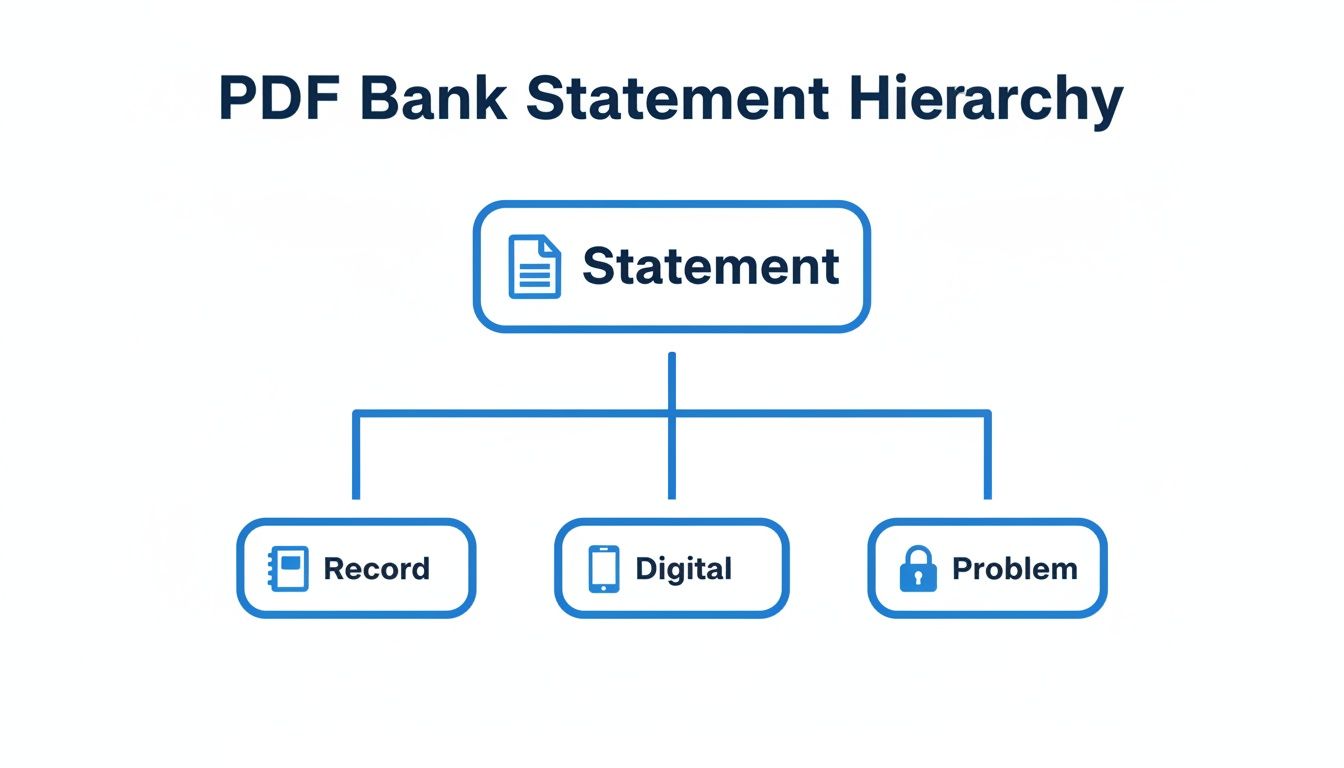
This diagram gets to the heart of what a PDF statement is: it's an official record trapped in a digital format, which can create real headaches. Understanding this structure is the first step toward solving the problems these documents can cause. Let's break down the key parts you'll find on almost any statement.
The Header: Your Financial ID
Right at the top of the statement is the header. This section is essentially the business card for your bank account. It contains all the identifying information needed to confirm who the statement belongs to and which account it covers.
You can expect the header to include:
- Bank Information: The bank's name, logo, and contact details.
- Account Holder Details: Your name (or your business's name) and mailing address.
- Account Number: The unique number for your bank account, which is often partially hidden for security.
- Statement Period: The specific date range covered by the statement, like "October 1, 2024 - October 31, 2024."
This information is the first thing anyone checks. During a loan application or an audit, this is where they look to verify that the document is legitimate.
The Summary Section: A High-Level Overview
Just below the header, you’ll almost always find a summary box. This part gives you a quick, at-a-glance snapshot of the account's activity for the month. It’s the executive summary of your financial life, boiling everything down to the most important numbers.
The summary is like the scoreboard of a game. It doesn't show you every single play, but it gives you the final score so you know if you won or lost financially that month.
This summary usually presents four key figures:
- Opening Balance: How much money was in the account when the period started.
- Total Deposits/Credits: The sum of all money that came into the account.
- Total Withdrawals/Debits: The sum of all money that went out of the account.
- Closing Balance: The final amount left in the account at the end of the period.
This section is perfect for a quick health check, but the real story is in the transaction details.
The Transaction List: The Heart of the Statement
This is where the real action is. The transaction list is the most valuable part of a PDF bank statement, providing a chronological log of every single thing that happened in the account. This is the raw data you need for bookkeeping, tracking expenses, and reconciling your books.
Each line item in this list usually contains several key pieces of information:
- Transaction Date: The day the transaction was made.
- Posting Date: The day the transaction actually cleared the bank. These two dates can be different, which is a tiny but important detail for accurate accounting.
- Description: A short note about the transaction, like a store name, a check number, or the type of transfer.
- Debits: Money that left the account (purchases, fees, withdrawals).
- Credits: Money that came into the account (deposits, refunds, interest).
- Running Balance: Some statements include a column showing your account balance after each individual transaction.
The descriptions are often where things get messy. They can be cryptic ("CHKCD DEBIT 12345"), inconsistent, or shortened, making it tough for software—and sometimes even people—to figure out what the expense was for. This is a huge reason why manually entering data from a PDF bank statement is so tedious and full of errors.
How Businesses Use Bank Statement Data
A PDF bank statement is far more than just a simple record of what came in and what went out. For most businesses, it’s the raw material for some of their most critical decisions. It's the hard evidence an underwriter needs to sign off on a loan, the ledger an accountant pores over to balance the books, and the paper trail an auditor follows to ensure everything is above board.
When the stakes are this high, getting the data out of that PDF quickly and accurately isn't just a matter of convenience—it's fundamental.
Think of the data on a bank statement as fuel. For your business to run, you have to get that fuel from the storage tank (the PDF) into your engine (your accounting or lending software). Trying to do this by hand is like moving gasoline one bucket at a time. It’s painfully slow, messy, and you're guaranteed to spill some along the way.
Loan Underwriting and Credit Decisions
For any lender, a bank statement is a source of truth. It offers a completely unfiltered look into an applicant's real financial habits, confirming their income, spotting debts they might not have mentioned, and revealing how stable their cash flow truly is. A loan officer working against a deadline simply can't afford to manually punch in hundreds of transaction lines just to calculate a debt-to-income ratio.
They need fast answers to crucial questions:
- Is the income they claimed real and consistent? Regular payroll deposits on the statement will prove it.
- Are there any red flags? Things like frequent overdraft fees or large, odd-looking transfers can signal risk.
- What's their actual monthly cash flow? The statement shows where the money really goes, not just what the applicant put on their form.
In this world, one tiny data entry mistake could mean approving a bad loan or unfairly rejecting a good applicant. Getting the data out fast and flawlessly is essential for making smart credit decisions and keeping risk under control.
Accounting and Bookkeeping Reconciliation
Every accountant and bookkeeper knows the end-of-month ritual: reconciliation. This means meticulously matching every single transaction in the company’s accounting software, like QuickBooks or Xero, with the corresponding entry on the bank statement. It's the only way to be sure the company's financial records are 100% accurate.
Manually keying in data from a PDF bank statement turns this vital financial check into a dreaded administrative chore. It’s not just tedious; it's a recipe for errors.
Accurate bookkeeping isn't just about getting the numbers right—it's about building a reliable financial foundation for your entire business. When reconciliation is slow and painful, it delays financial reporting and strategic planning.
When you can automatically pull the dates, descriptions, and amounts from statements, accountants can stop being data entry clerks and start being financial analysts. They can finally focus their time on categorizing expenses, spotting trends, and giving business owners the insights they actually need.
Financial Audits and Compliance Checks
During a financial audit, every single transaction is put under a microscope. Auditors need cold, hard proof to verify that a company’s financial reports are accurate and compliant with regulations. Bank statements are the perfect impartial, third-party documents for this.
An auditor will often need to:
- Trace large transactions back to their original source documents.
- Verify the cash balances reported on the balance sheet.
- Check for any unusual activity that might point to fraud or a compliance issue.
Handing an auditor a stack of PDFs and wishing them luck is a massive waste of everyone's time. By extracting the data into a format they can easily search and sort, companies make the entire audit process smoother. It helps them answer questions faster and shows they’re serious about financial transparency.
The need to get this right is only growing. Recent analysis shows that credit card payments now make up 35% of all consumer payments, with debit and ACH transfers also on the rise. This flood of data, all captured in monthly PDF bank statements, is crucial for finance managers handling everything from subcontractor invoices to commission reports. As you can imagine, manually reviewing it all is becoming impossible. You can find more details in the Federal Reserve's 2024 Diary of Consumer Payment Choice.
Comparing Manual and Automated Data Extraction
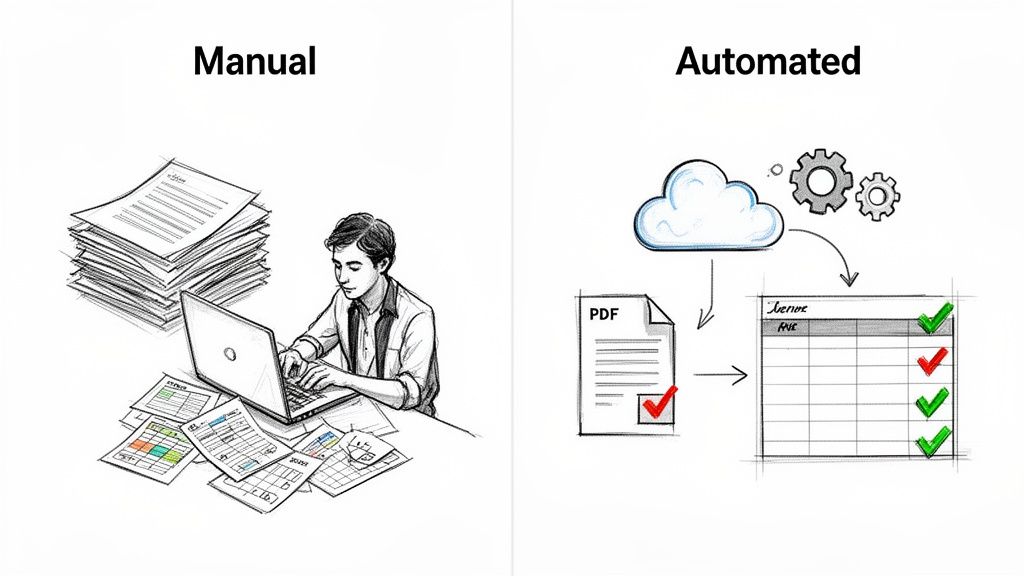
When it comes to getting information out of a PDF bank statement, you really only have two choices: do it by hand or let technology do the heavy lifting. The difference between these two paths isn’t just about convenience—it’s a fundamental split that impacts your efficiency, accuracy, and bottom line.
Putting them side-by-side reveals a stark contrast. The old way is all about painstaking manual labor, while the new way uses smart technology to get the same job done in a fraction of the time. Let’s break down what each process actually looks like in the real world.
The Painstaking Manual Process
Picture this: your accounting team needs to reconcile last month's expenses. If you're doing it manually, you're kicking off a multi-step slog that’s not just slow but also wide open to costly mistakes. It’s a familiar, inefficient grind.
- Print or Display: First, someone has to either print out a stack of statements or juggle windows, with the PDF on one screen and a spreadsheet on the other.
- Manual Re-Typing: Then comes the soul-crushing part. A team member reads every single transaction and painstakingly keys the date, description, and amount into the spreadsheet. Line by line. Page by page.
- Cross-Verification: To catch the inevitable typos, a second person often has to double-check every entry against the original PDF. This doubles the time and the headache.
This whole process is a massive drain on your resources. It's not just about the payroll hours you're burning; it's about the financial fallout from errors. We’ve all seen it happen—a single misplaced decimal can turn a $100.00 transaction into a $1,000.00 nightmare, completely skewing your financial reports. To get a better sense of the hidden costs, check out our deep dive into the challenges of manual data entry.
The Efficient Automated Workflow
Now, let's flip the script and look at an automated approach. This isn't just a small improvement; it completely redefines the process, turning hours of work into a task that takes just a few minutes. The focus shifts from mind-numbing labor to intelligent, instant data capture.
Here’s the new flow:
- Upload: Instead of printing, you simply drag and drop the PDF bank statement into a parsing tool. That’s it.
- Automated Extraction: The software instantly reads the document, intelligently identifies key fields like dates and transaction amounts, and pulls them into a structured format.
- Export: With a couple of clicks, you have clean, organized data ready to be exported directly into your spreadsheet or accounting system.
The real magic of automation isn't just the speed. It’s about freeing your team from the grunt work of transcribing data so they can focus on analyzing it. They get to interpret the financial story, not just type it out.
This change has a huge impact on your business. By embracing automated data processing, you slash the risk of human error, close your books faster, and let your talented employees focus on the strategic work that actually drives growth.
Manual Entry vs Automated Extraction A Head-to-Head Comparison
To truly see the difference, let’s put these two methods in the ring together. The table below makes it crystal clear why automation is the undisputed winner for any business serious about efficiency and accuracy.
| Metric | Manual Data Entry | Automated Extraction with DocParseMagic |
|---|---|---|
| Speed | Hours or even days, depending on statement length and complexity. | Seconds to minutes per document, regardless of length. |
| Accuracy | Prone to human errors like typos and transpositions, with an average error rate of 1-4%. | Near 100% accuracy, eliminating costly mistakes. |
| Cost | High labor costs due to hours spent on data entry and verification. | Low operational cost with a high return on investment. |
| Scalability | Difficult to scale; more documents require hiring more people. | Infinitely scalable; process hundreds of documents as easily as one. |
| Employee Focus | Employees are stuck in low-value, repetitive tasks. | Employees are freed up for strategic analysis and decision-making. |
For any business processing more than just a handful of statements a month, the numbers speak for themselves. The choice isn't just about modernizing—it's about making a smarter, more profitable business decision.
Turning PDF Bank Statements into Actionable Data
So, we've seen how the old, manual way of handling bank statements is slow and full of pitfalls. But what does the automated alternative actually look like? How do you get from a static PDF bank statement to data you can actually use? It's much simpler than you might imagine and boils down to just three steps: Upload, Parse, and Export.
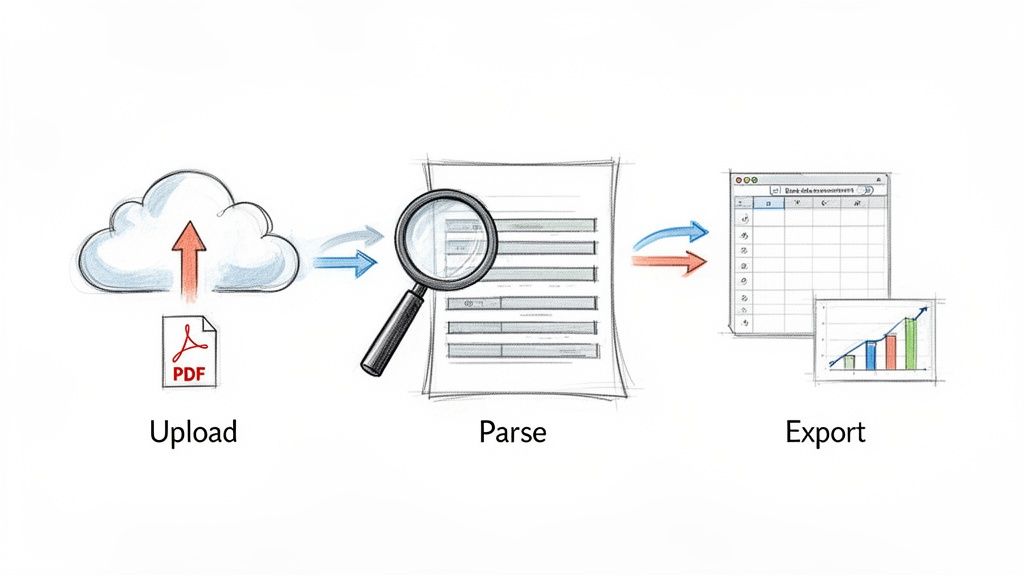
Think of a tool like DocParseMagic as your own smart financial assistant. Instead of giving a stack of papers to someone to type up, you hand them to a digital expert who can read, understand, and organize everything in seconds. This isn't just about reading text; it’s about recognizing what the numbers actually mean.
Step 1: Upload Your PDF Bank Statement
First things first, you just need to get your PDF into the system. It's as simple as dragging and dropping the file right into the platform. You don't have to worry about converting files, messing with special formats, or telling the system what it's looking at.
This whole first step is designed to be completely effortless. Got one statement? Great. A hundred? No problem. The process is the same. The system is built to handle variety, so it doesn't matter if the statements come from different banks with their own unique layouts.
Step 2: Parse and Extract Key Data
This is where the magic happens, and it’s all done for you behind the scenes. Once your PDF is uploaded, the technology gets to work parsing the document. It scans the entire statement, intelligently identifying and pulling out the most important pieces of information.
This goes way beyond basic text recognition. The system understands the context of the document, which allows it to accurately find and extract specific fields like:
- Transaction Dates: Nailing down the exact day of each transaction.
- Descriptions: Pulling out the vendor name or payment details.
- Debits and Credits: Separating the money coming in from the money going out.
- Running Balances: Tracking the account total after every single line item.
The best part? This technology works without needing a pre-made template for every bank. It adapts on the fly, which is a must in a world where statement formats are always changing.
As more of the world goes digital, this becomes even more important. The World Bank reports that 79% of adults globally now have a bank account, largely thanks to mobile banking that delivers statements as PDFs. With over 750 digital-only banks now serving 1.8 billion customers, the variety of statement formats has exploded. Thankfully, modern parsing tools turn this complexity into clean, simple spreadsheets.
Step 3: Export Clean and Usable Data
In just a few moments, the extraction is done. All that once-locked data from your PDF bank statement is now sitting in a neat, structured table, ready for you to use. The final step is to export it in a format that works for your workflow—usually a CSV or Excel file.
This clean, perfectly formatted data can then be dropped directly into your other business systems. Those frustrating hours of manual entry are gone, replaced by a few clicks. This seamless jump from a tricky document to a ready-to-use spreadsheet is what automation is all about.
This isn't just about saving time. It's about transforming a source of administrative pain into a reliable stream of financial data that can power your business decisions.
Once you have this data, it makes sense to see how it fits into your other tools. Exploring the capabilities of dedicated small business accounting software is a great next step for making your financial workflows even smoother.
When you see how automation solves the biggest headaches of manual processing, the choice is clear. The risk of typos vanishes, the time sink disappears, and your team can finally focus on analysis instead of transcription. For any business wanting to tighten up its processes, learning how to convert PDF data into a CSV format is a fantastic starting point. This simple process is how a challenging PDF becomes your greatest source of financial clarity.
Best Practices for Managing Your Financial Data
Getting data out of a PDF bank statement is a huge win, but what you do next is just as important. Once that information is free, you need a smart, reliable system for handling it. Managing financial data the right way isn't just a "nice-to-have"—it's fundamental for keeping your information secure, staying compliant, and building records you can actually trust.
Think of it this way: you wouldn't leave cash sitting out on a counter. Your extracted financial data is just as valuable, and it needs the same level of care. The goal is to create a process that's secure, organized, and ready for an audit from day one.
Lock Down Your Digital Records
First things first: security. As soon as you export a list of transactions, you have a file full of sensitive information. Protecting it from prying eyes is non-negotiable. This means going way beyond just saving a file to your desktop.
Here are the essentials for keeping your data safe:
- Use Secure Storage: Keep your financial files in an encrypted, secure cloud service or on a protected company server. Storing them on a local computer is risky—laptops get stolen and hard drives fail.
- Control Who Has Access: Not everyone in the company needs to see every bank statement. Set up role-based permissions to ensure only authorized people can view or change sensitive financial files.
- Create a Naming Convention: A consistent file naming system will save you countless headaches. A simple format like
[CompanyName]_BankStatement_[BankName]_[MonthYear]works great. For example:ABC-Corp_BankStatement_Chase_Oct2024.csv.
Verify the Data and Build Confidence
Even the best automated tools aren't magic. It’s always a good idea to have a quick verification step in your process, at least initially. This isn't about painstakingly checking every single line item; it's about quick spot-checks to build confidence in your new system.
Trust, but verify. A simple check to see if the summary totals from your extracted data match the totals on the original PDF bank statement is a powerful way to confirm accuracy. It builds confidence that your automated process is working as it should.
This quick validation step proves your system is running smoothly. As you consistently see accurate results over time, you can relax and do these checks less often, fully trusting the data you're getting.
Follow Data Retention Rules
Finally, you need a plan for how long to keep all these records. Tax and audit rules require you to hang on to different financial documents for specific periods. For example, the IRS generally suggests keeping tax-related records for 3 to 7 years.
A solid data retention policy should cover three things:
- What to Keep: Both the original PDF bank statement and the data file you extracted from it.
- How Long to Keep It: Set a clear timeline based on legal and regulatory guidelines.
- How to Get Rid of It: When the time is up, securely delete or shred the data. Don't just let it sit around—that's a security risk.
Putting these practices in place turns a locked-down PDF into a secure, well-organized, and compliant financial data system that truly works for your business.
Common Questions About PDF Bank Statements
Even when you feel like you've got a handle on the process, a few specific questions always seem to pop up when dealing with financial documents. Let's tackle some of the most common ones head-on so you can handle every pdf bank statement with confidence.
Can a PDF Bank Statement Be Edited or Forged?
It’s a valid concern. While a basic PDF can be edited, banks usually add security layers to official statements to prevent tampering. Think of it like a digital watermark.
For anything high-stakes, like a loan application or a financial audit, verifying the document's authenticity is non-negotiable. The absolute best practice is to get the statement directly from the bank yourself. If you can't, modern verification tools can help spot red flags, but nothing beats confirming the source.
Is It Safe to Upload Bank Statements to a Parsing Tool?
Yes, provided you’re using a reputable service. Top-tier data extraction platforms invest heavily in enterprise-grade security to keep your sensitive information locked down. This always includes end-to-end encryption, which essentially scrambles your data during upload and storage, making it unreadable to anyone without authorization.
Before you upload a single document, always check out a provider's security and compliance policies. You want to see a clear commitment to data privacy—that’s how you know your financial information will stay confidential.
What Is the Difference Between Scanned and Native PDFs?
This is a big one. A native PDF is born digital. The bank generates it directly from their system, so the text is clean, structured, and easy for software to read. This is the gold standard for automated data extraction because the accuracy is incredibly high.
A scanned PDF, on the other hand, is just a picture of a paper statement. To pull data from it, the software first needs to use a technology called Optical Character Recognition (OCR) to "read" the image and convert the shapes of letters and numbers into actual text. Good parsing tools have powerful OCR built-in, so they can handle either type of pdf bank statement you throw at them.
Ready to stop wasting hours on manual data entry? DocParseMagic turns any PDF bank statement into a clean, organized spreadsheet in seconds. Try it for free and see how much time you can save.