Intelligent Document Processing Solutions: AI Automation for 2026
If your team is buried under a mountain of invoices, claims, and contracts, you know the pain. Intelligent document processing solutions are the answer. Think of them as a smart assistant that can read, understand, and organize all your files automatically. They classify documents, pull out key information like invoice numbers or policy details, and feed it straight into your business systems. No more manual data entry.
What Are Intelligent Document Processing Solutions
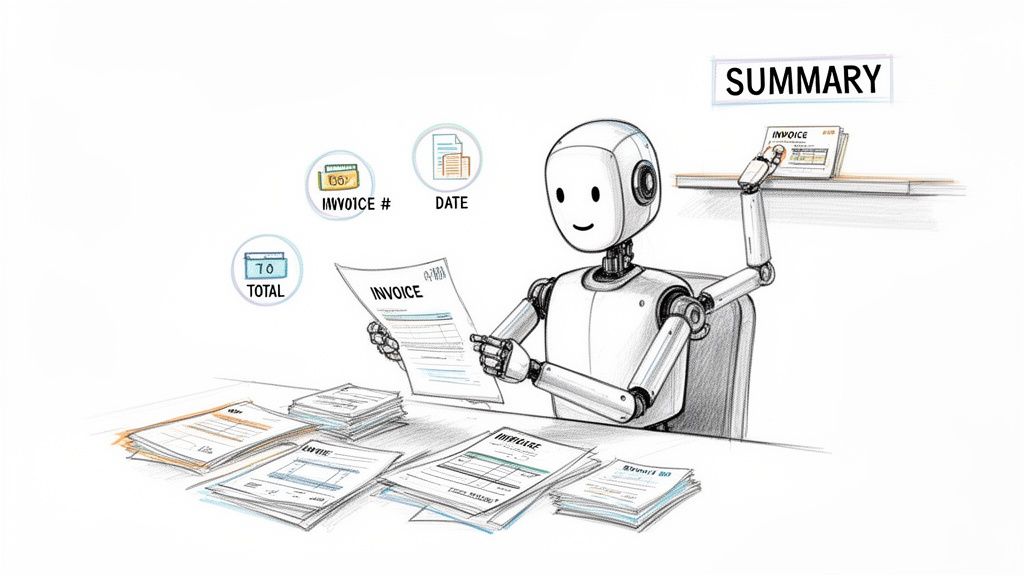
For any business that runs on documents, the daily grind is real. We spend countless hours on tedious data entry, a process that’s not just slow but also ripe for human error. This is exactly the headache that intelligent document processing (IDP) was designed to cure. It goes far beyond just capturing data; it actually comprehends it.
Here’s a simple way to think about it: A basic scanner is like a librarian who just stacks books on a shelf. An IDP solution, on the other hand, is like a seasoned researcher who reads every document, understands the content, summarizes the key takeaways, and knows precisely where to find any piece of information later. That's the crucial difference—IDP doesn't just see words on a page; it understands what they mean. Before diving deeper, it's worth getting a handle on what is intelligent document processing and how it can affect your day-to-day operations.
More Than Just Reading Text
At its core, IDP isn't a single tool but a combination of powerful technologies working together to turn messy documents into clean, ready-to-use data.
It generally follows a few key steps:
- Classification: It starts by figuring out what kind of document it's looking at. Is it an invoice, a purchase order, or maybe a loan application? The system knows.
- Extraction: Next, it pinpoints and grabs the specific data you need—things like dates, totals, names, and even individual line items—no matter where they appear on the page.
- Validation: Finally, it double-checks the extracted data against your business rules to make sure it's accurate before passing it along to other systems.
Think of an IDP platform as the ultimate translator. It takes your unstructured documents (like PDFs, scans, and emails) and converts them into the structured, organized information your business systems (like your ERP or CRM) need to function. It brings order to the chaos, all without a person having to lift a finger.
A Rapidly Growing Market
The surging demand for this kind of automation shows a fundamental shift in how companies are approaching their old-school, paper-based problems. The global IDP market is exploding, growing from USD 1,500 million in 2022 and on track to hit a projected USD 4,382.4 million by 2026.
This isn't just a future trend; it's happening now. As of 2026, the market has already hit USD 2,420 million. Notably, cloud-based platforms make up over 58% of that market, showing that businesses want flexible solutions they can access from anywhere. You can explore the numbers in this intelligent document processing market analysis. This rapid adoption proves one thing: companies are fed up with the bottlenecks and mistakes that come with manual paperwork.
How IDP Goes Beyond Traditional OCR and RPA
If you’ve ever tried to automate document processing with tools like Optical Character Recognition (OCR) or Robotic Process Automation (RPA), you’ve probably hit a wall. It’s a common story: the initial setup works, but as soon as a new document layout arrives, the whole process grinds to a halt.
This frustration happens because these older technologies are specialists, not problem-solvers. They were built to handle rigid, predictable tasks, and they stumble when faced with the messy reality of business documents.
Think of traditional automation as a very junior employee who can only follow a hyper-specific checklist. As long as every step is identical, they’re fast and efficient. But the moment something unexpected happens—a field moves, a new term is used—they get stuck. This is where intelligent document processing solutions take a completely different, and far more capable, approach.
The Limits of OCR and RPA
For many, OCR is the first taste of automation, but it's a very basic tool. Its only job is to look at an image and convert the text it sees into a digital text file. That’s it.
OCR can read "Invoice #123" and "Total: $450," but it sees them as just meaningless strings of characters. It has no idea that one is an identifier and the other is a currency value. To dig deeper into how this foundational tech works, you can explore our guide on what Optical Character Recognition is and its place in modern workflows.
Robotic Process Automation (RPA) adds another layer. An RPA "bot" is a script that can perform repetitive, rule-based actions, like copying the text from the OCR output and pasting it into another system. The catch? It needs a fixed map. If an invoice from a new vendor puts the "Total" at the top instead of the bottom, the RPA bot’s map is now wrong, and the automation breaks. It can't adapt.
Legacy automation tools are brittle. They operate perfectly within a narrow, unchanging set of rules but lack the intelligence to handle the natural variety and unpredictability of business documents. They see the structure, but they don't understand the meaning.
The Intelligent Difference of IDP
This is exactly the problem that intelligent document processing was built to solve. IDP isn’t the junior employee with a checklist; it's the seasoned manager who can think on their feet. By layering artificial intelligence (AI) and machine learning (ML) on top of a powerful OCR engine, IDP learns to understand documents conceptually.
An IDP platform knows that an "invoice number" is an invoice number, whether it's labeled "Inv. #," "Invoice No.," or is just a string of numbers near the top corner. It doesn’t rely on a rigid template. Instead, it uses context, position, and past experience to find the right information, even on documents it’s never encountered before.
This AI-driven brain lets IDP handle tasks that are simply out of reach for OCR and RPA alone:
- Handle Endless Variations: It can process invoices, claims, and contracts from thousands of different senders without needing a custom template for each one.
- Extract Tricky Data: It accurately pulls line-item details from complex tables, even when they span multiple pages or have an unusual structure.
- Validate and Enrich Data: IDP can flag a missing purchase order number or cross-check a total against the sum of its line items to ensure accuracy before the data ever enters your systems.
To really see the difference, it helps to put these technologies side-by-side.
IDP vs. OCR vs. RPA: A Capability Showdown
This table breaks down how each technology approaches the core challenges of document automation. While OCR and RPA are good at their specific jobs, IDP is designed for the entire workflow.
| Capability | Traditional OCR | Traditional RPA | Intelligent Document Processing (IDP) |
|---|---|---|---|
| Data Extraction | Converts image to raw text; no context. | Copies and pastes data based on fixed rules. | Understands context to extract specific fields. |
| Adaptability | None. Purely a conversion tool. | Low. Fails when document layouts change. | High. Adapts to new and varied formats. |
| Document Understanding | None. Sees only characters and words. | None. Follows a pre-programmed script. | High. Interprets document purpose and content. |
| Ideal Use Case | Digitizing a static, single-format document. | Automating a repetitive task with a fixed UI. | End-to-end automation of varied document workflows. |
At the end of the day, OCR and RPA are useful tools, but they are just pieces of the puzzle. Intelligent document processing solutions bring those pieces together and add an AI-powered brain, creating a system that’s resilient, flexible, and truly capable of handling the demands of a modern business.
Where Intelligent Document Processing Actually Makes a Difference
Theory is one thing, but where does Intelligent Document Processing really make a difference? Let's talk about the day-to-day, real-world problems it solves by turning messy document workflows into smooth, automated systems.
Think about an accountant I know, Sarah. Every month, she used to get absolutely buried under a mountain of supplier invoices. Each one had a different layout, and she'd spend hours manually punching dates, totals, and line items into the accounting system. It was tedious, prone to typos, and held up the entire payment process.
This is the perfect job for IDP.
From Manual Entry to Automated Accounting
With an IDP solution in place, Sarah's first week of the month looks completely different. She doesn't type a thing. Instead, she just feeds the invoices into the system—scans, PDFs, even pictures from a phone. The software instantly recognizes them as invoices, pulls out all the critical data, and neatly organizes it.
- Before IDP: Sarah spent roughly 40 hours a month just on invoice entry. A single mistake could take hours to track down and fix.
- After IDP: The same batch of invoices is processed in less than 30 minutes. The data is then pushed directly into the accounting software, waiting for her final review.
This isn't just about saving time. It makes the data more accurate, speeds up payments, and frees up Sarah to work on financial strategy instead of being a data entry clerk. We've seen firsthand how IDP is a game-changer for processing https://docparsemagic.com/blog/data-extraction-from-invoices.
The finance world has caught on in a big way. Projections show that by 2026, the finance industry will account for a massive 45.57% of the entire IDP market. Banks and financial firms are using it for everything from Know Your Customer (KYC) checks to Anti-Money Laundering (AML) compliance, pulling key details from IDs and bank statements automatically. It’s no wonder large companies, which are expected to represent 61.54% of the IDP market in 2026, are leading the charge.
Making Sense of Insurance and Legal Documents
The same logic applies to other paper-heavy fields. Imagine an insurance broker trying to find the best policy for a client by comparing a dozen dense, complex documents. Reading each one manually is a nightmare. An IDP platform can scan all of them at once, extracting coverage limits, premiums, and exclusions into a simple table for a side-by-side comparison.
This is where you see how IDP connects all the dots in an automated workflow.
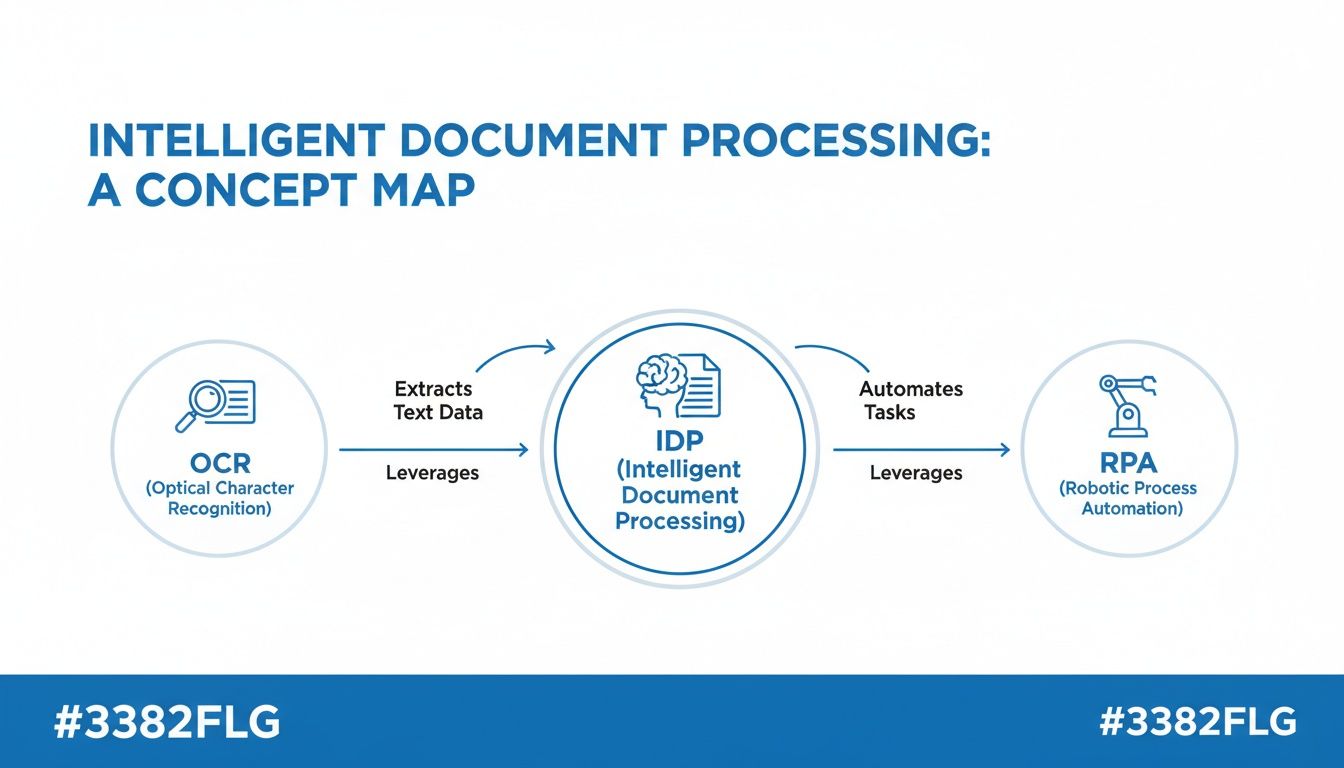
As you can see, IDP isn’t just another tool; it’s the brain of the operation, using OCR to "read" and then telling robotic process automation (RPA) what to do with the information.
In the legal field, this is huge for tasks like AI contract review. Lawyers can instantly find key clauses, dates, and party names across hundreds of agreements without having to read every single word.
The core benefit is consistent: IDP translates unstructured information locked in varied documents into structured, usable data. It’s not just about speed; it's about unlocking insights that were previously too difficult or time-consuming to access.
Solving Headaches in Sales and Procurement
Finally, let’s look at a couple more common scenarios. What about a sales manager trying to reconcile commission statements from different partners, all in unique formats? Or a procurement expert comparing vendor proposals where the pricing and terms are all over the place?
IDP acts as a universal translator in both cases.
- Commission Reconciliation: The sales manager uploads all the statements. The IDP tool pulls out the sales figures, commission rates, and payouts, consolidating it all into a single spreadsheet that’s ready for review.
- Vendor Proposal Analysis: The procurement team feeds all the different proposals into the system. The software extracts the pricing, timelines, and key terms, making it easy to do a true apples-to-apples comparison in minutes.
From finance to sales, the applications for intelligent document processing solutions are almost endless. By taking over the tedious job of data extraction, IDP lets your skilled people get back to the high-value work they were actually hired to do.
Essential Features of a Modern IDP Solution
Let's be clear: not all intelligent document processing solutions are created equal. I've seen too many companies get burned by investing in a platform that looks good on the surface but can't handle the messy reality of their documents. It's a fast track to a frustrating and expensive dead end.
To avoid that trap, you need to know what to look for. Think of this as your practical buyer's guide—a rundown of the non-negotiable features a modern IDP platform absolutely must have to solve real-world problems.
Template-Free Data Extraction
If you only remember one thing, make it this: the most important feature is template-free extraction. I can't stress this enough.
Older systems were built on templates. You had to manually map out every single document layout. If a vendor tweaked their invoice format even slightly, the whole thing would break, and you'd be back to square one, building a new template. This completely defeats the purpose of automation.
A truly modern IDP solution uses AI to read a document like a human does. It understands the concept of an "invoice number," whether it's labeled "Inv. #," "Invoice No.," or just sitting by itself in the top-right corner. This is the secret sauce that lets you process documents from thousands of different suppliers or customers without your IT team living in a constant state of panic.
A platform that relies on templates isn't truly intelligent; it's just a rigid rule-follower. The goal is to find a solution that adapts to your documents, not the other way around. This flexibility is the foundation of scalable document automation.
Core Platform Capabilities
Once you've confirmed a system is template-free, the next step is to look at its core engine. A great IDP solution is more than just an extractor; it's a complete workflow machine.
Here are the essentials I always look for:
- Broad File Type Support: Business documents come in every shape and size. Your platform needs to handle native PDFs, scanned JPEGs and PNGs, Word docs, and even Excel files without forcing you to convert everything first.
- A No-Code User Interface: You shouldn't need a computer science degree to run the tool. The best platforms are built for the people who actually do the work—the accountants, claims processors, and logistics coordinators. A friendly, no-code UI puts them in the driver's seat.
- Seamless Integration: An IDP tool that traps your data is useless. It must have easy ways to get information out, whether that's a simple export to Excel or a direct, real-time connection to your ERP, CRM, or accounting software.
Advanced Data Handling and Validation
Pulling data out of a document is just the first step. The real value comes from making sure that data is clean, accurate, and ready for work. This is where advanced features separate the contenders from the pretenders.
- Data Validation: The system should be your first line of defense against errors. It can automatically check that a date is in a valid format or flag an invoice where the line items don't add up to the total. It’s like having a tireless assistant double-checking everything.
- Data Normalization: Consistency is key. A good platform will automatically standardize data, turning various date formats like 10/15/2024 or Oct 15, 2024 into a single, clean format like YYYY-MM-DD.
- Data Transformation: The platform should also be able to intelligently reformat data. For instance, it can take a field with "John Doe" and instantly split it into separate "First Name" and "Last Name" columns, saving your team from hours of manual cleanup.
Finally, a quick word on pricing. Look for a model that's transparent and lets you grow. You should be able to start small, maybe with a free trial or a pilot project, and scale up as you prove the value. Avoid vendors who want to lock you into a massive, upfront commitment before you've processed a single document.
Your Roadmap to a Successful IDP Implementation
Bringing in a new piece of technology can seem like a monumental task. The good news? Rolling out an intelligent document processing solution doesn't have to be a six-month headache. The smartest way to do it is to start small, prove the value quickly, and build from there.
A lot of people think you need a dedicated IT squad and a bottomless budget just to get started. That's an outdated idea. With today's no-code platforms, the people who actually suffer through manual data entry every day can be the ones to champion a better way.
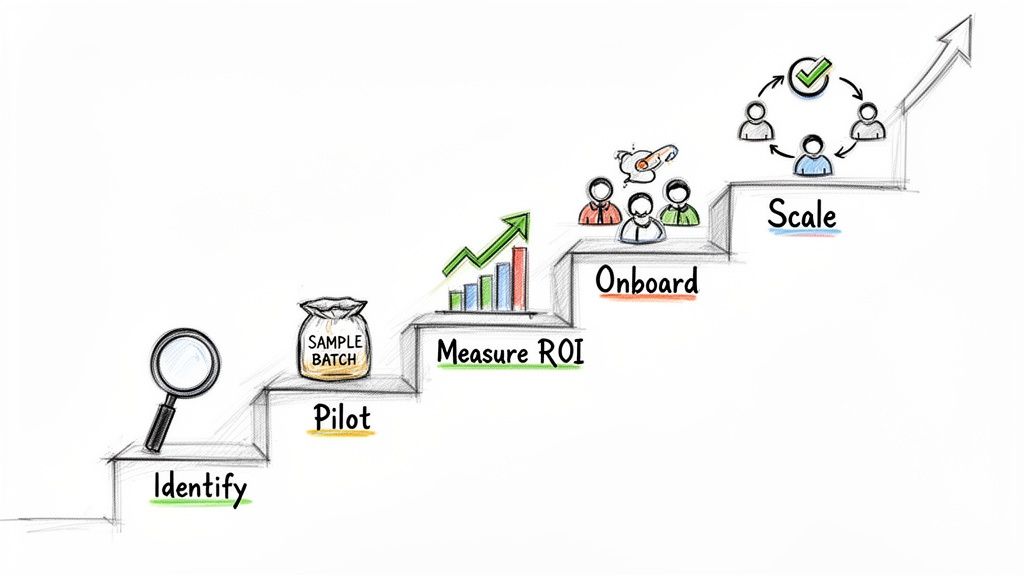
Here’s a simple, five-phase plan I've seen work time and time again. It’s designed to get you from dipping your toes in the water to a full-scale rollout, all while proving the value at every turn.
Phase 1: Identify Your Biggest Pain Point
First things first: forget about software for a minute and look at your own workflows. Where is your team really getting bogged down? Is it the endless stream of supplier invoices? The mind-numbing task of reconciling commission statements? Or maybe it's sifting through piles of insurance claims.
Don't try to solve every problem at once. Pick one specific, time-sucking document workflow that’s a real bottleneck. Focusing on a single pain point makes it much easier to see the impact and build a case for doing more.
Phase 2: Run a Small-Scale Pilot
Once you have your target, it's time to take a test drive. Most of the best intelligent document processing solutions will offer a free trial or some startup credits. Grab that opportunity and run a small pilot.
Pull together a batch of 20-50 real-world documents. I’m talking about the messy, coffee-stained, poorly scanned ones—not the pristine examples from a sales demo. Run this batch through the system and see what happens. This is the only way to know for sure if a tool can handle the beautiful chaos of your actual work.
A pilot project is your low-risk reality check. It’s where you find out if the tech lives up to the hype and can actually handle the quirks of your company's documents.
Phase 3: Measure the Initial ROI
After your pilot, it’s time to do the math. This is where you gather the hard numbers you need to justify expanding the project.
To calculate your initial Return on Investment (ROI), focus on two simple things:
- Time Saved: How many hours did the pilot save your team compared to the old manual way? Multiply those hours by your team's hourly cost, and you've got a dollar figure.
- Errors Reduced: Did the software catch mistakes a person might have missed? Think about the cost of those errors—overpayments, compliance headaches, or just the time it takes to fix them.
Phase 4: Onboard Your Team
With a clear ROI in hand, you’re no longer asking your team to try something new; you’re offering them a solution. When you onboard them, focus on how easy the platform is and how it will make their lives easier. Frame it as a tool that gets rid of their most boring tasks, not one that replaces them.
For a closer look at managing these workflows effectively, check out our guide on modern document processing strategies.
Phase 5: Scale Across Departments
Success is contagious. Once your first team is up and running, other departments will start noticing. That's your cue to share your results. Use your initial project as an internal case study. Show them the time saved, share a few testimonials, and help them find their own document headaches to cure.
This is how you turn a small, successful pilot into a wave of efficiency that spreads across the entire company.
Common Questions About Intelligent Document Processing
When you're thinking about bringing in any new automation, a lot of practical questions pop up. It's only natural. Leaders always want to know about the real costs, the security implications, and how much effort it’s actually going to take to get started. When it comes to intelligent document processing, those questions are front and center.
Let’s walk through the most common concerns we hear from organizations. My goal is to give you clear, straightforward answers to help you feel confident about what comes next.
How Much Technical Skill Do We Need To Use an IDP Solution?
This is probably the biggest myth holding companies back. There’s a widespread assumption that you need a team of developers or IT gurus to get an IDP platform up and running. Honestly, that might have been true years ago, but modern no-code solutions have completely changed the game.
Today's platforms, like DocParseMagic, are built for the people who actually handle the documents every day—the accountants, the claims processors, the operations managers. If you can work your way around a spreadsheet, you have all the technical skill you need to build a powerful automation workflow. The whole experience is usually based on simple drag-and-drop tools, making it easy for anyone on your team to use.
You don’t need to write a single line of code. You don’t even need to understand the nuts and bolts of machine learning. You just need to know what information you want to get from your documents, and the platform does the heavy lifting.
How Secure Is Our Data in an IDP Platform?
Handing over sensitive business documents is a big deal, so security should absolutely be a top concern. Any IDP vendor worth their salt will treat data security as their number one priority. As you look at different options, focus on providers who are completely open about their security practices.
Here are a few non-negotiables to look for:
- Data Encryption: Make sure all your data is encrypted, both while it's being uploaded (in transit) and while it's being stored (at rest).
- Compliance Certifications: Look for key certifications like SOC 2, ISO 27001, GDPR, and HIPAA. These are strong signals that the provider has a serious, mature security program.
- Access Controls: The platform must give you fine-grained control over who can see what. You should be able to limit access to specific documents or data fields to only the right people.
Security isn't just a bullet point on a feature list; it's the foundation of trust. A good IDP solution doesn't just automate your work—it helps you stay compliant and protects your sensitive information by keeping it all in one secure, auditable place.
What Does an IDP Solution Typically Cost?
The price for intelligent document processing solutions can vary quite a bit, but the good news is that the industry has mostly moved on from the huge, scary upfront costs of the past. Most modern platforms run on a flexible subscription or a pay-as-you-go model.
This approach has some real benefits for businesses:
- Low Barrier to Entry: You can almost always start with a free trial or a small starter pack. This lets you test the system with your own documents and see the value for yourself before committing serious budget.
- Scalable Pricing: Costs are tied directly to how much you use the service. As your document volume grows, your plan grows with you. It’s a model that works just as well for a small business as it does for a large enterprise.
- Predictable Expenses: A subscription gives you a clear, fixed cost each month or year, which makes budgeting a whole lot easier.
Many platforms, for instance, base their pricing on the number of documents or pages you process. This means you're only paying for what you actually use. The ROI becomes incredibly clear once you stack that cost against the dozens or hundreds of hours your team spends on manual data entry.
What If We Have Really Messy or Unusual Documents?
"Our documents are just too complicated for a machine to handle." We hear this all the time, especially from companies that deal with a mix of old forms, bad scans, or invoices from a thousand different vendors. It's a perfectly valid concern.
But this is exactly where the "intelligent" part of IDP proves its worth. Older systems were rigid and template-based; if a field was moved even a half-inch, they’d break. Today's AI-powered platforms are designed for variety and chaos. They learn to understand the context of a document to find the data, even if it’s in a different spot, uses a different label, or is buried in a low-quality scan.
The only way to know for sure is to put it to the test. A good IDP provider will be so confident in their tech that they'll encourage you to run a pilot with your absolute worst documents. You’ll probably be surprised at how well the system can find order in the mess.
Ready to see how easily you can automate your own document workflows? DocParseMagic offers a no-code platform that turns your messiest files into clean, actionable data in minutes. Sign up for free and start processing your documents today.