Automated Data Extraction From Invoices A Practical Guide
Let’s be honest: manually keying in data from invoices is a soul-crushing task. It's the slow, painful process of taking information from a PDF or a piece of paper and typing it into your accounting system. This isn't just a time-waster; it's a real financial drain that holds your business back.
Why Manual Invoice Processing Is a Business Bottleneck
For too many finance teams, the day starts with a mountain of paperwork. Picture an accounts payable specialist with a fresh stack of invoices from all your different vendors, each one laid out completely differently. Their entire morning disappears into the tedious work of hunting for invoice numbers, due dates, line items, and totals, then manually punching it all into the system. It's repetitive, mind-numbing, and practically begs for errors to happen.
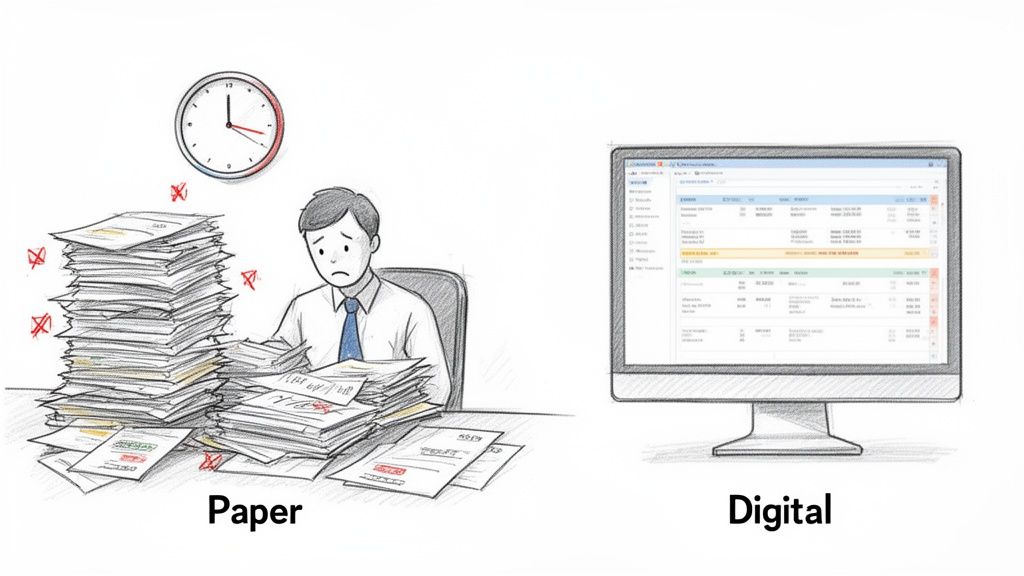
This process isn't just inefficient—it's expensive. The average cost to manually process a single invoice sits somewhere between $15 and $22.75. That adds up fast. Worse, a shocking 39% of manually processed invoices have errors, which means you're not just paying for the initial entry but also for the time spent fixing mistakes and dealing with the fallout.
The Hidden Costs You're Not Thinking About
The obvious costs are just the tip of the iceberg. Sticking with manual methods creates a ripple effect of problems that can stall growth and hurt your team's effectiveness. Time and again, finance leaders point to the same issues cropping up from this outdated approach:
- Late Payments and Strained Vendor Relationships: Slow processing means late payments. This can result in penalty fees, but more importantly, it can damage the goodwill you have with crucial suppliers.
- Zero Visibility into Cash Flow: Without data being entered in real-time, you never have an accurate, up-to-the-minute view of your company's liabilities. This makes financial forecasting and strategic planning feel like you're guessing in the dark.
- Low Morale and High Turnover: Asking skilled finance professionals to spend their days doing robotic data entry is a surefire way to cause burnout. It keeps them from doing the high-value work they were hired for, like analysis and financial strategy.
The real problem here isn't about saving a few minutes per invoice. It's a strategic bottleneck. When your sharpest minds are buried in paperwork, they can't give you the insights needed to move the business forward.
Making the Strategic Shift to Automation
Automated data extraction from invoices is the clear solution. Think of it less as a tool and more as a fundamental upgrade to how your finance department runs. By automating how you capture invoice data, you free your team to shift from being data enterers to becoming data analysts. For a broader look at this, check out this excellent guide on the Top 10 Business Process Automation Benefits.
This guide will show you exactly how to put an automated system in place, turning a costly, error-prone chore into a major source of efficiency and competitive advantage. If you want to dig deeper into what this transformation can mean for your business, read our article on the benefits of automated invoice processing.
How AI and OCR Team Up to Read Invoices
To really get a handle on automated invoice data extraction, you need to understand the two technologies at its heart: Optical Character Recognition (OCR) and Artificial Intelligence (AI). Think of them as a tag team. OCR handles the seeing, and AI does the thinking.
First up, the document gets fed into an OCR engine. This could be anything from a crisp PDF emailed from a supplier to a slightly crumpled scan of a paper invoice. The OCR's job is straightforward but absolutely vital: it scans the image and turns every letter and number it finds into digital, machine-readable text. It essentially transforms a picture of words into actual text data. If you want a deeper dive into the mechanics, you can learn more about what Optical Character Recognition is and how it works.
But here’s the catch. A raw text dump from OCR is just a long, messy string of characters. It’s a start, but it lacks any real meaning. The system doesn't know that "123 Main St" is a shipping address or that "$54.99" is the total amount due. It has no context.
AI Gives the Raw Text Meaning
This is where the AI rolls up its sleeves. Using sophisticated tools like Natural Language Processing (NLP) and machine learning, the AI sifts through that raw text from the OCR. It’s been trained on millions of real-world invoices, so it has learned to spot the patterns, context, and relationships between different bits of information.
For example, the AI figures out that the string of numbers following "Invoice #" is, you guessed it, the invoice number. It learns that the largest dollar amount at the bottom of the page, especially when it’s next to a word like "Total," is the final amount owed. This ability to understand the document like a person would is what makes modern tools so powerful.
The need for this kind of intelligent data conversion is huge. In fact, the Data Extraction segment now commands a massive 28.6% share of the entire AI for Invoice Management market, a clear sign that businesses are demanding high-precision, intelligent tools.
The Old Way: Why Template-Based Systems Failed
Older automation tools relied on basic OCR and rigid, hand-built templates. You literally had to draw a box on a sample invoice and tell the system, "For Vendor ABC, the invoice number will always be right here."
This approach was a logistical nightmare.
- Incredibly fragile: The moment Vendor ABC tweaked their invoice design—even slightly—the template would break. Data extraction would grind to a halt until someone went in and manually fixed it.
- Impossible to scale: Imagine doing this for hundreds, or even thousands, of different suppliers. Creating and constantly maintaining all those unique templates was a full-time job in itself.
I've seen procurement teams try to manage 500+ supplier invoice formats with a template-based system. It always ends in failure. The endless maintenance completely negates any time savings the automation was supposed to deliver.
AI: The Smarter, Template-Free Approach
Thankfully, modern AI-powered systems are completely template-free. They couldn’t care less if the invoice number is in the top right or bottom left. The AI model reads the document holistically, using context to find the information it needs, much like a human would. This flexibility is the secret sauce for building automation that actually scales and works reliably.
Here’s a quick breakdown of how the old and new methods stack up.
Comparing Traditional OCR vs AI-Powered Extraction
This table really highlights the key differences between the clunky, template-based OCR systems of the past and the intelligent, AI-driven platforms available today. For anyone dealing with the complexity of real-world invoices, the advantages of the modern approach are crystal clear.
| Feature | Traditional OCR | AI-Powered Data Extraction |
|---|---|---|
| Setup Process | Requires a manual template for each vendor layout. | No templates needed; works right out of the box. |
| Flexibility | Fails if the invoice layout changes slightly. | Adapts to new and varied invoice formats automatically. |
| Scalability | Poor. Quickly becomes unmanageable with many vendors. | Excellent. Handles thousands of suppliers seamlessly. |
| Accuracy | Prone to errors from layout shifts or poor scans. | High accuracy by understanding data context. |
Ultimately, the shift to AI-powered, template-free extraction isn't just an upgrade—it's what makes true, hands-off invoice automation possible at scale.
Building Your Automated Extraction Workflow
Theory is great, but getting your hands dirty is what really matters. Setting up a smart workflow to pull data from invoices isn't about flipping a single switch; it’s about building a connected pipeline. Each stage is designed to turn a chaotic pile of documents into clean, structured data that’s ready for your financial systems.
This diagram gives you a bird's-eye view of how a raw invoice gets transformed into useful data.
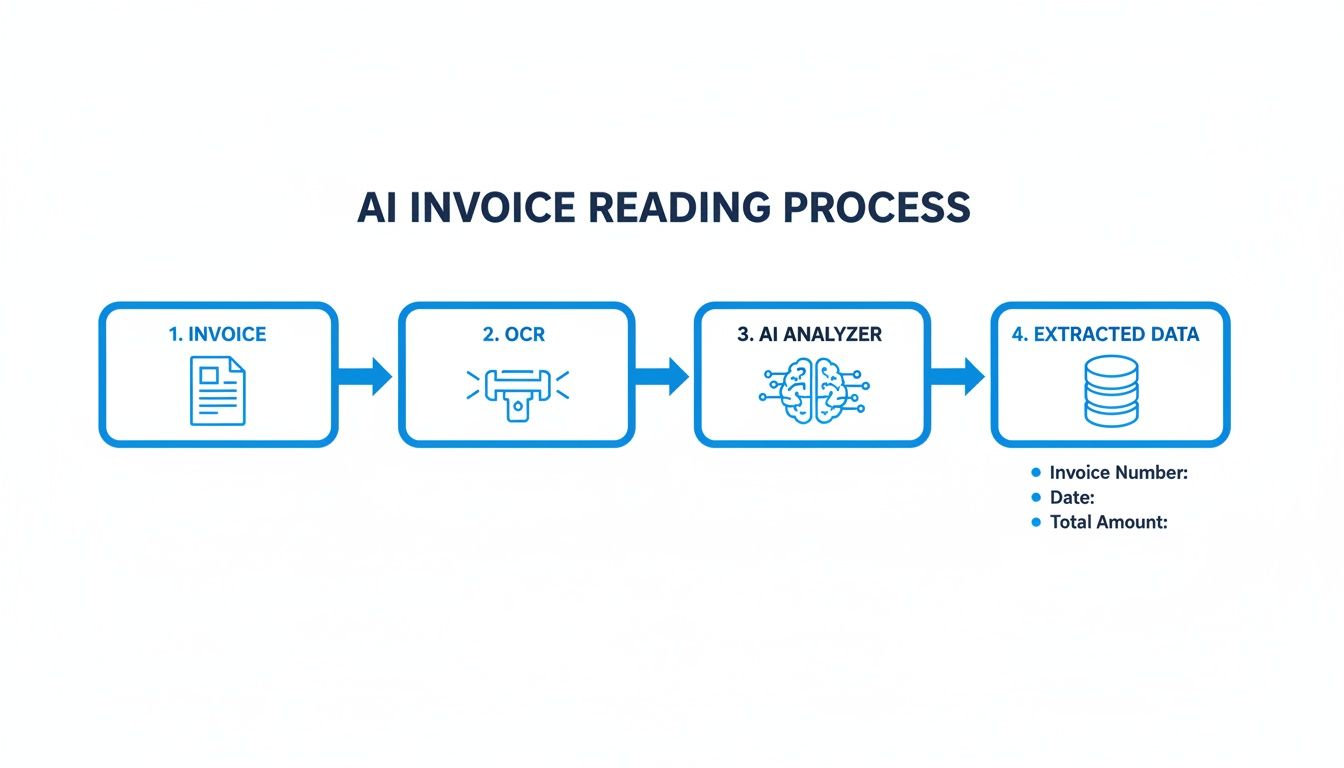
As you can see, the core of it is the OCR and AI engine, which does the heavy lifting to get the document ready for your business.
Mastering Invoice Capture and Preprocessing
It all starts the moment an invoice lands on your desk—or in your inbox. They come in every imaginable format: crisp PDFs from a supplier portal, grainy email attachments, or even a quick photo snapped on a phone. A solid system has to be able to handle all of it.
The first real step is preprocessing. This is the cleanup crew. It preps the document so the AI can read it properly, kind of like adjusting the lighting before taking a picture. This phase automatically handles tasks like:
- Deskewing images to straighten out crooked scans.
- Removing noise, like those annoying speckles or shadows that confuse OCR.
- Enhancing contrast to make the text pop.
Don’t underestimate this part. An AI is only as smart as the information it gets, and a clean, sharp image can make a huge difference in the accuracy of the whole process.
AI Parsing: The Intelligent Extraction Phase
Once the document is clean, the AI really gets to work. This is where the system goes beyond just reading text (that’s OCR) and starts understanding it. The model scans the entire document to identify and tag all the key information.
It figures out what’s a header, what’s a line item, and what’s in the footer, locating specific fields no matter where they are on the page. For a construction firm, that means the AI can find the subcontractor’s ID and project number. For an e-commerce company, it can spot shipping codes and SKUs on a supplier invoice.
The magic here is the contextual understanding. The AI doesn’t rely on a rigid template. It understands that the words "Invoice #" are a label for the number that comes after it, just like a person would. This is what makes the system so flexible and able to handle invoices from hundreds of different vendors.
This is the heart of the data extraction from invoices workflow, turning a messy document into a neat set of data points.
Implementing Smart Validation Rules
Extracted data is worthless if it's wrong. That’s where validation rules come in. These are automated checks you set up to make sure the data makes sense before it gets into your accounting software. Think of it as a quality control gate that catches errors a human might even overlook.
Here are a few practical examples of validation rules I've seen work well:
- Format Checks: Make sure the 'Invoice Date' is actually a date (like MM/DD/YYYY) and not just a string of random characters.
- Mathematical Verification: Automatically check if the line items plus tax actually add up to the 'Total Amount'. If the math is off, the invoice gets flagged.
- Database Lookups: Cross-reference the 'Vendor Name' or 'PO Number' with your own records. If there’s no match, it could signal a typo or even a fraudulent invoice.
A construction company, for instance, could run a quick lookup to confirm a subcontractor’s ID is on their approved vendor list. It’s a simple check that adds a serious layer of security.
Designing a Human-in-the-Loop Review Process
Let’s be realistic: no AI is perfect 100% of the time. For that last 1-2% of edge cases, you need a quick and easy way for a person to step in. This is called a human-in-the-loop (HITL) workflow.
A good system knows when it's not sure. If the AI’s confidence score for a field drops below a certain point (say, 95%), it should automatically flag that invoice for a human to review.
An effective HITL screen will show the original invoice right next to the extracted data. The reviewer can instantly see the low-confidence field, click to correct it, and approve the invoice. This gives you the speed of automation with the final check of a human eye, all without creating a new bottleneck. In fact, Uber reported a 70% reduction in average handling time just by adding a smart UI to their AI extraction process.
Integrating Clean Data with Your Systems
The final piece of the puzzle is getting that clean, verified data where it needs to go. The whole point is to create a seamless path from the invoice straight into your other business software.
Most modern platforms give you a few ways to do this:
| Integration Method | Description | Best For |
|---|---|---|
| CSV/Excel Export | Download the extracted data in a simple spreadsheet. | Easy, universal import into almost any accounting tool. |
| Direct API Integration | Set up a live connection to systems like QuickBooks, Xero, or SAP. | Fully automated, real-time data flow with zero manual steps. |
| Webhooks | Automatically push data to other apps as invoices are processed. | Custom workflows, like sending a notification to a project manager in Slack. |
An e-commerce business could set this up so that invoice data automatically updates their inventory system and their accounting software simultaneously. This end-to-end automation closes the loop, finally killing off manual data entry for good. Building this out turns data extraction from invoices from a tedious chore into a smooth, integrated part of your financial operations.
Solving The Toughest Challenge: Invoice Line Items
Pulling a header detail like an invoice number or a total amount is relatively straightforward. The real test for any automated system, though, is digging into the line items. This is where most platforms start to struggle, and honestly, it’s what separates the good from the great.
So, why is this so hard? It all comes down to tables. Invoice tables are the Wild West of document formatting.
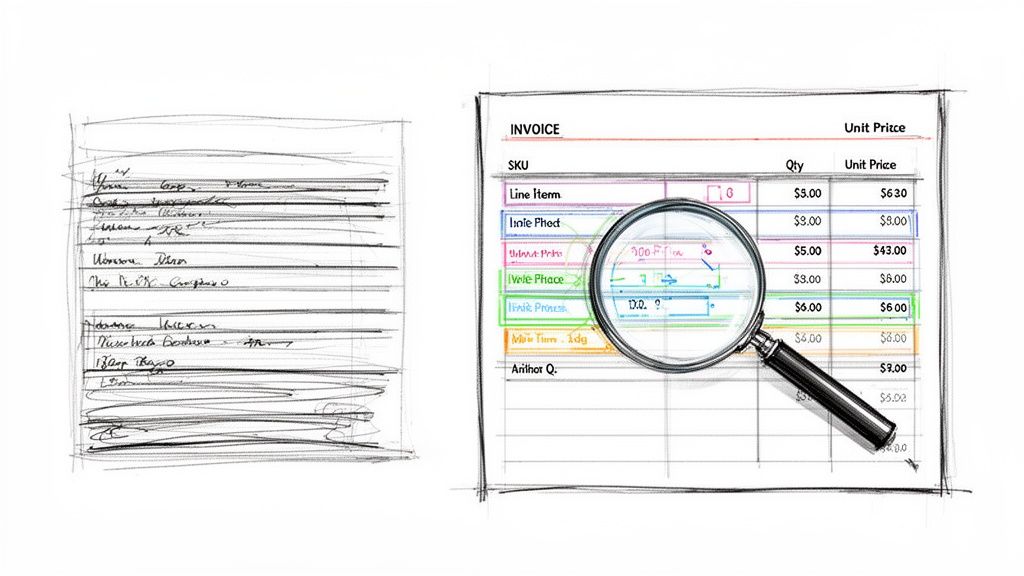
You might get a clean, simple grid with neat lines. But more often, you’ll find invoices with no borders at all, forcing the software to guess the table structure based purely on text alignment. Throw in tables that spill across multiple pages or use merged cells for descriptions, and you've got a recipe for disaster. A standard OCR tool just sees a jumble of words and numbers, completely failing to link a specific product to its quantity and price.
Why Line Item Accuracy Is Non-Negotiable
Getting line items right isn't just a minor detail—it's the bedrock of so many critical business functions. Without this granular data, you're missing a huge piece of the puzzle.
- Precise Inventory Management: If you're in retail or distribution, you need to know exactly which SKUs were bought and in what quantity for accurate restocking and forecasting.
- Accurate Project Job Costing: For a construction firm or creative agency, you have to allocate specific material costs or service hours to the right project. A grand total just won't cut it.
- Detailed Spend Analysis: Procurement teams live and breathe this data. It's how they spot purchasing trends, negotiate better deals with suppliers, and find real opportunities to save money.
Simply put, without accurate line-item data, you’re flying blind.
Advanced AI for Complex Table Structures
This is where modern platforms have really changed the game. They use a combination of AI and computer vision to not just read the text, but to actually see the document's layout. The system analyzes the spatial relationships between different data points to reconstruct the table, even if there are no visible lines. If you're dealing with this challenge, our guide on how to extract tables from PDF files dives much deeper into the mechanics.
This visual approach is what allows the AI to navigate tricky layouts that would completely confuse older, template-based systems.
A common scenario I’ve seen is an invoice with different tax rates applied to individual line items. A basic tool might just grab the final tax total from the bottom. But a sophisticated AI can correctly associate the 7% tax with one product and the 12% tax with another, giving you perfect accuracy for financial reporting.
This isn’t a small-time trend, either. The global market for this technology has already grown to USD 1.82 billion. The best machine learning tools are now hitting 99% accuracy on line items, a massive improvement from traditional methods where error rates often hit 3.6%. This directly impacts the bottom line, boosting a team member’s daily throughput from around 20 to over 32 invoices.
By nailing the hardest part of the document—the line items—a smart platform turns a simple invoice into a goldmine of business intelligence that's ready to use right away.
Putting It All Into Practice: A Real-World Walkthrough with DocParseMagic
Theory is one thing, but seeing a tool completely simplify a tedious job is another. Let's walk through a quick, no-code workflow using a platform like DocParseMagic to show you how to turn a messy scanned invoice into clean, structured data in under a minute.
This is for the operations managers and accounting teams out there who don't have the luxury of a dedicated IT department for custom builds. It’s all about getting a powerful result without touching a single line of code.
From Scanned Mess to Structured Data
Okay, picture this: a new supplier sends over an invoice. Of course, it's not a pristine digital PDF. It's a slightly crooked scan an employee forwarded from their phone. Manually, this is where you’d start squinting at the screen, deciphering blurry text, and painstakingly typing everything into a spreadsheet.
With a tool like this, the process is completely different.
You just drag and drop that scanned image file right into the interface. You don't have to straighten it, convert it, or—and this is the big one—build a template for this new vendor. These systems are built to handle documents as they show up in the real world.
Here’s what the DocParseMagic interface looks like moments after uploading a typical scanned invoice.
As you can see, the original document is on the left. On the right, the AI has already done the heavy lifting, identifying and pulling out the key fields into a clean, organized table. It's all there, ready for a quick review.
The Power of "Zero-Shot" Extraction
The second you upload that invoice, the AI kicks in. In just a few seconds, it reads the document's layout and content, zeroing in on all the critical information your finance team needs to capture.
You'll see the fields just… appear.
- Invoice Number: Found and correctly identified.
- Vendor Name: Pulled straight from the header.
- Invoice Date & Due Date: Recognized and put into a standard format.
- Total Amount: The final, all-important number is captured precisely.
This is where the time savings really start to stack up. The system works on the very first invoice from a new vendor just as easily as it does on the hundredth. By getting rid of the need to build, test, and manage templates, you get back all those hours that used to be sunk into administrative setup.
But the most impressive part is how it tackles the trickiest section of any invoice.
Nailing Complex Line Items Without the Headaches
As we've covered, line items are where most basic tools fall flat. A platform like DocParseMagic, however, uses more advanced AI that can see the table-like structure of the line items—even on a document with no clean grid lines.
It intelligently goes through row by row, correctly linking each product description to its SKU, quantity, unit price, and total. If you run an e-commerce store, this means you can instantly capture the exact items purchased to update your inventory. For a construction firm, it means assigning specific material costs to the correct job without breaking out a calculator.
After the AI does its pass, all the extracted data is laid out in a clean, spreadsheet-style view right next to the original document. You can give it a quick once-over to confirm everything is accurate. If it looks good, one click is all it takes to export the data as a CSV or Excel file, ready to be uploaded directly into your accounting software.
The whole process—from a messy scan to usable data—takes less than 60 seconds.
Common Questions About Invoice Data Extraction
When teams start exploring ways to automate their invoice workflow, a lot of the same questions come up. It's a pretty big shift from manual entry, so it makes sense to dig into the details before diving in. Here are some straightforward answers to the questions we hear all the time about data extraction from invoices.
How Accurate Is AI-Based Data Extraction?
This is usually the first thing everyone wants to know. For good reason, too. The short answer is: very accurate. Modern AI platforms regularly hit 98-99% accuracy on key fields and even tricky line items. That's a huge leap from the error rates you typically see with manual data entry.
How? It comes down to machine learning models that have been trained on millions of different invoices. The AI isn't just looking for text in a specific spot on the page; it’s actually learning to understand the context of the document. For those rare instances where the AI isn't confident, it simply flags the field for a quick human check. This "human-in-the-loop" step ensures the final data you get is practically perfect.
Do I Need Templates for Each New Vendor?
Nope. And honestly, this is one of the biggest wins of modern AI. Old-school OCR tools made you build a rigid, manual template for every single vendor's invoice layout. If a vendor changed their format even slightly, the template would break. It was a nightmare to maintain.
Today’s systems are completely template-free. The AI is smart enough to identify a field like 'Invoice Number' no matter where it shows up. This is a game-changer if you work with dozens or even hundreds of suppliers because it cuts out a massive amount of setup and maintenance time.
The real power of a template-free system is its immediate value. You can process an invoice from a brand-new vendor with the same speed and accuracy as one from a supplier you've worked with for years.
What File Types Can I Use?
Your data extraction tool should work with invoices as you get them, without forcing you to convert files. A good platform is built to handle the mix of formats that businesses deal with every day.
You should expect it to handle all of these without a problem:
- Digital PDFs sent directly from a supplier’s accounting system.
- Scanned documents, which are still common in plenty of industries.
- Image files like JPG or PNG, maybe from a quick photo someone snapped with their phone.
The best tools even have built-in magic to automatically correct for things like skewed pages or bad lighting. This little detail saves a ton of time you might otherwise spend cleaning up files before you can even start.
How Does This Integrate With My Accounting Software?
Getting the data out is only half the battle; getting it in to your other systems is what really closes the automation loop. This needs to be a seamless handoff. Most platforms give you a few simple options to make this happen.
You can almost always export the verified data into a standard CSV or Excel file, which you can then import into any accounting system. For a truly automated workflow, look for direct API integrations with popular software like QuickBooks, Xero, or SAP. An API connection lets the data flow directly from the invoice into your system in real-time, no manual steps required.
Ready to stop the copy-paste grind and get hours back every week? DocParseMagic turns your messy invoices and documents into clean, structured data in minutes. Try it for free and see how simple data extraction from invoices can be.