How Does an Invoice Work? Your 2026 Guide
You finished the work. The product shipped, the project wrapped, or the service was delivered. Then the uneasy part starts. You need to ask for money in a way that’s clear, professional, and easy for the customer to process.
That’s where many new business owners get stuck. They know they should send an invoice, but they aren’t fully sure what the invoice does once it leaves their hands. Does it just request payment? Is it a legal record? What happens after the client receives it? Why do some invoices get paid quickly while others disappear into approval limbo?
The simplest way to think about an invoice is this: it’s a formal IOU with details. It tells the buyer what you provided, what they owe, when they owe it, and how the payment should happen. If you understand that idea, you already understand the heart of how does an invoice work.
The rest is the journey. The invoice gets created, sent, reviewed, approved, paid, and recorded. Along the way, small errors, missing fields, and messy document formats can slow everything down. That hidden friction matters because invoicing isn’t just paperwork. It directly affects your cash flow.
Your First Step to Getting Paid
A freelance designer sends the final website files on Friday afternoon. The client replies, “Looks great.” The project feels finished. From a business standpoint, though, one step still turns completed work into actual revenue: sending the invoice.
An invoice is the document that formally asks for payment and gives the customer the information they need to act on it. For a solo client, that may mean opening the email and paying the same day. For a larger company, it may mean the invoice gets forwarded to bookkeeping, matched to a purchase order, typed into an accounting system, approved by a manager, and scheduled for payment. That part is easy to miss when you are the one sending it.
This is why invoicing can feel slower than it should.
From the seller’s side, the invoice marks the start of “now I get paid.” From the buyer’s side, it marks the start of “now we process this.” Those are not always the same experience. A customer may fully intend to pay you and still hit delays because the invoice arrived as a PDF no one can search, the project name does not match their records, or a missing PO number forces someone to stop and ask questions.
That is the hidden friction many new business owners never get warned about. An invoice does more than state an amount due. It has to travel through another company’s workflow, and every extra bit of manual checking, retyping, or clarification can slow payment.
A simple way to judge your invoice is to ask: could a stranger in the client’s finance team understand this without calling me?
If the answer is yes, you have done your first job well. You have turned finished work into a clear payment request, with enough detail for both sides to track what happens next. If you want a practical example of how freelancers set this up, Receipt Router's freelancer invoicing guide shows the basic documents and flow.
One habit matters more than many owners realize. Send the invoice promptly, while the work, price, and approval are still fresh in everyone’s mind. Waiting a week often creates avoidable confusion, and confusion is where payment timelines start to stretch.
What an Invoice Is And What It Is Not
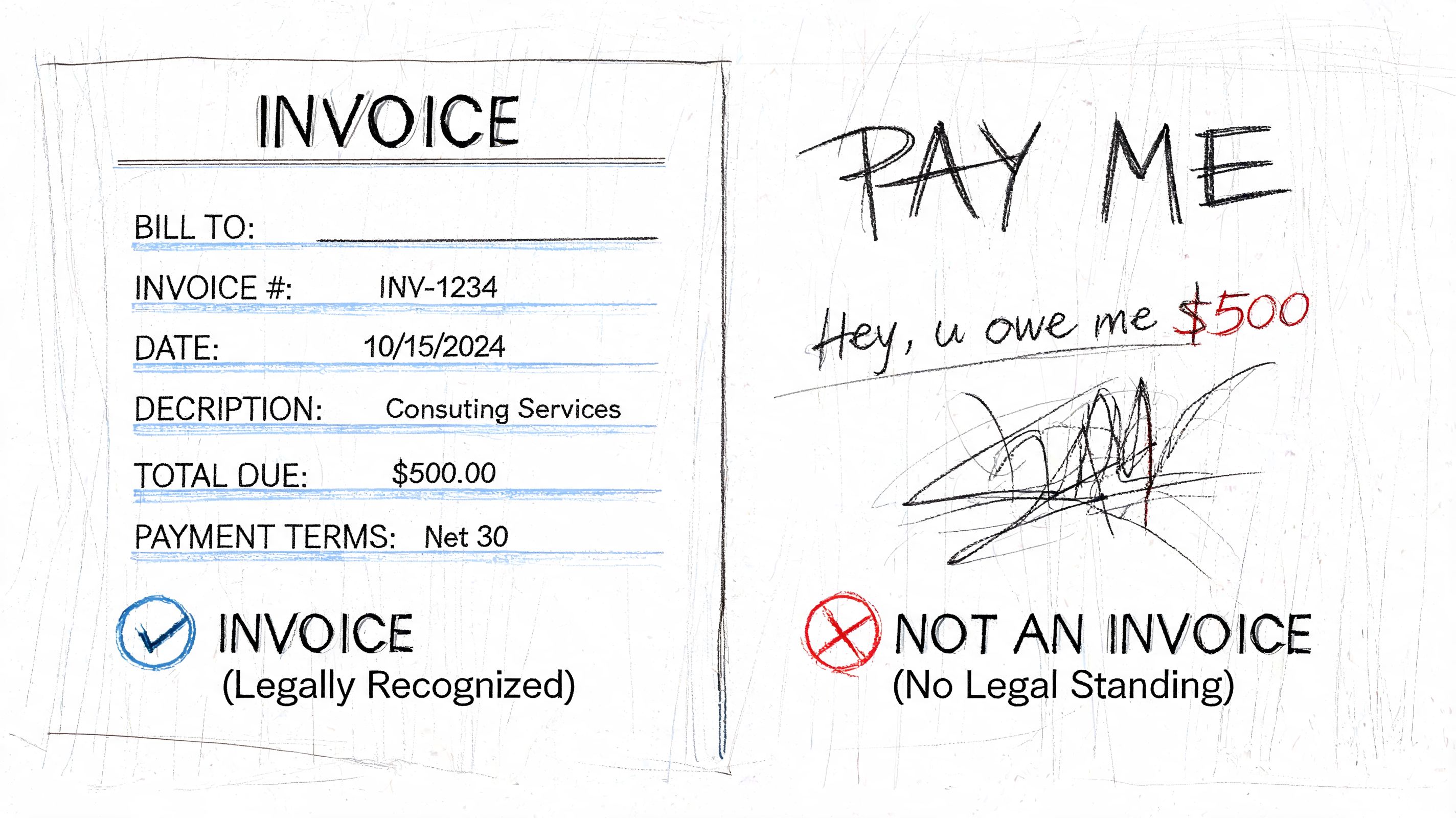
An invoice is a formal request for payment tied to a real transaction. It says, in business terms, “I delivered this. This is the amount owed. This is when payment is due.”
It helps to keep the IOU analogy in mind. An invoice isn’t vague. It’s a detailed IOU with names, dates, amounts, and terms attached.
What an invoice does
When you send an invoice, you are doing several things at once:
- Documenting the sale so both parties know what was delivered
- Triggering the payment process on the buyer’s side
- Creating an accounting record that can be tracked later
- Reducing misunderstandings about price, scope, or timing
A well-written invoice answers the buyer’s first questions before they ask them.
What it is not
New owners often mix invoices up with other documents. The differences matter.
| Document | What it means | When it’s used |
|---|---|---|
| Quote or estimate | A proposed price | Before the work starts |
| Purchase order | The buyer’s authorization to buy | Before or during fulfillment |
| Invoice | The seller’s request for payment | After goods or services are provided |
| Receipt | Proof that payment was made | After payment |
A quote is not money owed yet. A purchase order is not payment. A receipt means the payment already happened. The invoice sits in the middle. It is the official prompt that moves the transaction toward payment.
For solo operators who want a simple side-by-side explanation of receipts and invoices, Receipt Router's freelancer invoicing guide is a useful reference.
A lot of payment confusion starts when someone sends the right information in the wrong document.
Why buyers treat invoices seriously
An invoice usually enters a buyer’s bookkeeping or accounts payable process. That means it may be checked against an order, routed for approval, and saved for tax and audit purposes. Even when the relationship is friendly, the document itself needs to be businesslike.
That’s why “Can you just pay me?” and “Please find attached invoice 1048 for the agreed service period” produce very different results. One is informal. The other is something a finance team can process.
Anatomy of an Invoice The Key Fields Explained
If an invoice is a formal IOU, its fields are the details that make the IOU usable. Every line helps the buyer understand what they owe and helps the seller prove what was billed.
A complete invoice doesn’t have to be complicated. It does have to be clear.
The must-have fields
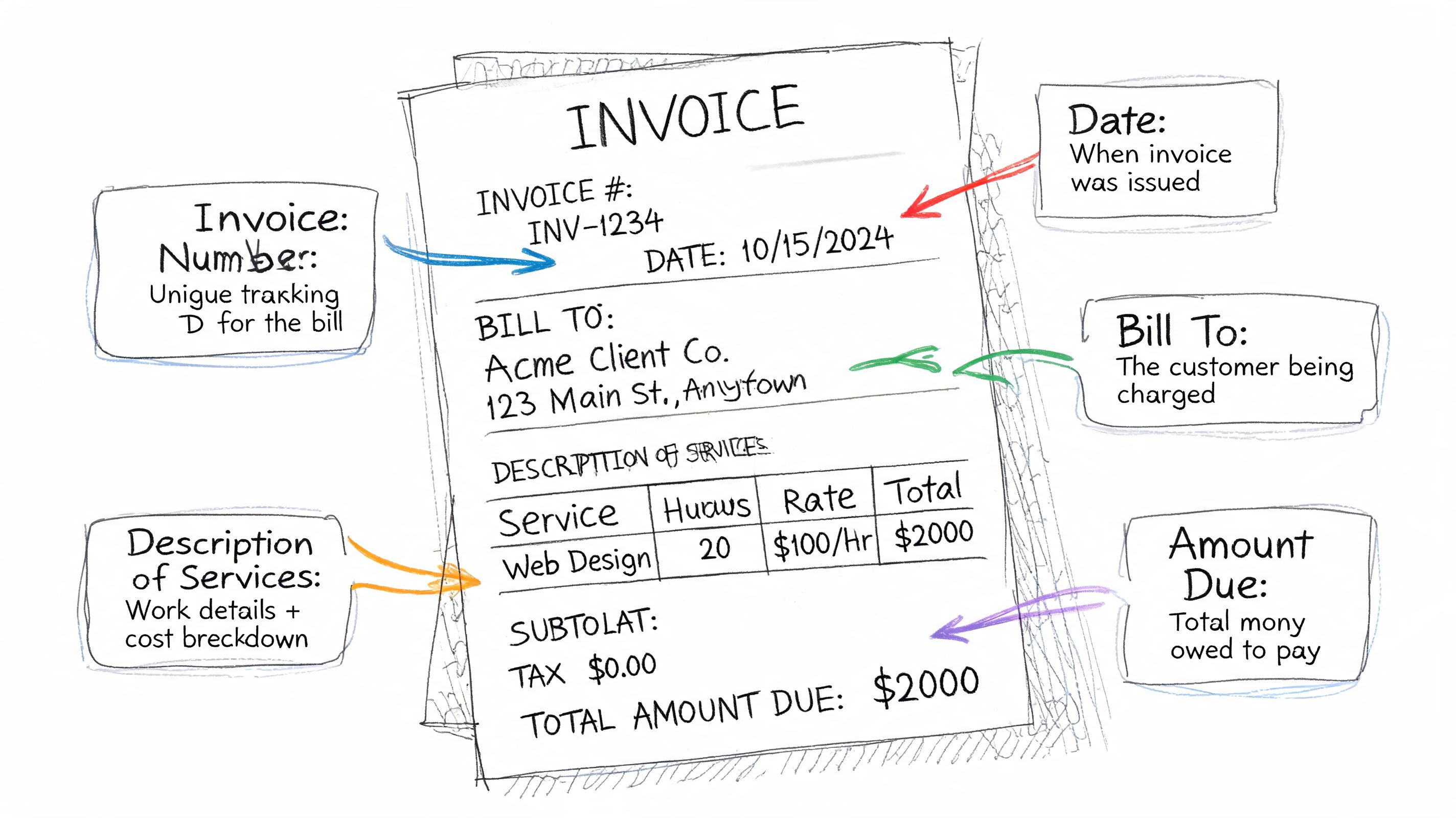
Most invoices should include these core items:
- Your business details. Your business name, address, email, and phone number.
- Customer details. The client’s business name and billing contact.
- Invoice number. A unique identifier so this invoice can be tracked.
- Issue date. The date you created and sent the invoice.
- Due date or terms. When payment is expected.
- Description of goods or services. Clear line items showing what was sold.
- Quantity and rate. Hours, units, or project fee details.
- Subtotal, taxes, discounts, and total due. The math must be easy to follow.
- Payment instructions. Bank transfer details, card link, check instructions, or another approved method.
Each field answers a practical question. Who sent this? Who owes it? What is being billed? How much? By when?
Why line items matter so much
Line items are where many invoices become either easy or painful. “Consulting services” is often too vague. “Consulting services for March content planning, 8 hours at agreed rate” is much better.
If you want a clearer explanation of how itemized billing works, this guide on what invoice line items are and why they matter is worth reading.
Here’s the broader reason line items matter. Proper invoice processing often requires capturing 8 to 12 data points per document with enough accuracy for audit trails. Key fields include the payment amount, check or invoice number, and the work period covered. Conditional payment terms may also need to be flagged for routing, as explained in GetBuilt’s guide to conditional and unconditional lien waivers.
The clearer the line item, the fewer emails you’ll get asking, “What exactly is this charge for?”
A quick reading habit for senders and receivers
Before sending or approving an invoice, scan it in this order:
- Identity. Is the right seller billing the right customer?
- Dates. Does the issue date and work period make sense?
- Amounts. Do quantity, rate, subtotal, and total agree?
- Terms. Is the due date stated clearly?
- Payment path. Is it obvious how the buyer should pay?
A short visual walkthrough can help if you’re more of a visual learner.
Where people get tripped up
Sellers often think an invoice is mainly about the total amount. Buyers often care just as much about the supporting detail. If the numbers are right but the context is missing, approval can stall.
That’s especially true when invoices include partial work periods, retained amounts, or exceptions. In those cases, accuracy isn’t just a nice touch. It’s what makes the document usable inside the approval process.
The Invoice Lifecycle From Issuance to Approval
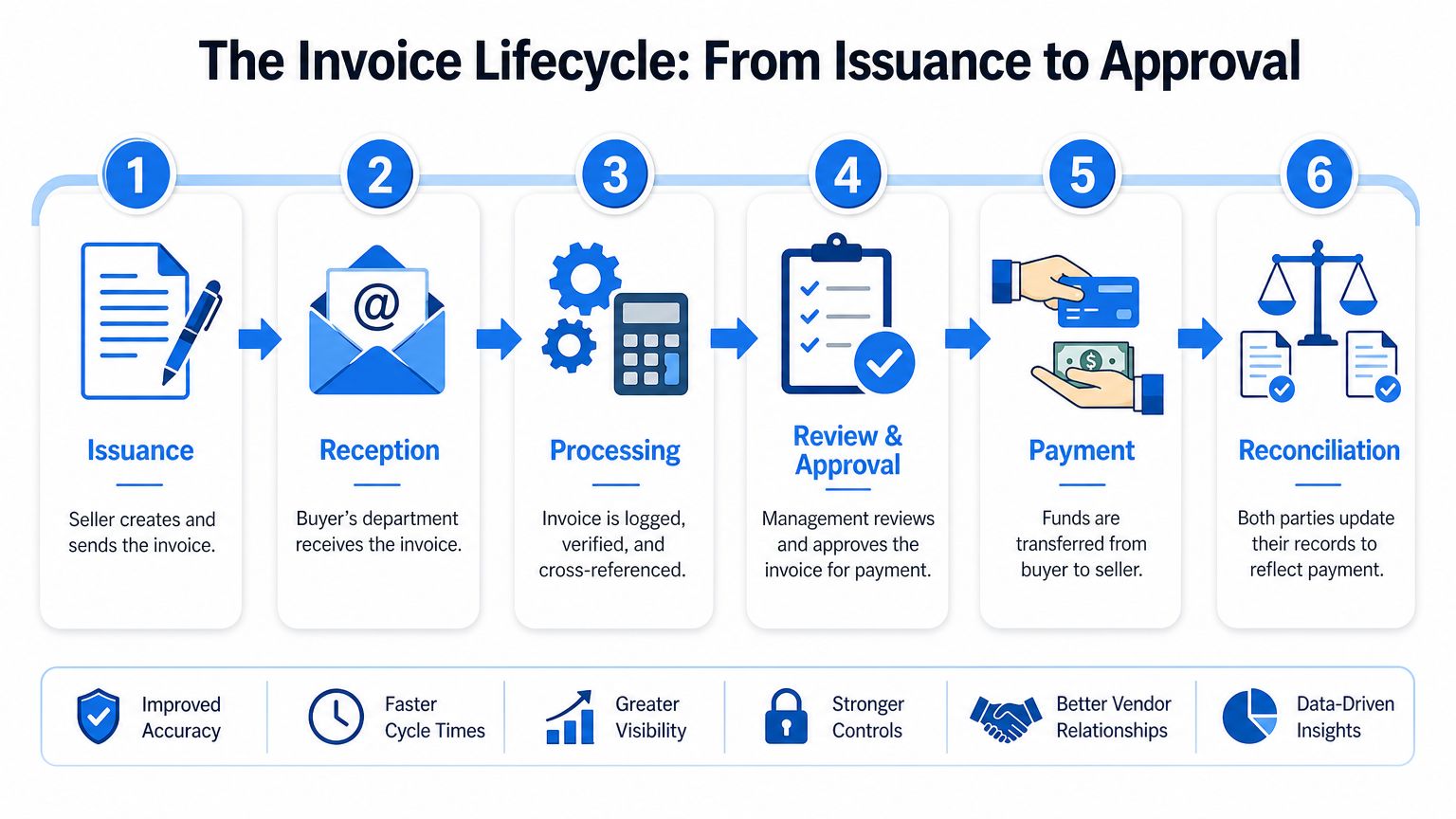
An invoice has a life after you send it. That’s the part many small business owners never see.
You email the invoice and assume the next step is payment. But inside the buyer’s business, that invoice usually travels through several hands and systems before money is released.
The six-stage journey
A typical invoice moves through a process like this:
| Stage | What happens |
|---|---|
| Issuance | The seller creates the invoice and sends it |
| Reception | The buyer receives it by email, portal, or mail |
| Processing | Someone logs it and checks the details |
| Review and approval | A manager or finance contact approves payment |
| Payment | Funds are sent |
| Reconciliation | Both sides update records to show the invoice is settled |
A fuller walkthrough of this workflow appears in this explanation of the invoice payment process.
What the buyer checks
Suppose you supplied office furniture to a company. Their team may compare your invoice to a purchase order and delivery confirmation before approving it. If the quantities don’t match, or the invoice references the wrong order number, the document can sit untouched until someone resolves the mismatch.
For service businesses, the check may be more human. A project manager confirms the work was completed, then accounting verifies the amount and terms. If that manager is busy or out of office, your invoice waits.
Some invoices are delayed because of disputes. Many more are delayed because they’re waiting for one person to approve them.
Where hidden friction shows up
The friction usually isn’t dramatic. It’s ordinary. A PDF arrives in the wrong inbox. A scanned invoice is hard to read. A line item is too vague. The approver doesn’t know which budget it belongs to.
Those small points of confusion are why getting paid can feel slower than it should.
In some industries, the process is even more layered. Construction is a good example. In that workflow, invoices may need conditional lien waivers attached, and the company must track the whole payment chain because a waiver from a primary subcontractor doesn’t protect against liens from lower-tier suppliers. That makes multi-document correlation essential, as explained in Contractor Foreman’s article on lien waivers in construction billing.
What this means for a small business owner
When a client says, “We’re processing it,” that often means your invoice is somewhere between reception and approval. That doesn’t always mean something is wrong.
It does mean your invoice has to be easy to route, verify, and approve. A clean document moves faster because it gives the buyer fewer reasons to pause.
Payment Terms Settlement and Accounting
Your invoice has cleared the approval stage. Now the question becomes simple and urgent. When does the money hit your account?
Payment terms answer that question. They are the timing rules written on the invoice, and they work like the due date on a formal IOU. “Due upon receipt” asks for payment as soon as the buyer has the invoice and approves it. “Net 30” means the buyer has 30 days from the invoice date to pay. “Net 60” gives them even longer.
Those few words shape your cash flow.
If you run a small business, the timing matters because your costs usually arrive before the customer’s payment does. Payroll, software subscriptions, materials, rent, and taxes do not wait for a client’s accounts payable team. A sale can be profitable on paper and still create stress if the payment terms are long.
How the invoice shows up in the books
Once an invoice is issued, it starts affecting accounting records on both sides.
For the seller, the invoice becomes accounts receivable. That is money expected from a customer. For the buyer, an approved invoice becomes accounts payable. That is money owed to a supplier.
You can picture the invoice as a formal IOU that lives in two filing cabinets at once. In your file, it is an asset because you expect cash to come in. In your customer’s file, it is a liability because cash will need to go out.
| Business role | Accounting effect |
|---|---|
| Seller sends invoice | Records accounts receivable |
| Buyer receives and approves invoice | Records accounts payable |
| Buyer pays invoice | Payable is cleared |
| Seller receives payment | Receivable is cleared |
That is why invoicing is more than a request for money. It feeds the records used to track expected inflows, upcoming outflows, and the gap between earning revenue and collecting cash.
Where settlement gets stuck
This stage often looks straightforward from the outside. Inside a finance team, it can be messy.
A buyer may receive invoices by email, vendor portals, PDFs, scanned documents, or accounting integrations. Someone may need to type the details into the payable system by hand, confirm the amount against a purchase order, and match the final payment to the correct invoice number. If one vendor sends neat digital invoices and another sends blurry scans with vague descriptions, the second invoice usually takes longer to settle.
That hidden friction is easy to miss if you only look at the sender’s side. From the buyer’s side, settlement is not just “pay the bill.” It is “enter it, verify it, code it, schedule it, send funds, and match the payment back to the right record.”
For a growing business, that administrative load adds up fast. If invoicing and payment tracking are taking too much time each week, experienced bookkeepers can help keep receivables, payables, and follow-up organized.
What settlement actually means
Settlement is the point where money moves and the invoice is closed correctly in the records.
The buyer pays by bank transfer, ACH, card, check, or another agreed method. The seller then applies that payment to the matching invoice. If the payment reference is missing or unclear, someone has to stop and investigate which invoice the money belongs to. That slows down reconciliation and can leave an already paid invoice looking open in the system.
A paid invoice closes the loop. An unpaid or unmatched invoice keeps showing up in aging reports, cash flow planning, and month-end accounting until someone resolves it.
Clear invoice numbers, clear remittance details, and realistic payment terms make this final step much easier. They do not remove every delay, but they give both the sender and the receiver fewer chances to get stuck.
Common Invoice Errors and How to Avoid Them
Most invoice problems aren’t caused by dishonesty or bad intent. They come from routine mistakes. A wrong date, a missing purchase order number, a duplicate send, or a line item that’s too vague can all stop payment.
The hidden cost is bigger than many owners realize. Industry data suggests 5% to 15% of manually processed invoices contain errors requiring correction before payment, which forces finance teams to spend extra time on reconciliation, according to BILL’s invoice processing overview.
The errors that show up most often
A few problems cause the bulk of invoice back-and-forth:
- Duplicate invoices. The same invoice gets sent twice, or two invoice numbers refer to the same work.
- Incorrect amounts. Rates, quantities, taxes, or subtotals don’t match the agreement.
- Missing reference details. The invoice doesn’t include the purchase order, project code, or service period the buyer needs.
- Vague descriptions. The buyer can’t tell what the charge covers.
- Wrong customer details. The invoice is addressed to the wrong legal entity or department.
Why these mistakes happen
The root cause is often manual work. Someone copies details from email threads, contracts, spreadsheets, or handwritten notes into a final invoice. If the incoming information is inconsistent, the invoice inherits that inconsistency.
This gets worse when businesses receive invoices in many formats. One vendor sends a polished PDF, another sends a scanned image, another exports from Excel, and another uses a custom layout. Humans can read all of them, but comparing them quickly and accurately is tiring work.
A prevention routine that works
A simple checklist can prevent a surprising number of issues:
- Use sequential invoice numbers so duplicates are easier to spot.
- Match the invoice to the agreement before sending. Check rate, quantity, and billing period.
- Include buyer-required references such as PO number or project name.
- Review the math separately from the wording. Calculation errors and description errors are different problems.
- Keep a sent-invoice log so you know what was issued, when, and to whom.
“Before you send an invoice, read it once as the seller and once as the buyer.”
What buyers can do too
The receiving side has responsibilities as well. Buyers should have a consistent intake process, a standard approval path, and a habit of checking invoices against supporting documents.
That’s especially important in businesses with multiple suppliers and mixed document formats. The more variety a team handles, the more valuable consistency becomes.
The Future of Invoicing How Automation Speeds Up Everything
Manual invoicing works when volume is low and formats are predictable. It starts to break down when invoices arrive from many vendors, in many layouts, with many approval rules attached.
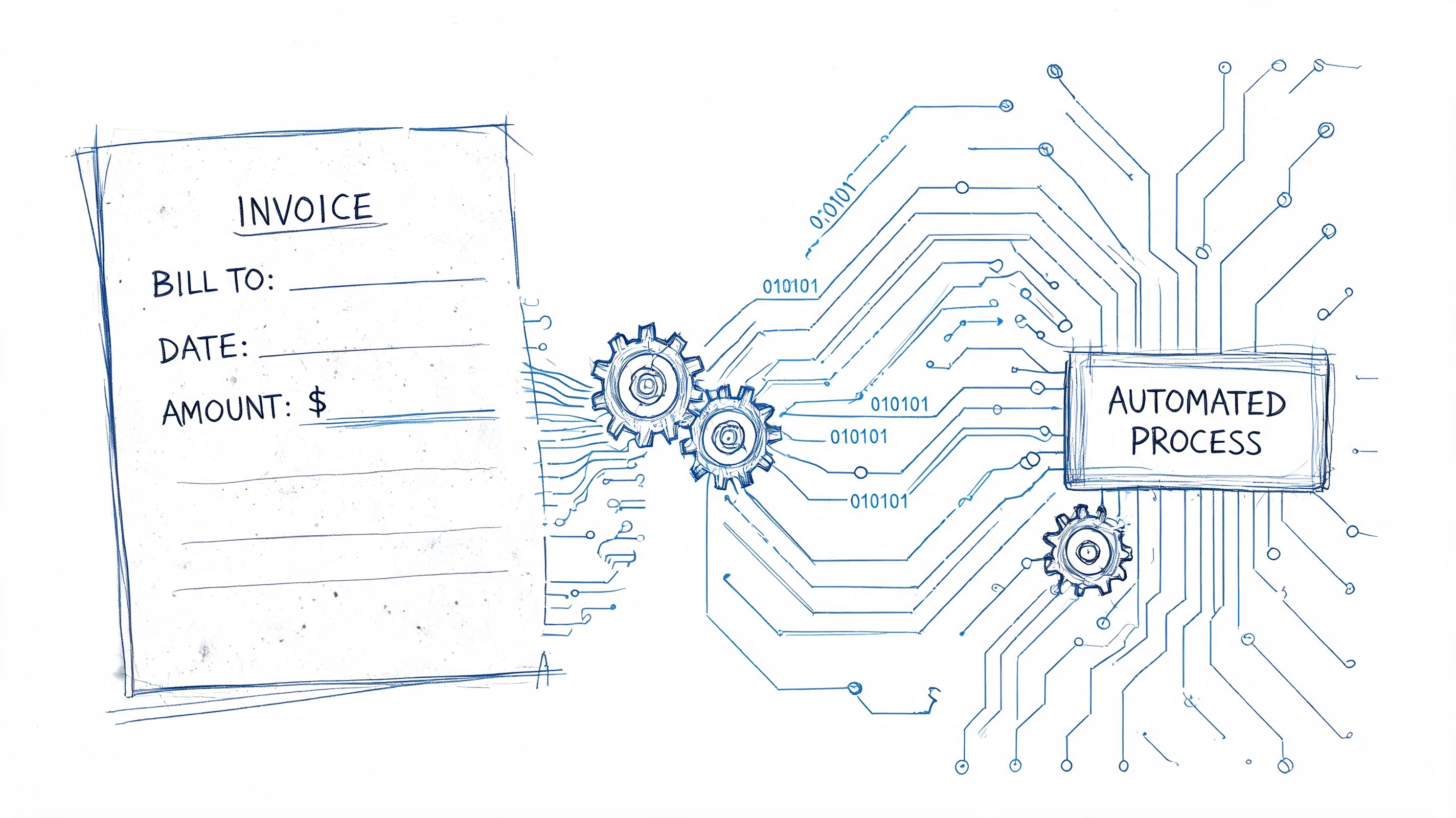
That’s where automation becomes practical, not fancy. It helps teams read documents faster, extract the important fields, and move invoices through review without so much typing, copying, and chasing.
What automation changes
Instead of a staff member opening each invoice and manually entering the details, an automated workflow can identify and extract fields like:
- Vendor name
- Invoice number
- Invoice date
- Amounts and totals
- Line items
- Payment-related details
That matters because the financial gap between manual and automated processing is large. Manual invoice processing costs $15 to $16 per invoice, while automated systems can reduce that to as low as $3 per invoice, an 80% savings, according to Hyperbots’ explanation of invoice data accuracy. The same source describes a material handling equipment company that cut book-closing time from 16 days to 6 days after using automated approval workflows.
Why this helps both senders and receivers
For senders, cleaner processing can mean fewer delays caused by missing or misread information.
For receivers, automation reduces repetitive data entry and makes it easier to standardize information from different document formats. A tool such as DocParseMagic’s automated invoice processing workflow can extract structured invoice data from PDFs, Word and Excel files, scans, and photos so teams can review the results in organized tables instead of retyping them.
Automation is not only about software
Some teams need help designing the workflow itself. If a business is building invoice intake, routing, and validation processes across several systems, it may make sense to hire dedicated AI automation engineers who can set up the handoffs and rules behind the scenes.
The real benefit
The key value isn’t just speed. It’s consistency.
When invoice data is captured in a structured way, approvals are easier, reconciliation is cleaner, and audit trails are stronger. Staff spend less time decoding documents and more time handling exceptions that require judgment.
If you’re still wondering how does an invoice work in a modern business, the answer is this: the principles haven’t changed, but the handling has. The invoice is still a formal IOU. The difference is that good systems now help businesses read it, route it, and settle it with far less friction.
If your team is tired of retyping invoice data from PDFs, scans, spreadsheets, and mixed vendor formats, DocParseMagic gives you a practical way to turn those files into clean, analysis-ready data. You can upload documents, extract the fields you care about, and move invoices into review faster without building a template-heavy process.