Your Guide to Automated Invoice Processing
Think about your accounts payable team for a moment. Are they buried under stacks of paper invoices? Or maybe drowning in a sea of email attachments, each one needing to be opened, read, and manually keyed into your accounting system? That's the old way of doing things.
This traditional process isn't just slow—it's expensive and practically invites human error. A single misplaced decimal point, a typo in a vendor number, or a delayed approval can cascade into incorrect payments, strained supplier relationships, and missed early payment discounts that hit your bottom line.
What Is Automated Invoice Processing?
Automated invoice processing is the modern answer to that operational headache. It's a system that uses technology to intelligently manage the entire invoice lifecycle, from the moment an invoice arrives until the final payment is sent, all with minimal human touch.
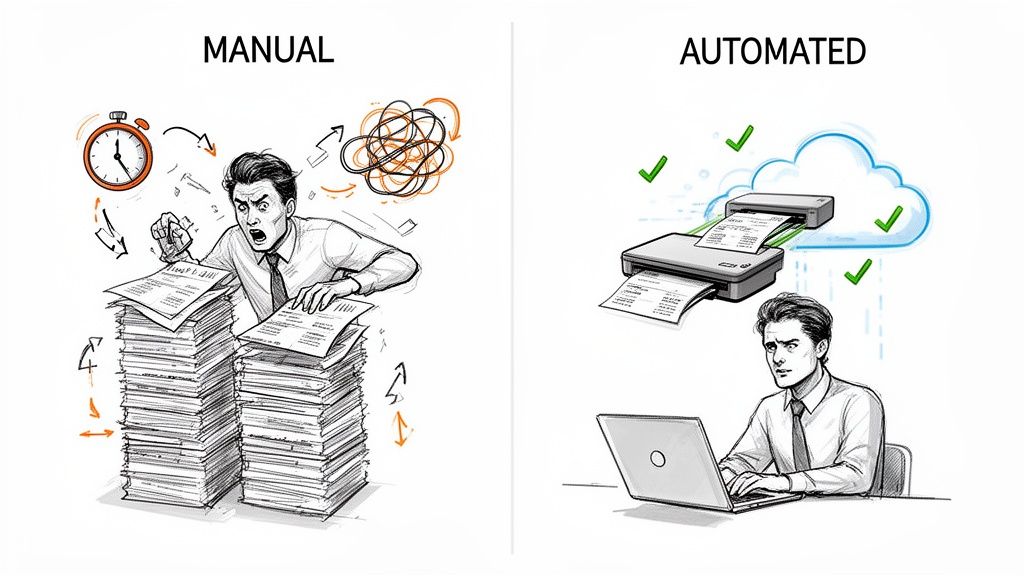
Think of it like a smart digital assistant for your finance department. Instead of your team manually sorting, reading, and entering data, the system automatically ingests invoices from any source—be it a PDF in an email, a scanned paper document, or an electronic file—and handles the rest.
From Manual Grind to Automated Flow
The real difference between manual and automated systems boils down to one word: efficiency. A manual workflow is purely reactive; it sits and waits for a person to push it to the next step. An automated workflow, on the other hand, is proactive. It uses technology to execute predefined rules and only flags things for human review when there's an exception.
The impact is huge. Studies consistently show that making this shift can slash invoice processing costs by as much as 80%.
To see just how different these two approaches are, let's put them side-by-side.
Manual vs Automated Invoice Processing at a Glance
This table gives a quick snapshot of the key differences between sticking with traditional invoice workflows and embracing a modern, automated system.
| Metric | Manual Processing | Automated Processing |
|---|---|---|
| Data Entry | 100% manual keying of data from invoices. | Automatic data extraction using AI and OCR. |
| Accuracy | Prone to human errors like typos and duplicates. | High accuracy with automated validation rules. |
| Approval Routing | Slow email chains and physical hand-offs. | Instant routing based on predefined workflows. |
| Processing Time | Days or even weeks per invoice. | Minutes or hours per invoice. |
| Visibility | Limited; status is often a mystery. | Real-time tracking of every invoice's status. |
As you can see, the improvements in speed, accuracy, and visibility are significant when you let technology handle the heavy lifting.
Why Automation Is a Game Changer
At the end of the day, automated invoice processing isn't just about paying bills faster. It’s about building a more resilient, scalable, and strategic finance department. When your team isn't bogged down by the drudgery of data entry and chasing approvals, they can finally focus on work that truly matters.
By eliminating repetitive tasks, automation empowers finance professionals to shift their focus from transactional work to strategic analysis, cash flow optimization, and vendor relationship management.
This transition unlocks tremendous value. Instead of just pushing paper, your finance team can start analyzing spending patterns, negotiating better terms with suppliers, and contributing directly to the company's financial health. In this guide, we'll dig into how this technology works and the real-world benefits it can deliver for your business.
The Tech That Makes Modern Invoice Automation Tick
To really get what automated invoice processing is all about, you have to peek under the hood at the technologies making it all work. These aren't just separate gadgets; they're a finely tuned system, kind of like a high-tech assembly line. Each part has a specific job, and together, they turn a messy pile of documents into clean, usable financial data.
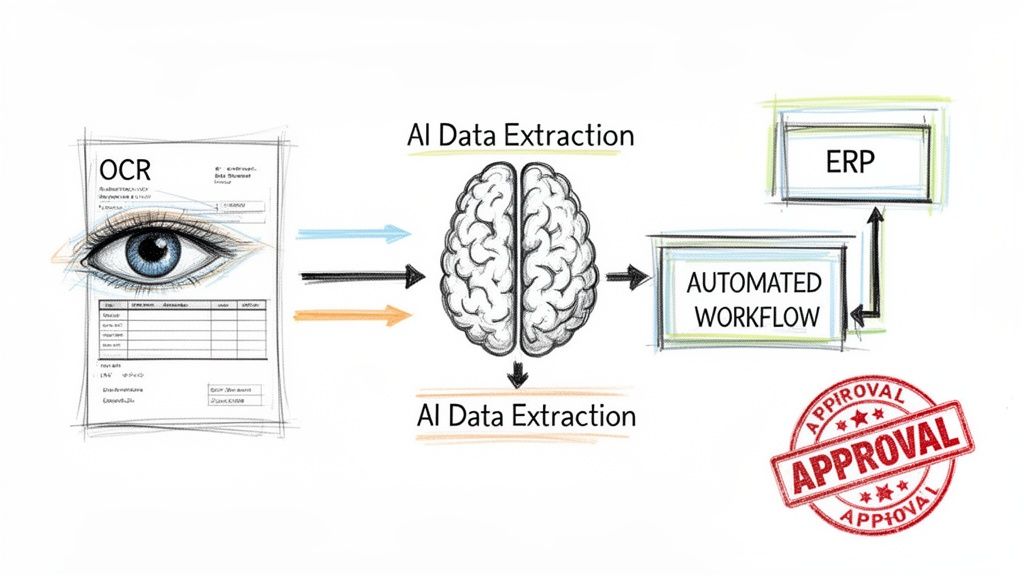
The whole process starts by grabbing the raw information from an invoice and then layering on more and more intelligence until it’s ready for payment—all without a single keystroke. Let’s break down the three core pillars that drive the entire operation.
Step 1: Optical Character Recognition (The Digital Eyes)
First things first, you have to get the invoice—whether it’s a PDF in an email or a scanned piece of paper—into a format a computer can actually read. This is where Optical Character Recognition (OCR) steps in. Think of OCR as the system's digital eyes. It looks at the document and converts the letters and numbers into raw text.
But OCR by itself isn't enough. It can read the characters, but it doesn't have a clue what they mean. For example, it might see the number "12345" but has no idea if that's an invoice number, a zip code, or how many widgets were ordered. That’s why modern platforms use OCR as just the starting point before handing the job off to something much smarter.
Step 2: AI-Powered Data Extraction (The Intelligent Brain)
This is where the magic really happens. Once OCR has turned the document into text, AI-powered Data Extraction acts as the system's brain. It doesn't just see the text; it understands it. This technology is a core part of what’s called Intelligent Document Processing, and its job is to tell the difference between all the key pieces of information on the page. If you're curious, you can learn more in our guide that explains what Intelligent Document Processing is.
The big difference here is that older, template-based systems made you manually map out where to find the invoice number or total amount for every single vendor. Modern AI is way more flexible. It can spot the important details no matter where they are on the page, including:
- Vendor Name and their contact info
- Invoice Number and Purchase Order (PO) Number
- Invoice Date and Due Date
- Line Items, complete with descriptions, quantities, and prices
- Subtotals, Taxes, and the Grand Total
This ability to adapt to any invoice format without needing a manual setup is a huge leap forward. It means you can process an invoice from a brand-new vendor just as easily as one from a supplier you've worked with for years, saving a ton of time on IT configuration and upkeep.
Today's AI models can pull data with over 95% accuracy, which dramatically cuts down on the time your team spends double-checking and fixing errors. That level of precision means you can trust the data flowing into your accounting system right from the start.
Step 3: Automated Workflows (The Central Nervous System)
With clean, accurate data in hand, the final piece of the puzzle is the Automated Workflow. This is the central nervous system of the operation, routing the right information to the right place at exactly the right time. A workflow is basically a set of rules you define that tells the system what to do next.
For instance, a common workflow might look like this:
- Match the Invoice to a PO: The system automatically cross-references the invoice details with the matching purchase order in your ERP.
- Route for Approval: If everything lines up (a "two-way match"), the invoice might get approved instantly. If there’s a mismatch or the invoice is over a certain amount (say, $5,000), it’s immediately sent to the right manager for a quick review.
- Sync with Your Accounting Software: Once it's fully approved, all the data is automatically pushed into your accounting software, like QuickBooks or SAP, creating a new bill ready for payment. No data entry needed.
Automating these business rules is what delivers the biggest efficiency gains. Just think about the speed. It used to take anywhere from 10 to 30 minutes to process a single invoice by hand. Now, AI-driven systems can do it in seconds. This allows automated workflows to handle an average of 30 invoices per hour, a massive jump from the five per hour managed manually—a 70% to 80% improvement. You can dig into more of these invoice processing benchmarks if you want to see the numbers.
What This Actually Means for Your Business
Let's move past the tech jargon. The real magic of automated invoice processing isn't just about fancy software; it's about the tangible, day-to-day impact on your company's bottom line, speed, and strategic focus. This isn't just an IT project—it's a financial and operational game-changer.
The benefits start with your budget and ripple out from there, touching everything from team morale to vendor relationships.
Stop Overpaying for Invoice Processing
Manual processing is one of those hidden costs that quietly eats away at your profits. Think about it: every invoice that lands on someone's desk kicks off a chain of expensive, human-powered tasks. Historically, that has cost companies anywhere from $10 to $15 per invoice.
With automation, that number plummets to under $3 per invoice. Industry-wide, businesses that make the switch have been shown to cut their invoice processing costs by a staggering 80%.
Where do these savings come from? You’re no longer paying people to manually type data, fix typos, hunt down approvals, or rifle through filing cabinets. The system does the heavy lifting in seconds, turning a major overhead cost into a minor, predictable expense.
The image below gives you a clear picture of just how dramatic this financial shift is.
It's a straightforward win. By taking manual labor out of the equation, you immediately free up cash for more important things.
Get Things Done Faster and More Efficiently
Cost is one thing, but speed is another. A manual workflow is full of frustrating bottlenecks. Invoices get buried in email inboxes, paperwork gets lost in interoffice mail, and managers are often too busy to sign off on payments. Automation breaks down these roadblocks and gets things moving.
This newfound speed unlocks some serious advantages:
- Actually Capture Early Payment Discounts: Lots of vendors offer a 1-2% discount if you pay within 10 days. Most companies miss out because their manual process is just too slow. Automation makes it easy to hit those deadlines, effectively turning your AP team into a source of revenue.
- Say Goodbye to Late Fees: Late payment penalties are not only a waste of money, but they also damage your reputation. By automating the approval and payment schedule, you can ensure every single bill is paid on time.
- Build Stronger Vendor Relationships: When you pay your suppliers quickly and reliably, you build trust. That goodwill often leads to better payment terms, priority service, and a much more stable supply chain.
The difference is night and day. Instead of taking days or even weeks to push a single invoice through the system, automation can handle the entire process in a few hours—sometimes in just a few minutes.
This efficiency gives your business more agility. You can manage cash flow with greater precision and react faster when market conditions change. For a deeper look at the advantages, check out our guide on the full spectrum of benefits from automated invoice processing.
Improve Accuracy and Stay Compliant
Let's be honest—people make mistakes. A simple typo during data entry can lead to an overpayment, a duplicate payment, or a messy financial report. Automated systems all but eliminate these human errors.
The software uses AI to cross-reference invoice data with your purchase orders, vendor files, and other internal rules. This ensures everything matches up before a payment is ever approved.
This gives you a much tighter grip on your finances. Every step is logged digitally, creating a clean, easy-to-follow audit trail. When the auditors come knocking, you won't be digging through boxes of paper. You can pull up any invoice and its entire approval history with just a few clicks, making audits faster, smoother, and a whole lot less stressful.
Your Step-by-Step Implementation Plan
Switching to automated invoice processing might feel like a huge undertaking, but you can make it manageable by breaking it down into a few clear steps. A good plan isn't just about plugging in new software; it's about fundamentally changing—and improving—how your finance team works. By following a structured roadmap, you can minimize disruptions, get your team excited about the change, and start seeing a return on your investment much faster.
This guide will walk you through the whole process, from figuring out what's broken now to keeping the new system running smoothly for years to come.
Step 1: Analyze Your Current Invoice Workflow
Before you can build a better process, you have to be brutally honest about the one you have now. This first step is all about a deep dive into your existing accounts payable workflow to find exactly where things get stuck, slow down, or go wrong. Don't just guess—get the real data.
Start by mapping out every single touchpoint an invoice has, from the moment it lands in someone's inbox until it's finally paid. Ask yourself and your team these questions:
- Where are the bottlenecks? Do invoices sit for days waiting on approvals from a specific department?
- What is your true cost-per-invoice? You need to factor in everything: employee time, software fees, printing, and even physical storage costs.
- How often do errors happen? Get a real count of duplicate payments, data entry mistakes, and misapplied GL codes.
- What is your average processing time? Clock it. How many days does it take from receipt to payment?
This analysis is critical. It gives you the baseline you'll use later to prove that your new automated system is actually working.
Step 2: Define Your Automation Goals
Once you have a clear picture of your current headaches, you can set specific, measurable goals for your new system. Vague ambitions like "improve efficiency" won't cut it. You need to turn your pain points into concrete targets that your team can rally behind.
A successful implementation starts with knowing exactly what you want to achieve. Whether it's cutting processing time by 50% or capturing 90% of early payment discounts, having clear objectives provides a benchmark for success and keeps the project from getting sidetracked.
Your goals should directly attack the problems you found in your analysis. For instance:
- Goal: Slash the average invoice processing time from 15 days to just 3 days.
- Goal: Drive the cost per invoice down from $12 to under $4.
- Goal: Eliminate all late payment fees within the first six months.
- Goal: Boost the capture rate of early payment discounts from a mere 10% to over 75%.
These specific metrics will become your key performance indicators (KPIs), letting you track progress and celebrate wins along the way.
The benefits you're aiming for really boil down to three key areas, as shown below.
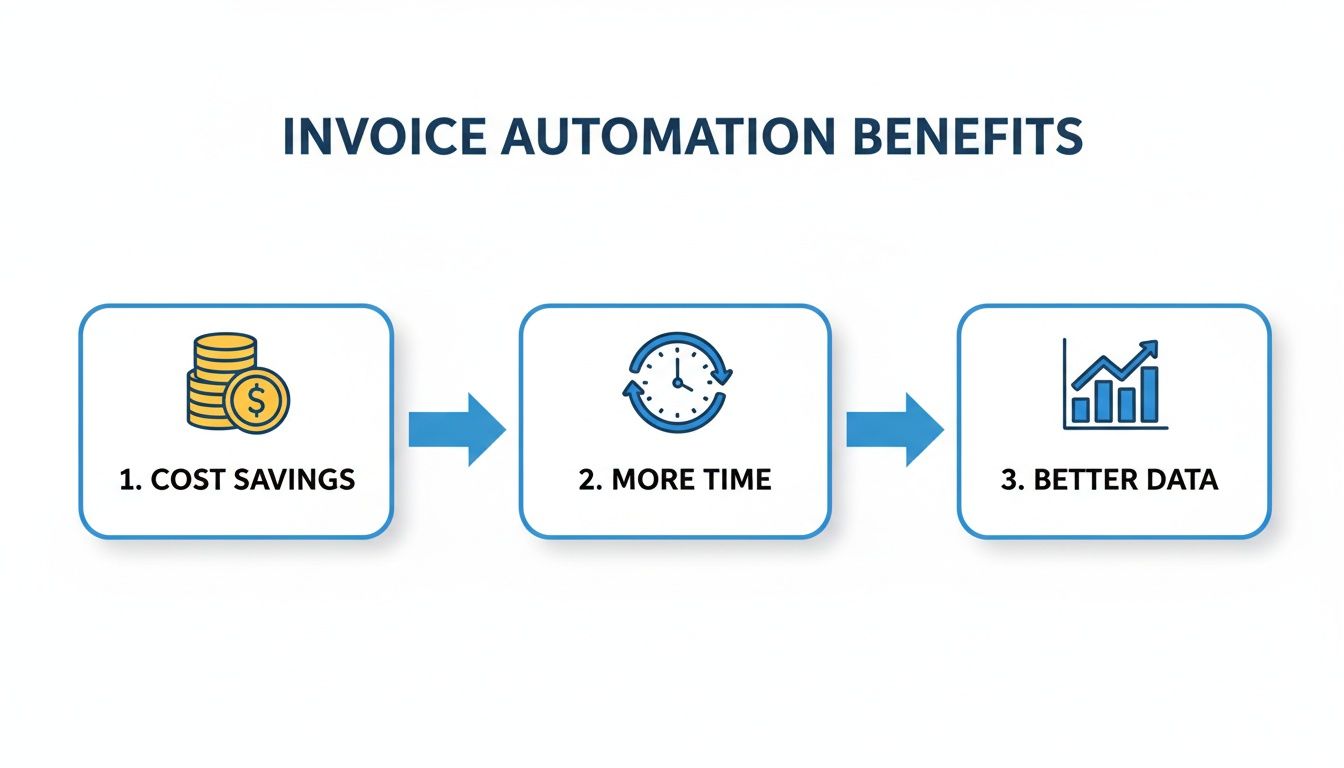
As you can see, automation directly translates into saving money, giving your team more time for valuable work, and providing cleaner data for smarter business decisions.
Step 3: Choose the Right Automation Partner
Let's be clear: not all automation tools are the same. The software you pick is the engine for your entire new workflow, so it’s crucial to find a platform that actually fits your business, plays nice with your existing tech, and is genuinely easy for your team to use.
Here's what to look for in a great solution:
- AI-Powered Data Capture: The system needs modern AI that can read and understand any invoice format you throw at it, without relying on rigid, outdated templates.
- Seamless ERP Integration: Make sure the software connects effortlessly with your accounting system—whether it’s QuickBooks, Xero, or SAP. This prevents manual data entry and keeps everything in sync.
- A User-Friendly Interface: The platform should feel intuitive to your finance pros, not just your IT department. A no-code solution empowers your own team to manage and tweak workflows without needing a developer.
When you're evaluating vendors, insist on live demos where they process your actual invoices. It’s the single best way to see how the software will handle the real-world complexities you deal with every day.
Step 4: Launch a Pilot Program
Instead of trying to flip the switch for the entire company at once—a "big bang" rollout that rarely goes well—start small with a focused pilot program. This approach lets you test the system in a controlled environment, iron out the wrinkles, and build some positive momentum.
Choose a small, representative group for the pilot. This could be a single department or even just the invoices from a few high-volume vendors.
During the pilot, you have three main objectives:
- Validate the Workflow: Make sure the automated approval routes and data validation rules are working exactly as you designed them.
- Gather Team Feedback: Listen to the users. Their input is gold for identifying small tweaks to the process or interface that can make a huge difference.
- Measure Initial Results: Start tracking your KPIs against the baseline you set in Step 1. Demonstrating early wins is the best way to get everyone else excited.
A successful pilot program does more than just test the software. It creates internal champions for the new system and gives you a powerful success story to share when it's time for the full company-wide rollout.
Seeing Invoice Automation in Action Across Industries
It's one thing to talk about the technical side of invoice automation, but where it really clicks is seeing how it solves real problems for real businesses. While every industry faces its own unique set of challenges, the core promise of automation—making things faster, more accurate, and less of a headache—is something everyone can get behind.
Let’s take a look at how teams in three very different fields are using this technology. These aren't just generic case studies; they're quick snapshots of how a flexible tool can be shaped to fit specific, everyday operational pains.
The Accounting Firm That Reclaimed Its Time
Picture a bustling accounting firm that serves dozens of small businesses. Every month, they're hit with a tidal wave of invoices from their clients' suppliers, each with a different layout. Manually punching all that data into the books was a soul-crushing task, eating up more than 10 hours of a senior accountant's valuable time each week.
After bringing in an automated invoice processing system, their entire workflow changed. Invoices are now captured and read automatically, with the system pulling out key data with impressive accuracy. It even gets smart enough to code expenses to the right general ledger accounts before syncing everything with each client's accounting software.
The change was immediate. The firm got those 10 hours back every single week. This freed up their experts to focus on strategic advisory work that clients actually value—and are happy to pay more for. They could suddenly handle more clients without hiring more people, which directly grew their bottom line.
The Manufacturer That Stopped Leaking Money
Now, let's step onto the floor of a mid-sized manufacturing plant. Their procurement team was in a constant struggle to make sure they weren't getting overcharged for raw materials. The root of the problem was the painstaking process of manually matching supplier invoices against purchase orders (POs) and goods receipt notes (GRNs). This three-way matching was slow, tedious, and a perfect recipe for human error.
Even a tiny discrepancy could mean paying for materials that never showed up or getting billed at the wrong price. Over a year, these small leaks added up to a serious financial drain. Worse, the delays meant they were always missing out on early payment discounts from their most important suppliers.
With an automated system in place, that three-way match now happens in a blink. An invoice comes in, and the software instantly checks its line items against the PO and the GRN.
- If it's a perfect match: The invoice is green-lit for payment right away.
- If something's off: The system instantly flags the problem and sends an alert to the procurement manager with all the necessary documents attached.
This simple change put an end to costly overpayments and helped them capture every single early payment discount available.
The Insurance Agency That Sped Up Payouts
Finally, let’s visit an independent insurance agency. At the end of every month, they get hit with massive, multi-page commission statements from all the different insurance carriers they work with. Trying to make sense of these was a true nightmare. An agent had to manually hunt down each policy, double-check the commission, and key it into their system.
The whole process took so long that it consistently delayed closing the monthly books, leaving them in the dark about their actual revenue. Mistakes were frequent, leading to frustrated agents who were paid incorrectly and financial reports that couldn't be trusted.
By adopting automated invoice processing, they completely overhauled their reconciliation. The software now reads each carrier statement, pulls out the policy numbers and commission data for every line, and neatly organizes it all. The finance team can now reconcile commissions in a fraction of the time, close their books faster, and most importantly, pay their agents the right amount, on time, every time.
Choosing the Right Invoice Automation Software
Picking the right software for automating your invoices is a huge decision. It's not just about buying a tool; it's about finding a partner. The right choice can free up your team and deliver incredible insights, but the wrong one will just trade one set of problems for another. You need a solution that fixes today's headaches and can still keep up as your company grows.
It’s like buying a vehicle. You wouldn't get a two-seater sports car if you have a family of five and need to haul soccer gear. You need something that fits your life. In the same way, your invoice automation software has to be a perfect match for your finance team’s unique needs, your existing workflows, and the systems you already use.
Look Under the Hood at the Core Technology
The heart of any invoice automation platform is its data extraction technology. Honestly, this is the most critical piece to get right. Many older systems are still stuck using rigid, template-based OCR. That means for every new vendor invoice that comes in, someone has to manually create a map showing the software where to find the invoice number, the date, and the line items. It’s fragile and a constant maintenance nightmare.
A modern solution should be built on AI and machine learning. This lets the software actually understand an invoice, intelligently finding and pulling the data it needs—no matter the layout. It learns and adapts on its own, which makes it far more powerful and reliable.
When you’re talking to vendors, give them a stack of your messiest, most confusing invoices and ask them to process them live in the demo. That’s the quickest way to see if their tech is the real deal or just a shiny new interface on an old, clunky engine.
Make Seamless Integration a Top Priority
Your invoice tool can't be an island. It has to talk to your other financial systems, especially your accounting software or ERP. If it doesn't, your team will be stuck manually keying in data all over again, which completely defeats the point of automating in the first place.
Look for platforms with pre-built connections to common systems like QuickBooks, Xero, Sage, or NetSuite. If you're running on a custom or older system, make sure the vendor has a solid API or at least offers simple ways to get data out, like CSV or Excel exports. You can find many automated invoice processing software options that are built with easy integration in mind.
Demand a No-Code, User-Friendly Experience
The best tools are built for the people who will be in them all day: your finance and AP teams. A platform that requires a developer or an IT expert to make simple changes will only slow you down and frustrate everyone.
Look for a no-code solution with a simple, intuitive interface—think drag-and-drop. This puts the power back into the hands of your accounts payable staff. They should be able to tweak approval workflows, adjust rules, or add new vendors themselves without having to log a single IT ticket. That kind of self-service is what really drives efficiency and gets you the best return on your investment. The software should serve your team, not the other way around.
Got Questions? We've Got Answers
Let's tackle some of the common questions that pop up when teams are looking at automating their invoice processing. Getting these answers sorted can help you move forward with a clear head.
How Tech-Savvy Does My Team Need to Be?
That's the best part—not very. Most modern invoice tools are built specifically for finance pros, not developers. You'll find that the best platforms have simple, drag-and-drop interfaces that let you get started in minutes. The whole point is to empower your current team, not force them to learn code.
What About Really Complicated Invoices?
Yep, they can handle them. This is where today’s AI-powered systems really pull ahead of the pack. They're smart enough to read and pull data from tricky, multi-page invoices, including all the nitty-gritty line item details like quantity, unit price, and SKUs.
The old way involved building a rigid template for every single vendor. Modern AI is different; it learns and adapts to new invoice layouts on its own. This saves a massive amount of time on setup and maintenance.
This ability to adapt is what makes modern automated invoice processing so powerful.
How Does This Plug Into Our Existing Accounting Software?
Integration is usually straightforward. Most platforms are designed to play nicely with the tools you already use and often have pre-built connectors for a simple, one-click setup.
Common connections include:
- QuickBooks: To create bills and track payments automatically.
- Xero: For syncing invoice details right into your general ledger.
- Sage: To link your accounts payable workflow directly with your main financial system.
If you're using a custom-built or older system, there are always options. You can typically export data as a simple CSV or Excel file, or use an API for a truly seamless connection. This ensures your books are always accurate without anyone having to type a single number.
Ready to stop the manual data entry grind? DocParseMagic turns messy invoices and statements into clean, actionable data in minutes. Sign up for free and see how it works.