Bank Statement Checker: Your 2026 Guide to Verification
You’re probably looking at one of three situations right now. A borrower sent a PDF that “looks fine” but feels off. Your accounting team is buried under statement reviews and manual reconciliation. Or you’re trying to verify cash flow from a mix of bank PDFs, mobile screenshots, and exports from newer financial platforms that don’t fit the old playbook.
A bank statement checker is supposed to make that easier. But good verification still starts with judgment. Software helps most when you already know how a genuine statement should behave, where fraud tends to show up, and which edge cases break otherwise solid workflows.
The practical reality is simple. Manual review is still useful for building pattern recognition. Automated checking is what makes the work scalable, consistent, and fast enough for modern underwriting, accounting, and operations teams.
The Foundations of Manual Bank Statement Auditing
A manual statement audit starts before you read a single transaction. First decide what question you’re trying to answer. Are you confirming income stability, validating business cash flow, reconciling reported balances, or checking whether a document itself is authentic? That purpose changes what you focus on.
When analysts skip that step, they often review statements mechanically. They confirm that transactions exist, but miss what the statement is saying. A bank statement isn’t just a list of debits and credits. It’s a timeline of behavior, timing, consistency, and pressure points.
Start with document identity checks
Before reviewing cash flow, verify the frame around it.
Check these basics first:
- Account holder details should match the person or business you’re reviewing. Names, partial account numbers, and mailing details need to align with the file package and the application.
- Statement period must make sense for the decision you’re making. Gaps between months often matter as much as what appears within a month.
- Institution branding and formatting should be internally consistent from page to page. If page one looks polished and later pages look slightly different, slow down.
- Opening and closing balances should connect logically across consecutive statements when you have more than one month.
If you need a visual refresher on statement anatomy before going deeper, Senki’s modern guide to reading bank statements is a useful companion. It’s especially helpful for newer reviewers who need a clean baseline.
Practical rule: If the statement header information doesn’t make sense, don’t trust the transaction detail until you resolve that first.
Build a transaction review rhythm
Strong manual auditors don’t read every line with the same intensity. They scan for structure first, then zoom in on exceptions.
A reliable rhythm looks like this:
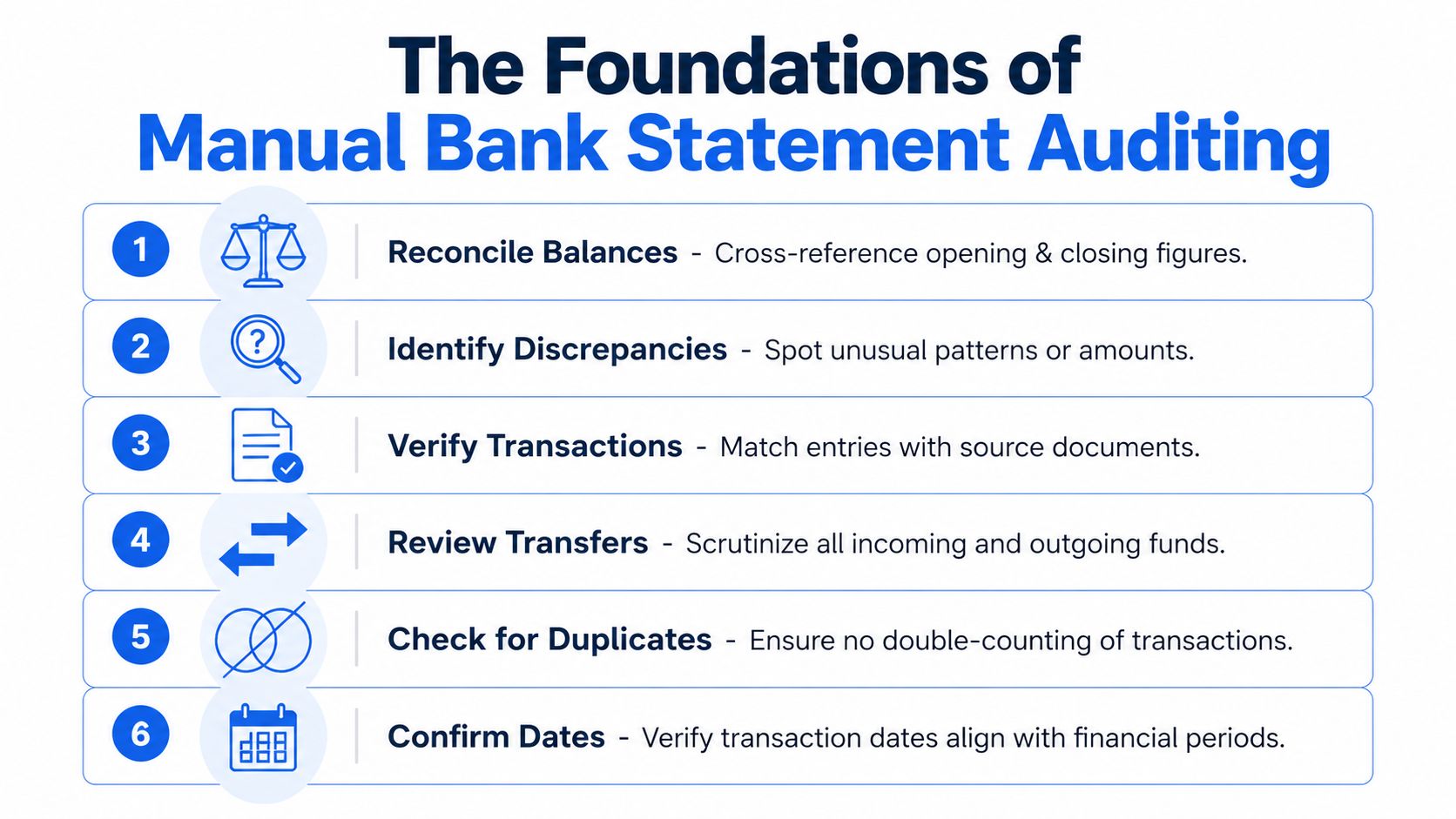
-
Reconcile the balances
Confirm that the opening balance plus credits minus debits equals the closing balance. If the arithmetic fails, either the statement is altered or there’s a reading issue that needs explanation. -
Mark recurring inflows
Salary, client payments, transfers, benefits, and reimbursements can look similar at first glance. Separate true recurring income from internal movement. -
Tag recurring outflows
Rent, loan payments, subscriptions, insurance, and utility payments tell you whether the account behavior is stable or strained. -
Flag large one-off items
A single deposit may be legitimate. It may also be borrowed funds, a transfer from another account, or a temporary balance boost. -
Review transfer behavior
Transfers often distort the financial picture. Money moved between owned accounts isn’t new income. -
Check date logic
A statement can be numerically correct and still misleading if transaction timing is manipulated around period ends.
For many teams, examples prove useful. A side-by-side bank statement example walkthrough can help reviewers see what normal structure looks like before they start hunting for anomalies.
Calculate a few metrics manually
Manual review becomes more disciplined when you compute core figures yourself at least a few times. That practice sharpens judgment and helps you catch outputs that software may later generate incorrectly from poor input files.
Focus on a short working set:
| Manual check | What it tells you |
|---|---|
| Average monthly income | Whether inflows are consistent or irregular |
| Lowest balance during period | How close the account runs to stress |
| Total recurring debt payments | Ongoing fixed obligations |
| Frequency of overdraft-related behavior | Financial strain or poor account management |
| Share of deposits from likely transfers | Whether reported income is inflated |
You don’t need a complex model to learn a lot. Even a rough worksheet often reveals patterns that a quick glance misses.
What manual review catches well and where it breaks
Manual auditing is still good at one thing machines struggle with in isolation. Context. A human reviewer can tell when a statement feels commercially unusual even if every line item technically parses.
That said, manual review has obvious limits:
- Fatigue sets in fast when you’re checking long statements or large file batches.
- Cross-account analysis gets messy when applicants submit multiple accounts and overlapping transfers.
- Messy scans slow everything down because reviewers spend time reading the file rather than evaluating risk.
- Inconsistent judgment appears when different staff members use different review habits.
A careful manual review builds instinct. It doesn’t scale well on its own.
That tension is exactly why automated bank statement checker tools became so valuable. They don’t replace judgment. They remove the repetitive reading work so judgment can be used where it matters.
Identifying Red Flags for Fraud and Financial Errors
A statement can look polished and still be wrong.
Fraud review usually breaks down when a reviewer hunts for one obvious giveaway instead of testing whether the document holds together under pressure. Strong review starts with coherence. Do the layout, dates, balances, transaction patterns, and account behavior all support the same story? If they do not, keep pulling.
The first layer is document integrity
Start with the file itself before judging the finances inside it. On a manual review, I want to know whether I am looking at a native bank document, a poor export, or something that has been edited after download.
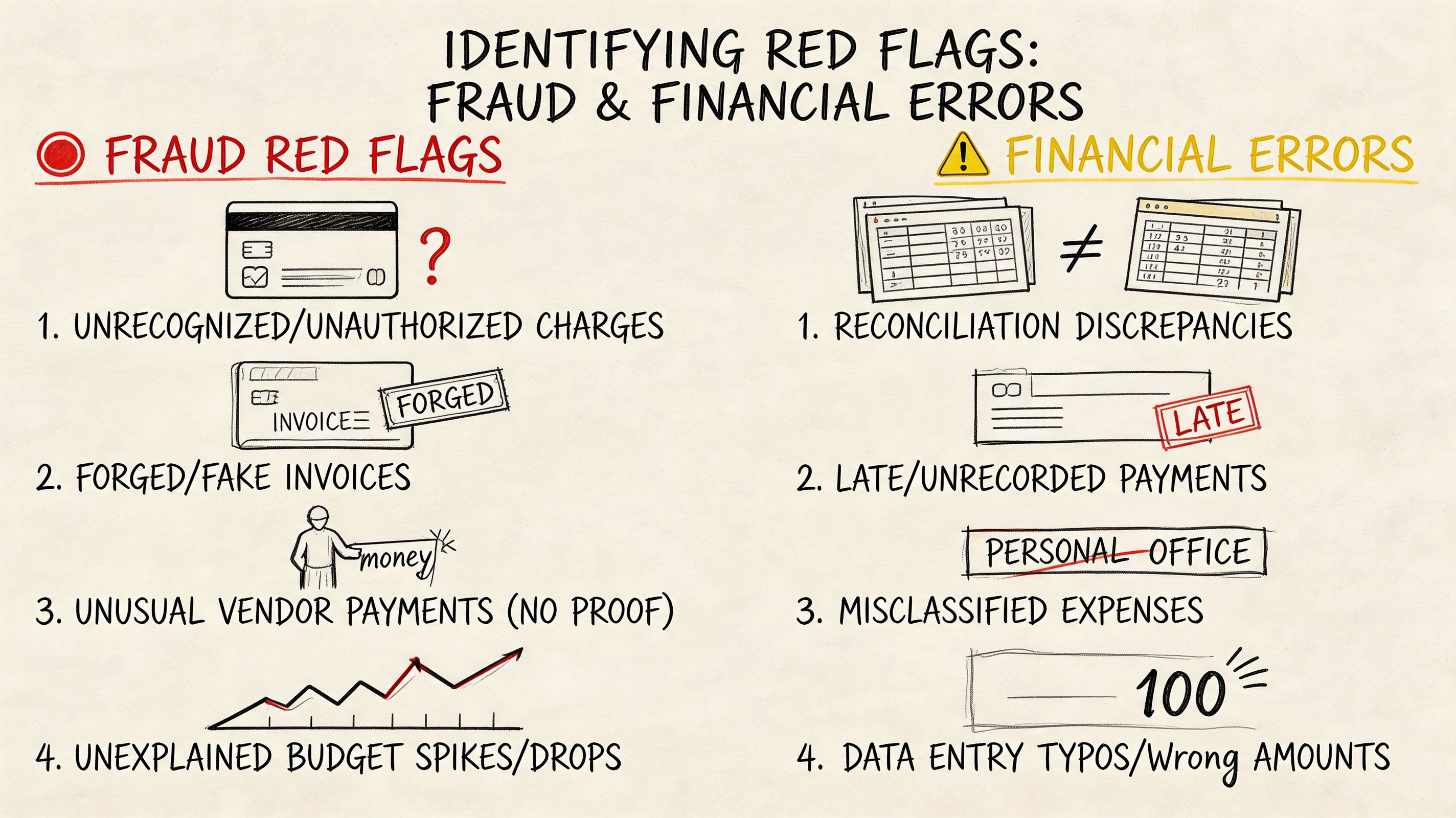
Common warning signs include:
- Font changes inside the same transaction table
- Uneven spacing around amounts, dates, or descriptions
- Decimals that do not align across rows
- Page numbering gaps or sequence changes
- Headers or footers that shift from one page to the next
- Balance fields that look different from nearby text
None of these points proves fraud on its own. Banks produce inconsistent PDFs, and scanned files can look rough. But cosmetic friction paired with suspicious transactions deserves a harder check. Teams that regularly receive attached statements rather than bank-feed data should also understand the quirks of working with PDF bank statements in verification workflows, because formatting problems and tampering can look similar until you test the numbers.
The second layer is transaction behavior
After the document passes a basic integrity check, examine whether the account behaves like a real day-to-day account for the person or business behind it.
The patterns that raise concern usually appear together:
| Pattern | Why it matters |
|---|---|
| Frequent round-number deposits | May point to staged cash flow instead of normal earnings |
| Heavy transfers between related accounts | Can make income look larger than it is |
| Same-day credit and debit reversals | May indicate circular funding or temporary balance support |
| Sudden income jump near an application date | May reflect short-term positioning rather than stable income |
| Repeated low-balance pressure | Suggests strain or weak cash control |
| Missing normal living or operating expenses | Questions whether this is the primary account |
One of the hardest calls is separating earned income from internal movement. An account can show healthy inflows and still fail basic plausibility. If deposits arrive regularly but there is little evidence of rent, payroll, supplier payments, utilities, card spend, or other ordinary outflows, the statement is incomplete, unrepresentative, or staged.
Treat transfers as unverified until you can show they come from outside the applicant’s own account network.
Arithmetic failures carry more weight than visual suspicion
Visual review finds leads. Arithmetic confirms them.
A forged statement may survive a quick read, but it often breaks when you test the mechanics:
- Running balance logic from one line to the next
- Opening and closing balance reconciliation
- Consistent treatment of credits and debits
- Month-end balances carried correctly into the next period
- Transaction dates that fit the stated period
When the running balance fails, escalate immediately. At that point, one of three things is true. The source statement is wrong, the extraction is wrong, or the document was altered. All three require follow-up.
Risk signs often show up before clear fraud signs
A clean statement can still describe a weak borrower or a stressed business. That distinction is critical because authenticity and credit quality are separate judgments.
Watch for combinations like these:
- Regular incoming funds that trend downward
- Debt payments that stay current but consume more of each month’s inflow
- Rising cash withdrawals while balances decline
- Returned items or reversals mixed with unstable deposit timing
- Reported income with little cash retention after obligations clear
These patterns do not automatically indicate manipulation. They often indicate pressure. In underwriting, audit, and fraud operations, that changes the decision path. The file may be genuine and still support a lower limit, a request for more statements, or a manual review of source-of-funds.
Errors can mimic fraud until you trace the source
Understanding common pitfalls helps experienced reviewers save time. Strange formatting, duplicated entries, and missing lines are not always signs of deception. OCR mistakes, merged PDFs, mobile scans, and broken exports create false alarms every day, especially when teams review statements from traditional banks, neobanks, and newer financial apps in the same queue.
Use a simple escalation sequence:
If the issue is visual, test the arithmetic. If the issue is arithmetic, test continuity across pages and periods. If both fail, treat the file as high risk.
That workflow works across old-style bank PDFs and less standardized statement sources. The tool changes. The logic does not.
How Automated Bank Statement Checkers Work
A reviewer opens a statement packet that looks ordinary at first glance. One file is a clean bank PDF. Another is a mobile screenshot from a neobank. A third is an export with broken columns. The checking standard should stay the same across all three. Automated bank statement checkers matter because they turn that mixed input into one review process with consistent tests.
Manual review still sets the standard for judgment. Automation handles the repetitive work that slows teams down, such as extracting rows, standardizing formats, recalculating balances, and flagging exceptions for review. The result is not fewer controls. It is tighter control applied faster.
Intake sets the ceiling for quality
Weak tools fail early. They work well on ideal PDFs, then break on scans, page photos, password-free statement downloads, or document bundles that include unrelated pages.
A usable checker has to ingest different file types, isolate the statement pages, and preserve the reading order before any real analysis starts. That is why many finance and risk teams still need file-based workflows even if they also use open banking feeds. Direct connections help with standard bank data. File ingestion still matters for emailed statements, historical documents, neobank exports, and edge cases that arrive outside a bank API. A practical reference on working with PDF bank statements in automated workflows is useful if your intake queue still starts with attachments.
Extraction works only if the tool understands statement structure
Generic OCR reads characters. A bank statement checker has to read a ledger.
The difference shows up in familiar failure points: wrapped descriptions that shift columns, credits and debits displayed inconsistently, running balances that sit too close to transaction amounts, and scanned pages with skew or low contrast. Generic text extraction often captures something readable but not something reliable enough to analyze.
A financial-specific engine goes further. It identifies the transaction table, separates dates from descriptions, maps debits and credits into a consistent schema, and keeps balances tied to the right row. That matters on traditional bank statements, but it matters even more on less standardized sources such as digital wallet exports and neobank statements, where labels and layouts vary more than many guides admit.
Classification turns extracted rows into usable evidence
After extraction, the checker labels activity. That is the point where raw statement text becomes something an analyst can test.
Useful categories usually include payroll or business income, transfers, loan payments, rent, utilities, card spending, cash withdrawals, fees, and refunds. Better systems also detect recurring patterns, such as monthly debt servicing, repeated inbound transfers from the same source, or frequent balance top-ups that can distort a simple income read.
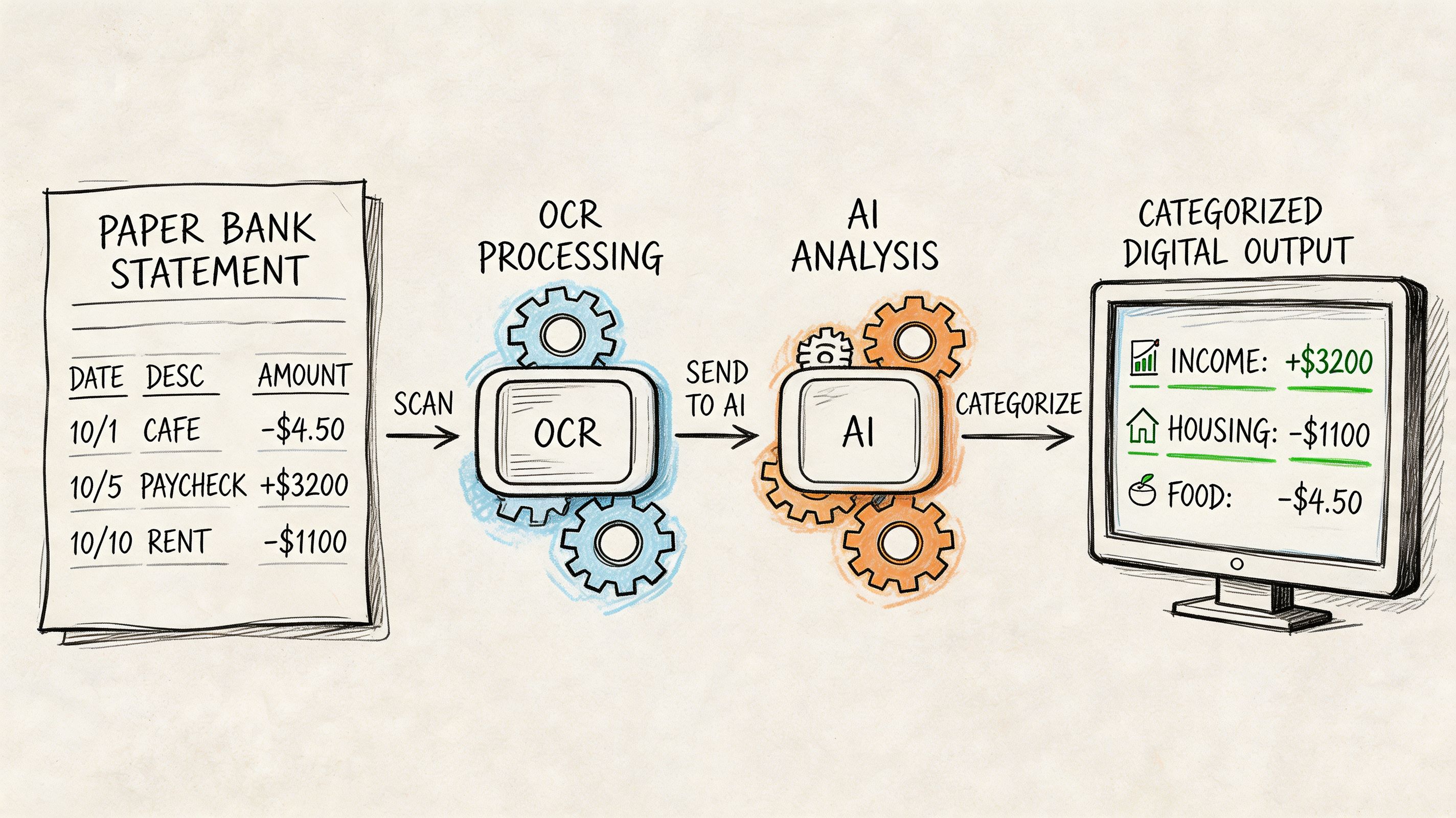
A capable workflow usually follows this sequence:
- Ingest the file from PDF, image, scan, or export.
- Extract dates, descriptions, amounts, balances, and account identifiers.
- Normalize date formats, decimal formats, and debit or credit conventions.
- Classify transactions with rules plus model-based pattern matching.
- Recalculate ledger continuity to confirm that rows behave like a real statement.
- Flag document anomalies and transaction patterns that need human review.
- Export a structured result for underwriting, audit, reconciliation, or investigation.
Validation separates extraction tools from actual checkers
A parser can read a statement. A checker has to challenge it.
Strong systems test arithmetic across the ledger, confirm opening and closing balance continuity, look for missing pages or duplicated transaction blocks, and compare layout behavior across pages. Some also inspect document-level anomalies such as inconsistent fonts, irregular spacing, page substitutions, or metadata conflicts. Those tests do not prove fraud by themselves, but they reduce the risk of trusting a polished fake or a damaged file.
This is the standard I use in practice. If the rows extract cleanly but the balances do not reconcile, the file is not ready for decision use. If the balances reconcile but the document structure is inconsistent, it still needs review. Automation earns its place when it narrows the analyst's time to exceptions rather than forcing a full manual rebuild of every statement.
Good automation tests whether the document behaves like a real financial record, not just whether text can be read from the page.
A short explainer can help if you want to see this process visually in context.
Output quality decides whether the process actually saves time
The final output should support action. If analysts receive a text dump or a messy CSV, they still have to repair the data before they can review cash flow, confirm income, or investigate anomalies. That pushes the workload downstream.
High-value output is structured, consistent, and traceable back to the source rows. It should preserve transaction order, keep categories transparent enough to audit, and show where the system found exceptions. That applies whether the source was a mainstream bank PDF, a neobank export, or a less conventional account record tied to a digital asset platform.
| Capability | Low-value result | High-value result |
|---|---|---|
| Extraction | Raw text dump | Structured transaction table |
| Categorization | Minimal labels | Review-ready categories |
| Validation | No arithmetic testing | Reconciled balances and continuity checks |
| Fraud review | Surface anomalies only | Document and transaction exceptions with context |
| Export | Cleanup required | Spreadsheet-ready output with traceable fields |
The best bank statement checker does not replace the analyst. It gives the analyst a cleaner file, a shorter exception list, and a method that still holds up when the source is not a standard bank PDF.
A Faster Workflow Example with DocParseMagic
Monday morning is when weak statement-review processes show themselves. A team pulls files for reconciliation or underwriting and gets a mixed batch: clean bank PDFs, scanned statements from old inbox threads, phone photos, and document packs with statements buried between unrelated pages. The review work stalls before the financial analysis starts.
The primary cost is cleanup. Analysts spend time rotating pages, splitting combined files, correcting broken rows, and checking whether copied transactions shifted a balance or duplicated a line. That work is repetitive, but it also creates risk. Every manual fix is another place for an avoidable error to enter the file.
Before automation, cleanup absorbs the review budget
In practice, statement checking slows down for a simple reason: source quality varies more than the review standard does. Teams still need a transaction table they can trust, whether the source arrived as a native PDF or a poor scan.
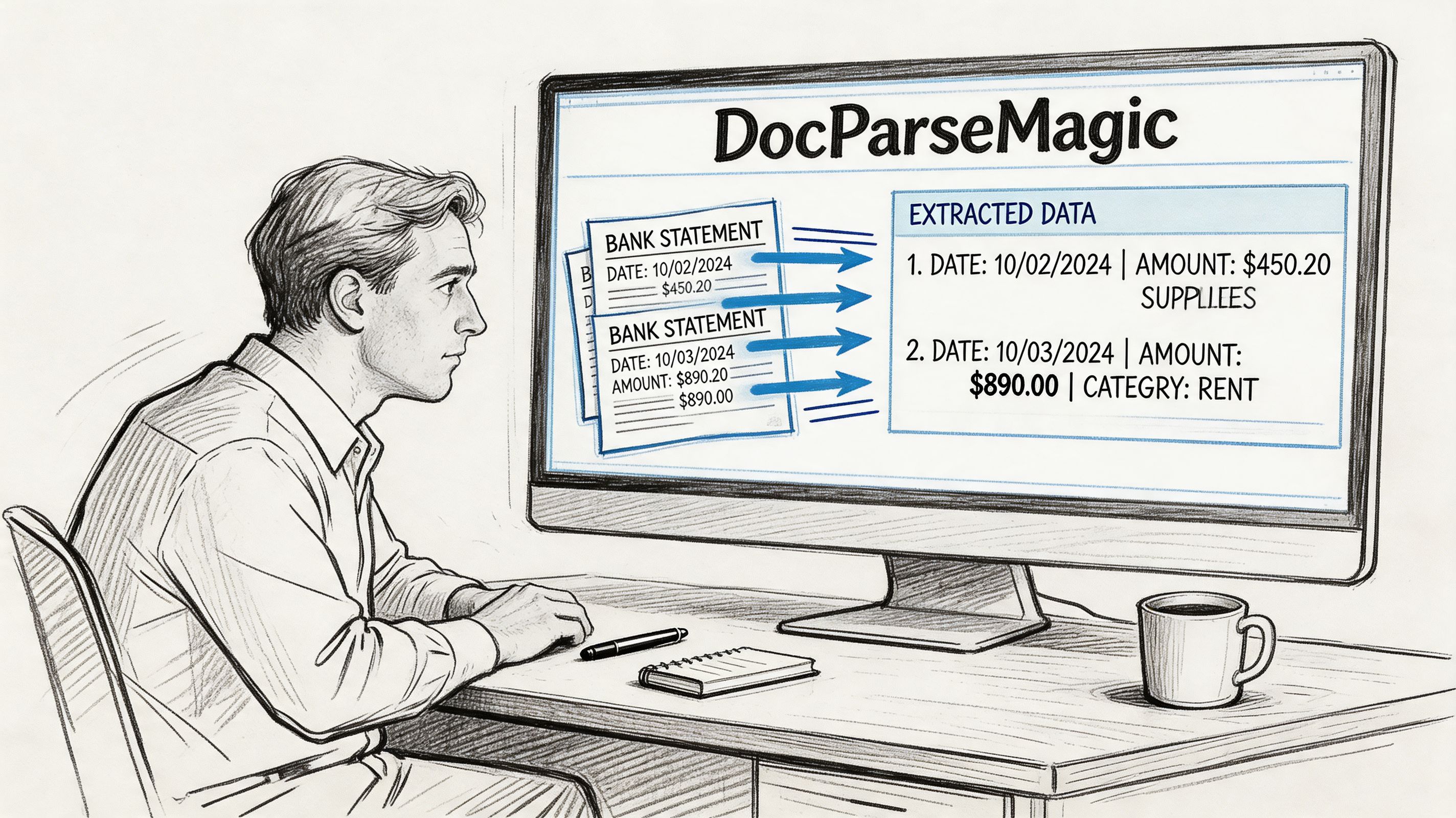
Messy scans and phone images often need significant human correction before they are fit for reconciliation or audit support. A tool such as DocParseMagic improves that first mile by converting inconsistent inputs into a structured sheet the reviewer can test, filter, and trace back to the source document. That matters even more for teams handling image-based files. The workflow for extracting data from bank statement images and scanned documents is often where time savings first show up.
A practical workflow starts with intake control
A useful process standardizes documents before anyone starts making judgment calls. With DocParseMagic, the sequence is straightforward:
-
Upload the batch PDFs, scans, photos, and mixed document packets go through one intake step.
-
Detect the statement structure The parser identifies dates, descriptions, debits, credits, balances, and account details without forcing the team to rebuild templates for each layout.
-
Export a normalized dataset Reviewers get one table instead of a folder of mismatched files.
-
Work the exceptions Attention goes to unreadable fields, balance breaks, duplicate entries, odd transfers, and missing pages.
That shift is operationally important. Analysts stop spending the first part of the job manufacturing a usable dataset and can start testing continuity, cash flow, and unusual activity much earlier.
What changes in daily use
The value is not just speed. It is repeatability.
When every statement is converted into a common structure, reviewers can apply the same checks across traditional bank records, neobank exports, and other less conventional account histories. That is the gap many teams struggle with. Manual methods are usually designed for familiar PDFs, while live workloads include screenshots, partial exports, and statements with inconsistent labels.
| Task | Manual approach | Workflow with DocParseMagic |
|---|---|---|
| Compare periods | Open each file one by one | Filter one normalized table |
| Trace income or inflows | Read line by line | Sort and group transactions quickly |
| Investigate suspicious activity | Rely on notes and memory | Review flagged exceptions in context |
| Build audit support | Recreate schedules manually | Export spreadsheet-ready working data |
A faster checker is not the one with fewer buttons. It is the one that reduces rework and preserves an audit trail from source document to final table.
Why no-code parsing works for mixed-source reviews
No-code tools help when the people reviewing statements are finance staff, loan analysts, operations managers, or auditors rather than developers. They need a reliable output, not a template-maintenance project every time a statement format changes.
That does not remove the need for judgment. Review discipline still sits with the analyst:
- Input quality still affects confidence
- Exceptions still need review
- Unusual transfers still need context
- Final conclusions still require human sign-off
The gain is narrower and more useful than vendor marketing usually suggests. DocParseMagic handles collection, extraction, and normalization across uneven source types. The reviewer uses that cleaned dataset to test balances, investigate anomalies, and decide whether the statement holds up.
Advanced Verification for Non-Traditional Statements
A borrower sends three files instead of a bank statement. One is a neobank PDF with shortened merchant labels. One is a wallet app screenshot. One is a CSV export from a crypto-linked account that shows transfers but no opening balance. The review standard should not collapse just because the source changed.
This is the gap many teams run into. Their process works on conventional bank PDFs, then breaks on app-based records, image captures, and exports that were never designed for underwriting or audit review. The statements may still be usable, but only if the reviewer applies the same control logic with different evidence tests.
Why standard workflows miss them
Traditional statement reviews assume a familiar structure. Header fields are stable. transaction descriptions follow known bank conventions. Running balances are visible and continuous. Non-traditional records often break those assumptions.
Neobanks may use mobile-first layouts with cropped metadata. Wallet apps may show activity history without statement-level context. Remittance platforms can present reversals, holds, and linked-account transfers in ways that look like income if the reviewer only scans credits. Crypto-adjacent services add another layer of risk because movement between wallets can create volume without proving real operating cash flow.
The problem is not the existence of these sources. The problem is reviewers using a bank-only checklist on records that need a more forensic read.
What to test when the source is unfamiliar
Start with identity. Confirm that the platform name, account holder details, currency, and transaction language belong together. Small inconsistencies matter here. A mismatched logo, an odd export title, or date formatting that changes midway through the file can signal a stitched record rather than a native one.
Then test economic meaning, not just transaction presence.
- Separate external inflows from internal transfers. Wallet top-ups, card loads, and self-transfers can inflate activity without showing earned income.
- Check for continuity gaps. Missing days, broken balance sequences, or partial exports often hide the period where the actual issue sits.
- Review reversals and failed movements. Frequent returned transfers or temporary credits can indicate balance staging.
- Compare timestamps to platform behavior. Native app records usually follow consistent time zones, posting order, and status labels.
- Challenge business plausibility. If the entity claims normal operating activity but the record shows mostly wallet shuffling or exchange movement, the statement does not support the story.
Image-based records need extra care because formatting clues are easier to fake and harder to audit manually. Teams dealing with screenshots, photographed records, or mobile app captures usually need a workflow for extracting data from image files for structured financial review before they can test balances and transaction patterns properly.
Non-traditional records can be valid evidence. They just require tighter source checks and better separation of real inflows from recycled funds.
One review logic, different evidence tests
Teams often create separate habits for each source type. One method for banks. Another for remittance apps. Another for crypto-linked histories. That usually weakens consistency because each reviewer starts making judgment calls from a different baseline.
A better approach is to keep one verification framework and adjust the proof required for each source:
- Confirm the source and account identity
- Extract a usable transaction table
- Classify inflows, transfers, reversals, and cash-out activity
- Test date and balance continuity
- Escalate activity that does not fit expected platform behavior
That approach works across traditional and non-traditional records because the core audit question stays the same. Is the record authentic, complete enough for the decision being made, and consistent with the financial story presented?
What holds up in practice
Methods that hold up under review:
- Flexible intake for PDFs, screenshots, exports, and mixed file sets
- Clear separation of income, transfers, and wallet recycling
- Cross-checks for reversals, pending items, and staged balances
- Preservation of the trail from source file to normalized output
- A documented exception path when the record is too incomplete to rely on
Methods that fail under pressure:
- Counting every credit as revenue
- Accepting screenshots without continuity testing
- Treating crypto-linked movement as proof of operating liquidity
- Using tools that only parse standard bank templates
- Letting each team invent its own rules for unfamiliar formats
The strongest reviewers do not reject these files automatically. They test them with more discipline, ask better questions, and use tools that can bring very different source types into one defensible workflow.
From Manual Checker to Automated Authority
A strong bank statement checker process doesn’t start with software. It starts with a disciplined review standard. You need to know how to reconcile balances, separate income from transfers, spot suspicious formatting, and challenge transaction patterns that don’t fit the story being presented.
But manual review alone won’t hold up under volume, messy files, and newer statement formats. That’s where automation earns its place. It turns statements, scans, and photos into structured data, applies validation logic consistently, and gives analysts time to focus on exceptions instead of transcription.
For finance teams, underwriters, accountants, and operations managers, that’s the shift that matters. Less clerical work. Better visibility. Faster decisions with a stronger audit trail.
A mature process does both. Humans set the standard. The tool enforces it at speed.
If your team is still copying figures out of PDFs, screenshots, or scanned statements by hand, DocParseMagic is worth a look. It turns messy business documents into clean, analysis-ready spreadsheets without template setup, so you can spend less time fixing files and more time reviewing the financial story behind them.