Automated Data Processing Software And How It Transforms Workflows
Think of automated data processing software as your team's smartest assistant. It takes all those messy documents—invoices, reports, forms—and automatically reads them, pulling out the exact information you need. No more mind-numbing copy-pasting. It turns piles of paperwork into clean, organized data you can actually use.
This isn't just about saving a little time. It's about getting your team back to doing the work that matters and stamping out those frustrating (and costly) human errors.
Your Workflow Before and After Automation
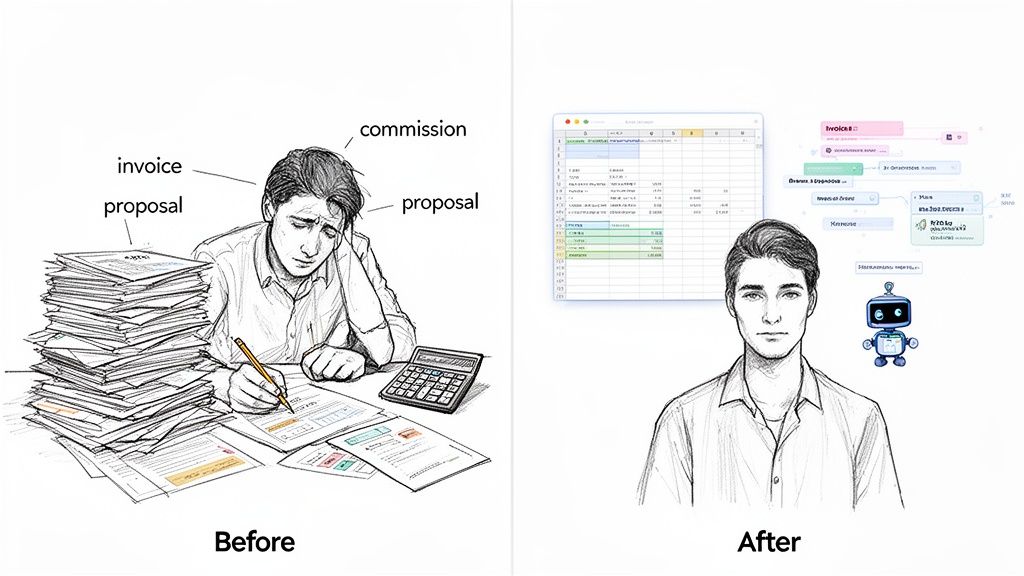
Let's be honest, we've all seen it. An accounting clerk, surrounded by a mountain of invoices, manually punching numbers into a spreadsheet. A sales manager trying to compare details from a dozen different proposals, each in its own unique format. It’s a struggle.
That’s the "before" picture. It’s a world of tedious manual work, where great employees are stuck performing repetitive tasks that don’t use their skills. It's a recipe for burnout and bottlenecks.
The Real Cost of Doing Things by Hand
That daily grind of manual data entry is more than just slow—it's incredibly expensive. Every minute an employee spends typing is a minute they aren't spending on high-value work like analyzing trends or talking to customers.
The hidden costs stack up fast:
- Human Error: When you're doing the same thing over and over, mistakes happen. A single typo on an invoice can throw off your books and lead to real financial problems.
- Wasted Productivity: Your team gets bogged down in admin tasks, unable to focus on the projects that actually grow the business.
- Slow Decisions: Need to make a quick decision? Too bad. It might take hours or even days to pull the data together. By then, the opportunity might be gone.
Sticking with these old methods is becoming a bigger and bigger problem. The global Data Analysis Software Market was valued at USD 300 billion in 2024 and is expected to hit USD 500 billion by 2033. This massive growth is a clear signal: businesses are moving on from manual work to keep up with the data they generate.
The "After" Picture: A Smarter Way to Work
Now, let's picture a new reality. That same accounting clerk drags and drops a folder of invoices into an automated data processing software. A few seconds later, a perfectly formatted spreadsheet is ready, with every invoice number, date, and line-item total captured and checked for accuracy.
This is the "after" picture. Your workflow is completely different. The software becomes a tireless member of the team, reading and structuring information flawlessly, 24/7. It doesn’t just grab text; it understands what it's looking at.
Automation doesn't replace your people. It promotes them. It frees them from the drudgery of data entry so they can become the data analysts and strategists you hired them to be.
This change is fundamental. Your business stops being reactive—always trying to catch up on paperwork—and becomes proactive. If this idea is new to you, our guide on what document automation is can give you more background. With automation, your team finally gets to focus on what matters most: making smarter, faster decisions that create real value.
What Is Automated Data Processing Software Anyway?
Think of automated data processing software as a team of digital experts who are incredibly fast and never make typos. You hand them a messy pile of documents—invoices, bank statements, even photos of receipts—and in moments, they've neatly organized all the important information into a spreadsheet for you. This technology is all about turning chaotic paperwork into clean, structured data you can actually use, all on its own.
To really get a handle on this, it helps to know how to automate business processes in general. Data entry is one of those repetitive tasks that's perfect for automation. The right software moves your team away from mind-numbing manual work and frees them up for more important, strategic thinking.
To illustrate the difference, let's compare the old way with the new way.
Manual Vs Automated Data Processing
| Aspect | Manual Data Processing | Automated Data Processing Software |
|---|---|---|
| Process | A person physically reads each document and types the data into a system. | Software automatically scans, reads, and extracts data from documents. |
| Time | Slow and labor-intensive; can take hours or days for large batches. | Extremely fast; processes thousands of documents in minutes. |
| Accuracy | Prone to human error like typos, transpositions, and fatigue-based mistakes. | Highly accurate, often over 99%, with built-in validation rules. |
| Cost | High operational costs due to labor, plus the hidden costs of fixing errors. | Lower operational costs; you pay for the software, not per keystroke. |
As you can see, the shift from manual to automated isn't just a minor improvement—it’s a fundamental change in how work gets done.
Going Beyond Just Reading Text
Older technology mostly relied on a basic tool called Optical Character Recognition (OCR). You can think of OCR as a simple transcriber; it looks at an image of a document and just types out the words it sees. It’s helpful, but it doesn't actually understand what any of those words mean.
Today's automated data processing software is much smarter. It uses artificial intelligence (AI) to not only read the text but also to comprehend its context.
For instance, it knows that the number next to "Total Due" on an invoice is the one you care about, regardless of where it's printed on the page. It can tell the difference between a "Customer ID" on a form and a "Purchase Order Number" on an order sheet. This is a huge leap forward from just converting pictures of words into text. We dive deeper into this in our guide on what is Intelligent Document Processing.
Turning Chaos into Structured Data
This ability to understand context is crucial because most businesses are buried in unstructured data—information that doesn’t fit neatly into the rows and columns of a spreadsheet. This is where automation really proves its worth. In fact, the market for this kind of software is expected to skyrocket from USD 14.1 billion in 2026 to USD 44.2 billion by 2036. It’s a direct response to the massive problem of handling the 80% of unstructured data that holds most companies back.
The real power of automated data processing software is its ability to create order from disorder. It takes varied, complex documents and extracts information into a consistent, predictable format that you can immediately use.
At the end of the day, this software is a bridge. It connects the messy, real-world documents your business runs on to the clean, organized data your systems and people need to make smart decisions. It’s not just about doing things faster; it’s about making your data finally work for you.
The Core Features That Make It All Work
To really get what automated data processing software can do for your business, you need to see what makes it tick. These aren't just fancy bells and whistles; they're the specific tools that drive real efficiency and accuracy. They’re what turns a chaotic pile of documents into a clear, reliable source of information.
The whole process is actually pretty straightforward. First, the software pulls in your documents. Then, its AI brain interprets them. Finally, it spits out the important information as clean, structured data.
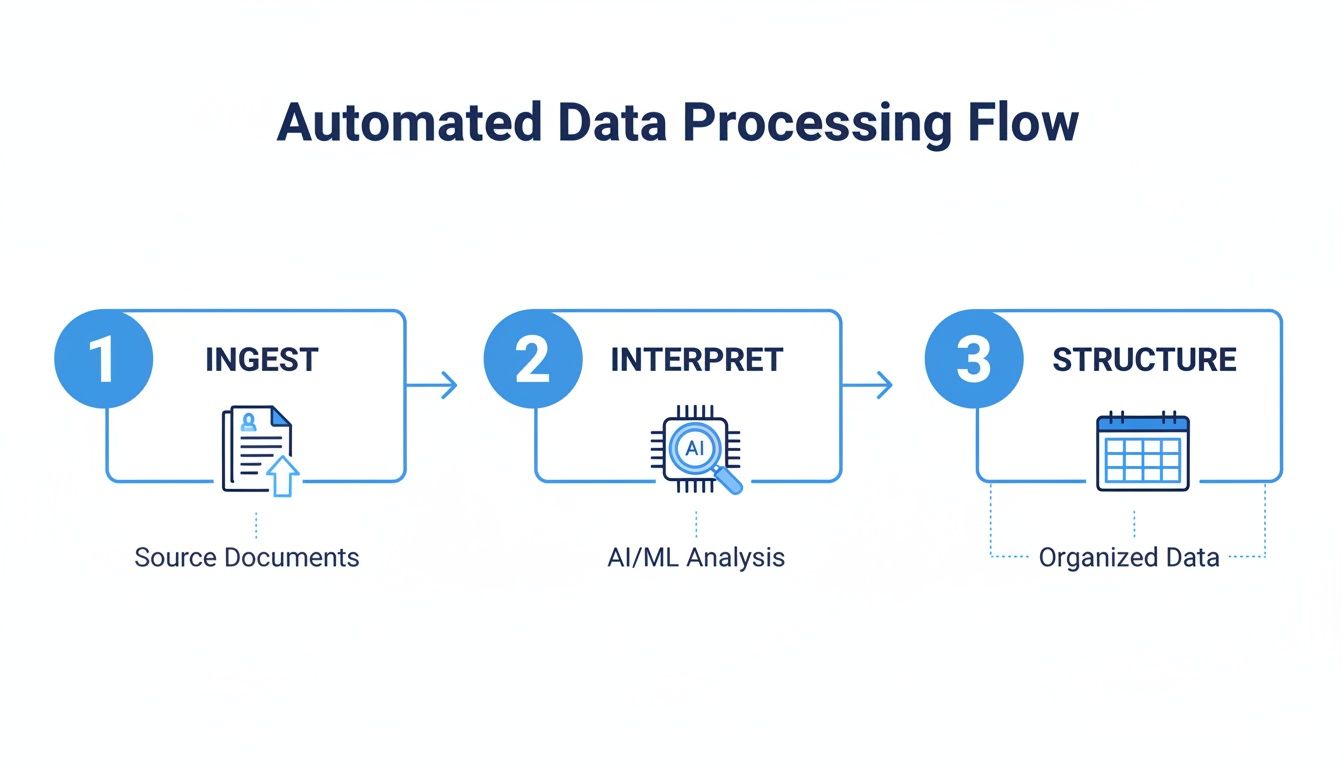
This diagram shows just how simple it is: raw documents go in, and perfectly organized data comes out, all without a single person lifting a finger.
Document Parsing and Field Extraction
The magic really starts with document parsing and field extraction. Think of it like a super-smart assistant who can scan any document and instantly pick out the exact details you care about. The software reads a file and intelligently identifies and extracts those specific data points.
Let's say a procurement manager has 50 different vendor proposals to sift through. Instead of spending days manually building a comparison spreadsheet, the software can pull out all the key details in minutes.
- Pricing: It grabs every quoted price for services or products.
- Payment Terms: It finds terms like "Net 30" or "Due on Receipt."
- Delivery Dates: It identifies and standardizes all the promised delivery timelines.
Almost instantly, the manager has a clean spreadsheet comparing every vendor side-by-side. What used to be a multi-day slog is now a quick, data-driven decision.
Data Validation and Smart Calculations
Pulling data is one thing, but making sure it’s correct is just as crucial. Good automated data processing software comes with powerful data validation rules built right in. It acts like an automatic fact-checker, cross-referencing information to catch mistakes before they cause bigger problems.
Picture an invoice coming in. The software doesn't just read the "Total Amount" and call it a day. It actually adds up all the line items to confirm the math is right.
If the numbers don't match—maybe because of a typo on the invoice or a simple calculation error—the system flags it for a human to review. This simple check can stop overpayments and keep your financial records clean.
The software can also handle calculations on its own. It can figure out sales tax, apply discounts, or calculate commissions based on rules you set, freeing up your team from boring manual math.
Seamless Integrations with Your Existing Tools
The last step is putting that data to work. The best software doesn't trap your data in a new, isolated system. It provides seamless integrations that push the information directly into the tools you and your team already rely on. This is usually handled through a process called ETL (Extract, Transform, Load).
The market for these ETL tools is exploding, a clear sign of how important it is for businesses to connect their data. It was valued at $7.63 billion in 2026 and is projected to skyrocket to $29.04 billion by 2029. For finance teams, this means invoice data can automatically create a bill in their accounting software, which can slash error rates by as much as 95%.
With a platform like DocParseMagic, connecting to thousands of apps is a breeze.
- Accounting Systems: Send invoice details straight to QuickBooks or Xero.
- ERP Platforms: Update inventory or project records in your main business system.
- CRM Software: Add data from new contracts or forms directly to customer profiles.
This direct connection eliminates the final manual step of exporting and importing files, giving you a truly hands-off, automated workflow. Many modern tools even use advanced features like an AI ER Diagram Generator to help visualize and build the data structures that make these integrations so smooth. Together, these core features deliver huge value by turning document chaos into an automated, trustworthy source of truth.
Real-World Workflows Transformed by Automation
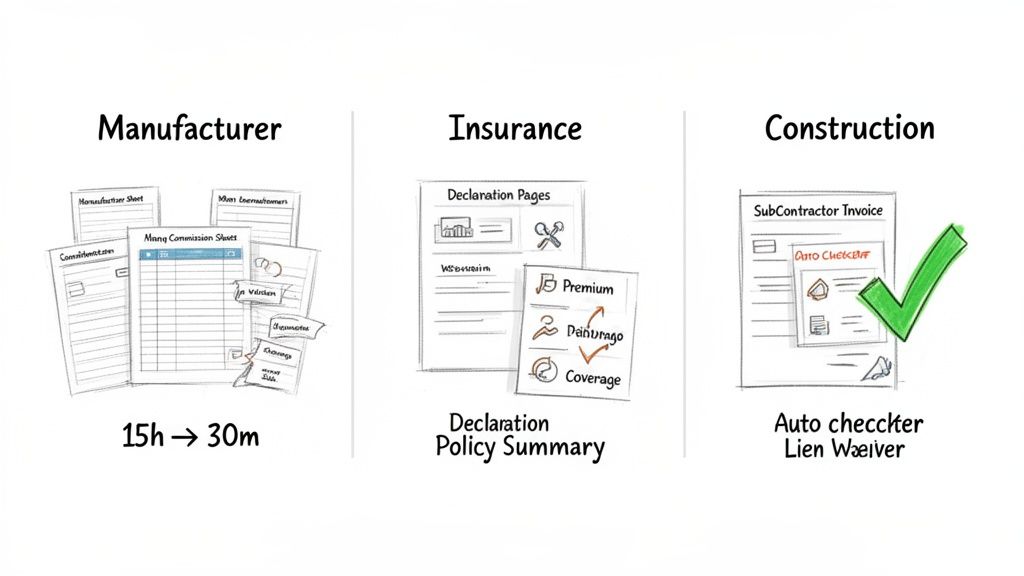
It’s one thing to talk about benefits in theory, but the real "aha!" moment comes when you see automated data processing software solve the frustrating, real-world problems that teams face every day. The true value isn’t just a bullet point on a feature list; it’s in how these tools fix specific, soul-crushing tasks. Let's step into the shoes of a few professionals to see what their daily grind looked like before and after bringing in automation.
These stories aren't just about saving a little time. They're about completely changing how work gets done. When you can hand off the mind-numbing document chores to a reliable digital assistant, your team gets back precious hours to focus on what actually matters—strategy, growth, and customer relationships. It's a fundamental shift from being a data entry clerk to becoming a high-impact analyst.
Let's look at how a no-code platform like DocParseMagic turns these messy, error-prone workflows into smooth, automated processes. The results aren't just small improvements; they're a total game-changer for efficiency and accuracy.
For the Manufacturer's Rep Drowning in Commission Reports
Meet Alex. He's a manufacturer's rep juggling a dozen different product lines. Every month, a wave of commission statements hits his inbox, and of course, every single one has a different layout, format, and set of data fields.
Before Automation: The end of the month was a nightmare. Alex would block off over 15 hours just to consolidate all these reports. His process was brutal: open a PDF, hunt for the sales figures and commission rates, then carefully copy-paste everything into a master spreadsheet to figure out what he earned. Typos were inevitable, and the time spent double-checking everything was almost as bad as the initial data entry.
After Automation: Now, Alex uses automated data processing software. He just drags the whole folder of commission reports into the platform. In about 30 minutes, the system has read every document, pulled out the key numbers, and organized it all in a single, clean spreadsheet. The software even runs the final commission calculations for him, completely free of errors.
The change is staggering. A task that used to eat up two full workdays now finishes in less time than a lunch break. Alex can use that reclaimed time to actually build client relationships instead of fighting with spreadsheets.
This is a textbook example of automation delivering an immediate and massive return on time. The software effortlessly handles the messy, inconsistent layouts that made the manual process such a headache.
For the Insurance Broker Buried in Policy Documents
Next, let's consider Sarah, an insurance broker who manages hundreds of client policies. When a client calls asking for a quick summary of their coverage, the great document hunt used to begin.
Before Automation: Sarah would have to manually dig through each client's policy declaration pages—often dense documents running dozens of pages long. She'd scan line by line, looking for specific details like premium amounts, coverage limits, and deductibles. The search was tedious, could take up to an hour per client, and was wide open to human error. Providing quick, confident service felt nearly impossible.
After Automation: Today, Sarah’s process is practically instant. She uploads a client's policy files to her automated platform. The software, which has been trained to understand insurance forms, immediately gets to work extracting all the critical data.
- Premiums: Pulled and listed cleanly.
- Coverage Limits: Identified for auto, home, and liability.
- Deductibles: Clearly extracted and organized.
In seconds, she has a complete, accurate summary of the policy. She can now answer client questions on the spot, generate faster renewal quotes, and offer a level of service that was simply out of reach before. What used to take hours now takes a few clicks.
For the Construction Manager Juggling Invoices and Waivers
Finally, there's Mark, a construction project manager. His job means coordinating dozens of subcontractors, which translates to a constant flood of invoices and lien waivers.
Before Automation: Mark spent a huge chunk of his week just chasing paperwork. He had to manually check every single subcontractor invoice against the original contract, confirm the work was actually done, and—most importantly—make sure a signed lien waiver was attached before he could approve payment. A single missed waiver could put the entire project in financial jeopardy, making the whole process incredibly stressful and slow.
After Automation: Mark now relies on an automated system. Subcontractors upload their invoices and waivers to a dedicated online portal. From there, the automated data processing software takes over. It instantly reads both documents, checks the invoice amount against the project budget, and verifies that the lien waiver is present and filled out correctly. If it all lines up, the invoice is automatically sent to accounting for payment. If something is missing or incorrect, the system flags it and notifies Mark immediately.
This simple workflow ensures compliance, gets subcontractors paid faster (which keeps them happy), and shields the project from financial risk. Best of all, it gives Mark hours back every single week.
How to Choose the Right Automation Software
Picking the right automated data processing software can feel like a huge task, but it doesn't have to be. Let's be honest, not all tools are built the same, and the key is finding one that slots right into your team's day-to-day work, not one that creates a new set of problems.
Think of it like hiring a new team member. You’d never bring someone on board without checking their skills and seeing if they're a good fit for the team. You need to do the same kind of vetting for any software you're considering. It has to be able to do the job you need it to do, period.
Evaluate Core Usability and Accessibility
The very first question to ask is: who is this really built for? So many tools are marketed as "user-friendly," but you have to dig deeper. Are they truly no-code? If your accounting team has to constantly ping IT for help just to set up a new invoice parser, then the software has already failed to make things more efficient.
Look for a platform with a straightforward, drag-and-drop interface. The goal is to be able to upload a document and start pulling data from it in minutes, not spend hours or days wrestling with complicated settings. The best systems are designed for the people actually doing the work—the business users—not just for developers.
A truly no-code solution empowers your team to build and manage their own automation workflows. If it requires complex setup or technical scripting to get started, it will quickly become another expensive, underused tool.
This kind of accessibility is what makes or breaks an implementation. It ensures the people who feel the pain of manual data entry the most—your clerks, managers, and reps—are the ones who can easily build the solution.
Test Its Ability to Handle Real-World Documents
Let's face it, your business doesn't run on perfectly clean, standardized forms. It runs on a chaotic mix of PDFs, grainy scans from an old office machine, and even smartphone photos of crumpled receipts. A truly powerful automated data processing software has to handle this messy reality without forcing you into rigid templates.
Before you even think about signing a contract, test the software with your actual documents.
- Varying Layouts: Upload invoices from ten different vendors. Can the software find the "Total Due" on all of them, even if it’s in a different spot on each one?
- Poor Quality Scans: Feed it a slightly skewed or low-resolution scan. Does the accuracy plummet, or is its AI smart enough to still read the data correctly?
- Mixed Document Types: Try processing a batch that includes purchase orders, bank statements, and insurance forms all at once.
The ability to work without templates is a complete game-changer. It means the software is intelligent enough to understand context, which saves you from the endless, frustrating task of creating a new template for every minor variation you encounter.
Scrutinize Accuracy and Integration Capabilities
High accuracy isn't just a nice-to-have; it's non-negotiable. Ask potential vendors for their typical accuracy rates—for modern AI platforms, this should be over 99%. But don't just take their word for it. The free trial is your chance to prove it with your own files. Look for tools that not only extract the data but also help validate it, like checking if the line items on an invoice actually add up to the total.
Just as important are the integration capabilities. Extracting data is only half the battle. That information is only useful if it can flow automatically into the systems you already rely on every day.
To help you compare your options, here’s a quick checklist of what to look for when you're evaluating different solutions.
Software Evaluation Checklist
| Evaluation Criteria | What to Look For | Why It Matters |
|---|---|---|
| Document Handling | No-template, AI-driven extraction that works with scans and varied layouts. | Avoids endless setup and adapts to real-world document chaos. |
| Ease of Use | A truly no-code, drag-and-drop interface designed for business users. | Empowers your team to automate their own work without IT dependency. |
| Accuracy Rate | Published rates of 99%+ and built-in data validation rules. | Ensures the data is trustworthy and prevents costly errors. |
| Integration Power | Pre-built connectors (like Zapier) to your accounting, ERP, or CRM systems. | Creates a true end-to-end automated workflow, eliminating manual data transfer. |
| Pricing Model | Transparent, predictable pricing (e.g., per-document) and a free trial. | Allows you to test the ROI and avoid getting locked into a bad fit. |
Putting these criteria to the test will give you a clear picture of whether a tool is just talk or if it can actually deliver.
Finally, a "try before you buy" philosophy is essential. Any vendor confident in their product will let you test it out. A free trial with no credit card required, like the one offered by DocParseMagic, gives you the freedom to test the platform thoroughly. This helps you choose the best automated data processing software for your needs, ensuring you get a flexible and powerful solution that delivers immediate value. For a deeper dive into the available options, you can learn more about document data extraction software in our detailed guide.
Start Automating Your Documents in Minutes
You’ve seen what automated data processing software can do in theory. Now, it’s time to see it work for you. The best part? Getting started is surprisingly quick and straightforward.
Forget about those long, complicated software rollouts that used to take months and a whole IT team to manage. With modern tools like DocParseMagic, you can get your first taste of automation in just a few minutes. A smarter workflow is literally a few clicks away.
Your First Three Steps to Automation
The whole process is designed to be simple, with no technical hurdles to jump over. You can start seeing real results with the very first document you upload.
Here’s how to get your automation journey started right now:
-
Sign Up for a Free Trial: The easiest way to see if this is for you is to try it yourself. Look for a platform like DocParseMagic that offers a completely free trial with no credit card needed. This lets you explore everything without any risk.
-
Upload Your First Document: Grab a real-world document you deal with all the time—an invoice, a purchase order, or a delivery slip. Just drag and drop the file into the platform. It doesn't matter if it's a crisp PDF, a fuzzy scan, or even a photo you snapped with your phone.
-
Watch the Magic Happen: This is the "aha!" moment. In just a few seconds, the software reads the document, figures out what information is important, and pulls it all into a clean, structured spreadsheet. No templates to build, no code to write.
Seeing it work instantly is what makes the difference. You immediately see the time you just got back from that one document.
The Immediate Return on Your Time
That first document you process isn't just a test—it's your first dose of real ROI. Think about the minutes you just saved. Now, imagine multiplying that by the hundreds or even thousands of similar documents your company handles every month. The impact adds up fast.
Every document you automate is more than just a task checked off a list. It’s a direct investment back into your team’s most valuable resource: their time. It’s more time for analysis, more time for strategy, and more time for the high-impact work that actually grows the business.
This isn’t some far-off benefit you have to wait for; it’s about taking back hours of your week, starting today. This simple, three-step process shows the true value of automated data processing software: it gets rid of the soul-crushing, error-prone work of manual data entry, freeing you up to focus on what really matters.
Stop copy-pasting your way through the day. It’s time to start automating.
Frequently Asked Questions
It's smart to ask a few more questions before jumping into a new tool, even when the benefits seem clear. Here are some straightforward answers to the things we hear most often about automated data processing software.
How Accurate Is This Type of Software?
You can expect modern AI-powered tools to hit accuracy rates well above 99%. This isn't just a marketing claim; it's a result of the software doing more than just reading words.
Think of it this way: instead of simply transcribing text, the software actually understands the document's context. It can spot key fields, cross-check information, and even perform calculations to make sure the line items on an invoice add up to the total. This catches the kinds of subtle errors that often slip past a human eye during tedious manual entry.
Do I Need Any Technical or Coding Skills?
Not at all, as long as you pick a genuine no-code platform. These solutions are designed from the ground up for business experts in areas like accounting, logistics, and insurance—not for developers.
The best platforms have a simple, drag-and-drop interface. This lets you build your own custom automation workflows in just a few minutes, all without writing a line of code or waiting on the IT team.
What Kinds of Documents Can It Process?
The really good solutions are flexible. They're built to handle the mix of structured and unstructured documents that businesses run on every single day.
- Digital Files: Native PDFs, Word documents, and Excel spreadsheets.
- Scanned Documents: Paperwork that's been scanned into an image format.
- Photographs: Pictures of receipts or forms snapped with a smartphone.
This means you can process everything from invoices and purchase orders to bank statements, commission reports, and insurance policies. If you can save it as a file, a powerful platform can probably read it.
How Does It Handle Different Layouts Without Templates?
This is where the magic of modern AI comes in. Older systems relied on rigid templates, which would break the second a supplier changed their invoice layout. Today's software is much smarter.
The AI learns to identify information by what it is, not where it is. It knows what an "Invoice Number" or "Policy Effective Date" looks like, so it can find it whether it’s at the top, bottom, or middle of the page. This "no-template" approach means the software just works, saving you from the headache of constantly building and fixing templates for every new document format.
Ready to stop the tedious copy-paste and see automation in action? DocParseMagic turns your messy documents into clean, structured data in minutes. Try it for free and see how much time you can get back. Start your free trial at DocParseMagic.