Modern Accounts Payables Procedures for Flawless Invoicing
Let’s face it, for too many companies, accounts payable is a mess. It’s a tangle of late payments, duplicate invoices, and soul-crushing manual data entry. These aren't just minor annoyances; they're genuine problems that cost real money, damage supplier relationships, and kill any chance of snagging early payment discounts.
By putting modern accounts payables procedures in place, you can stop the bleeding and turn your AP department from a chaotic cost center into a smooth, efficient part of your business.
Why Your AP Process Is Costing You More Than You Think
Finance teams often don't realize just how expensive a clunky accounts payable workflow truly is. The real costs are hiding in plain sight—they’re the hidden drags on your team's efficiency, morale, and your company's bottom line.
Think about it. Every minute someone spends typing invoice data by hand or literally walking a piece of paper around the office for a signature is a minute they could be doing something far more valuable, like actual financial analysis.
These old-school manual processes are also breeding grounds for human error. A single misplaced decimal or a typo can easily lead to an overpayment, a duplicate payment, or a late fee that stings. It's not surprising when you learn that up to 84% of a typical AP staffer’s day is eaten up by these kinds of repetitive manual tasks. That's a huge opportunity for improvement just waiting to be seized.
The Ripple Effect of Inefficient AP
The trouble doesn't stop at the accounting department's door, either. When you're consistently late with payments, your suppliers notice. A good vendor might suddenly shorten your payment terms, stop offering you discounts, or worse, start prioritizing other clients over you. That's a direct hit to your supply chain and your ability to operate smoothly.
The real cost of a broken AP process is what you're missing out on. It's the early payment discounts you can't take, the strategic insights buried under paperwork, and the strong vendor partnerships you're failing to build.
Getting your accounts payable procedures in order isn't just about tidying up the back office; it’s a strategic move that pays dividends. A structured, automated workflow lets you:
- Slash operational costs by cutting down on manual work and costly mistakes.
- Get a better handle on cash flow with clear visibility into what you owe and when.
- Build stronger relationships with suppliers by being the client they can always count on to pay on time.
- Improve security and compliance with a clear, digital paper trail for every transaction.
For any business looking to cut down on operational waste and errors, exploring solutions for accounts payable automation is the logical first step. It’s how you start building a more resilient and profitable financial operation. The rest of this guide will walk you through exactly how to do it.
Designing Your Core Accounts Payable Workflow
Before you can fix your AP process, you need a solid blueprint. A well-designed workflow is the bedrock of effective accounts payables procedures. It ensures every invoice follows a consistent, predictable, and auditable path from the moment it arrives until it’s paid. Without that structure, you’re just inviting chaos.
The first move is to get crystal clear on roles and responsibilities. Ambiguity is the enemy of efficiency; when people aren't sure who does what, invoices get lost, approvals stall, and payments get delayed. Your goal here is to completely eliminate the guesswork.
Establishing Clear Roles and Responsibilities
Start by mapping out every single touchpoint in the invoice lifecycle. You can build your framework by asking a few critical questions:
- Who receives the invoices? The answer can’t be "whoever gets it." Designate a single point of contact or, even better, a central email address like
invoices@yourcompany.comto stop vendors from sending bills to random employees. - Who's in charge of coding? Assign specific team members the job of applying the correct general ledger (GL) codes to each invoice. This is non-negotiable for accurate cost tracking.
- Who gives the final sign-off? This is where you build your approval hierarchy. Let’s be real: not every purchase needs the CEO's attention.
Without this clarity, you run into all the classic AP headaches.
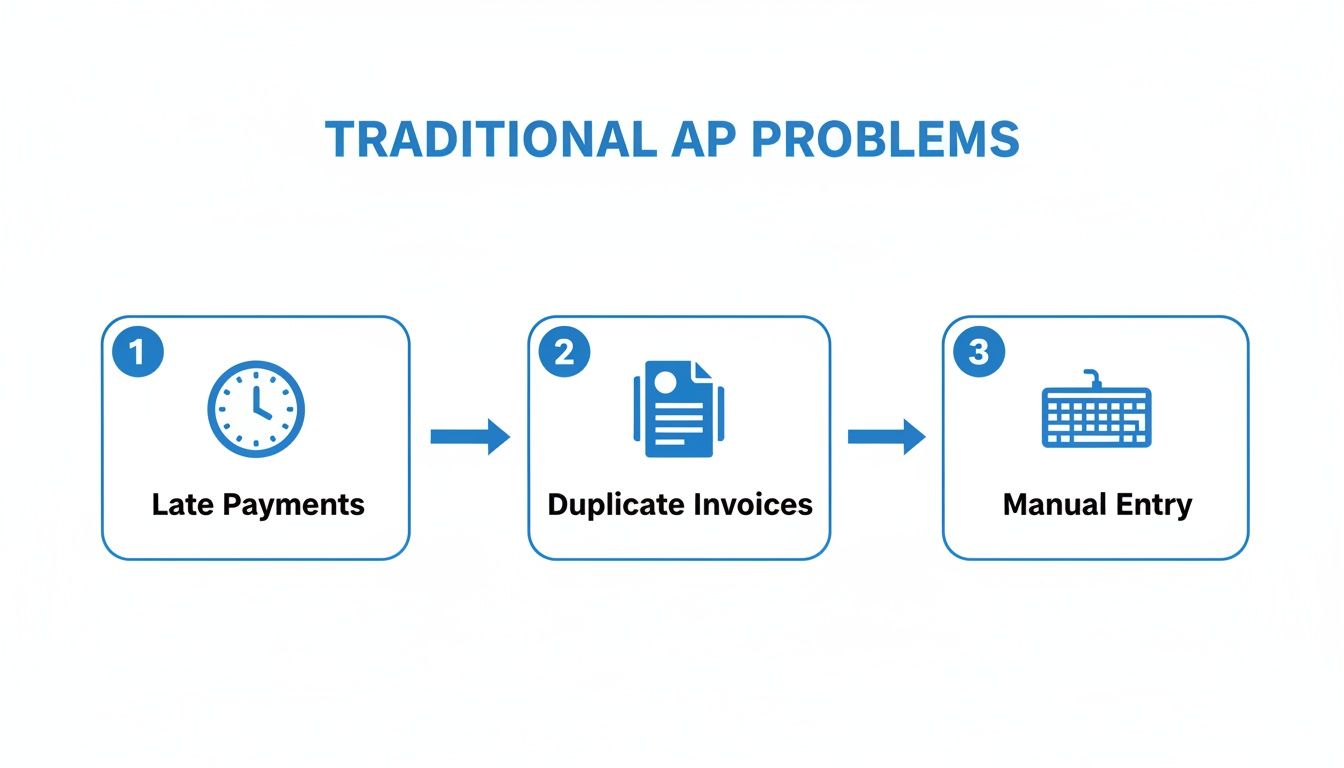
Late payments, duplicate invoices, and endless manual entry are almost always symptoms of a process that lacks clear roles and accountability. A structured system is the cure.
Creating a Smart Approval Hierarchy
An approval hierarchy is just a set of rules that dictates who needs to approve a purchase based on its value or type. This is how you prevent bottlenecks. It empowers department heads to approve routine expenses while reserving the big-ticket items for senior leadership.
Let's imagine a growing retail business. Their approval workflow might look something like this:
- Office Supplies (under $500): A simple invoice for printer paper can be approved directly by the office manager. No need to bother anyone else.
- Marketing Spend ($501 - $5,000): A bill for a new digital ad campaign? That needs a green light from the Marketing Director.
- Inventory Orders (over $50,000): A massive purchase order for next season's stock absolutely requires sign-off from both the Head of Procurement and the Chief Financial Officer (CFO).
This tiered approach ensures the review time matches the financial impact. It keeps small, everyday purchases moving quickly while giving the big investments the oversight they deserve.
A great workflow isn’t about adding more steps; it's about making sure the right people take the right actions at the right time. Your process should build momentum, not create friction.
By defining these pathways, you create a standardized system where everyone, from the AP clerk to the CFO, understands the journey an invoice takes. That predictability is the key to faster processing times, fewer errors, and a finance department that runs like a well-oiled machine. You have to get this foundation right before you even think about automation.
Automating Invoice Capture and Data Extraction
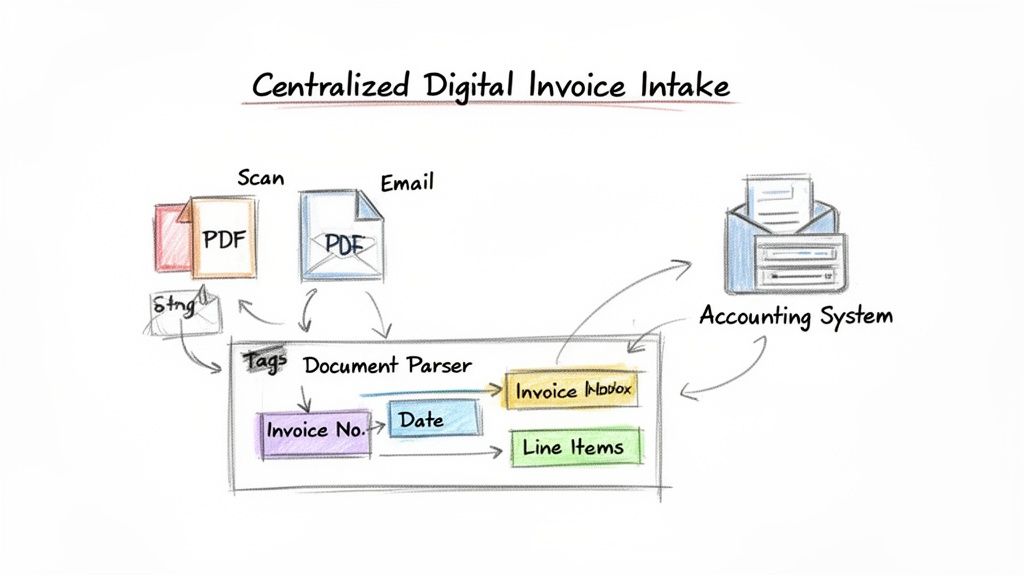
This is where the real magic happens in upgrading your accounts payables procedures. Forget the days of sifting through physical mail and hunting down invoices lost in various email inboxes. The single most powerful first step is to funnel every invoice into one central digital hub. This creates a clear, predictable starting point for every single payment you owe.
Whether it’s a crisp PDF, a scanned paper invoice, or some other attachment, a unified intake process is your best defense against lost bills. Just setting up a dedicated email like invoices@yourcompany.com can tame the chaos overnight. It’s a simple change, but it ensures nothing slips through the cracks.
Introducing Intelligent Document Parsing
Once all your invoices are coming into one place, you can attack the biggest time-sink in AP: manual data entry. This is where intelligent document parsing tools are a game-changer. Think of this technology as a hyper-efficient assistant that instantly reads every invoice, no matter the layout, and pulls out all the critical information for you.
Instead of a team member painstakingly keying in numbers from a PDF, the software does the heavy lifting, automatically identifying and extracting the essentials:
- Vendor Name
- Invoice Number and Date
- Purchase Order (PO) Number
- Line-Item Details (quantity, description, unit price)
- Subtotals, Taxes, and the Final Amount Due
This structured data is then pushed directly into your accounting system or ERP, primed for validation and approval. For any business serious about efficiency, exploring Accounts Payable Automation isn't just a good idea—it's the logical next step.
The real goal isn’t just to go paperless; it’s to make the process effortless. Good automation handles the repetitive grunt work so your team can focus on what matters: exceptions, analysis, and smart financial management.
This transition is absolutely critical, yet it's shocking how many companies are still stuck in the past. A staggering 68% of all invoice data is still typed in by hand. This reliance on manual work is a massive, unnecessary drag on productivity and a major source of errors.
Invoice Data Capture Methods Compared
Let's break down the practical differences. When you're deciding how to handle invoice data, you're essentially choosing between the old way and the new way. Here’s how they stack up.
| Metric | Manual Data Entry | Automated Document Parsing |
|---|---|---|
| Speed | Slow; minutes per invoice, often with backlogs. | Near-instant; seconds per invoice, processes in batches. |
| Accuracy | Prone to human error (typos, transpositions). | Highly accurate; uses AI to minimize mistakes. |
| Cost | High labor costs, plus the cost of fixing errors. | Lower operational cost; subscription-based pricing. |
The table makes it pretty clear. While manual entry feels familiar, automated parsing delivers undeniable improvements in speed, accuracy, and overall cost-effectiveness.
From Manual Entry to Strategic Insight
Adopting automated data capture is about so much more than just going faster. It’s about accuracy and, most importantly, unlocking your team's potential. When you remove the soul-crushing task of copying and pasting from PDFs, you slash the risk of costly human errors. No more misplaced decimals or mistyped invoice numbers that lead to overpayments or paying the same bill twice.
Imagine your AP team cutting its manual data entry time by over 80%. Suddenly, they’re not just data entry clerks; they’re financial analysts. They now have the time to investigate spending trends, manage cash flow with precision, and build stronger vendor relationships. That's the real value.
If you want to dig deeper, you can learn how to set up an automated invoice processing workflow in our detailed guide. This is how a modern AP department stops being a cost center and starts driving real strategic value for the business.
Fine-Tuning Your Validation and Approval Workflows
Once your system has pulled all the data from an invoice, the real work begins: making sure that data is correct. This is where your validation and approval process steps in, acting as the critical safeguard against errors, overpayments, and even fraud. Without a rock-solid verification system, even the most accurate data capture won't do you much good.
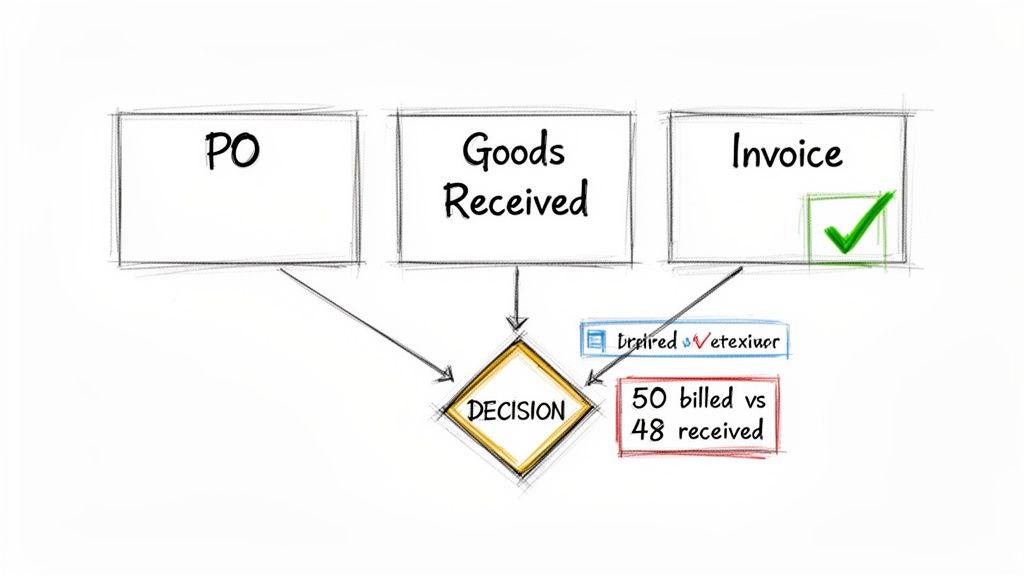
The bedrock of any strong invoice validation process is three-way matching. This isn't just some abstract accounting term; it's a practical, hands-on method to confirm you're only paying for what you actually ordered and received. The system essentially cross-references three crucial documents:
- The Purchase Order (PO): This is the document outlining what your company agreed to buy.
- The Goods Receipt Note: This confirms what your team physically received at the loading dock.
- The Vendor Invoice: This is what the supplier is actually asking you to pay.
When the details on all three documents—item quantities, descriptions, prices—line up perfectly, the invoice gets a green light for payment. It's a simple concept that has a massive impact on financial control. You can get a more detailed look at the mechanics in our guide on the essentials of 3-way matching for invoices.
What Happens When Things Don't Match Up?
Let’s walk through a common scenario. Say your IT department puts in a purchase order for 50 new laptops. A few days later, the shipment arrives, but the receiving department signs a goods receipt confirming only 48 laptops made it. The problem? The vendor’s invoice still bills you for all 50.
In a manual, paper-based system, this kind of small discrepancy is incredibly easy to miss, and you'd end up paying for two laptops you never got. But with an automated three-way match, the system instantly spots the mismatch. It flags the invoice, puts it on hold in an exception queue, and sends an alert to the AP team. Payment is paused until you can get on the phone with the vendor and sort it out.
From Validation to Approval and Audit
After an invoice passes the validation check, it moves on to the approval stage. A modern system completely gets rid of the old-school paper chase and endless email chains. It uses the approval hierarchy you already set up to route the invoice to the right manager automatically.
What if an approver is out of the office or just slow to respond? The system can be configured to send polite, automated reminders. Every single action—from the initial match to the final sign-off—is timestamped and logged. This creates a clean, unchangeable digital audit trail, which makes life a whole lot easier when internal or external auditors come knocking.
The goal here is to make the correct approval path the easiest one to follow. When you automate the routing and reminders, you remove the friction. Compliance stops being a chore and just becomes part of the natural workflow.
The results speak for themselves. Top-performing AP departments that have adopted these automated procedures are now seeing touchless processing rates of 52.8%. Even better, their approval cycles have been cut down to just 3.5 days, which is a huge boost for managing cash flow. It’s a level of efficiency that’s almost impossible to hit when you’re still pushing paper around.
Making Payments and Handling Curveballs
Once an invoice has been checked, matched, and approved, you're at the final stage: cutting the check (or, more likely, sending the electronic payment). This isn't just a transactional step; it's a strategic one. Your accounts payables procedures here can directly boost your company's financial health.
The real game is balancing your cash flow with capturing those valuable early-payment discounts. Instead of paying invoices as they come in, a much better approach is to schedule regular payment runs, say, once or twice a week. This gives you predictability and control. You can group payments to snag that sweet 2% discount for paying within 10 days while letting others ride out their standard 30-day terms. It’s all about making your working capital work smarter for you.
What to Do When Things Go Wrong
Let's be realistic—no process is perfect. Invoices will show up with problems, and that’s okay. The true test of your AP department is how smoothly it handles these exceptions. A clear, well-documented plan for dealing with hiccups is absolutely essential.
You'll inevitably run into a few common snags:
- Mismatched Details: The price or quantity on the invoice doesn't line up with the purchase order.
- Missing PO: The vendor forgot to include the PO number, which stops any automated matching in its tracks.
- Duplicate Invoices: A good system should catch these, but a human backstop is always wise.
When an exception pops up, the invoice needs to be flagged and sent directly to a designated AP specialist. Their job is to play detective—calling the vendor for a corrected invoice or looping in the purchasing team to figure out the discrepancy. Dealing with these issues head-on keeps them from turning into aged, overdue problems.
An exception isn't a failure of the process; it's a test of its resilience. A great system doesn't just process perfect invoices—it efficiently resolves the imperfect ones.
Closing the Books and Keeping Records Straight
After a payment goes out, there are two final but crucial tasks. First, the payment has to be recorded in your accounting system or ERP. This officially marks the invoice as paid and keeps your general ledger accurate. It's the bedrock of sound financial reporting.
At the same time, you need to archive all the related paperwork—the purchase order, receiving report, invoice, approval emails, and payment confirmation. Storing these documents together digitally creates a complete audit trail for every single transaction. When auditors come knocking, you can pull up the entire history in seconds, not spend days digging through filing cabinets.
This kind of organized, efficient process is exactly why so many companies are investing in new tools. The global accounts payable automation market was valued at $5.7 billion in 2025 and is expected to jump to $18.1 billion by 2034. Businesses are hungry for this kind of streamlined, compliant operation. You can learn more by exploring our detailed guide on the end-to-end invoice payment process.
Answering Your Top Questions About AP Procedures
Even with a solid plan, you're bound to have questions when you start overhauling your accounts payable process. That’s perfectly normal. Getting these common concerns sorted out upfront is often the key to a smooth rollout versus a bumpy one.
Let's dive into some of the most frequent questions I hear from finance managers who are ready to get their AP workflow in order.
Where Do I Even Begin? What's the First Step?
The single most important thing you can do first is map out your current process from start to finish. Seriously, don't skip this. Before you can fix a single thing, you need to know exactly how an invoice travels through your company right now—from the moment it lands on someone's desk (or in their inbox) to the second the payment goes out.
Get granular. Pinpoint every touchpoint, every person who handles the invoice, and every piece of software involved. I guarantee this exercise will reveal hidden bottlenecks, redundant tasks, and risks you never even knew you had. Once you have that map, you can finally build a new, smarter procedure that targets those specific weak spots.
We're a Small Business. Can We Do This on a Tight Budget?
Absolutely. You don't need a huge budget or a fancy ERP system to make a massive difference. For small businesses, the biggest wins come from standardizing your process and using smart, affordable tech.
Start here:
- Write down your rules. Create a simple, one-page policy that outlines who approves what and establishes a single, central email address for all incoming invoices. This step costs nothing and immediately cuts down on the chaos.
- Look for modern tools with flexible pricing. Many platforms can automate the painful task of invoice data entry without a big upfront investment. This tackles the most time-consuming manual work at a cost that can grow with you.
What Are the Most Important Metrics to Track?
You can't improve what you don't measure. To see if your new AP procedures are actually working, you need to keep an eye on a few key performance indicators (KPIs). The ones that give you the most bang for your buck are:
- Cost Per Invoice Processed: This is your core efficiency metric.
- Invoice Processing Time: How long does it take from receipt to payment approval? Faster cycles mean better cash management and happier suppliers.
- First-Pass Match Rate: What percentage of invoices sail through without any issues? A high number here means your purchasing and receiving processes are in sync.
- Early Payment Discounts Captured: This one is pure gold—it shows you how much money AP is saving the company.
Tracking these KPIs isn't just about creating reports for management. It's about getting real-time feedback. When you see your processing time drop and your discount capture rate climb, you'll know for sure that you're heading in the right direction.
How Does Automation Actually Help with Internal Controls?
This is a big one. Automating how you capture invoice data puts your internal controls on solid ground. For starters, it creates a digital, unchangeable audit trail. Every single action—from the initial data scan to the final approval—is logged with a user and a timestamp. It becomes incredibly easy to see who did what and when.
It also slashes the risk of human error and potential fraud that comes with manual data entry. An automated system is far better than the human eye at catching a duplicate invoice or flagging a number that just doesn't look right. By locking in your approval workflows, automation guarantees that no invoice gets paid without the proper sign-offs, helping you clamp down on unauthorized spending.
Ready to stop the tedious copy-paste and bring powerful automation to your accounts payables procedures? DocParseMagic turns messy invoices and documents into clean, structured data in minutes. Sign up for free and start processing your first documents today.