Text to Email: Convert Messages Instantly
A technician texts a photo of a vendor invoice from a loading dock. A client replies “approved” by SMS after hours. An adjuster sends a short update from the field with a claim number buried in the message. All of that information matters, but it often lands in the worst possible place for business operations: one person’s phone.
That is where text to email becomes useful.
Used well, it does more than copy a message from one channel to another. It moves urgent information into the place where teams already organize records, route work, search history, and trigger follow-up actions. For finance managers, that means fewer screenshots in chat, fewer missed approvals, and fewer hours spent retyping data from messages into inboxes, spreadsheets, and systems.
Why Forward a Text to an Email Anyway
A common failure point in document-heavy work is not the document itself. It is the handoff.
Someone in the field gets the invoice first. Someone in sales gets the renewal confirmation first. Someone in operations gets the text that says the revised policy is attached. If that message stays on one device, the process stalls.
Email still matters because it is where the business memory lives. In high-volume teams, records need to be searchable, forwarded, labeled, archived, and tied back to the rest of the workflow. Text is fast. Email is durable.
Where text wins
SMS is the better channel when speed matters. SMS open rates reach 98%, and 45% of messages receive a response, compared with email’s average 6% response rate according to Intradyn’s text messaging statistics.
That difference shows up in work:
- Late payment follow-up: A vendor is more likely to see a text reminder quickly than a standard email buried in an inbox.
- Field confirmations: A subcontractor can reply to a text with a photo or a short status update while standing on-site.
- Urgent approvals: A simple “yes, proceed” sent by text can move a delayed transaction forward.
Where email wins
Email is better when the message needs context, routing, or retention.
A forwarded text in an inbox can be:
- Filed into the right shared mailbox
- Attached to a customer or claim thread
- Reviewed by multiple team members
- Used to trigger downstream automation
Practical rule: Use text to capture attention. Use email to preserve the record.
Value lies not in “forwarding” in the casual sense. It is creating a bridge from fast, informal communication into a system the whole business can use. If an invoice photo, approval message, or policy update lands in email with the right subject line, sender mapping, and routing, the back office can act without chasing the original sender.
Quick and Simple Text Forwarding Methods
If your volume is low, you do not need a platform on day one. Basic forwarding methods are enough for occasional use, personal archiving, or a small team proving a workflow before investing in automation.
Email remains the center of recordkeeping for a reason. Global email users are projected to reach 4.73 billion by 2026, with 392.5 billion emails sent daily, according to Porch Group Media’s email statistics roundup. That makes email the practical place to consolidate business messages.
Use the phone’s built-in forward option
Most phones already let you forward an individual text message to an email address.
On iPhone
- Open the Messages app.
- Press and hold the message.
- Tap More.
- Select the message or messages you want.
- Tap the forward arrow.
- Enter the email address and send.
On Android
- Open your messaging app.
- Press and hold the message.
- Tap the menu or forward option.
- Enter the email address.
- Send the forwarded message.
This method works well when someone only needs to pass along a one-off confirmation, invoice note, or client reply.
Its weaknesses show up quickly:
- No structure: The email subject is often weak or missing.
- No routing logic: Everything goes to whoever the sender remembers.
- No consistency: Different staff forward messages in different ways.
Use email as the destination for a team mailbox
A simple improvement is to forward texts into a shared inbox instead of a personal address.
Examples:
- ap@company.com for invoice-related messages
- claims@company.com for field reports
- procurement@company.com for vendor updates
That sounds minor, but it changes ownership. Once the text reaches a shared inbox, the team can triage it together.
Use carrier or gateway-style forwarding with caution
Some businesses rely on SMS gateway style methods that map phone messaging to email addresses. These can be convenient, but availability and reliability vary by carrier and region. They also tend to be brittle for business use because they are hard to standardize across devices and users.
For a small team, native forwarding is usually safer than building a process around carrier-specific behavior.
Keep the workflow narrow
Basic forwarding works best when you limit the use case.
- Good fit: A project manager forwards occasional lien waiver updates.
- Good fit: A broker forwards a one-time policyholder confirmation.
- Poor fit: An AP team receives dozens of invoice texts each day.
- Poor fit: A claims team needs searchable, structured data from photos and messages.
If your team is also trying to move information in the opposite direction, this guide on email to text message workflows is a helpful companion because many teams need both directions working together.
Key takeaway: Manual forwarding is acceptable when the message itself is the record. It breaks down when the message is only the start of a larger process.
Using No-Code Platforms for Automated Forwarding
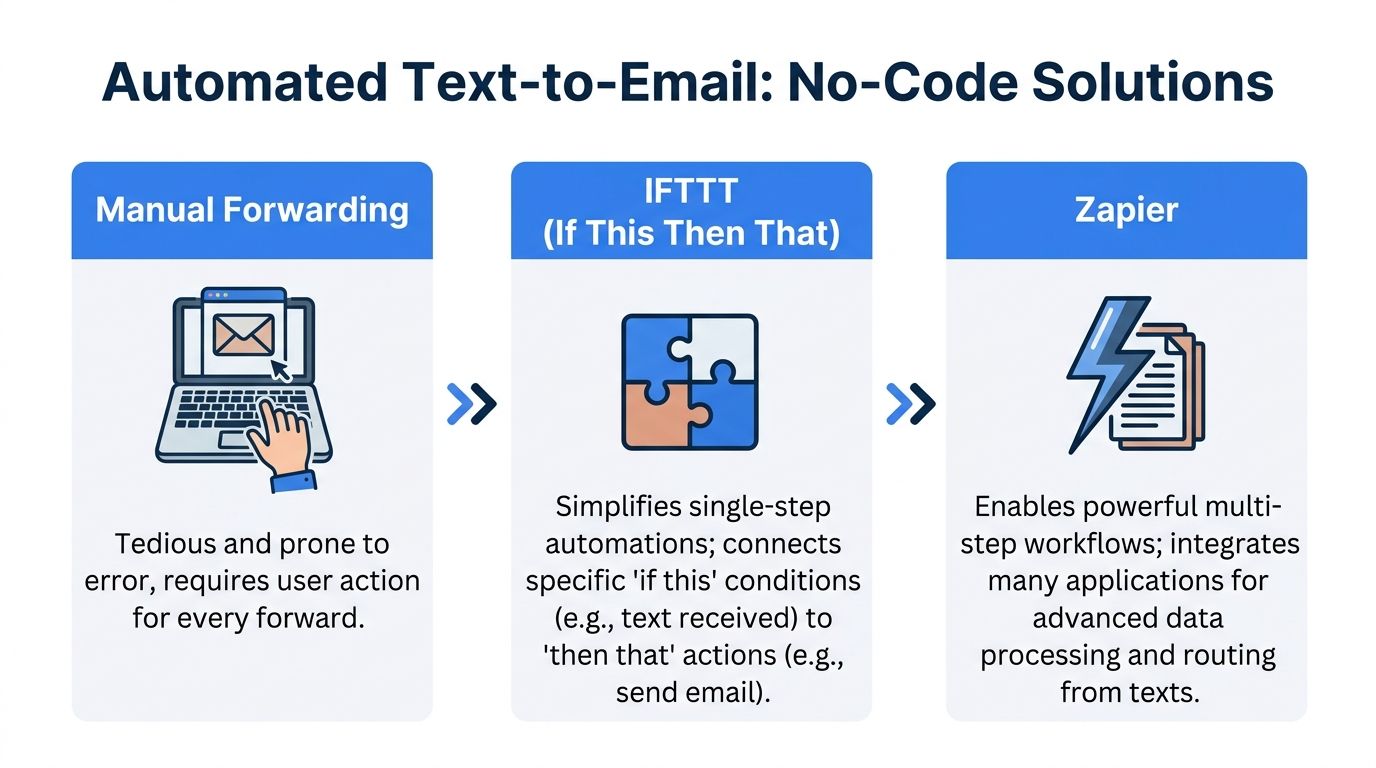
Manual forwarding gets information into email. No-code automation turns that same event into a repeatable workflow.
That is the point where text to email stops being a convenience and starts acting like infrastructure.
What no-code tools change
Tools like IFTTT and Zapier let you define a trigger and an action.
A simple example:
- Trigger: receive a text from a specific number
- Action: create a Gmail draft with a standard subject line and label
A better business example:
- Trigger: receive a message tagged as invoice-related
- Action: send an email to the AP inbox, label it, and notify the right person
The difference is consistency. Instead of relying on staff to remember who should receive what, the workflow makes that decision.
Good use cases for IFTTT and Zapier
IFTTT is useful when the rule is simple. One event. One action. Minimal branching.
Zapier is better when the workflow has steps and conditions. For example, a message can be routed differently depending on who sent it, what mailbox it belongs to, or whether an attachment needs to be included.
A finance team might use a no-code flow to:
- Route approvals: Forward only messages from approved managers into a finance mailbox.
- Tag by process: Add labels like “invoice,” “claim,” or “renewal.”
- Create a clean subject line: Turn “yes paid” into “Vendor payment confirmation from field contact.”
- Start a second action: Notify a coordinator after the email is created.
Text to Email Method Comparison
| Method | Best For | Setup Complexity | Flexibility |
|---|---|---|---|
| Manual phone forwarding | One-off messages and personal archiving | Low | Low |
| Carrier or gateway-style forwarding | Very light use where existing support already exists | Low to medium | Low |
| IFTTT | Simple automatic forwarding rules | Medium | Medium |
| Zapier | Multi-step business workflows and routing | Medium | High |
| Custom API build | Internal systems and high-control environments | High | Very high |
What works and what does not
What works:
- A narrow workflow with a clear trigger
- Standard subjects and labels
- Shared inbox destinations
- Simple conditions tied to sender, keyword, or message type
What does not:
- Treating every inbound text the same
- Forwarding into one giant mailbox with no routing
- Building a chain so long that nobody can troubleshoot it
- Using no-code where application-level control is needed.
If your team is comparing automation options more broadly, this overview of what is no-code automation gives a solid framework for deciding when a no-code layer is enough and when it is not.
Tip: The first automation should remove a repetitive handoff, not redesign the whole department. Start with one message type and one destination inbox.
Automating Business Document Workflows via Text
The most useful text to email workflows are not about conversation. They are about capturing business data at the moment it appears.
That usually happens before anyone opens a spreadsheet.
A field adjuster sends a photo of a report by text. A supplier texts a copy of an invoice. A broker sends a policy image and a short note. If the workflow forwards that message into email, the back office still has to open it, interpret it, and retype it.
A stronger workflow does more. It converts an unstructured message into a usable internal record.
A practical insurance example
Take a claims workflow.
An adjuster in the field texts a damaged property report to a business number. The system sends that message and image into email. From there, a parsing step extracts items like policy number, claim ID, and damage description. The claims team receives a structured email summary instead of a loose message thread.
That changes the work in three ways:
- Triage is faster because the important fields are visible immediately.
- Re-entry drops because staff do not need to copy details line by line.
- Handoffs improve because the inbox contains something people can act on.
The same pattern fits finance
The accounting version is straightforward.
A site lead texts a vendor invoice photo. The workflow emails the image into the finance process. The system extracts invoice number, date, total, and line items. The AP team receives a clean summary and can move directly to review, coding, or exception handling.
That is where automated email matters. Automated email workflows triggered by parsed document data can achieve up to 2,270% higher conversion rates than manual campaigns, and finance teams can save an average of 80% of their time on manual sends, according to Unbounce’s summary of automated campaign performance.
The marketing language in that benchmark comes from campaign workflows, but the operational lesson applies well to finance and operations. Timely, triggered communication beats batch-style manual follow-up.
What the structured email should contain
A useful text to email output is not just the original message pasted into the body. It should package the data for the recipient.
A good structured email often includes:
- Clear subject line: “Invoice received from Job Site 14” works better than “Fwd message.”
- Parsed fields near the top: invoice number, sender, date, amount, policy reference, or claim ID
- Original message body: preserved for audit trail
- Attachment or image: included when the source document matters
- Next-step cue: review, approve, reconcile, or follow up
Why teams stall without this
When businesses skip the structure step, they create hidden labor.
Someone checks the phone. Someone forwards the text. Someone opens the inbox. Someone downloads the image. Someone types values into a spreadsheet. Someone else asks whether the total was read correctly.
None of that is difficult. It is just expensive in aggregate.
Practical rule: If a text contains business data, do not stop at forwarding. Package the message so the next person can use it without interpretation.
The best text to email workflows treat SMS as the capture point, not the destination. The email should arrive ready for a human decision or an automated next step.
Developer APIs for Custom Text to Email Solutions
No-code tools cover a lot of ground. They do not cover everything.
If text to email needs to be a core part of your internal system, an API-based approach gives you more control over message intake, validation, formatting, security, and routing.
When APIs make sense
A development team should consider APIs when the business needs:
- Custom intake rules based on sender identity, account status, or workflow stage
- High-volume handling across many users or business units
- Two-way communication tied to an internal product or portal
- Pre-email processing such as parsing, normalization, or approval checks
- Direct integration with proprietary systems
In those cases, the business is not just forwarding texts. It is building a messaging layer into operations.
What services like Twilio and SendGrid help with
Twilio is commonly used to receive and send SMS programmatically. SendGrid is often used to generate and deliver emails with application-level control. Together, tools like these let a team accept inbound text, transform the content, and create an email that fits internal rules.
For example, the application can:
- detect whether the sender is a vendor, adjuster, or customer
- reformat the subject line based on workflow type
- attach metadata before the email is sent
- store message history alongside the email event
That level of control matters when legal review, compliance review, or internal reporting depends on consistency.
If you are evaluating the email side of a custom build, this API for email guide is a useful reference because it explains how API-driven email differs from standard mailbox workflows.
The trade-off
APIs offer power. They also create responsibility.
A no-code flow can usually be changed by an operations lead. An API workflow usually needs developer time, testing, monitoring, and ownership. That cost is worth it when text to email is business-critical. It is excessive when you only need to route occasional confirmations to a shared inbox.
Best Practices for Secure and Accessible Forwarding
Many text to email setups fail in quiet ways. The message arrives, but it is hard to trust, hard to use, or hard to read.
Professional workflows need more than delivery. They need security, clarity, and accessibility.
Keep access narrow
A common mistake is granting broad inbox access to every tool that touches the workflow. That creates unnecessary exposure.
Use dedicated business inboxes for forwarding targets. Limit who can change routing rules. Keep personal devices out of shared recordkeeping wherever possible.
If you are reviewing connected-tool risk before granting inbox permissions, this article on security risks of giving email access is a useful checklist for what to examine.
Do not email text as an image when the text matters
This is an accessibility issue many teams miss.
When text from a document is embedded in an image and emailed, it becomes inaccessible to screen readers. Workflows should generate live text hierarchies with proper HTML tags instead, as explained by Ohio State’s email accessibility guidance.
That matters in finance and insurance because the content is often structured:
- invoice totals
- policy details
- claim summaries
- line items
- due dates
If those appear only inside a screenshot or forwarded image, the email becomes much harder to read and harder to audit.
Build for readability, not just transfer
A better forwarding workflow should preserve structure.
Use these habits:
- Write semantic headings: Put the claim number, invoice number, or policy reference in visible text, not only in an attachment.
- Separate fields clearly: Dates, totals, names, and IDs should each have their own line or section.
- Keep the original attached: Preserve source material for context, but do not force recipients to rely on it for basic facts.
- Use a document management standard: Folder naming, retention rules, and ownership rules matter once forwarded messages become business records. This guide to best practices for document management is a useful companion for setting those rules.
Tip: A message is not fully “captured” until another person can find it, understand it, and act on it without opening three other tools.
Security and accessibility are often treated as extra polish. In document workflows, they are core design choices. If the forwarded message cannot be trusted or cannot be read properly, the automation is incomplete.
Choosing Your Path from Simple Text to Smart Data
The right text to email method depends on what the message needs to become.
If you only need to save an occasional text, native forwarding is enough. If a small team wants fewer manual handoffs, no-code automation is usually the best next step. If texts are feeding a core operational process, developer APIs make sense. If the message contains invoice, policy, or claims data, the key opportunity is not forwarding alone. It is converting that content into structured information the business can use.
That is the shift finance teams care about.
A forwarded message is helpful. A structured email with extracted fields, clear routing, and a usable audit trail is far more valuable. It reduces retyping, shortens review cycles, and gives teams one place to work from.
The strongest text to email setups do not just move messages faster. They remove the manual gap between field communication and back-office action.
If your team is ready to go beyond simple forwarding, DocParseMagic helps turn invoices, statements, policy documents, and other messy files into clean, structured spreadsheet data you can route into email-driven workflows without the usual copy-paste. It is a practical next step when texts and document images are arriving faster than your team can process them manually.