
NetSuite RESTlet API: Your Practical Integration Guide
If you're looking at a backlog of invoice PDFs, a brittle CSV import, and a finance team that keeps asking why vendor bills still need manual cleanup, you're in the exact spot where the netsuite restlet api starts to make sense.
A lot of NetSuite integrations fail for a simple reason. The standard endpoint doesn't match the business process. Parsed invoice data arrives with the fields you care about, but NetSuite needs record lookups, line construction, validation, and sometimes custom logic before a Vendor Bill can be created safely.
That gap is what RESTlets solve. They let you build the API you need inside NetSuite, instead of forcing your external system to know every NetSuite record quirk in advance.
What is a NetSuite RESTlet and Why You Need One
Monday morning usually makes the case. Parsed invoice data is already coming out of a tool like DocParseMagic as clean JSON, but NetSuite still needs record lookups, field mapping, subsidiary checks, expense or item line decisions, and a response the calling system can act on. A RESTlet is the layer inside NetSuite that handles that work on your terms.
In NetSuite, a RESTlet is a custom HTTP endpoint written in SuiteScript and deployed from your account. It accepts requests from an external system, runs server-side logic in NetSuite, and returns JSON or plain text responses. That sounds simple, but the practical value is control. You decide what payload shape to accept, what validation must pass before a Vendor Bill is saved, and what error details should come back when something fails.
That control matters for invoice automation. Generic APIs are fine when the sender already knows every internal ID and every record rule. Real integrations rarely look like that. Parsed invoice data often arrives with vendor names, PO numbers, invoice dates, totals, tax amounts, and line descriptions. NetSuite wants a valid transaction with the right vendor, subsidiary, currency, account or item references, and line structure. A RESTlet lets you keep that translation inside NetSuite, where the business rules already live.
I usually treat the RESTlet as the contract boundary for the integration.
That leads to a cleaner design:
- Validate the payload before any write happens
- Resolve external values to NetSuite records, such as vendor, item, account, or location
- Build the transaction in the structure NetSuite expects
- Return a response the caller can use for retry, logging, or exception handling
- Keep NetSuite-specific logic out of the parsing tool and out of brittle import files
Oracle documents RESTlets as one of NetSuite's supported scriptable web service options, which is why they remain a practical choice when you need custom request handling inside the account itself (Oracle NetSuite Help).
The trade-off is real. RESTlets give you flexibility, but you also own the API contract, authentication setup, validation path, logging strategy, and long-term maintenance. For a production invoice flow, that is usually the right trade. I would rather keep vendor bill creation rules in one reviewed SuiteScript entry point than spread them across a parser, an iPaaS mapper, and spreadsheet-based cleanup.
If you are designing the request and response model up front, these integration design patterns help frame where validation, retries, and idempotency should live. If the business goal is reducing manual rekeying from invoice documents, the DocParseMagic guide on how to automate data entry from parsed business documents pairs well with this implementation approach.
Practical rule: Use a RESTlet when the external system can send business data, but NetSuite still needs internal logic to turn that data into a correct transaction.
Choosing Your RESTlet Authentication Method
At some point this usually turns into a support ticket. The RESTlet works in sandbox, the parser can send invoice JSON, and then production fails because authentication was copied from an old integration nobody fully understands. For an invoice sync that needs to turn parsed data into Vendor Bills every day, authentication is not a setup detail. It affects deployment, secret rotation, troubleshooting, and who gets paged when tokens expire.
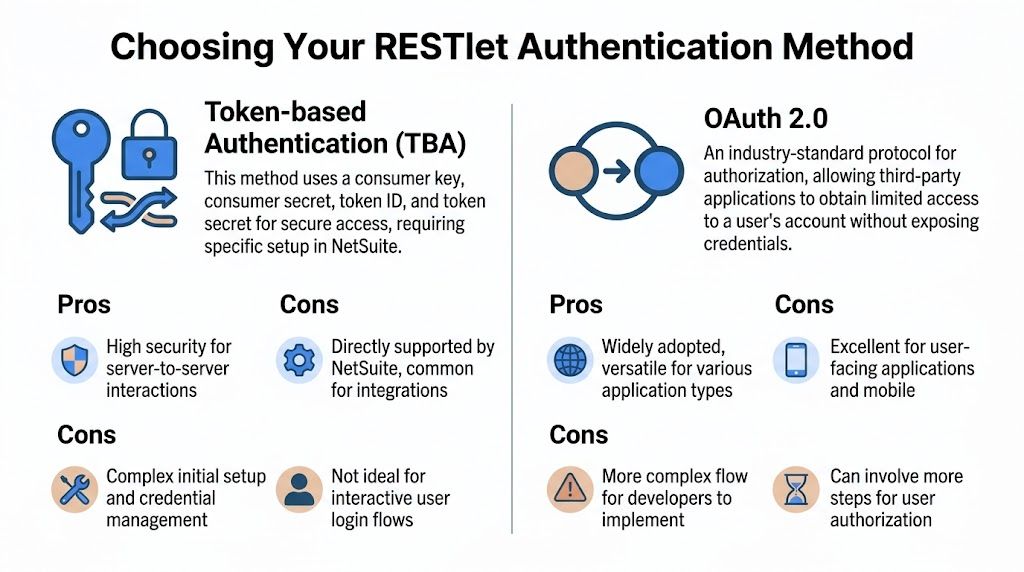
Why NLAuth is effectively off the table
NLAuth sends user credentials with the request. That alone should make many development groups stop.
Oracle has retired support for new integrations built on user credential patterns and directs developers toward token-based methods instead (Oracle NetSuite Help on supported authentication for REST web services and RESTlets). Even if you can still find NLAuth in old accounts, it creates avoidable risk. Password changes break integrations. MFA and user lifecycle controls get messy. Audit conversations get uncomfortable fast.
If you inherit NLAuth, treat it as technical debt with a migration plan.
Where TBA still fits
Token-Based Authentication, or TBA, uses OAuth 1.0a signing. It is still common in older NetSuite estates because many integrations were built that way and still run reliably.
TBA uses four credentials:
- Consumer key
- Consumer secret
- Token ID
- Token secret
The good part is predictability. If the account already has TBA integrations, the team often knows how to provision tokens, store secrets, and troubleshoot signature errors.
The bad part is the signing model. OAuth 1.0a is harder to implement correctly than bearer-token auth, especially if the external system is a document parser, custom middleware, or a small service that just needs to post invoice data. Header construction, encoding rules, and timestamp or nonce issues create failures that are annoying to debug. I usually keep TBA only when I am extending an existing integration family and want to avoid changing the auth model during the same release.
If your upstream process starts with parsed PDFs, standardizing that data before it hits NetSuite helps. A clean PDF to JSON invoice extraction flow reduces the number of moving parts you have to debug when auth and payload issues happen at the same time.
Why OAuth 2.0 is the right default
For a new netsuite restlet api integration, OAuth 2.0 is the safer default.
NetSuite supports OAuth 2.0 for RESTlets, and Oracle's developer guidance reflects that direction for current builds (Oracle Developers Blog on RESTlet authentication options). In practice, Client Credentials is usually the best fit for server-to-server invoice syncs because there is no user session to manage and no reason to pass a person's credentials through the integration.
I recommend OAuth 2.0 for new work for three concrete reasons:
- Token handling is simpler for external services
- Secret rotation is easier to explain and automate
- The auth pattern is easier for another developer to maintain six months later
That last point matters more than teams admit.
The real trade-off
TBA can be the pragmatic choice in an account with established token provisioning, existing monitoring, and scripts already built around OAuth 1.0a. Changing auth at the same time you change business logic is how simple projects become long ones.
OAuth 2.0 is cleaner for new builds, but setup can feel less familiar if your team has spent years in TBA. Expect a bit of friction at the start. The payoff is lower operational overhead later.
Use TBA when you are extending a legacy integration and want the smallest possible change set. Use OAuth 2.0 when you are building a new RESTlet endpoint for a long-lived production flow, such as posting parsed DocParseMagic invoice data into Vendor Bills.
NetSuite RESTlet authentication methods compared
| Method | Security | Best For | Recommendation (2026) |
|---|---|---|---|
| NLAuth | Weak by current standards because it relied on full user credentials | Legacy systems only | Don't use for new RESTlets |
| TBA via OAuth 1.0a | Strong for server-to-server use when managed correctly | Existing integrations already built on TBA | Acceptable for legacy maintenance |
| OAuth 2.0 | Preferred for new deployments and easier service authentication | New RESTlet integrations | Best default choice |
Pick one authentication model per integration family and document it well. Mixed auth across sandbox, production, and related services creates support issues that have nothing to do with the invoice payload and everything to do with inconsistent setup.
Building Your First RESTlet in SuiteScript 2.x
At this point, the integration usually stops being academic.
A finance team wants parsed invoice data posted into NetSuite as Vendor Bills. The payload already exists. The parser already works. What fails is the last mile: a RESTlet that accepts a real JSON document, validates it, maps it to NetSuite fields, and returns a response the calling system can act on without guesswork.
Start with the required shape
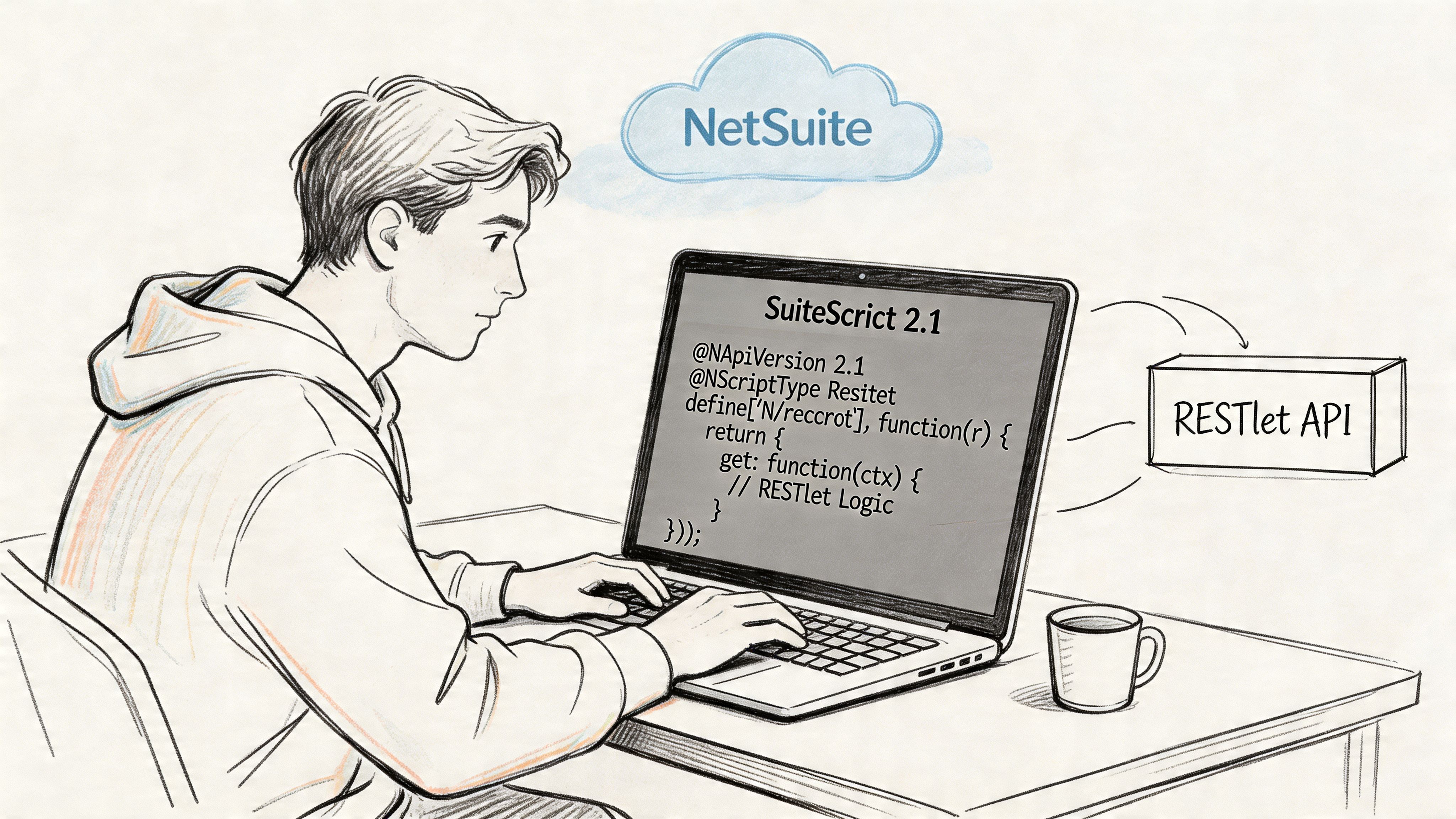
SuiteScript 2.1 RESTlets follow a fixed contract. Declare @NApiVersion 2.1 and @NScriptType Restlet, then expose the functions that map to the HTTP methods you plan to support. Oracle documents that entry-point model in its RESTlet developer guidance.
For a production invoice sync, I usually start with POST only. One write path is easier to test, easier to monitor, and easier to reason about when you are still proving the payload contract.
Here's a practical template for a POST-first RESTlet:
/**
 * @NApiVersion 2.1
 * @NScriptType Restlet
 */
define(['N/record', 'N/search', 'N/log'], function(record, search, log) {

    function post(requestBody) {
        try {
            validatePayload(requestBody);

            var vendorBill = record.create({
                type: record.Type.VENDOR_BILL,
                isDynamic: true
            });

            vendorBill.setValue({
                fieldId: 'memo',
                value: requestBody.memo || 'Imported via RESTlet'
            });

            var billId = vendorBill.save();

            return {
                success: true,
                internalId: billId
            };
        } catch (e) {
            log.error({
                title: 'RESTlet POST failed',
                details: e
            });

            return {
                success: false,
                message: e.message || String(e)
            };
        }
    }

    function validatePayload(body) {
        if (!body) {
            throw new Error('Request body is required');
        }
    }

    return {
        post: post
    };
});
That script is only the frame. It does not yet resolve vendor names, map expense lines, or prevent duplicate bills. It does give you the right place to add those concerns without turning the first version into a mess.
Export the method you intend to call
One of the easiest ways to waste an afternoon is to send POST to a RESTlet that never returned post from the module.
NetSuite does not infer your intent. If the function is missing, named wrong, or not included in the returned object, the request fails and the error often points you toward deployment or URL problems first. In practice, this is why I check the exported object before I debug anything else.
Use a quick checklist:
- Match the HTTP method to the function name:
post,get,put, ordelete - Return that function in the module's final object
- Keep the first version limited to the methods you will support
- Test with the same method your upstream service will use in production
That sounds basic. It still catches a lot of first-build failures.
Validate the payload before you touch a record
For a DocParseMagic-style invoice flow, the incoming JSON matters more than the record creation call. If the payload shape is loose, the NetSuite side becomes harder to support because errors show up deep in field mapping instead of at the contract boundary.
I validate in this order:
- Confirm the body exists
- Confirm required top-level fields such as vendor, subsidiary, tranDate, and lines
- Confirm
linesis an array - Confirm each line has the fields your mapping expects
- Reject bad requests before any record work starts
That approach prevents partial processing and gives the caller a clean failure state.
A simple payload for a parsed invoice might look like this:
{
  "externalInvoiceId": "INV-24881",
  "vendorExternalRef": "VEND-1024",
  "tranDate": "2026-04-10",
  "memo": "DocParseMagic invoice import",
  "lines": [
    {
      "account": "6500",
      "amount": 125.00,
      "description": "Freight"
    },
    {
      "account": "7200",
      "amount": 980.00,
      "description": "Packaging materials"
    }
  ]
}
If your upstream process begins with extracted document data, normalize it into a stable JSON contract before you map anything into NetSuite fields. A good reference point is this guide to converting PDF invoice output into structured JSON.
Use only the modules you need
A small dependency list keeps RESTlets easier to debug.
For a Vendor Bill create flow, these modules usually carry the load:
N/recordto create the bill, set body fields, add lines, and saveN/searchto resolve related records such as vendors, accounts, or itemsN/logto capture request failures and mapping issues during support
Add more only when the use case demands it. For example, N/error can help standardize errors, and N/runtime can help branch behavior by environment or script parameter. I would not add them until there is a clear reason.
Return responses an integration can use
A string like "success" is not enough once another system is orchestrating retries.
The caller needs to know whether NetSuite created the bill, rejected the payload, or failed during processing after validation. That distinction drives what happens next. Retry. Fix the data. Or route it for manual review.
A useful success response usually includes:
successstatus- the created record ID
- an external reference the caller can match to its own job log
Example:
return {
    success: true,
    internalId: billId,
    status: 'created'
};
For validation failures, return a machine-readable shape:
return {
    success: false,
    status: 'validation_error',
    errors: errors
};
That pattern pays off later when operations needs to answer a simple question quickly: did NetSuite reject the invoice, or did the integration itself break?
Keep the first version narrow
For a first release, create one Vendor Bill from one validated payload.
Do not mix in attachment ingestion, duplicate detection, vendor auto-creation, tax edge cases, and approval routing on the same pass unless the project requires all of them on day one. Each added branch makes testing harder and support slower.
A good first scope looks like this:
- Accept one JSON payload
- Validate required fields
- Create one transaction
- Return one clear result
That is enough to prove the actual business path. It is also enough to expose the field-mapping issues, subsidiary rules, and line-level edge cases that generic hello-world RESTlet examples never show.
RESTlet Deployment Testing and Governance
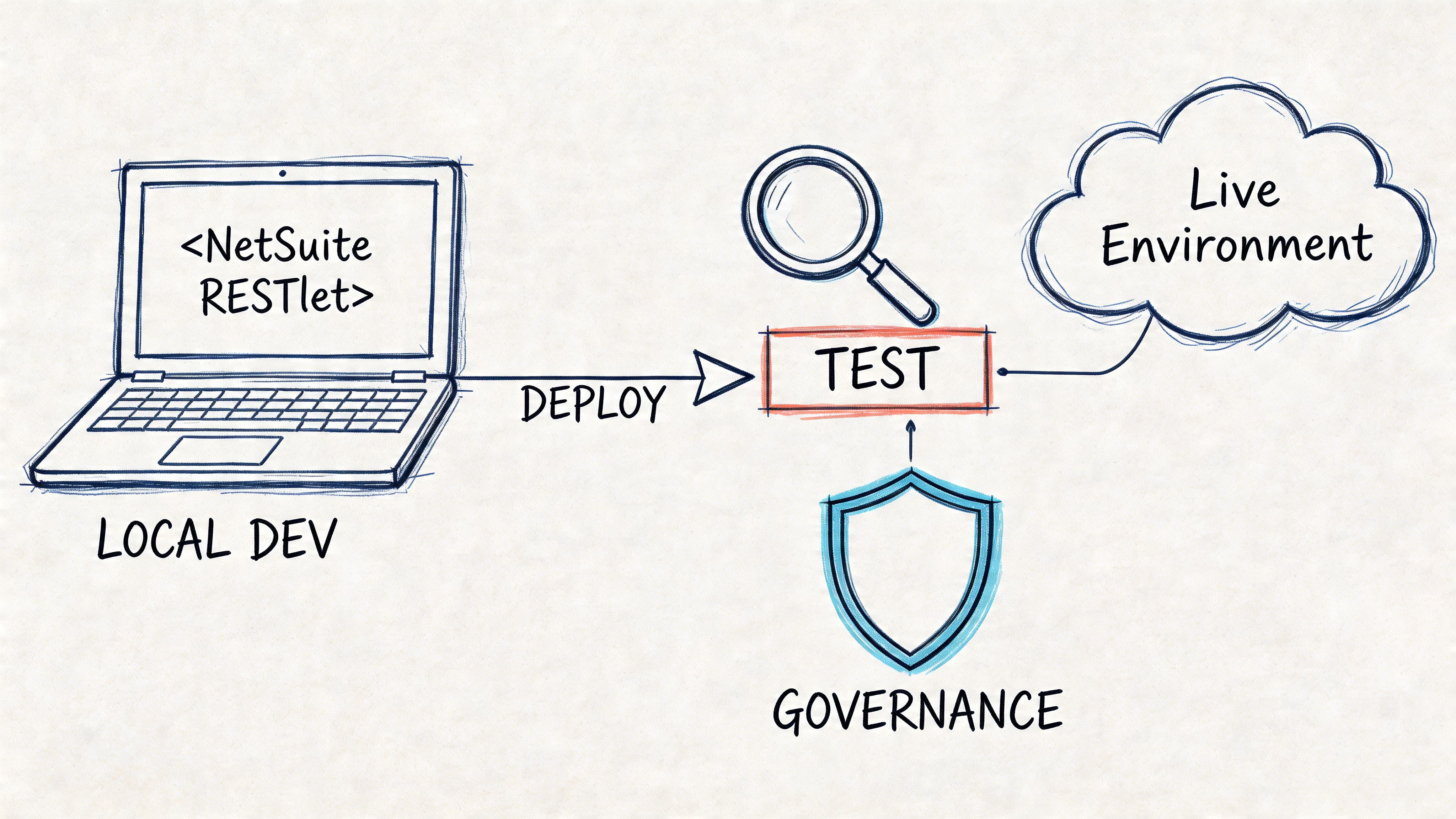
Monday morning usually looks fine in Postman. By Wednesday, the same RESTlet is getting hit by a queue of parsed invoices, one deployment is still in Testing, another is using the wrong URL, and operations is asking why some bills made it into NetSuite while others vanished. Deployment and governance are where a proof of concept turns into an integration you can trust.
Deploy it the right way
The sequence in NetSuite is simple, but the order still matters:
- Upload the SuiteScript file to the File Cabinet
- Create the Script record
- Create the Script Deployment
- Set deployment status to Released
- Use the external URL for your API client
A surprising number of "RESTlet is broken" reports come down to deployment state or URL mix-ups. Teams copy the script record URL instead of the external RESTlet URL, or they test against a deployment that was never released for external access.
I also recommend naming deployments for their purpose, not just the script name. customdeploy_ap_vendorbill_restlet_sb1 is easier to operate than a generic deployment name when you have separate sandboxes, production, and multiple finance integrations.
Test the real request, not a shortcut
The first external test should look as close to production as possible. Use the same HTTP method, the same auth pattern, the same headers, and JSON shaped like the payload your upstream system will send.
For a POST request, verify:
- Method set to POST
- Content-Type set to
application/json - Authorization matching your chosen method
- Body as raw JSON
- The exact external RESTlet URL
A minimal test body might look like this:
{
  "memo": "RESTlet deployment test"
}
That is enough to prove the deployment is callable. It is not enough to prove the integration is ready.
For an invoice flow, I prefer saving a second Postman request that mirrors a parsed document payload, even before the mapping is complete. That catches contract issues early, especially around date formats, null handling, and line arrays. If your source data starts with OCR or document extraction, a sample based on invoice data pulled from scanned images is far more useful than a one-field smoke test.
Governance changes how you design the endpoint
RESTlets run under SuiteScript governance limits. In practice, that means the endpoint should do one bounded unit of work and return. Validate the payload. Resolve the minimum references you need. Create or update the target record. Stop there.
Problems show up fast when a RESTlet tries to do too much in one call. A loop that loads and saves large numbers of records, performs repeated searches for every line, or chains follow-up work inside the same request will eventually hit usage limits or timeouts. The failure mode is ugly because it often appears only after the integration starts processing real invoice volume.
The safer pattern is simple:
- Keep synchronous work short
- Cache or minimize record lookups
- Avoid load/save cycles inside large loops
- Push heavy follow-up processing to Map/Reduce, Scheduled Script, or a queue
For a Vendor Bill integration, that usually means the RESTlet should create the bill and return a result. Attachment processing, enrichment, audit logging beyond the basics, and downstream matching can run elsewhere if the business process allows it.
Watch concurrency and retry behavior
Throughput issues rarely appear during single-record testing. They appear when the caller sends bursts.
NetSuite enforces account and user-level execution limits, so a caller that fires requests in parallel without any backoff strategy will eventually get throttled. In the field, this usually shows up as intermittent failures that are hard to reproduce by hand because the payload is valid and the script itself is fine.
Design the caller for retryable failure from day one:
- Retry transient 429 and 5xx responses
- Use exponential backoff with jitter
- Log the external reference on every attempt
- Make create operations idempotent where possible
That last point matters a lot for invoice imports. If DocParseMagic or your middleware retries after a timeout, the RESTlet may have already created the Vendor Bill. Without an external reference check or duplicate prevention rule, the retry can create a second bill for the same invoice.
A short deployment checklist
| Check | Why it matters |
|---|---|
| Script file uploaded | NetSuite cannot create the script record without it |
| Correct entry point exported | Prevents avoidable method and routing errors |
| Deployment set to Released | External callers cannot use a testing-only deployment |
| Content-Type is JSON | Avoids request parsing issues |
| External URL verified | Prevents calls to the wrong endpoint |
| Saved Postman or API client test cases | Makes regression testing faster |
| Retry policy documented | Prevents burst traffic from turning into duplicate or failed imports |
| Integration user and role reviewed | Limits access and avoids permission surprises in production |
Real-World Example Sending DocParseMagic Data to NetSuite
The most useful RESTlet examples are the ones that look like a real payload from a real system.
A common finance workflow starts with a parsed invoice. The document platform extracts vendor name, invoice number, bill date, total, and line details. NetSuite then needs those fields turned into a Vendor Bill with valid references and usable error messages if something doesn't line up.
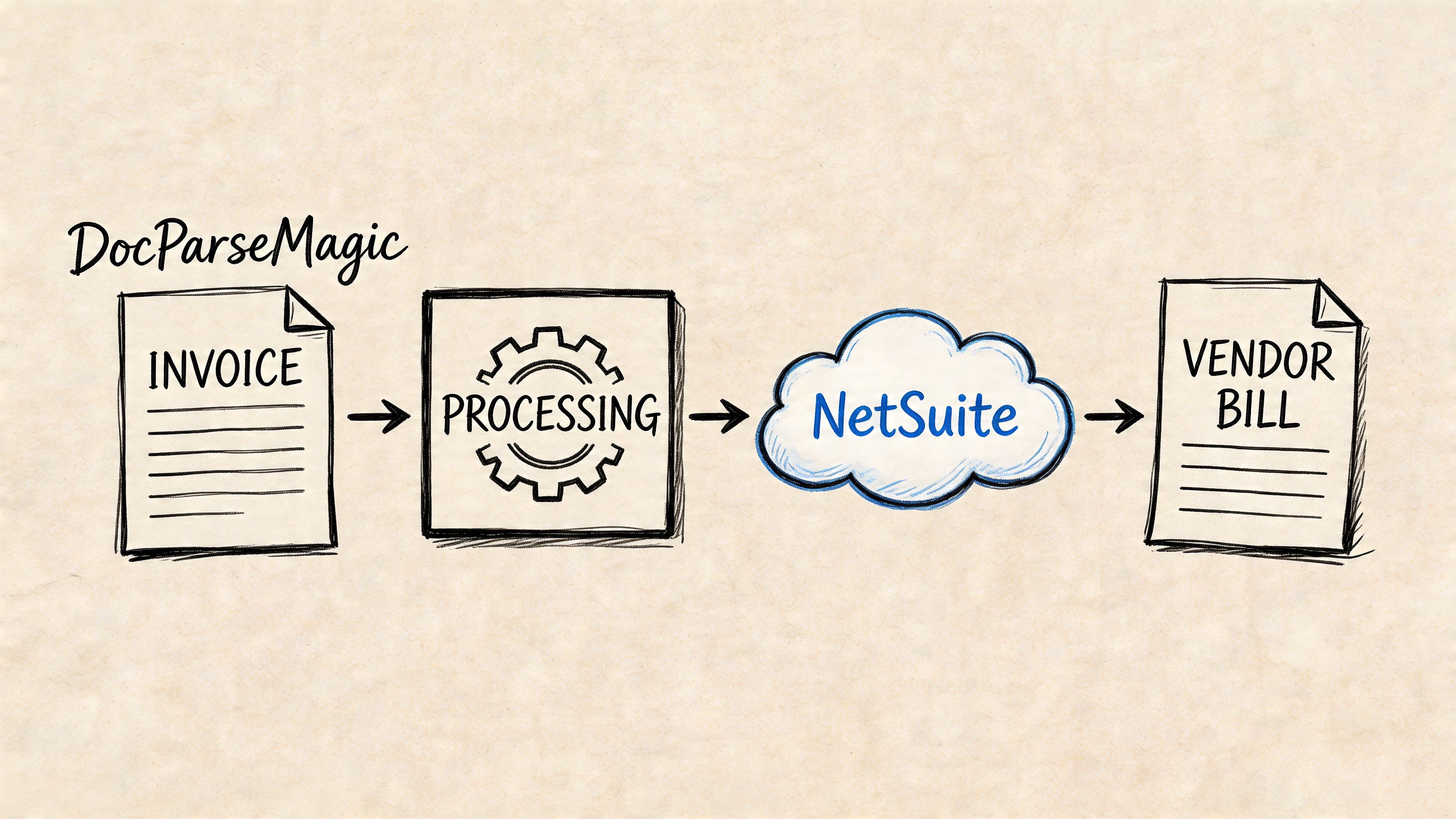
The payload shape that works well
A clean inbound JSON contract should separate header fields from line fields and avoid exposing NetSuite internals unless the upstream system already owns them.
Example payload:
{
  "invoiceNumber": "INV-48392",
  "vendorName": "Acme Industrial Supply",
  "tranDate": "2026-01-12",
  "memo": "Imported from parsed invoice",
  "externalReference": "doc-8f2c1",
  "lines": [
    {
      "itemName": "Packaging Materials",
      "quantity": 10,
      "rate": 12.50,
      "amount": 125.00
    },
    {
      "itemName": "Freight Charge",
      "quantity": 1,
      "rate": 35.00,
      "amount": 35.00
    }
  ]
}
A few notes from practice:
- Use business identifiers in the payload when possible. Vendor name or a source-system external key is easier to manage than hardcoded NetSuite internal IDs.
- Keep dates explicit and consistent.
- Pass line items as an array, even when there is only one line.
- Include a source reference so support staff can trace the originating document quickly.
If invoice extraction starts from scans or photos rather than text PDFs, the upstream challenge is usually getting reliable structured data first. This is the same kind of preprocessing problem discussed here: https://docparsemagic.com/blog/extracting-data-from-image
The Vendor Bill RESTlet
Below is a practical SuiteScript 2.1 example. It does four things:
- Validates the payload
- Finds the vendor
- Creates the Vendor Bill
- Returns a structured success or error response
/**
 * @NApiVersion 2.1
 * @NScriptType Restlet
 */
define(['N/record', 'N/search', 'N/log'], function(record, search, log) {

    function post(requestBody) {
        try {
            validateRequest(requestBody);

            var vendorId = findVendorIdByName(requestBody.vendorName);
            if (!vendorId) {
                return errorResponse('vendor_not_found', 'Vendor was not found: ' + requestBody.vendorName);
            }

            var bill = record.create({
                type: record.Type.VENDOR_BILL,
                isDynamic: true
            });

            bill.setValue({
                fieldId: 'entity',
                value: vendorId
            });

            if (requestBody.invoiceNumber) {
                bill.setValue({
                    fieldId: 'tranid',
                    value: requestBody.invoiceNumber
                });
            }

            if (requestBody.tranDate) {
                bill.setValue({
                    fieldId: 'trandate',
                    value: new Date(requestBody.tranDate)
                });
            }

            if (requestBody.memo) {
                bill.setValue({
                    fieldId: 'memo',
                    value: requestBody.memo
                });
            }

            if (requestBody.externalReference) {
                bill.setValue({
                    fieldId: 'externalid',
                    value: requestBody.externalReference
                });
            }

            requestBody.lines.forEach(function(line, index) {
                var itemId = findItemIdByName(line.itemName);

                if (!itemId) {
                    throw new Error('Item not found on line ' + (index + 1) + ': ' + line.itemName);
                }

                bill.selectNewLine({
                    sublistId: 'item'
                });

                bill.setCurrentSublistValue({
                    sublistId: 'item',
                    fieldId: 'item',
                    value: itemId
                });

                if (line.quantity != null) {
                    bill.setCurrentSublistValue({
                        sublistId: 'item',
                        fieldId: 'quantity',
                        value: line.quantity
                    });
                }

                if (line.rate != null) {
                    bill.setCurrentSublistValue({
                        sublistId: 'item',
                        fieldId: 'rate',
                        value: line.rate
                    });
                }

                bill.commitLine({
                    sublistId: 'item'
                });
            });

            var internalId = bill.save();

            return {
                success: true,
                status: 'created',
                internalId: internalId,
                invoiceNumber: requestBody.invoiceNumber || null
            };

        } catch (e) {
            log.error({
                title: 'Vendor Bill RESTlet failed',
                details: e
            });

            return errorResponse('processing_error', e.message || String(e));
        }
    }

    function validateRequest(body) {
        if (!body) {
            throw new Error('Request body is required');
        }

        if (!body.vendorName) {
            throw new Error('vendorName is required');
        }

        if (!body.lines || !Array.isArray(body.lines) || body.lines.length === 0) {
            throw new Error('At least one line is required');
        }
    }

    function findVendorIdByName(vendorName) {
        var vendorSearch = search.create({
            type: search.Type.VENDOR,
            filters: [['entityid', 'is', vendorName]],
            columns: ['internalid']
        });

        var results = vendorSearch.run().getRange({ start: 0, end: 1 });
        return results && results.length ? results[0].getValue('internalid') : null;
    }

    function findItemIdByName(itemName) {
        var itemSearch = search.create({
            type: search.Type.ITEM,
            filters: [['itemid', 'is', itemName]],
            columns: ['internalid']
        });

        var results = itemSearch.run().getRange({ start: 0, end: 1 });
        return results && results.length ? results[0].getValue('internalid') : null;
    }

    function errorResponse(code, message) {
        return {
            success: false,
            status: code,
            message: message
        };
    }

    return {
        post: post
    };
});
What this script gets right
This example is intentionally simple, but it follows patterns that hold up in production:
- It validates before creating the record
- It resolves references inside NetSuite
- It returns readable error codes
- It avoids partial line creation logic outside the main flow
What it doesn't do yet is duplicate detection, custom segment mapping, tax logic, or attachment handling. That's deliberate.
If the parsed invoice payload is stable, keep the RESTlet responsible for NetSuite translation, not document interpretation.
A short walkthrough helps if you're explaining the flow to finance or ops stakeholders:
Where teams usually get burned
Most issues in this pattern come from reference matching.
Vendor matching
If you search by display name alone, you need a naming convention you trust. In mature integrations, I usually prefer a stable external key over a free-text vendor label.
Item matching
Line-level item matching is often harder than vendor matching. Parsed invoices may contain descriptions that don't map cleanly to item records. If that's your environment, create an explicit mapping layer instead of pretending text equality is reliable.
Date handling
NetSuite date fields are less forgiving than many upstream systems. Normalize date strings before they enter the RESTlet if you can.
Error handling
The calling app needs to know whether the failure is:
- Retryable, like a temporary platform issue
- Data-related, like a missing vendor
- Configuration-related, like bad mapping
That classification matters more than a stack trace.
A better response contract
I like responses that make support work easier:
{
  "success": false,
  "status": "vendor_not_found",
  "message": "Vendor was not found: Acme Industrial Supply",
  "sourceReference": "doc-8f2c1"
}
That gives the external system enough context to route the record for review without opening NetSuite first.
What I'd change for production
Before putting this live at scale, I'd add:
- Duplicate checks using invoice number plus vendor
- A custom log record for failed payloads
- Config-driven field mappings
- A controlled item resolution strategy
- A decision on synchronous versus queued processing
That last one matters a lot. If finance expects instant confirmation for each invoice, synchronous can work. If documents arrive in bursts, you'll usually want the RESTlet to do lightweight intake and pass heavier work to background processing.
Advanced RESTlet Best Practices and Error Handling
A finance team usually discovers the weak spots in a RESTlet on a bad day, not during a demo. Parsed invoice data comes in from DocParseMagic, ten vendor bills post cleanly, then one payload has an unexpected tax code, another references a vendor alias instead of the NetSuite name, and a third gets retried twice by the caller because the first response timed out. If the RESTlet cannot explain what failed, whether it is safe to retry, and where the payload ended up, support turns into guesswork.
NetSuite's documentation covers RESTlet setup and invocation mechanics, but it does not spend much time on production recovery patterns, support workflows, or failure classification (Oracle NetSuite Help for RESTlet setup and invocation details). Teams usually have to define those conventions themselves.
Build an error trail you can support
A try/catch plus N/log is fine while you are writing the script. In production, it is too shallow.
Store failures in a durable place, usually a custom record keyed to a source reference from the upstream system. For invoice ingestion, I typically keep:
- source document ID
- request payload hash or reference
- vendor or external vendor reference
- error category
- NetSuite record ID if partial work succeeded
- retry status
- first failure time and last retry time
That record becomes the support surface. Accounting can search it. Operations can requeue from it. Developers can inspect patterns without digging through execution logs.
The biggest improvement is error classification. "Script error" is not useful to the caller. Separate failures into buckets such as retryable platform issue, invalid input, missing dependency, duplicate invoice, and configuration problem. That makes it much easier for a tool like DocParseMagic, or any middleware sitting in front of NetSuite, to decide whether to retry automatically or route the document for review.
Design for volume before it hurts
Volume problems show up in two places. Data access patterns and write concurrency.
For large reads, record-by-record REST patterns age badly. If the integration needs to look up item mappings, vendor references, or historical bill data in bulk, SuiteQL inside the RESTlet is often the better choice. Houseblend's write-up on NetSuite high-volume API integrations notes better performance for large datasets and also highlights the concurrency limits that shape scaling decisions (Houseblend on high-volume NetSuite API integrations).
For writes, the practical lesson is simple. Do not assume one integration user and one synchronous code path will carry every workload. NetSuite limits concurrent execution per user, so bursty invoice imports may need queueing, staggered retries, or multiple integration users split by workload. That does not excuse inefficient code. It means throughput planning has to match NetSuite's execution model.
Treat endpoint routing as configuration
RESTlet URLs are account and data-center specific. Hardcoding a domain works right up until it does not.
NetSuite documents the account-specific domain pattern and the need to use the correct service URL for the target account (NetSuite documentation mirror discussing RESTlet domains). In multi-account or multi-region setups, keep endpoint configuration outside the script and validate it per environment. This matters more than teams expect during sandbox refreshes, production cutovers, and managed integrations that talk to several NetSuite accounts.
Secure the integration like an API
A RESTlet is an exposed API endpoint with accounting impact. Treat it that way.
At minimum:
- validate types, required fields, and enum-like values before any record work starts
- restrict the integration role to the exact record permissions it needs
- strip tokens, signatures, and sensitive payload fragments from logs
- reject malformed payloads with a clear client error
- define retry rules only for transient failures
Use a short security review before release. This checklist on API Security Best Practices is a good baseline.
Know when to stop doing work inside the RESTlet
I rarely keep heavy business logic inside the RESTlet once invoice volume grows.
If the request needs broad searches, line-by-line matching across large item catalogs, attachment processing, or multi-step updates after bill creation, let the RESTlet do intake, validation, and idempotency checks first. Then hand off the expensive work to a scheduled or map/reduce script. That gives you cleaner retries and better control over governance usage.
For the DocParseMagic-to-Vendor-Bill pattern, that usually means the RESTlet should answer a few questions quickly: Is this payload valid? Has this invoice already been seen? Can NetSuite resolve the core references needed to continue? If yes, accept it and queue the rest when the processing path is likely to run long. That is the trade-off I make most often in production because it keeps the API predictable even when the downstream record creation logic gets complicated.
If your team is still copying invoice data from PDFs, spreadsheets, scans, or photos into NetSuite by hand, DocParseMagic is a practical way to turn messy business documents into structured data you can feed into an integration like this. It helps accounting, insurance, procurement, and operations teams extract fields and line items quickly so your RESTlet can spend its time creating clean records instead of compensating for bad input.