How to Manage Accounts Payable A Modern Playbook for 2026
If you’re trying to manage accounts payable effectively, you need a playbook that goes beyond just paying bills on time. The goal is to turn your AP department from a cost center into a strategic part of the business—and that starts with rethinking your entire process.
It’s about intelligently managing how invoices come in, automating approvals, picking the right way to pay, and, most importantly, using the data you collect to make smarter decisions.
Why Your AP Process Needs a Modern Playbook
Let's be honest: does your finance team spend its days buried under paper invoices, chasing down managers for approvals, and correcting typos from manual data entry? If that sounds familiar, you're not alone. This is the daily reality for countless businesses.
But here's the thing—accounts payable isn't just a back-office chore. It's a critical function that directly impacts your company’s cash flow, supplier relationships, and even your risk profile. Sticking with outdated, manual processes is a huge drain on resources and leaves you open to costly mistakes.
A modern AP playbook provides a clear, structured system for handling every invoice from the moment it arrives until it's paid. Nothing gets lost, and everything is tracked.
A well-run accounts payable process isn't just about paying bills. It gives you clear visibility into your cash flow, helps you pay on time, and builds stronger relationships with your vendors. It shifts AP from a reactive headache to a real strategic advantage.
The Hidden Costs of Manual AP
It's easy to assume most companies have moved on from manual work, but the numbers tell a different story. Research shows that by 2025, a surprising 68% of companies will still be dealing with manual invoice processing. That’s a ton of time wasted on simple data entry.
Worse, this manual work is prone to errors—up to 3-5% of all invoices, in fact. Those mistakes lead to overpayments, late fees, and strained vendor relationships. To get a handle on this, you have to find ways to automate manual processes that are eating up your team's time.
To give you a clearer picture, we've put together a quick comparison of the old way versus the new way.
Manual vs Automated Accounts Payable at a Glance
This table breaks down the fundamental differences between a traditional, hands-on AP workflow and a modern, automated one. You can see right away where the biggest improvements come from.
| Aspect | Manual Process | Automated Process |
|---|---|---|
| Invoice Intake | Physical mail, multiple email inboxes | Centralized digital inbox, automated data capture |
| Data Entry | Manual keying of invoice details | OCR technology extracts data automatically |
| Approval Routing | Chasing signatures via email or paper | Automated workflows based on preset rules |
| Error Rate | High (3-5% of invoices) | Significantly lower (under 1%) |
| Processing Time | Days or weeks per invoice | Hours or even minutes per invoice |
| Visibility | Limited; hard to track invoice status | Real-time dashboards and reporting |
As you can see, the shift isn't just about saving time; it's about gaining control and visibility over the entire process.
The flowchart below shows the key stages of an effective AP process, from the first touchpoint to the final report.
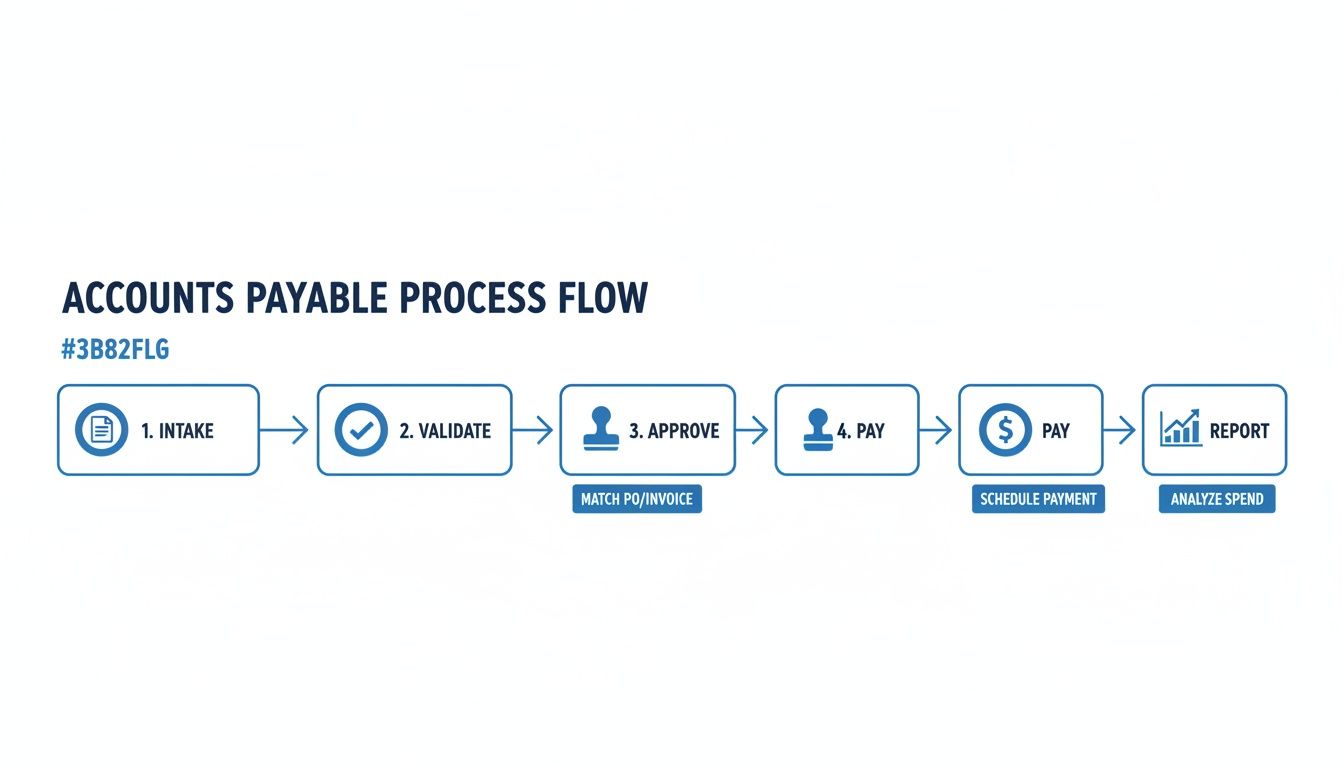
Every single one of these steps—intake, validation, approval, payment, and reporting—is an opportunity to get more efficient.
The Five Pillars of a Modern AP Playbook
This guide is your plan for moving from chaos to control. We'll walk you through building and improving each of these five critical stages, turning your AP team into a strategic asset.
Here’s what we’ll cover:
- Intake and Capture: How to centralize all incoming invoices and pull out key information automatically.
- Validation and Approval: How to set up rules that instantly check invoices and send them to the right person for approval.
- Payment Execution: How to pay vendors on time, every time, while choosing the most cost-effective payment method.
- Reporting and KPIs: How to use your AP data to track performance and guide financial strategy.
- Controls and Compliance: How to build a secure, fraud-resistant process that’s always ready for an audit.
When you get these areas right, you create a system that does more than just pay bills—it provides real business intelligence. For a closer look at the specific upsides, check out our article on the benefits of accounts payable automation.
Now, let's get into the "how-to" for each step.
Getting a Handle on Invoice Intake and Data Capture
Let's be honest, the very start of the accounts payable process is often a complete mess. If your team is drowning in a chaotic mix of paper invoices, random emails, and clunky vendor portals, you're not alone. This scattershot approach is a recipe for delays, lost documents, and frustratingly simple (and costly) data entry mistakes.
The first real win in fixing AP is to stop the chaos at the source. You need to create a single, clear path for every invoice to follow, whether it’s a PDF in an email, a piece of paper, or a submission through a portal. Funneling everything into one place stops invoices from getting buried in personal inboxes and gives you a real-time view of what's landed on your desk.
Create a Central Funnel for All Invoices
I’ve seen this play out a hundred times. A busy operations manager at a growing company gets invoices sent to her personal email, the general "info@" address, and even the sales team by mistake. She's spending a huge chunk of her week just chasing down documents before she can even think about paying them.
The fix is surprisingly simple: a dedicated AP email address. Something like invoices@yourcompany.com works wonders. When you direct all your vendors to use this one address, you instantly create a controllable funnel. It’s a small change that lays the groundwork for everything else.
Ditch Manual Entry for Smart Automation
Once your invoices are all flowing to one spot, the next hurdle is getting the data off the page and into your accounting software. Tapping numbers into a system by hand is not only mind-numbingly slow, but it's also where most errors creep in. A single typo can lead to an overpayment or a late fee that erodes trust with a key supplier.
This is where modern document parsing tools like DocParseMagic completely change the game. This kind of AI-powered software can read and understand the layout of any invoice, no matter the format. It doesn’t care if the invoice number is in the top right or the bottom left—it finds the key fields and pulls the data with stunning accuracy.
The real goal here is to kill the "copy-paste" job. An employee who used to spend ten minutes typing line items from a PDF can now watch the system do it in seconds. This frees up your people to do work that actually matters, like analyzing spend or negotiating better payment terms.
This isn't just about being more efficient; it's about survival. The global market for AP automation was recently valued at $3.08 billion and is expected to grow at a 12.8% clip every year through 2030. With invoice volumes projected to jump by 15-20% annually, manual processes just can't keep up.
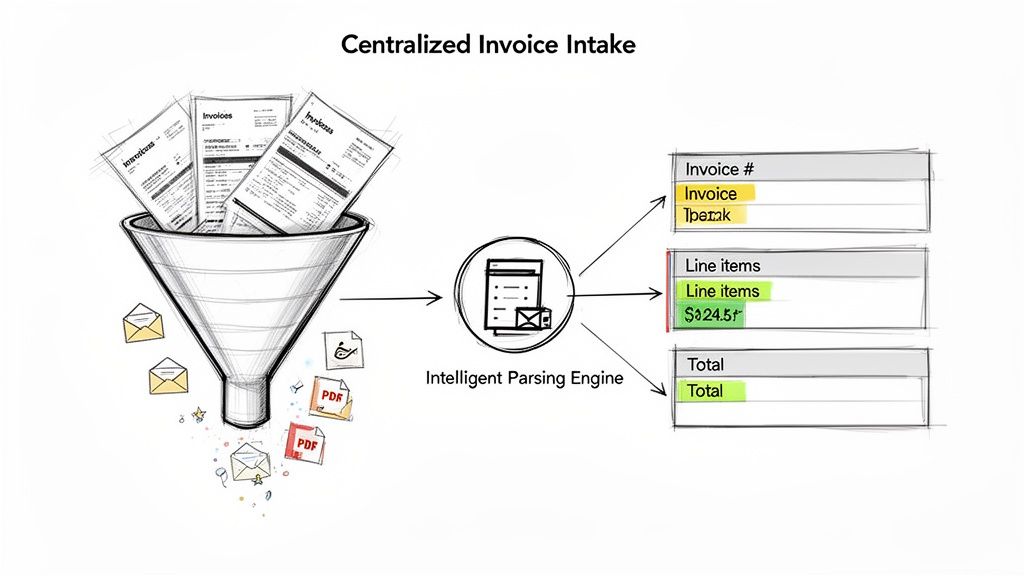
The image below shows what this looks like in practice. An automated tool serves up the extracted invoice data in a clean, organized format, ready for a quick review.
Suddenly, that messy pile of documents becomes clean, actionable data. You can spot issues or check totals at a glance.
Putting Your Data Capture Plan into Action
For companies with a global supplier base, a dedicated E-invoice portal can be a fantastic way to enforce standards right from the start. These portals give vendors a consistent way to submit invoices, which means you get consistent data every time.
Here’s a simple game plan for setting up your intake and capture workflow:
- Mandate a single channel. Whether it’s one email address or a specific portal, make it the only way you accept invoices. No exceptions.
- Automate the data lift. Use a document parsing tool to scan every incoming invoice and automatically extract the important details. If you want to dive deeper, our guide on data extraction from invoices is a great resource.
- Review, don't re-key. The extracted data should then pop up for a quick human check. This isn't for data entry; it's a quick validation step to confirm the AI's work and catch any obvious red flags.
By automating the front-end of your AP process, you're building a solid foundation for everything else. When clean, accurate data enters your system from day one, you'll find that validation, approvals, and payments become faster and far more reliable.
Building Your Bulletproof Approval Workflow
Once an invoice is captured and its data is clean, the next big challenge is getting it approved. How do you get it signed off and ready for payment without it getting lost in a black hole of email chains or sitting on a manager's desk for weeks? This is where many companies stumble when they try to manage accounts payable, creating bottlenecks that delay payments and frustrate vendors.
A messy approval process is a silent killer of efficiency. It adds friction and makes it impossible to know when an invoice will actually be ready to pay. To fix this, you need a clear, automated, and auditable system for both validation and approval routing.
Setting Up Automated Validation Rules
Before an invoice even gets to a human, you can have your system run a series of instant checks. This is your first line of defense, catching errors early and saving your team from hours of tedious manual work. The gold standard here is three-way matching.
This process automatically checks three key documents against each other:
- The Purchase Order (PO): What your company agreed to buy.
- The Goods Received Note: What your company actually received.
- The Vendor Invoice: What the vendor is billing you for.
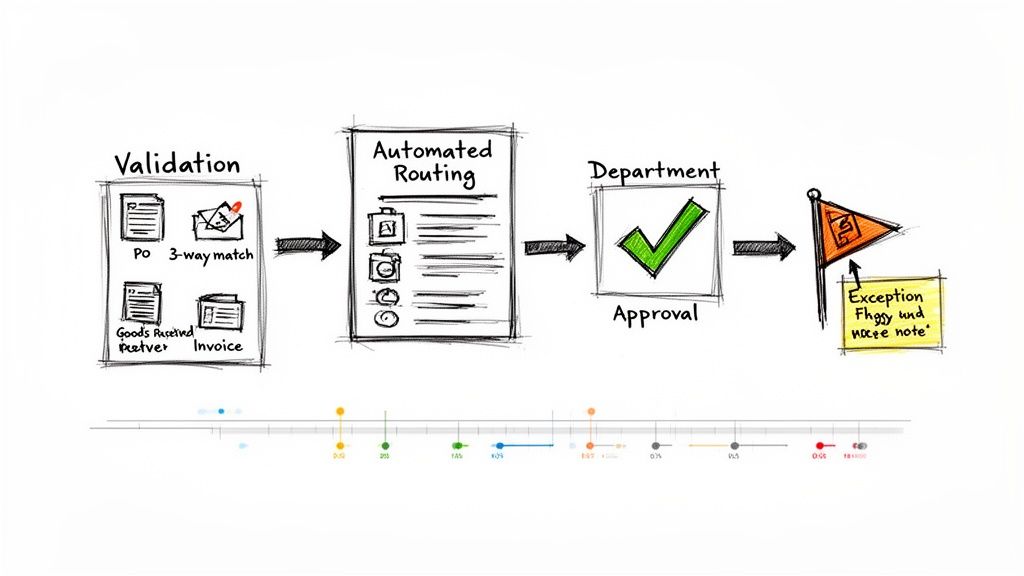
If the quantities, prices, and totals on all three documents line up, the invoice is automatically validated and moves on. If there's a mismatch—say, the invoice lists ten units but the receiving report shows only eight—the system flags it instantly.
This automated check is a complete game-changer. Instead of an AP clerk spending 20 minutes manually comparing line items, the system does it in a split second. This frees up your team to focus only on the exceptions that require human judgment.
This focus on efficiency is a top concern for finance leaders. It’s not just a nice-to-have; it's a strategic necessity. In fact, efficiency is the number one priority for 84% of accounts payable leaders heading into 2025, driven by rising transaction volumes and tight resources. You can dive deeper into these priorities in this comprehensive leadership report.
The diagram below shows how an automated workflow can direct an invoice through these validation and approval stages.
Intelligent Routing for Faster Approvals
Once an invoice passes that initial validation, where does it go next? Manually forwarding emails to department heads is slow and completely unreliable. A much better approach is intelligent routing, where you set up rules that automatically send the invoice to the correct approver.
These rules can be as simple or as complex as your business needs. Some of the most common routing rules I've seen are based on:
- Department: Invoices from a marketing vendor go directly to the CMO.
- Project Code: All invoices tied to "Project Titan" go to that project's manager.
- Amount: Invoices under $1,000 might get automatic approval, while those over $10,000 require CFO sign-off.
Think about a procurement team at a mid-sized manufacturing company. They work with hundreds of suppliers for different production lines. With intelligent routing, an invoice from a steel supplier for the "Alpha" line is automatically sent to the Alpha line manager. At the same time, a bill for new safety equipment goes straight to the facility manager. No one has to manually figure out who gets what. It just happens.
Creating a Clear Exception Handling Process
No system is perfect, and discrepancies will pop up. The key is having a structured process for handling these exceptions so they don't bring your entire workflow to a screeching halt.
When an invoice gets flagged for an issue (like a price mismatch or a missing PO), your system should do three things immediately:
- Alert the Right Person: Automatically notify the relevant team member—often the person who made the original purchase—about the discrepancy.
- Provide Context: Give them all the necessary information, including the invoice, the PO, and a clear description of the problem.
- Create an Audit Trail: Track every conversation and action taken to resolve the issue. This ensures accountability and gives you a clear record for future audits.
Building this kind of bulletproof workflow turns your approval process from a chaotic guessing game into a predictable and efficient machine. It’s a foundational step to truly getting a handle on how you manage accounts payable.
Optimizing Payments and Vendor Relationships
Getting an invoice approved feels like crossing the finish line, but it’s not the end of the race. The final, critical step—actually paying the bill—is where you truly define your relationship with your vendors. Paying an invoice is just a transaction. Paying it strategically, on the other hand, builds powerful partnerships and safeguards your cash flow.
A reliable and predictable payment process does more than just keep your suppliers happy; it turns you into a customer they want to do business with. When vendors know they can count on you for on-time, accurate payments, they’re often more willing to negotiate better terms, prioritize your orders in a crunch, and go the extra mile. It’s a simple shift that moves the relationship from transactional to relational.
The Art of Payment Timing
In accounts payable, timing is everything. The classic dilemma is holding onto your cash as long as you can without getting hit with late fees, while also snagging any early payment discounts on the table. It’s a delicate balance that demands a clear view of every due date.
Take the common "2/10 net 30" term. It’s a simple offer: pay within 10 days to get a 2% discount, or pay the full amount in 30 days. On a single $10,000 invoice, that $200 in savings might not seem like much. But multiply that across hundreds of invoices and dozens of vendors, and you’re talking about a significant financial win. This is where an automated system really shines, flagging these opportunities so you never leave money on the table.
Choosing the Right Tool for the Job: Payment Methods
Gone are the days when mailing a paper check was the only option. Today, you have an entire toolkit of payment methods, each with its own pros and cons regarding cost, speed, and security.
Here’s a quick rundown of the most common options and my take on when to use them:
- ACH (Automated Clearing House): This is your workhorse for routine domestic payments. It's secure, incredibly low-cost, and far more efficient than paper checks. For your regular, high-trust suppliers, ACH is the way to go.
- Virtual Cards: Think of these as your secret weapon against fraud. They are single-use credit card numbers created for one specific payment, making them almost impossible to compromise. Many also come with cash-back rebates, which can turn your AP department into an unexpected source of revenue.
- Traditional Checks: Let’s be honest, some vendors are still old-school. While checks are slow and fraud-prone, they're sometimes unavoidable. Just be sure to use them sparingly and have rock-solid controls around your check-stock, printing, and mailing processes.
A clean, meticulously organized vendor master file is your single source of truth. It's the foundation for preventing duplicate payments, catching fraud, and ensuring money always goes to the right place.
Keeping this file pristine isn't just a best practice; it's non-negotiable for a healthy AP function. For a deeper dive, check out our guide on vendor management best practices.
Let Your Data Tell the Story
Smart payment strategy isn't a one-time setup; it requires constant monitoring. This is exactly why improved reporting and analytics have shot to the top of the priority list for 54% of finance leaders. Whether you’re on the procurement team comparing supplier terms or an operations manager at a growing SME, you need real-time visibility.
Metrics like Days Payable Outstanding (DPO)—which often averages 45-60 days in manufacturing—and your early payment discount capture rate tell you exactly how you’re performing. You can find more on what’s top-of-mind for AP leaders in the 2025 Accounts Payable Leadership Report. Tracking this data allows you to fine-tune your approach, strengthening both your cash position and your vital vendor relationships.
Turning AP Data into Strategic Business Insights
An automated accounts payable system does a lot more than just cut checks—it’s a goldmine of financial data. But that data is only valuable if you actually use it. When you get your AP process humming, you can start turning raw numbers into the kind of business intelligence that really moves the needle.
The goal here is to get beyond simple, surface-level reports. We want to track the key performance indicators (KPIs) that tell the true story of your department's health and its impact on the entire company.
This is how AP stops being a back-office cost center and becomes a strategic partner. It all starts with knowing your numbers. By keeping a close eye on the right metrics, your finance team can spot trends, pinpoint bottlenecks, and flag potential issues long before they become massive headaches. You're essentially using data to build a smarter financial plan for the whole organization.
Measuring What Matters Most
To get a real handle on performance, you need to look at specific, measurable metrics. These KPIs go way beyond just counting invoices or tracking total spend. They give you a much deeper view into the efficiency, cost, and cash flow impact of your AP operations. Think of them as the vital signs of your company’s financial health.
Focusing on these indicators helps your team answer some critical questions:
- Are we actually efficient? We can find out where delays are happening and calculate the true cost to process a single invoice.
- Is our cash working for us? This helps us understand the timing of our payments and how it affects working capital.
- Are we leaving money on the table? We can finally see how often we’re capturing those valuable early payment discounts.
Let's dig into the most important KPIs you should be tracking.
A great AP dashboard doesn’t just spit out numbers; it tells a story. It should instantly show you where you're winning and, more importantly, where you need to focus your attention to improve.
And these metrics aren't just for the finance team's internal use. They provide crucial insights for procurement, operations, and the C-suite, helping everyone make better-informed decisions. Clean data is also the bedrock of strong security. In fact, the latest research shows that 79% of AP teams are now actively involved in fraud prevention—a job that’s nearly impossible without a clear data trail. You can discover more insights in the full 2025 leadership report.
Essential Accounts Payable KPIs and What They Mean
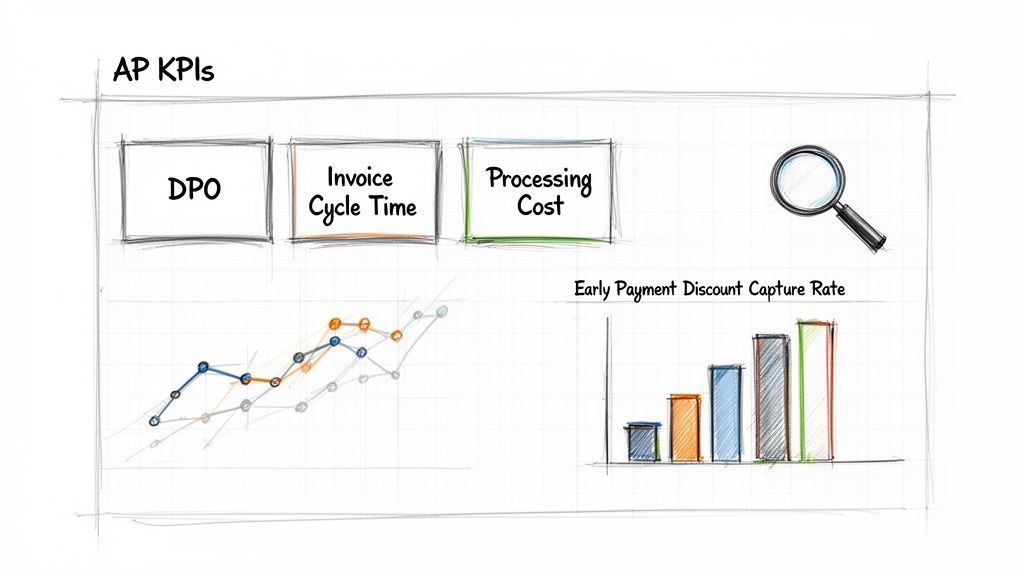
To get started, here’s a breakdown of the essential metrics every AP team should have on their dashboard. This table explains what each KPI is, how to calculate it, and what it really tells you about your business.
| KPI (Key Performance Indicator) | How to Calculate It | What It Tells You |
|---|---|---|
| Invoice Processing Cost | Total AP department costs ÷ Number of invoices processed | The all-in cost to process a single invoice, including labor, software, and overhead. A high number points to inefficiencies. |
| Invoice Cycle Time | Time from invoice receipt to payment date | How long it takes for an invoice to move through your entire system. Shorter cycles mean a more efficient process and happier vendors. |
| Days Payable Outstanding (DPO) | (Ending AP ÷ Cost of Goods Sold) x Number of days in period | The average number of days it takes your company to pay its suppliers. A higher DPO can improve cash flow, but if it's too high, it might signal payment issues. |
| Early Payment Discount Capture Rate | (Number of discounts captured ÷ Number of discounts offered) x 100 | The percentage of available early payment discounts you successfully take. A low rate means you are leaving money on the table. |
As you can see, each of these KPIs gives you a different lens for viewing performance. They're all interconnected, too. For instance, a high Invoice Processing Cost might be driven by a long Invoice Cycle Time, which in turn is killing your Early Payment Discount Capture Rate. By tracking them together, you get a complete picture of your AP function.
Common Questions About Taming Your Accounts Payable
Making the jump to a smarter accounts payable process can feel daunting.## Common Questions About Taming Your Accounts Payable
Making the jump to a smarter accounts payable process can feel daunting. It’s a big change, and it’s totally normal to have questions. Let's tackle some of the most common ones we hear from teams who are tired of the old way of doing things.
What’s the Real Cost of Manual Invoice Processing?
It's tempting to think the only cost is your AP clerk's salary, but that's not even close to the full picture. The real financial drain comes from all the little frustrations that pile up—the hours spent fixing typos from manual data entry, the sting of late payment penalties, and the big one: missed early payment discounts.
Think about it. When you can't get an invoice approved fast enough to grab a 2% early payment discount, you're essentially paying a premium for being slow. For many businesses, that lost money alone can add up to more than the cost of an automation tool over the course of a year.
Where Should We Even Start with Automating AP?
The best approach is to start with your biggest headache. For most teams I've worked with, the chaos begins at invoice intake and data capture. Before you try to boil the ocean, just start with a simple audit of your current process.
Get your team in a room and map out your workflow. You'll quickly see where the biggest bottlenecks are. My bet is it’s the mind-numbing task of typing out invoice details. Running a small pilot with a document parsing tool is the perfect first move. You get a quick, tangible win without having to commit to a massive, disruptive project right out of the gate.
Can Automation Actually Handle Our Complex Invoices?
Absolutely. This is a huge and valid concern, especially for companies dealing with project-based work or detailed purchase orders. The old-school OCR tools from a decade ago? They were terrible at this. They could barely pull a total, let alone line-item details.
But modern AI-powered parsing is a completely different beast. These newer systems are trained to understand the structure of a document, not just recognize characters. They can intelligently pinpoint and pull out all the crucial line-item data—quantities, SKUs, unit prices, you name it—even if the invoice layout is one you've never seen before. It’s a game-changer for handling the complex bills that used to bring everything to a halt.
Ready to stop wasting time on manual data entry? DocParseMagic turns messy invoices and documents into clean, structured data in minutes. Sign up for free and see how it works.