Automated Purchase Order Systems Explained
Think about the last time you had to get a purchase approved. Did it involve a stack of papers, a frantic search for the right person to sign off, and a flurry of emails just to get a simple order placed? That’s the old way of doing things, and it’s a massive time-sink.
An automated purchase order system completely changes the game. It takes that manual, paper-shuffling process and turns it into a smooth, digital workflow. Everything from the initial request and approval to creating the PO and sending it to your supplier is handled by smart software. It's all about cutting out repetitive tasks, eliminating costly mistakes, and giving you a clear, real-time view of company spending.
Moving Beyond Manual Purchase Orders
Staring at a mountain of paperwork, chasing approvals through endless email chains, and manually punching numbers into spreadsheets—this is the frustrating reality of traditional procurement. It’s a reactive, error-prone process that creates bottlenecks, hides where money is really going, and eats up time that could be spent on much more important work. The whole cycle is slow, murky, and just plain inefficient.
Trying to manage procurement manually is like trying to direct rush-hour traffic in a major city using only hand signals. It’s chaotic, a single human error can cause a massive jam, and that gridlock can bring multiple departments to a standstill. An automated purchase order system, on the other hand, is like a modern, synchronized traffic control system.
This digital approach is designed to prevent gridlock from the start. Requests flow through pre-set approval channels, budgets are checked automatically, and purchase orders are generated and sent to suppliers without anyone having to lift a finger.
Making the switch from manual chaos to automated clarity is about more than just saving a few hours. It’s a fundamental shift in how your business runs. Instead of constantly putting out purchasing fires, your teams can get ahead of the curve and manage procurement with real precision and control. This isn't just a nice-to-have anymore; it's becoming a necessity. New survey data shows that 95% of companies are seeing their procurement activity ramp up, which is pushing them to adopt digital tools. The trend is clear: by 2025, procurement teams are expected to see a 40% drop in manual work because of automation. You can explore more about these powerful procurement trends to see the full picture.
The upsides of leaving manual processes behind are obvious:
- Reduced Errors: Automation gets rid of the typos and data entry mistakes that lead to wrong orders and payment headaches.
- Faster Cycles: Approvals that used to take days or even weeks can now be handled in a matter of hours, which speeds up the entire procurement timeline.
- Enhanced Visibility: Everyone involved can see the status of a purchase request in real time. No more guessing games.
By automating these basic steps, you’re building a stronger, more efficient backbone for your operations. If you want to see how this applies more broadly, take a look at our guide on document workflow automation. This proactive approach turns procurement from a painful administrative chore into a real strategic advantage.
How Automated Purchase Order Workflows Function
Think of an automated purchase order system as a digital command center for your company's procurement. It takes a simple request and guides it through every step—approval, tracking, and fulfillment—without anyone getting lost in a maze of emails and spreadsheets. The whole process is laid bare, connecting departments, budgets, and suppliers in one clean, visible workflow.
It all starts when someone on your team needs to buy something. Instead of hunting down the right paper form, they jump into a central portal and fill out a digital purchase requisition. This captures all the crucial details—what they need, how many, and why—in a structured way right from the get-go.
This flowchart paints a pretty clear picture of the before and after—the tangled mess of manual processing versus the straight line of automation.
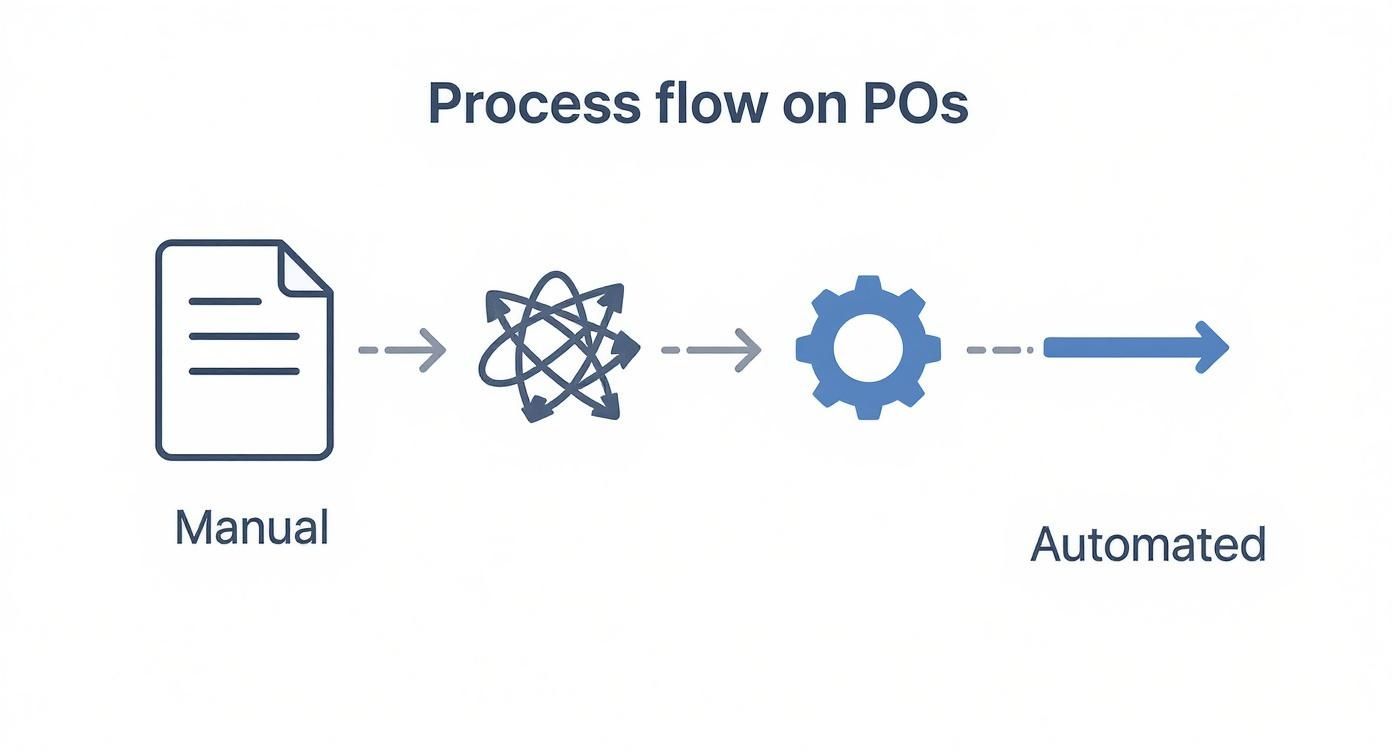
You can see how automation replaces a series of chaotic, disconnected tasks with a single, efficient flow.
Approval Routing and Budget Validation
Once that requisition is in, the system’s logic takes over. The request is automatically sent to the right person for approval based on rules you’ve already set. It's not just a blind forward; the routing is smart.
These rules can be based on things like:
- Spend Threshold: A $500 request might just need a manager's nod, but a $50,000 one probably needs to go all the way to the CFO.
- Department: Marketing requests land in the marketing director's queue, while IT hardware requests go straight to the head of IT.
- Category: The approval chain for new software licenses might be totally different from the one for ordering new office chairs.
At the exact same time, the system checks the request against the department's budget in real-time. If the purchase would push them into the red, it's flagged or even stopped right there. This proactive gatekeeping is a world away from finding out you're over budget weeks after the money has already been spent.
Clear rules are the bedrock of any good automated system. They dictate exactly how these workflows behave. To really nail this down, it’s worth exploring resources on creating solid SOPs for the purchase department, which essentially become the blueprint for your automation.
PO Generation and Supplier Dispatch
With all the approvals in hand, the system handles the final leg of the journey. It automatically converts the approved requisition into a professional, legally binding purchase order. The PO gets a unique number for easy tracking and is instantly sent to the chosen supplier, usually through email or a dedicated supplier portal.
No more manual data entry. No more saving PDFs and attaching them to emails. The entire communication is logged, giving you a perfect audit trail of when the PO was created and sent. This closes the loop, getting accurate, approved orders into your suppliers' hands immediately, which in turn speeds up fulfillment and builds stronger partnerships. The whole thing, from internal request to supplier confirmation, becomes a smooth, traceable, and incredibly efficient operation.
What Makes a Modern PO Automation Platform Tick?
When you hear "automated purchase order," it's easy to picture a simple digital form. But the truth is, not all automation platforms are created equal. A genuinely effective system is much more than a digitized version of your old paper process; it's a sophisticated engine with several key parts working in harmony. Knowing what these components are is the difference between buying a basic tool and investing in a system that truly transforms your procurement.
Think of it this way: a basic system is like a simple calculator. It can do the math, but that’s about it. A modern automation platform, on the other hand, is like the central command system in a smart building. It doesn't just process requests; it monitors budgets, controls access, and provides real-time data to keep everything running smoothly and securely.
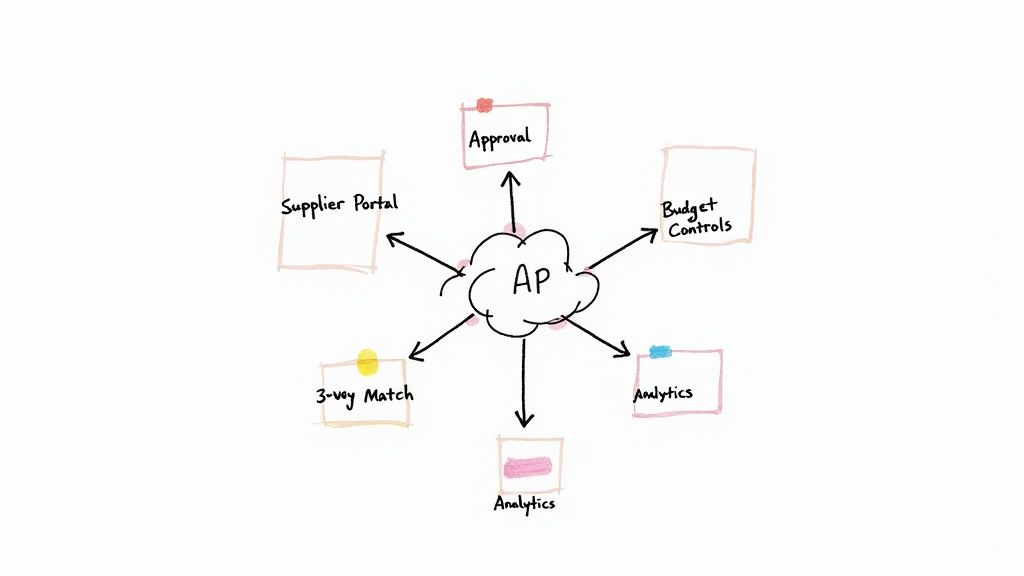
This interconnected design is what sets a powerful, modern platform apart. Let’s pull back the curtain and look at the essential features you should be looking for.
Customizable Approval Workflows
At its core, any good PO automation system needs to route requests to the right people. But a great one lets you build intelligent, multi-step approval chains that mirror your company’s actual policies.
This isn't about a one-size-fits-all approach. It's about creating specific rules for different scenarios, such as:
- Spend Thresholds: Maybe requests under $500 just need a manager's nod, but anything over $10,000 has to go straight to the CFO. A good system handles that automatically.
- Department or Project: IT hardware requests can be sent directly to the tech lead, while expenses for a new marketing campaign go to the CMO for sign-off.
- Vendor Type: If a request involves a brand-new supplier, you might want to add an extra review step from your procurement team to ensure they're properly vetted.
This level of customization means every purchase gets the right amount of scrutiny without bogging down the whole process with unnecessary steps.
Real-Time Budget Controls
Here’s where a modern system really shines: it acts as a financial gatekeeper, not an accountant doing cleanup after the fact. Instead of waiting until the end of the month to see if you overspent, real-time budget controls check every single purchase requisition against available funds before it ever becomes a PO.
Imagine a project manager trying to order new equipment. If that purchase would push their project over budget, the system can instantly flag it—or even block it entirely. This proactive approach gives finance teams incredible peace of mind and prevents those nasty end-of-quarter budget surprises.
A powerful platform provides a live, transparent view of committed spend versus available budget, empowering departments to make smarter purchasing decisions on their own.
This kind of technology-driven financial oversight is becoming the standard. The global accounts payable automation market was recently valued at $3.08 billion and is expected to grow at a CAGR of 12.8% through 2030. You can discover more insights about the rapid adoption of AP automation and see just how quickly this space is evolving.
Automated Three-Way Matching
Manually checking purchase orders against receipts and invoices is one of the most tedious, mind-numbing tasks in accounting—and it’s a huge source of errors. This is precisely why automated three-way matching is such a non-negotiable feature.
An effective system does this heavy lifting for you. It automatically compares the three key documents to confirm that:
- What you ordered (on the purchase order)
- What you received (on the goods receipt)
- What you were billed for (on the supplier invoice)
...all match up. If there’s any kind of discrepancy, like a price difference or the wrong quantity, the system immediately flags the invoice for a human to look at. This automated check catches costly mistakes, stops potential fraud in its tracks, and ensures you only ever pay for what you actually ordered and received. This component alone can reclaim hundreds of hours and protect your bottom line.
The Real-World Benefits of PO Automation
Moving to an automated purchase order system is about more than just a tech upgrade. It’s about getting real, measurable results that you can see across the entire business. The impact is tangible, affecting everything from your budget and operational speed to your ability to plan for the future. By automating how you buy things, you’re not just saving a few hours here and there—you’re building a smarter, more efficient, and more resilient company.
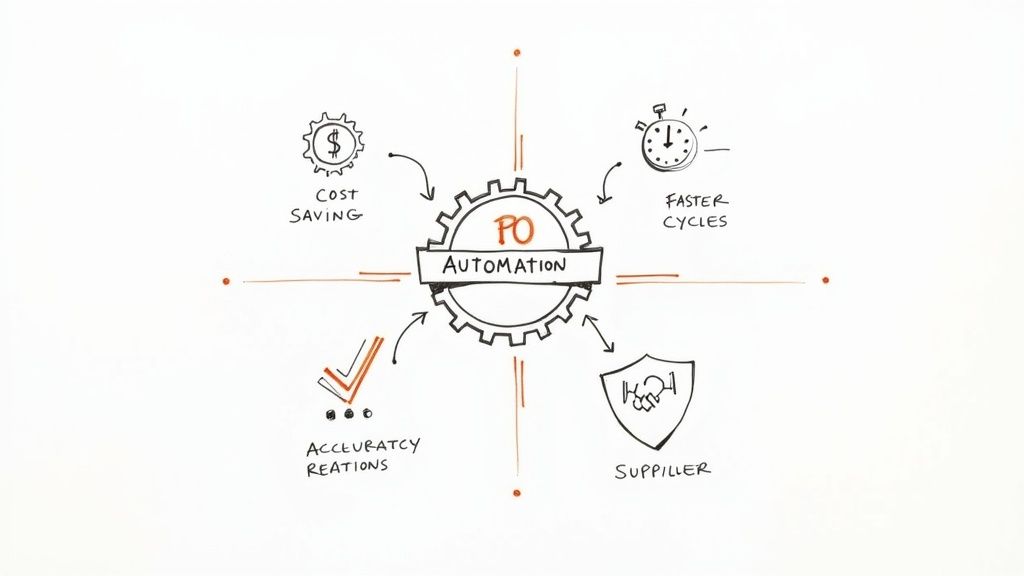
Let's break down these benefits into three core areas to see why leaving manual processes behind is such a game-changer.
Direct Financial Gains
The first place you'll feel the impact of automation is your bank account. Manual PO processing is full of hidden costs, from the labor spent on paperwork to the money lost correcting errors. Automation hits these issues head-on, transforming procurement from a necessary expense into a source of savings.
- Drastically Reduced Labor Costs: Just think about the time your team sinks into chasing down signatures, keying in data by hand, and fixing simple typos. Automation takes that tedious work off their plate, freeing them up for tasks that actually require their expertise.
- Capturing Early Payment Discounts: When your PO-to-invoice cycle is quick and error-free, you can pay suppliers on time, every time. Even better, you can start taking advantage of early payment discounts, which can add up to some serious cash over the course of a year.
Enhanced Operational Efficiency
Beyond the bottom-line savings, an automated purchase order workflow injects a whole new level of speed and accuracy into your day-to-day operations. It gets rid of the bottlenecks and the frustrating guesswork that always seems to bog down manual systems. The result is a smooth, predictable procurement cycle you can actually count on.
This is why so many businesses are jumping on board. Over a third of companies are already using workflow automation, and half of them plan on doing more. The momentum is real because the results are proven—some companies have seen cost savings as high as 30%. You can dig into more of the latest workflow automation facts and figures) to see the bigger picture.
By automating, you gain complete, real-time visibility into company spending. Every request, approval, and purchase is tracked in a central system, giving you an accurate picture of your financial commitments at any given moment.
Strategic Business Advantages
Finally, automation delivers long-term strategic wins that make your entire business stronger. It turns procurement from a simple administrative task into a source of valuable data that helps you make smarter decisions and build better relationships.
Here are a few of the key strategic victories:
- Stronger Supplier Relationships: When you pay on time and communication is clear, your vendors notice. This builds trust, which can lead to better pricing, priority service, and genuinely collaborative partnerships.
- Ironclad Compliance and Audit Trails: With automation, every single action is logged automatically. This creates a perfect, unchangeable audit trail that makes compliance a breeze and means you’re always ready for an audit.
- Data-Driven Purchasing Decisions: All your spending data is finally in one place. You can easily spot trends, find new ways to save money, and go into negotiations with suppliers armed with hard data.
Many of these advantages echo what we see in other financial departments. For a closer look, check out our guide on the benefits of accounts payable automation.
Your Step-by-Step Implementation Roadmap
https://www.youtube.com/embed/PwkP0yhBo6w
Making the switch to an automated purchase order system is a journey, not just a flip of a switch. You can't just install some software and expect everything to magically fix itself. A smart, phased approach is the key to a smooth transition that minimizes disruption and actually helps your team succeed. Think of it like building a house—you need a solid blueprint before you start pouring concrete.
This roadmap breaks the whole process down into four manageable stages. Following these steps will help you move from idea to reality with confidence, turning what feels like a huge project into a series of achievable goals. Let's walk through what a successful rollout really looks like.
Phase 1: Evaluate and Document Your Current Process
Before you can build a better workflow, you have to be brutally honest about the one you have now. The first step is to map out your entire purchase order process, from the moment someone needs something to the final payment clearing the bank.
Who’s involved at each step? Where do things grind to a halt? Pinpoint the specific pain points, like those approval delays that stretch for days or the constant data entry mistakes that throw everything off.
This isn't about finger-pointing; it’s about gathering cold, hard facts. This baseline analysis will be your best friend when you're defining your needs and, later, when you're proving how much of a difference the new system made. For a deeper dive into the strategic side, check out this excellent roadmap to implementing business process automation.
Phase 2: Define Your Software Requirements
Once you have a clear picture of your current headaches, you can start building a list of what you need from an automated solution. This is all about creating a practical checklist of "must-have" features versus "nice-to-have" perks.
Get specific. Your list should include things like:
- Integration Capabilities: Does the software need to talk to your existing accounting platform, like QuickBooks or Xero? This is a huge one.
- Customization Needs: Do you need complex, multi-level approval workflows that change based on the department or the dollar amount?
- User Accessibility: Will your team need to submit and approve POs from their phones while they're out in the field?
This detailed list is your shopping guide. It’ll help you cut through the noise and evaluate vendors to find a platform that solves your actual problems, not just the ones on a marketing brochure.
Phase 3: Plan the Rollout and Train Your Team
A brilliant system is completely useless if no one knows how to use it, or worse, if they don't want to. A thoughtful rollout and training plan is absolutely critical for getting your team on board.
Whatever you do, avoid a "big bang" launch where everyone is thrown into the deep end at once. That's a recipe for chaos. Instead, try a phased approach. Start with a small pilot group or a single department to work out the kinks and build some momentum.
Training needs to answer one question for every employee: "What's in it for me?" Show your team how the new automated system makes their specific job easier—less paperwork, faster approvals, and fewer headaches. Find a few enthusiastic people to act as internal champions who can help their colleagues through the transition.
Phase 4: Launch and Measure Success
Once you go live, the work isn't done. Now it's time to measure the impact. Go back to the pain points you identified way back in Phase 1 and compare the before-and-after numbers. Are approval cycles actually faster? Have data entry errors dropped? Are you finally capturing more early payment discounts?
Setting and tracking these key performance indicators (KPIs) gives you tangible proof of your return on investment. This data is what you’ll use to show leadership that the project was a success and to reinforce the positive change for your team. The logic is very similar to other financial workflows; for instance, you can see how to automate invoice processing using the same kind of structured approach.
Looking Ahead: The Future of Intelligent Procurement
An automated purchase order system is a huge step up, but honestly, it’s just the beginning. The next wave in procurement is already rolling in, and it's powered by artificial intelligence (AI) and machine learning. We're not just talking about making tasks automatic anymore; we're talking about building a procurement function that can actually predict what you need, suggest the best course of action, and get smarter over time.
Think about a system that uses predictive analytics to keep an eye on your inventory. Before you even notice stock is getting low, it’s already generating the necessary purchase orders. This flips procurement on its head—turning it from a reactive scramble into a proactive, strategic part of your business. It means you always have what you need on hand without locking up cash in a warehouse full of excess inventory.
The Secret Ingredient: Flawless Data for AI
Here’s the catch, though: these intelligent systems are only as good as the data you feed them. For AI to spot trends and make trustworthy predictions, it needs a steady diet of clean, structured, and accurate information. This is where intelligent data extraction becomes the critical link, translating messy, raw documents into the organized data an AI engine can understand.
This is exactly what a tool like DocParseMagic is built for—instantly turning unstructured documents into the kind of organized data AI thrives on.
The platform is designed to intelligently find and pull out key fields from any document you throw at it. This gives you the high-quality fuel you need to power advanced analytics and machine learning models.
“The future of procurement isn't just about faster approvals. It's about building a system that anticipates needs, recommends optimal suppliers based on performance data, and uses AI to find savings opportunities you might have missed.”
Ultimately, setting up an automated purchase order workflow today is the foundational move. It gets your organization ready for this smarter future by digitizing your processes and, more importantly, your data. When you add smart tools that guarantee data accuracy from the start, you're not just building an efficient system for today—you're building a launchpad for the predictive, AI-driven world of tomorrow.
Common Questions About Automated PO Systems
Thinking about automating your purchase orders is a smart move, but it's natural to have a few questions pop up. It’s one thing to see the benefits on paper, but you also need to think about the real-world investment, how it’ll connect with the software you already use, and what it means for your team.
Let's break down some of the most common things business leaders ask before they make the switch.
How Much Do These Systems Cost?
There's no single price tag, and that’s because the cost really depends on your company's needs. The final number is shaped by things like how many people will be using the system, how many POs you create each month, and which specific features you can't live without.
For a smaller business, you might be looking at a simple monthly subscription. On the other end of the spectrum, a large enterprise system with sophisticated AI tools and deep integrations into your main ERP will be a much bigger investment. The trick is to weigh the cost against the return—think about the hours saved on manual work, the money you'll save by catching payment errors, and the insights you'll gain from better spending control.
Will It Work with Our Current Software?
In almost all cases, yes. Integration is the name of the game for any modern automation tool. Most of these systems come with ready-made connectors for popular accounting software like QuickBooks, Xero, and NetSuite, which makes getting set up pretty straightforward.
If your business runs on custom-built or older legacy software, you'll want to look for a solution that offers a solid API (Application Programming Interface). An API is basically a bridge that lets your developers connect the new system to your existing one. Checking for this compatibility early in the process is crucial to make sure all your data flows smoothly without getting stuck in separate silos.
The best automated purchase order systems are designed to enhance your existing tech stack, not force you to replace it. They act as a powerful layer that connects procurement and finance seamlessly.
How Hard Is It to Train Our Team?
This is a big one, but the good news is that the best platforms are built to be intuitive. They’re designed for regular people, not just tech wizards, so the learning curve is usually pretty gentle. Getting your team up and running really boils down to two things: picking software that’s easy to navigate and having a solid training plan.
One of the best ways to get buy-in is to involve your team in the selection process. When they have a say, they feel a sense of ownership from day one. During training, don't just show them how to use it—show them why. Focus on how the new system solves their biggest headaches, like getting rid of tedious paperwork, speeding up approvals, and ending the hunt for signatures. When they see what's in it for them, they'll get on board a lot faster.
Ready to eliminate manual data entry from your PO and invoice workflows? DocParseMagic uses AI to instantly extract accurate data from any document and deliver it directly to a spreadsheet, fueling your automated systems with clean, structured information. Try DocParseMagic for free and see how it works.