The Guide to Automated Document Processing
Automated document processing is a fancy term for something simple: teaching software to read and understand your business documents for you. Instead of someone manually typing information from an invoice into a spreadsheet, the software does it instantly—and without typos. This gets your team away from mind-numbing data entry and back to work that actually matters.
What Is Automated Document Processing
Let’s be honest, we’ve all seen it. A desk buried under a mountain of invoices, stacks of purchase orders, and piles of contracts. Your team spends a huge chunk of their day just sifting through paper, hunting for dates and dollar amounts, and then keying that information into another system. It's slow, tedious work, and it's a breeding ground for human error. A single misplaced decimal or typo can throw everything off.
Now, imagine having a digital assistant that tackles that entire mountain of paperwork in minutes. This isn't just a simple scanner. It’s smart software that reads each document, figures out what it is, pulls out the exact information you need, and organizes it perfectly. That's really all automated document processing (ADP) is. It acts as the ultimate bridge between messy documents (both paper and digital) and the business tools you rely on every day.
Moving Beyond Manual Entry
For so many companies, manual data entry is the ultimate bottleneck. It’s a silent drain on resources, often accounting for a staggering 20-30% of total operational costs in document-heavy fields like accounting or logistics. ADP is designed to fix that problem by swapping out those repetitive, low-value tasks for a workflow that’s fast, accurate, and can grow with your business. It's a fundamental shift in how Automatic document processing turns cluttered, unstructured files into clean, structured data your systems can actually use.
This diagram shows you exactly what that transition looks like in practice.
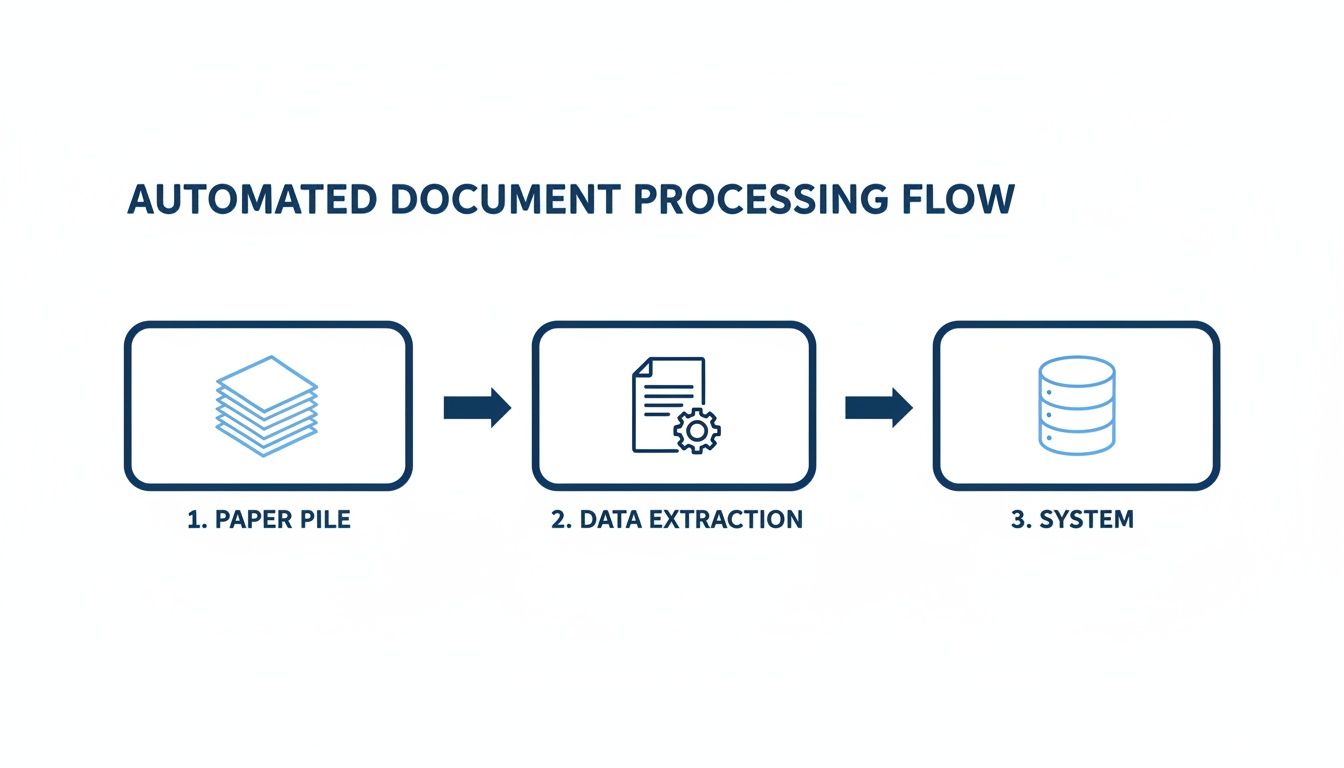
As you can see, the goal is simple: take the chaos of incoming documents and transform it into organized, usable data that flows right into your business applications.
The difference between the old way and the new way is night and day. A quick comparison makes it crystal clear.
Manual vs Automated Document Processing at a Glance
| Metric | Manual Processing | Automated Processing |
|---|---|---|
| Time per Document | 5-15 minutes | 5-30 seconds |
| Data Accuracy | 96-97% (at best) | 99.5%+ |
| Cost per Document | $3 - $7 | $0.20 - $0.50 |
| Scalability | Limited by headcount | Virtually unlimited |
This table really puts the ROI into perspective. You're not just saving a few minutes here and there; you're fundamentally changing the cost, speed, and reliability of your operations.
The Core Steps of Automated Document Processing
So, how does it actually work? Under the hood, an automated document processing system basically mimics the steps a human would take, just with far more speed and precision.
It all happens in three main stages:
- Ingestion: First, the system has to get the documents. It can pull them from just about anywhere—email attachments, scanned images, FTP folders, or digital files like PDFs and Word docs.
- Extraction & Understanding: This is where the magic happens. Using AI-powered technologies, the software doesn’t just read the text; it understands it. It knows an “invoice number” is different from a “PO number” and can spot the “grand total” even if it's in a different place on every document.
- Integration: Finally, once the data is pulled out and cleaned up, the system sends it where it needs to go. That could be your accounting software, a CRM, an ERP system, or even just a simple spreadsheet—ready for reporting, payments, or analysis.
The real point of automated document processing isn’t to replace people. It's to free them up. By letting software handle the grunt work, you allow your team to use their skills and judgment on strategic activities that actually grow the business.
If you’re looking to get a broader view of how this fits into the bigger picture, our guide on what document automation is is a great place to start. In the end, ADP is all about turning your static documents from a liability into a dynamic, valuable asset.
The Core Technologies Behind Document Automation
Document automation isn't just one piece of magical software. It’s actually a team of technologies working together, much like a well-oiled assembly line. Each part has a very specific job, and when they combine their efforts, they can turn a static document into clean, usable data.
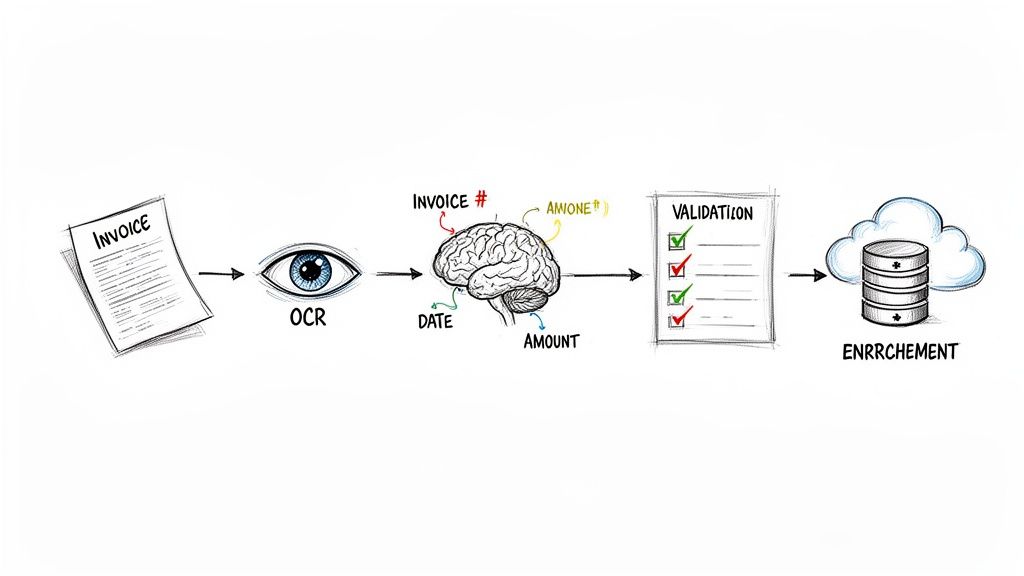
To really get a feel for how it works, let’s follow a single vendor invoice as it makes its way through this digital assembly line.
Stage 1: Optical Character Recognition
Everything starts with Optical Character Recognition (OCR), which acts as the "eyes" of the whole operation. When our invoice shows up—whether it's a scanned PDF or a picture from a smartphone—it’s really just an image file. The computer sees pixels, not words. OCR technology is what scans that image and turns every letter and number into digital text the computer can actually read.
Think of it like transcribing a handwritten letter into a Word document. You get all the text, but it's just a raw dump of characters. The system doesn't yet know that "INV-123" is an invoice number or that "$540.00" is the total amount owed. For a deeper look at this foundational tech, check out our guide on the fundamentals of Optical Character Recognition.
Stage 2: AI-Powered Parsing
This is where the real brainpower of automated document processing kicks in. The raw text from the OCR stage is handed off to an AI-powered parsing engine. Using natural language processing (NLP) and machine learning, this engine reads the text and, more importantly, understands its meaning and context.
This is a huge leap from basic OCR. The parsing engine can:
- Spot Key-Value Pairs: It knows that the text "Invoice Number" is a label for the value "INV-123."
- Grasp Context: It understands that the date "10/25/2024" next to "Due Date" is different from the date next to "Issue Date."
- Pull Out Table Data: It can read tables and correctly extract individual line items, grabbing the description, quantity, and price for each one.
For our invoice, the parser intelligently pulls out fields like the vendor’s name, the total due, and all the line item details, then neatly organizes them into a structured format. This is the moment that a messy blob of text becomes clean, organized data.
Stage 3: Data Validation
Once the data has been extracted, it heads to a quality control checkpoint. This is where the system uses business rules you’ve defined to double-check the information for accuracy. It's like having a meticulous auditor review everything before it moves on.
Data validation is the system’s built-in "common sense." It catches the kinds of errors and inconsistencies a person would, stopping costly mistakes before they get into your other business systems.
Some common validation checks include:
- Math Verification: Do the line items plus tax actually add up to the grand total?
- Format Checking: Is the PO number in the right format? Is the date even a real date?
- Completeness Check: Is a vendor address even on the invoice?
If our sample invoice had a math error or a missing PO number, the system would flag it for a human to quickly review. This ensures that only high-quality, trustworthy data gets through.
Stage 4: Data Enrichment
The final step is data enrichment. Here, the system takes the verified data and makes it even more useful by cross-referencing it with your existing business information, like records in your ERP or accounting platform.
For instance, the system could use the vendor's name from the invoice to look up their official vendor ID in your database and add it to the extracted data. Or, it might take the PO number from the invoice, find the original purchase order in your system, and confirm that the items and pricing are a perfect match. This step turns basic data into information that's ready for immediate use.
The demand for this kind of intelligent automation is skyrocketing. The intelligent document processing (IDP) market is forecast to jump from USD 3.22 billion in 2025 to an incredible USD 43.92 billion by 2034. As Precedence Research points out, this explosive growth shows just how vital it's become for businesses to get a handle on the unstructured data locked away in their documents.
Together, these four technologies create a seamless and powerful workflow. They work in harmony to deliver on the central promise of document automation: transforming messy, time-consuming paperwork into clean, actionable data with hardly any human effort.
How Automated Document Processing Drives Business Growth
While the tech behind it is impressive, the real story of automated document processing isn't about algorithms. It’s about what it does for your bottom line. This isn't just another IT project; it’s a strategic move that turns slow, expensive paperwork into a fast, efficient, and profitable part of your business.
The most immediate win? It gives your team back their most valuable resource: time. Manual data entry is a well-known productivity drain, forcing skilled people to spend their days on tedious copy-paste work instead of tasks that actually matter.
Reclaim Hours for High-Value Work
Think about a typical accounting team. One person might easily spend 20 hours a week just keying in data from invoices, matching them to purchase orders, and chasing people for approvals. That’s not just inefficient—it’s a massive missed opportunity.
Those are 20 hours that could be spent analyzing financial trends, negotiating better terms with vendors, or figuring out how to improve the company's cash flow.
A recent study found that companies can cut the manual labor costs tied to handling documents by up to 75%. This isn't just about saving money; it’s about freeing up your best people to focus on work that grows the business.
For example, when an accounts payable team automates its workflow, they can stop being data entry clerks and start being financial analysts. Instead of just pushing payments through, they can dig into spending patterns, spot opportunities to save money, and offer insights that lead to smarter decisions.
Drastically Improve Data Accuracy and Reduce Risk
Let's be honest, humans make mistakes. A simple typo or a misplaced decimal point on an invoice can easily lead to overpayments, compliance headaches, or a soured relationship with a key supplier. The good news is that research shows automated systems can slash these human error rates by as much as 90%.
This level of accuracy pays off in very real ways:
- Prevents Costly Mistakes: You stop overpaying on invoices because of bad data.
- Strengthens Compliance: Data is captured correctly every time, reducing the risk of fines.
- Builds Trust: Paying suppliers accurately and on time makes you a partner they want to work with.
Think of it as built-in quality control for your business data. By making sure the information entering your systems is clean from the very beginning, automated document processing acts as a powerful safety net. It stops small errors from turning into major financial or operational nightmares down the road.
Accelerate Your Business Cycles and Boost Cash Flow
The speed of your business is often limited by the speed of your paperwork. When invoices get stuck in a pile, payments are delayed, which can strain your cash flow and frustrate your vendors. When contracts sit on someone's desk for a week, new projects and sales opportunities get put on hold.
Automation demolishes these bottlenecks. Companies that switch to automated solutions report they can process documents up to 4x faster than they could manually. A process that used to take 12 days, like getting an invoice paid, can be wrapped up in just three.
This newfound speed sends positive ripples through the entire company. Faster invoice approvals mean you can grab early payment discounts, directly improving your profit margins. For an insurance company, processing claims faster leads to happier customers who stick around. In procurement, analyzing proposals more quickly means you can lock in better deals before your competitors.
By speeding up these core processes, you build a more agile and responsive organization that’s ready to jump on opportunities the moment they appear.
Document Automation Use Cases Across Industries
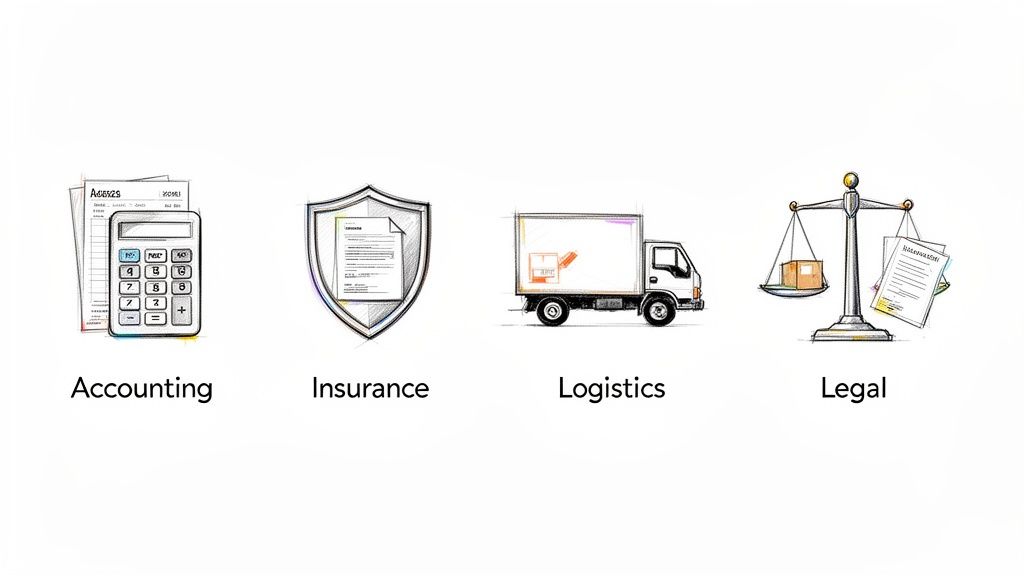
The real value of automated document processing isn't just theory—it's what happens when you apply it to the messy, paper-filled realities of different industries. Every business has its own unique document headaches, from accounting teams buried in invoices to insurance adjusters racing to process claims.
This is where automation stops being a buzzword and starts solving real-world problems, giving businesses a serious leg up on the competition.
Accounting and Finance Transformation
Ask anyone in accounting, and they'll tell you about the accounts payable (AP) bottleneck. It's a never-ending flood of vendor invoices showing up as PDFs, scanned images, and paper documents. Each one needs to be manually keyed in, checked, and routed for approval, a process that’s slow, tedious, and ripe for human error.
The change with automated document processing is night and day:
- Before: An AP specialist spends their day hunched over a keyboard, typing in invoice numbers, dates, and line items. Then comes the painful, manual task of matching each invoice to its purchase order.
- After: Invoices are automatically pulled from an email inbox. The system reads and extracts the key data in seconds, then performs a three-way match against the purchase order and goods receipt. The AP specialist now only reviews the exceptions, shifting their job from data entry to financial oversight.
This goes beyond just invoices. Consider the challenge of financial reporting, where automating bank statement processing can turn a multi-day reconciliation task into a few clicks.
This kind of automation is especially vital where financial regulations are tight. In North America, which is expected to command 47.60% of the global market by 2025 at a value of USD 5.04 billion, rules like Dodd-Frank and Sarbanes-Oxley push institutions toward automation. In response, U.S. banks have adopted these tools to shrink loan application processing from days to minutes, cutting operational costs by 30-40%.
Insurance and Claims Processing
The entire insurance industry runs on documents—applications, policies, medical records, and most importantly, claims. How quickly and accurately a claim is handled defines the customer experience and has a huge impact on operational costs. A slow manual process means unhappy clients and bloated administrative teams.
For insurers, the claims experience is the moment of truth. Automation turns this potential friction point into a seamless, positive interaction that builds long-term loyalty.
Here’s how automated document processing transforms the claims journey:
- A customer emails a photo of a damaged car along with a PDF of the repair quote.
- The system instantly reads the document, extracting the policy number, incident date, and total repair cost.
- It then checks the policy number against the customer's file, confirms their coverage is active, and flags the claim for an adjuster—all within minutes.
This incredible speed allows insurers to slash claims processing times by an average of 60%. Customers get their payments faster, and the internal team can handle a much larger volume of work without feeling overwhelmed.
Logistics and Supply Chain Management
Logistics is a whirlwind of paperwork. Documents like bills of lading (BOLs), proofs of delivery (PODs), and customs forms are the lifeblood of the supply chain. One mistake or delay can leave a shipment stranded and cause a cascade of expensive problems.
Automated document processing brings much-needed order to this chaos. Imagine a truck driver snaps a quick photo of a signed POD. The system can instantly:
- Read the tracking number, recipient's name, and signature from the image.
- Match the POD to the original shipment in the transportation management system (TMS).
- Automatically trigger an invoice to be sent to the customer.
This gives everyone real-time visibility, helps resolve disputes on the spot, and keeps the entire supply chain flowing without someone having to manually chase down paperwork.
Legal and Contract Analysis
Legal professionals deal with mountains of dense documents, from contracts and depositions to discovery materials. Manually combing through these files to find a specific clause, date, or obligation is an extremely slow and expensive process.
With automation, a law firm can upload hundreds of contracts at once. The software can then instantly pull out key data points, such as:
- Contract renewal dates
- Termination clauses
- Liability limits
- Governing law provisions
This lets legal teams quickly spot risks, compare terms across a huge portfolio of agreements, and ensure compliance without billing hundreds of hours for manual review. No matter the industry, automated document processing offers a clear path to turning paperwork bottlenecks into powerful sources of efficiency.
Your Step-By-Step Implementation Plan
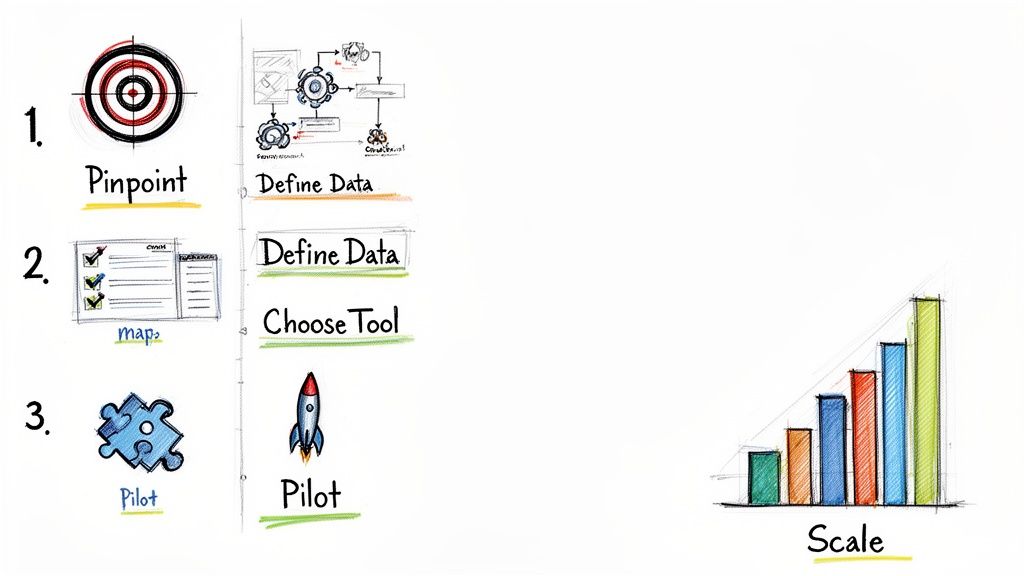
Diving into automated document processing can feel like a massive project, but it doesn't have to be. The real secret to a smooth rollout is to start small, prove the value, and then build on your success. A structured plan takes the guesswork out of the equation and helps you score quick wins that get your whole team on board.
This simple, six-step roadmap will guide you from your initial idea all the way to a full-scale solution, ensuring a successful transition every step of the way.
Step 1: Pinpoint Your Biggest Pain Point
Before you even think about software, look at your own operations. Where are you bleeding the most time? Which specific document workflow is causing the most headaches, delays, and costly errors?
Maybe it's your accounts payable team manually punching in data from hundreds of vendor invoices. Or perhaps it's the procurement folks who are drowning in complex supplier proposals they have to compare by hand. The key is to find that one process where automation will make the biggest, most visible impact right away.
Picking the right starting point is everything. A quick victory here creates a solid business case and gives everyone the morale boost needed to push forward.
Step 2: Map Your Current Workflow
Next, grab a whiteboard (or a virtual one) and sketch out the entire manual process from beginning to end. Who touches the document? Where does it go next? What are the common bottlenecks where things grind to a halt?
This exercise is often an eye-opener. You might discover that a single invoice takes 12 days to get paid simply because it sits on three different desks waiting for a signature. Documenting this journey gives you a crystal-clear picture of exactly where automated document processing can step in and help.
Think of this map as your "before" picture. It'll make the "after" results that much more impressive.
Step 3: Define Your Essential Data
With your target process in mind, it's time to get specific about the information you need. You don't need to capture every single character on the page. Just focus on the data points that are absolutely essential for running your business.
For a typical invoice, this might be:
- Vendor Name
- Invoice Number
- Invoice Date
- Due Date
- Total Amount
- Line Item Details (Description, Quantity, Price)
Pro Tip: Start with the bare minimum data you need to get the job done. You can always expand and add more fields later on. Keeping it simple at the beginning makes the setup way faster and the results easier to measure.
Having this list ready makes shopping for tools a breeze because you'll know precisely what data extraction features you're looking for.
Step 4: Choose the Right Tool
Now that you have a clear picture of your problem and data requirements, you can start exploring software. Today's tools range from massive enterprise systems to incredibly user-friendly, no-code platforms. You'll want to weigh factors like ease of use, how it connects with your existing software, and the pricing structure.
For many teams, a no-code solution like DocParseMagic is the perfect place to start. It empowers your business users—the people who actually do the work—to build and manage their own automation without having to wait on the IT department.
Step 5: Run a Small Pilot Test
Resist the urge to automate everything all at once. Instead, start with a small, manageable pilot test. Grab a small batch of real documents—say, 20-30 invoices from a few different suppliers—and run them through the tool you’ve chosen.
This pilot serves a few crucial purposes:
- It proves the tech works. You'll confirm that the tool can accurately pull the specific data you need from your real-world documents.
- It builds team confidence. Your team gets to see firsthand how the new process works and how much time it can save.
- It helps you fine-tune. You might realize you need to tweak a workflow or capture an extra piece of data you missed.
A successful pilot gives you concrete proof that this is the right move, making it much easier to get the green light for a wider rollout.
Step 6: Scale Systematically
With a successful pilot under your belt, you're ready to scale. But again, the key is to be methodical. You could start by rolling out the solution to the rest of the accounts payable team. Once that's running like a well-oiled machine, you can start looking for the next biggest pain point in another department, like logistics or HR.
By following this step-by-step approach, you transform what could be an overwhelming project into a series of small, manageable wins. This method ensures your investment in automated document processing delivers a clear ROI and gets your team excited about a smarter way of working.
Choosing the Right Document Automation Platform
So, you’re ready to automate your document workflow. That’s great! But now comes the tricky part: picking the right tool. With so many options out there, all promising the world, it’s easy to get lost or, worse, end up with a costly headache that doesn't deliver.
To cut through the marketing noise, you need a solid evaluation checklist. Let's walk through what really matters when you're comparing platforms.
Your first and most important filter should be data extraction accuracy. A tool is worthless if it constantly fumbles numbers, names, or dates. This just swaps one manual task for another—fixing the software’s mistakes. Don't just take a company's word for it; ask for proof. Look for platforms that can demonstrate 99% or higher accuracy on your real-world documents, not just their clean, perfect samples. Modern AI-powered systems are built to handle the messy variety of layouts you get from different vendors, which is a huge advantage over older, template-based tools.
Focus on Usability and Integration
Once you’ve shortlisted for accuracy, think about who will actually be using the software day-to-day. Is it a complex system that requires a developer to even look at it, or is it a no-code solution that your team can manage on their own? For most businesses, a simple, drag-and-drop interface is the way to go. It empowers the people who know the documents best—like your accounting or logistics teams—to build and tweak workflows themselves.
Next up is how well the platform plays with others. The data you pull from a document is only valuable if you can get it where it needs to go, automatically.
- ERP and Accounting Software: Does it have clean connections to your core systems like NetSuite, QuickBooks, or SAP? This is key for things like hands-free invoice processing.
- CRM and Databases: Can it push data directly into your CRM or other databases using APIs or pre-built connectors?
- Cloud Storage: Does it work with the tools you already use, like Google Drive, Dropbox, or SharePoint, to both find and file documents?
A platform with strong, flexible integrations is a sign of a well-thought-out product. Check out our guide to the best document automation software for a direct comparison of how top solutions stack up on this front.
A great platform should adapt to your existing tools, not force you to change your entire tech stack. Seamless integration is a sign of a well-designed, flexible solution.
Finally, take a hard look at the price tag. You want transparency, not a bill full of surprises for support calls or extra features. A pay-per-document or credit-based model is often the most straightforward and scalable option. It lets you start small and ensures your costs grow in line with your usage, without demanding a huge investment right out of the gate. By focusing on accuracy, usability, integrations, and clear pricing, you can confidently pick a partner that will actually make your work life easier.
Common Questions About Document Automation
It's only natural to have a few questions before you hand over your company's documents to a new system. After all, you’re talking about your most critical business information. Let's tackle the big questions we hear all the time as people consider making the switch to automated document processing.
The first one is always about security. Is my sensitive data actually safe on a third-party platform? The short answer is yes—if you choose the right one. Reputable platforms are built on a foundation of security, not with security as an optional extra.
For a document automation platform, security isn't just a feature—it's the foundation of trust. Without robust protection, even the most accurate extraction tool is a non-starter for any serious business.
Look for providers that use end-to-end encryption, which scrambles your data as it travels and while it's stored. More importantly, check for certifications like SOC 2 compliance. This isn't just a badge; it's proof from an independent audit that the company has enterprise-grade controls for keeping customer data locked down.
Do I Need an IT Department to Implement This?
Another common worry is about the setup. Do I need a team of developers to get this running? Years ago, the answer was probably yes. But modern tools have completely changed the game.
Today's best platforms are no-code solutions built for the people who actually use them day-to-day. Your accounting team, procurement specialists, or insurance brokers can set up and manage the automation themselves. Instead of writing code, they use simple drag-and-drop tools to show the system what data to pull. This means you can go from setup to running in minutes, not months.
What Kinds of Documents Can I Automate?
Finally, people ask about flexibility. Is this just for invoices? Can it only read one type of file? The reality is, these systems are incredibly versatile and can handle just about anything you throw at them.
You’re not limited to one file type. They can process:
- PDFs (whether they're born-digital or scanned images)
- Image files (like JPGs, PNGs, and TIFFs)
- Word documents and Excel spreadsheets
And it’s not just about the file type—it’s about the layout. Whether you're working with complex purchase orders, multi-page contracts, utility bills, or insurance forms, the AI is smart enough to find the data it needs. You don’t need to create a rigid template for every single vendor or document variation.
Ready to see how simple it is to eliminate manual data entry? DocParseMagic offers a no-code platform that lets you turn messy documents into clean, organized spreadsheets in minutes. Get your free credits and start automating today.