Automated Data Extraction: Transform Messy Docs into Structured Insights
Picture this: you’re tasked with finding one specific number buried somewhere in a thousand-page report. You'd have to read it page by page, right? Automated data extraction is the tech that finds it for you in seconds.
At its heart, automated data extraction is a process where smart software scans any document, identifies the exact pieces of information you need—like names, invoice totals, or policy dates—and pulls them into a clean, ready-to-use format.
What Is Automated Data Extraction
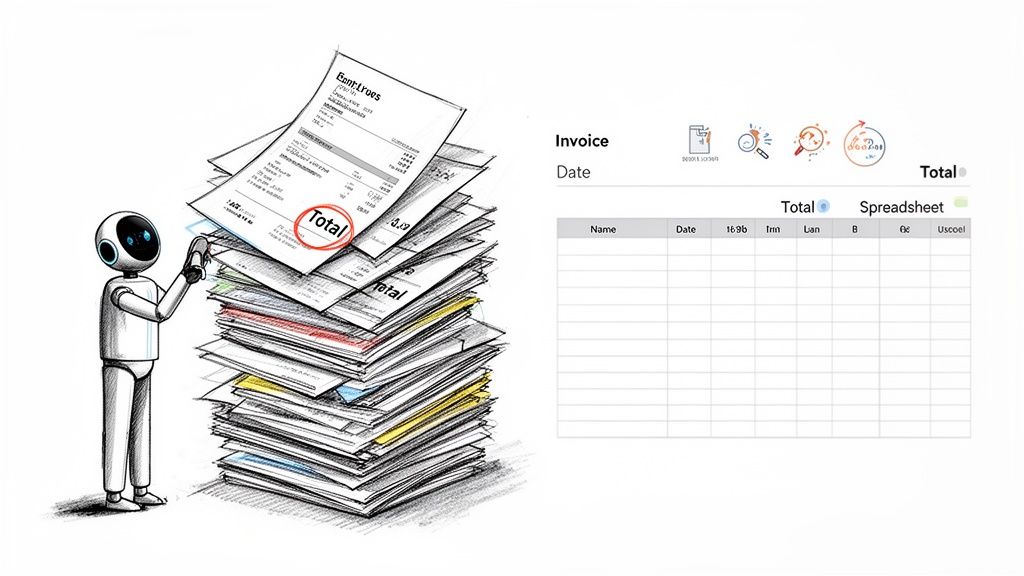
Think of it like a super-fast, incredibly accurate digital assistant. You can hand this assistant a mountain of paperwork—invoices, contracts, receipts, you name it—and it will read, understand, and neatly transcribe the key details into a spreadsheet or your business software. This gets rid of the mind-numbing, error-prone chore of manual data entry, freeing up your team to focus on work that actually requires their expertise.
The main goal here is to convert messy, unstructured or semi-structured data into organized, structured data. Unstructured data is just free-flowing text without a set format, like an email or a legal agreement. Structured data is the good stuff: neatly organized in rows and columns, perfect for analysis.
The Problem It Solves
Businesses are drowning in documents. Accounts payable teams sift through thousands of vendor invoices, while insurance agents pore over complex policy forms. Trying to handle all this by hand is not just slow; it’s a massive drain on resources and a breeding ground for expensive mistakes. One tiny typo on an invoice can throw off payments and create a reconciliation nightmare.
Automated data extraction hits this operational bottleneck head-on. By automating how you capture critical information, businesses can slash processing costs by up to 80% and shrink workflows that once took days down to just a few minutes.
The difference between the old way and the new way is stark. Let's break it down.
Manual Data Entry vs Automated Data Extraction
| Aspect | Manual Data Entry | Automated Data Extraction |
|---|---|---|
| Process | A person physically reads documents and types data into a system. | Software automatically reads, identifies, and extracts data from documents. |
| Speed | Slow and limited by human capacity. A few dozen documents per hour. | Extremely fast. Can process thousands of documents in the same timeframe. |
| Accuracy | Prone to human error (typos, fatigue). Accuracy rates often hover around 95-97%. | Highly accurate, often exceeding 99%. Flags exceptions for human review. |
| Scalability | Scaling requires hiring and training more people, which is costly and slow. | Easily scales to handle sudden spikes in volume with minimal extra cost. |
| Cost | High labor costs, plus the hidden costs of correcting errors. | Lower operational costs and a clear, predictable ROI. |
As you can see, automation isn't just a minor upgrade—it's a fundamental shift in how work gets done.
Key Benefits for Your Business
Switching to an automated data extraction solution offers immediate, real-world advantages. It moves your operations from a slow, manual crawl to a fast, data-driven sprint.
Here are the core benefits you can expect:
- Drastically Improved Accuracy: Software doesn't get tired, distracted, or make typos. Automation provides incredibly consistent and reliable data, and it even flags anything it's unsure about for a quick human check. This cuts down on the errors that mess with your financial reports and decision-making.
- Massive Gains in Speed and Efficiency: An automated system can chew through thousands of documents in the time it takes a person to get through a small stack. This speed lets your business operate in near real-time, making decisions based on what’s happening now, not last week.
- Significant Cost Savings: When you eliminate the hours spent on manual data entry, you slash labor costs. More importantly, you can reassign your team to higher-value work like analyzing trends, improving vendor relationships, or enhancing customer service instead of just typing.
Ultimately, automated data extraction isn't just about cool tech; it's about making your entire organization smarter and more agile. It turns chaotic piles of paper and PDFs into a valuable, organized asset that fuels growth and gives you a serious competitive edge.
The Technology Behind Intelligent Document Processing
So, how does this all actually work? It might seem like magic, but it’s really just a clever mix of technologies working in sync, a lot like a well-oiled assembly line. The whole process is often called Intelligent Document Processing (IDP), and its job is to turn piles of messy, unstructured documents into clean, organized data you can actually use.
Think of it as a system with digital eyes and a brain. Each part has a specific role, working together to make sense of everything from a crumpled receipt to a 50-page legal contract. Let's pull back the curtain and look at the core tech that makes it all happen.
Optical Character Recognition: The Eyes of the System
First things first, the system has to be able to see the text on the page. That's the job of Optical Character Recognition (OCR). OCR is the set of digital eyes that scans a document—whether it’s a PDF, a scanned image, or even a photo from your phone—and turns the pictures of letters and numbers into actual, machine-readable text.
It’s like taking a picture of a page from a book. You can read the words, but your computer just sees a bunch of pixels. OCR is the bridge that reads that image and converts it into a digital text file. This text becomes the raw material for everything that follows.
At its core, OCR digitizes the content, but it doesn’t understand it. It can read "04/15/2024," but it has no idea that this is a date. For true understanding, we need to add intelligence.
This is where the "brain" of the operation steps in to make sense of what the "eyes" have seen. For a deeper look into this area, you can learn more about what is intelligent document processing in our detailed guide.
Artificial Intelligence and Machine Learning: The Brain
Once OCR has pulled out the raw text, Artificial Intelligence (AI) and Machine Learning (ML) get to work. If OCR gives us the words, AI and ML provide the meaning and context. They don’t just see a random string of characters; they’re trained to spot patterns and understand relationships by learning from thousands, or even millions, of similar documents.
This is how a platform knows that the number next to the words "Total Due" is the invoice total or that a date floating in the top-right corner is the "Invoice Date."
- Pattern Recognition: ML models are trained on huge sets of real-world documents like invoices and contracts. Over time, they learn where to expect key pieces of information, even if the layout changes from one vendor to the next.
- Continuous Improvement: Here's the cool part: the more documents the system processes, the smarter it gets. Every time a user makes a correction, the ML model learns from that feedback, refining its accuracy for the next time.
This ability to learn and adapt is what makes modern data extraction so much better than old-school, template-based tools. It gives the system the flexibility to handle the endless variety of document formats businesses deal with every day.
Natural Language Processing: The Language Expert
Finally, for documents that are heavy on prose—think legal agreements, insurance policies, or lengthy proposals—Natural Language Processing (NLP) becomes critical. NLP is a specialized field of AI that’s all about teaching computers to understand human language, with all its quirks and complexities.
NLP allows the system to move beyond simple key-value pairs (like "Invoice Number: 12345"). It can interpret the meaning of a clause in a contract, figure out who the main parties are in an agreement, or pull specific terms and conditions from a dense wall of text. It's the component that truly understands nuance.
The rapid advances in these technologies are why the global Automated Data Extraction Platform market is projected to grow at a CAGR of over 20% in the next five years. More and more companies are realizing just how powerful these tools can be.
So, How Does This Actually Work?
It's one thing to talk about the tech, but it’s another to see it solve a real-world headache. Let's make automated data extraction concrete by walking through a process nearly every business deals with: tackling a mountain of vendor invoices.
We've all been there. You get invoices in every imaginable format—a clean PDF from one supplier, a slightly blurry scan from another, maybe even a smartphone photo. Instead of someone manually typing every line item into a spreadsheet, a platform like DocParseMagic can run the whole show for you.
Here’s a look at what happens under the hood, from messy document to clean, ready-to-use data.
Step 1: Getting the Documents In
It all starts the moment a new document hits your system. This first step is designed to be as frictionless as possible. You can drag and drop a folder of mixed files, forward an email with an attachment, or connect the system directly to your cloud storage.
The idea is simple: no matter how you receive your documents (PDFs, JPEGs, Word files), getting them into the extraction workflow should take zero effort.
Step 2: The Automatic Cleanup Crew
Once a document is uploaded, the system immediately gets it ready for analysis. Think of it like a photo editor automatically touching up an image. The software will:
- Straighten things out: If a page was scanned crooked, it deskews it.
- Improve clarity: It sharpens fuzzy text and gets rid of shadows or smudges.
- Figure out the layout: It identifies the basic structure of the document to make sense of where everything is.
This behind-the-scenes cleanup is a huge deal. It’s what allows the system to pull data accurately, even from a less-than-perfect original. And it all happens in a flash.
Step 3: The Brains of the Operation—Intelligent Extraction
This is where the magic really happens, powered by technologies like OCR, AI, and Machine Learning. The system doesn't just read the text; it understands it. It looks at the prepped document and pinpoints the exact information you care about, discerning that a specific number is the "Invoice Total" and a certain date is the "Due Date" based on context.
This flowchart shows how these pieces fit together to turn a simple document into structured, meaningful information.
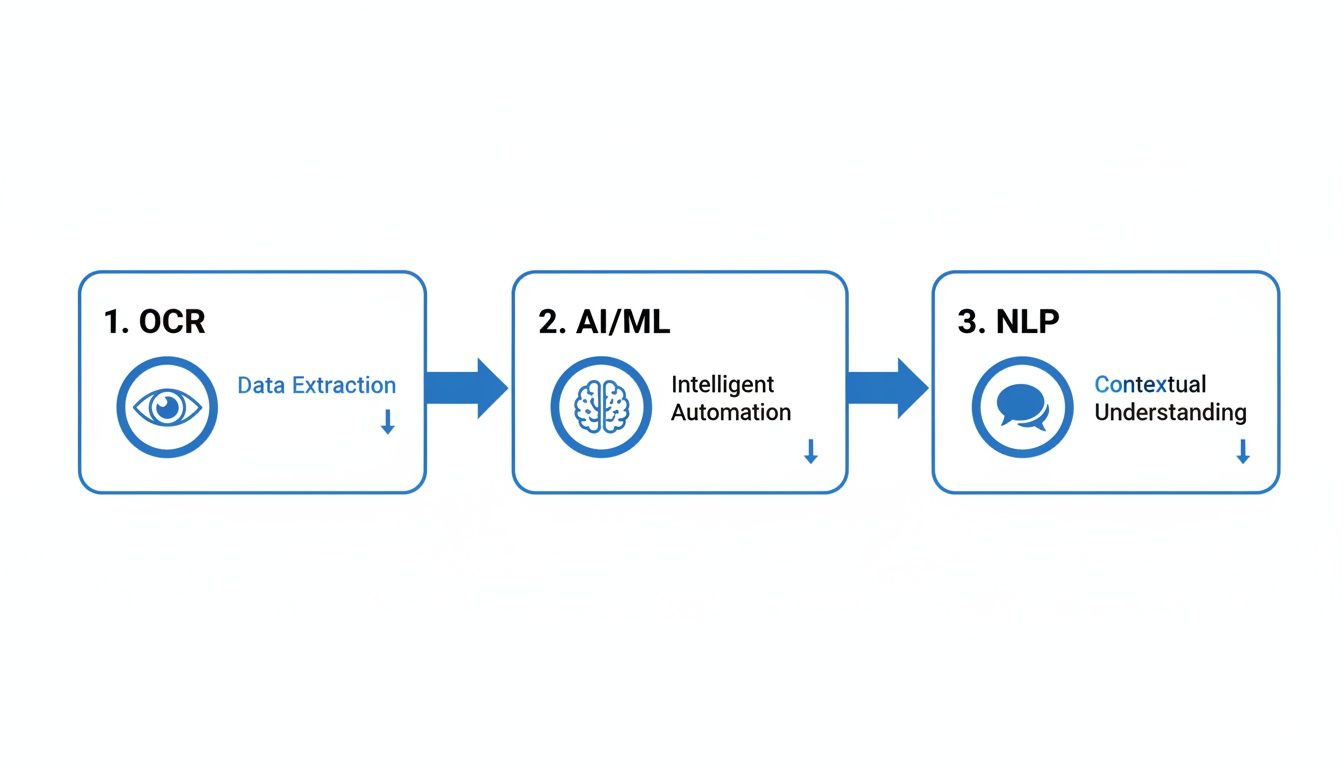
Essentially, OCR acts as the eyes, converting images to text, while AI and NLP provide the brain, interpreting what that text actually means.
Step 4: The Sanity Check (Automated Validation)
Let's be realistic—no automated system is infallible. That's why a good platform includes a validation step. For every piece of data it extracts, the software gives itself a confidence score. If it's 99% certain about an invoice number, that data sails right through.
But what if a number is smudged or a field is ambiguous? The system flags it for a quick human check. This "human-in-the-loop" model gives you the best of both worlds: the raw speed of automation paired with the reliability of human oversight.
The result? Your team only has to look at the handful of exceptions, not every single document that comes through the door.
Step 5: Sending the Data Where It Needs to Go
Once all the data is pulled and verified, it’s neatly organized into a structured format like a spreadsheet or a JSON file. From there, the platform can automatically push it into whatever system you use, whether that's your accounting software, an ERP, or a database.
What was once a tedious, manual task that could take hours is now an automated workflow that finishes in moments. For the person using it, the process feels incredibly simple, hiding all the powerful technology working tirelessly in the background.
Real-World Applications Across Industries
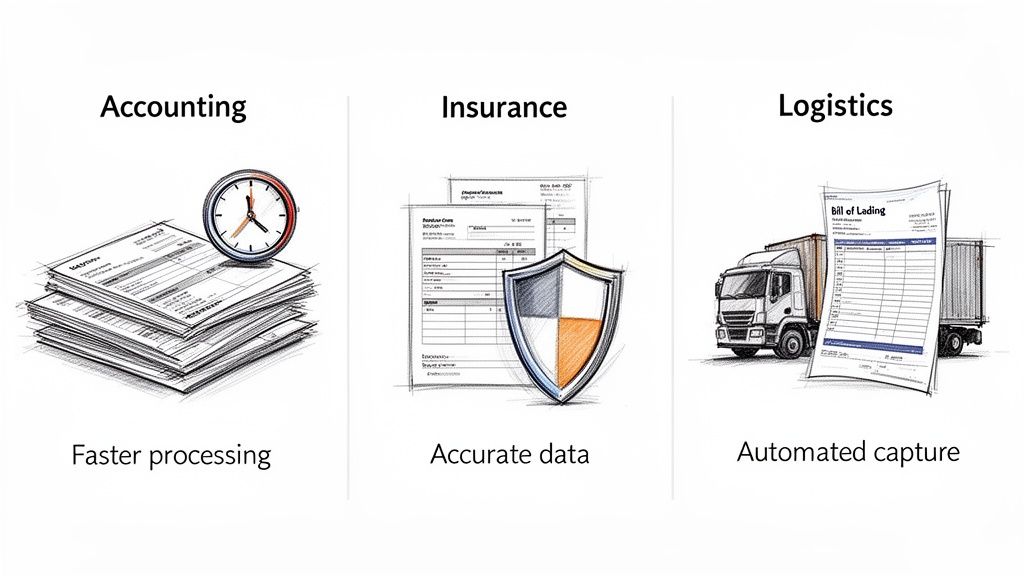
The theory behind automated data extraction is great, but its real value shines when you see it solving actual business problems. Technology for technology's sake isn't the goal. The true win is how it transforms slow, manual work into a fast, accurate, and scalable operation.
From finance to logistics, companies are finally getting out from under the paper pile. Let's look at how this is playing out in the real world, turning industry headaches into major gains.
Untangling Finance and Accounting
If you’ve ever worked in accounting, you know the feeling of being buried under a mountain of paper and PDFs. Invoices, expense reports, and bank statements show up in a million different formats, making manual data entry a slow, painful, and error-prone grind.
This is where automation delivers a knockout punch. An accounting firm, for instance, can set up a platform to process thousands of vendor invoices in a flash. The software reads each document, snags key details like the invoice number and line items, and zips that clean data straight into the accounting system. No more typing.
We're talking about a massive reduction in manual work. Teams often cut their invoice processing time by as much as 80%. This frees up skilled accountants to do what they do best: high-level financial analysis and strategic planning, not just data entry.
It's not just about saving time, either. It’s about paying bills on schedule to improve cash flow and catching costly mistakes like duplicate payments before they happen. For a great deep dive, check out this project on automating data extraction for invoice processing within the reinsurance world.
Bringing Speed to the Insurance Industry
The insurance sector is practically built on paperwork. Claims forms, policy agreements, and medical reports are dense, complex, and all slightly different. One tiny mistake in transcribing information can delay a claim, frustrate a customer, and even create compliance nightmares.
Automated data extraction hands insurance companies a powerful way to speed things up. Picture a claims processor getting hit with hundreds of forms after a big storm. Instead of a team spending days reading each one, a system can instantly:
- Pull out claimant details like names and policy numbers.
- Pinpoint the date of loss and the type of damage.
- Reference the original policy to check coverage limits and terms.
This lets adjusters get to work almost immediately, dramatically shrinking the claims cycle. Customers get their payouts faster, the company can handle more volume, and the administrative load on staff is significantly lightened.
Unblocking Logistics and Supply Chain
In logistics, every minute and every detail counts. A hold-up in processing a bill of lading or customs form can leave a shipping container stuck at the port, causing a chain reaction of delays and costs. Manual data entry from shipping documents is a classic bottleneck that grinds things to a halt.
Automated data extraction breaks that bottleneck wide open. A logistics manager can use it to capture data from bills of lading and packing lists the moment they arrive. This clean, structured data then kicks off the next step automatically, like updating inventory or scheduling a truck.
The result is real-time visibility into the supply chain. It cuts down on shipping errors and helps companies move goods more quickly and reliably. The whole operation becomes nimbler and better equipped to handle the constant shifts in global trade.
We've covered just a few examples here, but you can see more specific scenarios by exploring our automated data extraction use cases.
To understand how this technology addresses specific pain points, the table below connects common industry challenges with the direct benefits of automation.
Industry Problems Solved by Automated Extraction
| Industry | Common Challenge | Automated Solution | Key Benefit |
|---|---|---|---|
| Accounting | High-volume, manual invoice entry leading to errors and payment delays. | Automatically extract invoice data (vendor, amount, due date). | 80% reduction in processing time; improved cash flow management. |
| Insurance | Slow, labor-intensive claims processing from unstructured forms. | Extract data from claims forms and cross-reference with policies. | Faster claims resolution, improved customer satisfaction. |
| Logistics | Bottlenecks from manually processing shipping documents (bills of lading). | Instantly capture data from logistics paperwork to trigger workflows. | Increased supply chain visibility and reduced transit delays. |
| Legal | Tedious review of contracts to find specific clauses or dates. | Scan and extract key terms, obligations, and deadlines from agreements. | Reduced legal review time and minimized compliance risk. |
As you can see, the application isn't just about digitizing paper; it's about fundamentally improving how core business functions operate.
The market certainly reflects this growing adoption. The Data Extraction Software market, currently valued at USD 1.5 billion, is expected to hit USD 3.99 billion by 2032. While large corporations still make up over 60% of the market, the fastest-growing segment is small and medium-sized businesses, proving that this technology is becoming more accessible than ever.
What's the Real Business Impact and ROI?
When you’re thinking about bringing in new tech, it always boils down to one simple question: what’s the return? With automated data extraction, the ROI isn't just good; it's a game-changer. We're not talking about saving a few hours here and there. This is about fundamentally overhauling your efficiency and opening up new doors for growth.
The business case really stands on four solid pillars.
Slashing Your Costs
The most immediate and obvious win is in cutting down labor costs. Let's be honest, manual data entry is a slow, mind-numbing, and expensive task. Every single hour an employee spends keying information from a PDF into a spreadsheet is a direct hit to your bottom line. Automation wipes that out, freeing up hundreds, if not thousands, of work hours every year.
And it’s not just about salaries. Think about the other costs you get to dodge—like hiring temps during your busy season or the money you burn fixing human errors, such as accidental overpayments or missing out on early payment discounts.
Nailing Your Accuracy
Mistakes cost money. A single typo on an invoice can snowball into incorrect payments, frustrated vendors, and hours of painful reconciliation work. In fields like finance or insurance, a simple data entry error could even lead to serious compliance issues and massive fines.
Automated systems, on the other hand, regularly hit accuracy rates well over 99%. When you take human fatigue and distraction out of the picture, you get data that's clean, reliable, and consistent. This kind of accuracy stops those expensive downstream problems before they ever have a chance to start.
Moving at the Speed of Business
In today's market, speed is everything. Imagine being able to process thousands of documents in the time it used to take you to get through a few dozen. Automated data extraction turns that into a reality, shrinking workflows that once took days into a matter of minutes.
This means you can onboard new clients faster, handle insurance claims in record time, and get payments approved without delay. That kind of operational agility allows your business to grow without your administrative overhead growing right along with it.
Seeing the broader advantages of business process automation puts this into perspective. By speeding up the foundational step of data extraction, you create a ripple effect that speeds up every single process that depends on that information.
Unleashing Your Team's True Potential
Maybe the most important benefit isn't about the tech at all—it's about your people. When you rescue your team from the drudgery of data entry, you unlock their real talent.
Instead of copying and pasting, they can finally focus on work that actually matters: analyzing financial trends, negotiating better deals with suppliers, or building stronger relationships with customers. This shift doesn't just improve morale and productivity; it turns a cost center into a hub for real innovation.
It's no surprise the global market for Automated Data Processing is booming. Valued at USD 1,925.1 million, it’s expected to surge to USD 9,711.4 million by 2033 as more businesses catch on. You can dig into these market trends and projections for more detail.
By putting hard numbers to these four areas—cost, accuracy, speed, and your team's potential—you can build an undeniable business case for making the switch and calculate a clear, compelling ROI.
How to Get Started with an Automation Platform
Jumping into automated data extraction can feel like a massive undertaking, but today’s tools have thankfully made it much simpler than you’d think. You don't need to kick off a huge IT project or wait months to see results. It all starts with picking the right platform for your needs and, most importantly, starting small to prove the concept.
The real trick is to move from theory to practice. Once you find a tool that fits your team's existing skills and business goals, you can start seeing a real return on your investment almost right away.
Choosing Your Platform
Let’s be honest: not all automation platforms are the same. Finding the right one comes down to looking at a few key factors that will make or break your success. The goal is to find something that helps your team, not a tool that just creates new technical headaches.
When you're looking at different options, focus on these three things:
-
Ease of Use: Is this a no-code tool with a simple, drag-and-drop interface that anyone on your team can figure out? Or is it built for developers who know how to code? For most businesses, a no-code platform like DocParseMagic is the quickest way to get things done.
-
Document Compatibility: Can the platform actually read the documents you use every day? Make sure it can handle PDFs, scanned images, and Word files without forcing you to create rigid templates for every single vendor you work with.
-
Transparent Pricing: You need a pricing model that’s easy to understand. Pay-per-document or credit-based systems often make more financial sense than confusing subscription plans, especially when you're just starting and your volume is unpredictable.
The best platforms take the mystery out of automation. They should be straightforward to set up and easy to use from day one, feeling more like a helpful business utility than a complicated piece of software.
Making a smart choice here is critical. For a deeper dive into comparing your options, check out our guide on selecting the best document data extraction software for your business.
Your First Project: A Clear Roadmap
The best way to get started with automation is to pick a small, high-impact project. Don't try to automate everything all at once—that's a recipe for disaster. Instead, find one specific bottleneck to tackle first. This helps you prove the value and get your team excited about the change.
Here’s a simple plan to follow:
- Identify a Quick Win: Find a manual process that's repetitive, slow, and full of human error. A great example is automating expense receipts for just one department.
- Define Success: What does a "win" actually look like? Is it cutting processing time from a week down to a single day? Is it eliminating data entry mistakes completely? Set a clear, measurable goal.
- Run a Pilot: Take advantage of a free trial to process a small batch of your actual documents. There’s no better way to see how the platform works and understand the benefits firsthand.
By focusing on one real-world problem, you can show the value of automation in a tangible way and build the confidence to roll it out more widely. This is how you turn good ideas into successful results.
Frequently Asked Questions
It’s natural to have questions when you're looking at bringing in a new piece of technology. You want to make the right call, so we’ve put together answers to the most common things people ask about automated data extraction. The goal here is to give you a clear, no-fluff understanding of what it’s really like to use these tools.
Let's dive into the big topics: accuracy, ease of use, and security. Getting these answers upfront will help you move forward with total confidence.
How Accurate Is It Compared to a Person?
This is usually the first question on everyone's mind. It might sound surprising, but a good AI platform is actually more accurate than a person doing the same job. Think about it: even the most careful human gets tired or distracted. This leads to typos and mistakes, putting typical manual accuracy somewhere around 95-97%.
An automated system, on the other hand, never needs a coffee break. It applies the same exact rules to the first document as it does to the thousandth, often hitting accuracy rates above 99%. Better yet, these platforms get smarter over time. Every time you correct a piece of data, the AI learns, improving its performance for the next document. That kind of self-improvement is something a manual process just can’t match.
Do I Need to Be a Tech Whiz to Use This?
Not at all. A few years ago, you might have needed some coding skills or a technical background to set up data extraction. But that's ancient history now. Today’s best tools are built for regular business users, with simple, no-code interfaces.
Seriously, if you know how to drag and drop a file, you're good to go. The whole point of these platforms is to make your life easier, not to give you another complicated piece of software to learn. You can build your own workflows and tell the system what data to grab without ever touching a line of code.
The best platforms are built on a simple principle: you shouldn't need an IT degree to eliminate tedious work. They empower your finance, operations, or logistics teams to build the solutions they need themselves.
What Kind of Files Can I Use?
Versatility is the name of the game. Your business gets hit with documents in all sorts of formats, and a solid platform needs to handle whatever you throw at it. You shouldn't have to waste time converting files just to get them into the system.
Most leading tools can easily process a wide variety of common file types, including:
- PDFs: Works for both digital and scanned-in documents.
- Image Files: JPEGs, PNGs, and TIFFs are all fair game.
- Office Documents: You can drop in Microsoft Word and Excel files, too.
This flexibility means that whether a document comes in as a PDF attachment, a picture from a phone, or a standard digital file, the system can pull the data out without a hitch.
Is My Business Data Safe?
Security is everything, and any platform worth its salt makes it the absolute top priority. Reputable cloud-based tools use the same kind of heavy-duty security measures that banks and large enterprises rely on to keep your information locked down.
This includes things like data encryption, which protects your information while it's being uploaded and while it's stored on the servers. Top providers also have independent security certifications like SOC 2 or ISO 27001, which are basically a third-party stamp of approval that they're following the best security practices. It’s all designed to ensure your sensitive business data is kept safe and sound.
Ready to see how fast and easy automated data extraction can be? DocParseMagic turns your messy documents into clean, actionable spreadsheets in minutes. Get started for free and transform your workflow today!