How to automate invoice processing: Boost Efficiency and Accuracy
Automating invoice processing is all about swapping out the slow, clunky manual tasks for smart software that can grab, check, and send invoices on their way without anyone lifting a finger. This isn't just a small tweak; it's a major upgrade that slashes costs, shrinks payment cycles from weeks to just a few days, and gives you a live look into your entire accounts payable process.
The real win here is freeing up your team from the mind-numbing grind of data entry so they can focus on what really matters: strategic financial management.
The Urgent Case for Automation
Let's be honest: manual invoice processing is more than just slow—it's a serious drain on your finances and a huge operational headache. Every single invoice that hits an inbox or a desk sets off a long, tedious chain of manual keying, shuffling paper around for approvals, and chasing down updates. This old-school way of doing things is not only sluggish but also a minefield for expensive human errors.
Just think about the day-to-day problems this creates. A simple typo can mean you overpay a vendor. A lost invoice leads to late fees and, even worse, strains your relationships with key suppliers. Your finance team ends up spending way too much time hunting for documents and fixing mistakes instead of analyzing financial data and managing cash flow. That administrative quicksand directly eats into your profits.
The High Cost of Manual Methods
The numbers don't lie. Research shows that processing a single invoice manually can cost an average of $22.75. That cost comes from the labor involved and workflows that often drag on for more than two weeks. Now, compare that to an AI-driven platform that can handle the same invoice in a couple of days for as little as $2 to $3.
On top of that, automation can lead to a 40% drop in human errors, catching costly mistakes before they ever become a problem. The benefits go way beyond just the direct savings, too. A digital workflow gives you a crystal-clear audit trail, which makes compliance a breeze and your financial reports far more accurate.
If you want to dive deeper into the advantages, check out our guide on the primary benefits of accounts payable automation.
Key Takeaway: Moving to automated invoice processing isn't just about saving a few dollars per invoice. It's a strategic decision to boost cash flow, build stronger vendor partnerships, cut down on compliance headaches, and let your finance team do their best work.
A Stark Comparison
The gap between the old way and the new way becomes incredibly clear when you see the key metrics side-by-side.
Manual vs Automated Invoice Processing At a Glance
Here's a quick look at how the two approaches stack up.
| Metric | Manual Processing | Automated Processing |
|---|---|---|
| Average Cost Per Invoice | $15 - $25+ | $2 - $5 |
| Processing Time | 10-20 Days | 2-5 Days |
| Error Rate | High (prone to typos, duplicates) | Extremely Low (near-zero) |
| Visibility | Low (paper trails, email chains) | High (real-time dashboards) |
| Approval Process | Slow, manual handoffs | Instant, rules-based routing |
As you can see, this isn't just a minor improvement. It's a complete transformation of your financial operations from the ground up.
Building a Foundation for Successful Automation
It’s tempting to jump straight into software demos when you decide to automate invoice processing. I've seen it happen countless times. But the most successful projects don’t start with technology; they start with a hard look at your own operations.
Before you even think about a tool, you need to build a solid foundation by mapping out your current process and setting crystal-clear goals. This planning phase isn't optional. It’s how you find the hidden costs, bottlenecks, and frustrations that are bogging down your team. Skip this, and you risk buying a powerful tool that solves the wrong problems or doesn't fit your company’s needs at all.
Chart Your Current Workflow
First things first: get your current invoice workflow down on paper. Grab a whiteboard or pull up a flowchart tool and trace the entire journey of an invoice, from the moment it hits an inbox or a mailbox all the way to payment confirmation.
Get granular. Who touches it first? Where does it go for coding and verification? How are approvals chased down, and what happens when you find a discrepancy? You need to document every single handoff, every delay, and every manual touchpoint. This simple exercise is incredibly revealing. You'll quickly spot things like an invoice sitting in someone’s inbox for five days or the hours wasted manually matching line items to a purchase order.
Pro Tip: Don't do this in a vacuum. Pull in people from accounts payable, procurement, and even IT for this mapping session. They are in the trenches every day and will point out the real pain points you might miss. Getting them involved early also builds buy-in, which is absolutely critical for a smooth rollout later.
Define Your Automation Goals
Once you have a clear map of your current reality, you can set specific, measurable goals for what you want automation to achieve. Vague goals like "improve efficiency" just won't cut it. You need concrete targets that let you measure success and prove the project's return on investment (ROI).
Tie your goals directly to the bottlenecks you just uncovered. For instance:
- Reduce Cost-Per-Invoice: If your mapping revealed high labor costs, a great goal is to lower the cost to process each invoice from $15 to under $5.
- Accelerate Approval Times: Is your biggest delay getting approvals? Aim to slash the average approval cycle from 12 days down to 48 hours.
- Capture Early Payment Discounts: Set a tangible financial target, like capturing 95% of all available early payment discounts by processing invoices on time.
- Eliminate Manual Data Entry: A fantastic operational goal is to achieve a “touchless” processing rate where 80% of standard invoices fly through the system without any human intervention.
This diagram gives you a high-level view of how automation transforms that manual journey into a much more streamlined flow.
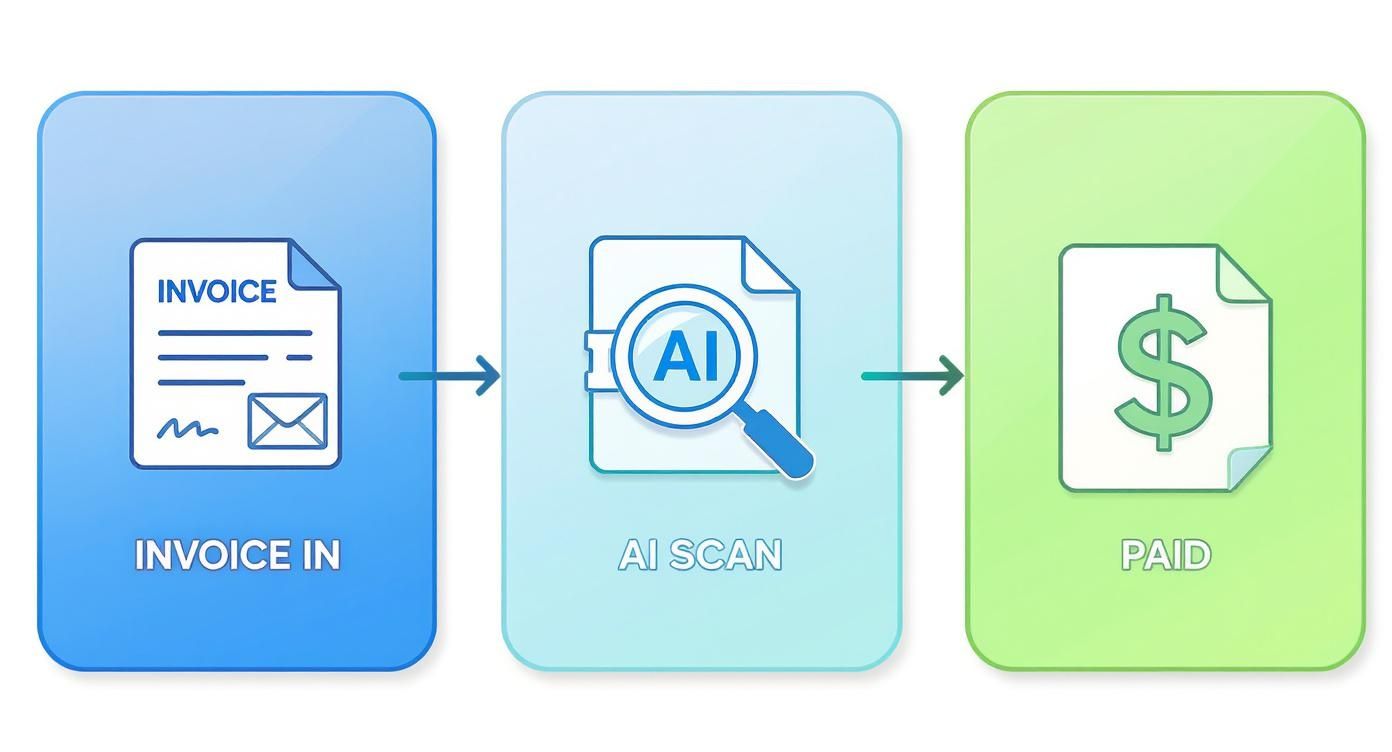
The key takeaway here is the drastic reduction in manual touchpoints. AI takes over the repetitive scanning and data entry tasks that eat up so much of your team's valuable time.
Align Key Stakeholders Early
A successful automation project is a team sport, not a solo mission run by the finance department. As you set your goals, make sure you have alignment from every key stakeholder across the business. This means talking to department heads who approve invoices, the IT team that will handle integrations, and the procurement folks who manage vendor relationships.
Thankfully, getting support is easier than it used to be. The push for AI-driven automation is everywhere, and reliance on manual entry is dropping fast as companies see the gains in efficiency and accuracy. To get a better handle on the technology making this possible, it's worth reading up on what intelligent document processing is and how it works. By building this strong foundation and getting everyone on board from the start, your project will be set up for success before you ever sign a contract.
Choosing the Right Invoice Automation Tools
Okay, you've mapped out your current process and know what you want to achieve. Now comes the fun part: picking the technology that will actually do the work. The market is flooded with invoice automation software, and honestly, they're not all built the same.
Your mission is to find a tool that solves today’s headaches and can keep up as your company expands. Think of it as hiring a new digital team member—it needs to fit right in, not create more friction. I always recommend looking for platforms that are powerful but don't require a computer science degree to operate. A no-code or low-code approach is a huge plus, as it empowers your finance team to make tweaks without waiting on IT.
Key Criteria for Evaluating Software
When you start looking at different platforms, it's easy to get dazzled by flashy feature lists. To avoid that trap, I suggest zeroing in on a few core things that truly matter for your day-to-day operations.
These are what I consider the absolute must-haves:
- OCR Accuracy: How well can the software actually read an invoice? Don’t settle for basic text scanning. Modern AI-driven tools understand context—they can tell the difference between an "Invoice Number" and a "PO Number," even if vendors place them in weird spots. Anything less just creates more manual correction work.
- Integration Capabilities: This is a big one. The software must play nicely with your existing accounting or ERP system, whether it’s QuickBooks, NetSuite, or something custom. If the integration is clunky, you’re just trading one manual task for another.
- Scalability: The tool you pick today needs to handle a lot more invoices tomorrow without breaking a sweat. Cloud-based solutions are typically the best bet here, since they can grow with you without you having to worry about servers and infrastructure.
For smaller businesses or those just dipping their toes in the water, exploring free tools can be a smart first step. A resource like this list of 12 Best Free Invoicing Software can give you a good sense of the entry-level options out there.
To help you compare apples to apples, here’s a quick checklist of features to look for when you're doing demos or trials.
Key Features to Compare in Invoice Automation Software
A checklist of essential features to evaluate when selecting an invoice automation solution for your business needs.
| Feature Category | What to Look For | Why It Matters |
|---|---|---|
| Data Extraction | High-accuracy OCR, AI-driven field recognition, line-item detail capture | Reduces manual data entry errors and saves significant time. The system should learn and adapt to new invoice formats. |
| Integration | Pre-built connectors for your ERP/accounting software, open API access | Ensures a smooth, two-way flow of data. Avoids creating data silos or manual import/export tasks. |
| Workflow & Approvals | Customizable, multi-step approval chains; rule-based routing (e.g., by amount or department) | Automates the entire review process, gets invoices to the right people faster, and enforces internal controls. |
| Validation & Matching | Automatic 2-way and 3-way matching (Invoice vs. PO vs. Goods Receipt Note) | Catches discrepancies early, prevents overpayments, and ensures you're only paying for what you ordered and received. |
| Exception Handling | A clear dashboard for flagged invoices, easy communication tools for resolving issues | Provides a centralized place to manage problems without resorting to endless email chains. |
| Reporting & Analytics | Dashboards for processing times, vendor spend, and cash flow forecasting | Gives you real-time visibility into your AP process, helping you spot bottlenecks and make smarter financial decisions. |
| User Experience (UX) | Intuitive interface, minimal training required, mobile accessibility | A tool that’s easy to use gets adopted quickly. If your team finds it frustrating, they'll find workarounds. |
Choosing the right combination of these features ensures you get a solution that not only automates tasks but also adds real strategic value to your finance operations.
Configuring Your Ideal Workflow
Let's make this real. Say you’ve picked a tool like DocParseMagic. The smart way to start isn't by dumping a thousand invoices into it on day one. Instead, you begin by telling the system exactly what information you care about.
You’ll go in and define the key data fields you need to pull from every invoice: vendor name, invoice date, due date, total amount, and all the individual line items. The best tools make this incredibly simple—you can often just draw a box around the information on a sample invoice to "train" the AI.
Next up, you build your validation rules. This is where you get to embed your company's logic directly into the workflow. For example, you can set a rule to automatically cross-reference an invoice total with the purchase order in your ERP. If they match within a 1% tolerance, bam—the invoice is approved and sent for payment. If not, it automatically gets routed to someone in procurement for a second look.
Expert Tip: Don't try to boil the ocean. Start with the invoice formats from your top five or ten highest-volume vendors. Nail the data capture for that group first. It'll give you a quick, tangible win and prove the system's value to everyone involved.
For a more comprehensive look at different tools on the market, you can explore our guide on the best invoice data extraction software, which breaks down the leading options.
The bottom line? You’re looking for that sweet spot between powerful features and ease of use. You need a system that can handle your most complex invoices but is simple enough that your team will actually embrace it. By focusing on accuracy, solid integrations, and the ability to scale, you’ll be well on your way to picking a solution that truly transforms your accounts payable process.
Handling Exceptions and Validation Rules
Let’s be honest: no matter how slick your new automation system is, things will go wrong. Some invoices will have missing info, others will have mismatched numbers, and some will just be weird. I’ve seen teams get so excited about the "happy path"—where every invoice sails through perfectly—that they completely forget to plan for the inevitable hiccups.
A truly great automated system isn't just about processing the easy stuff faster. It’s about how it handles the curveballs. The goal isn’t to eliminate every single exception (that's impossible), but to build a smart, structured way to catch, flag, and route them without derailing your entire workflow. You want to keep the vast majority of invoices flowing touch-free, while a human only steps in when absolutely necessary.

This way, you’re not just moving a bottleneck; you’re actually fixing the process.
Designing a Smart Exception Handling Workflow
First things first, you need to define what an "exception" actually means for your team. The best place to start is by looking at what’s slowing you down right now. What are the most common headaches your AP team deals with? Those are your prime candidates for automated flags and alerts.
Your exception workflow should be built to catch these problems right at the front door. Instead of finding out a PO number is missing just as you're about to schedule a payment, the system should flag it the second the invoice is scanned. This simple shift from reactive to proactive saves an incredible amount of back-and-forth.
Here are the most common exceptions you should be building rules for:
- Missing PO Number: The system should automatically flag any invoice that needs a PO but doesn't have one. No more manual searching.
- Mismatched Line Items: It compares the invoice line items against the PO and instantly flags any differences in price or quantity.
- Unapproved Vendor: An invoice from a company not in your master vendor file gets quarantined immediately for review.
- Potential Duplicate Invoice: The software scans for duplicate invoice numbers from the same vendor within a set window, like 90 days.
The real magic happens when you set up automated routing for each scenario. A PO mismatch could go straight to the procurement manager who placed the order. The unapproved vendor alert could go to your vendor management team. This gets rid of the manual "who owns this?" guessing game.
Establishing Intelligent Validation Rules
Once you’ve got the basic exceptions covered, you can build in more advanced validation rules. Think of these as your system’s common sense—a powerful defense against errors and even potential fraud. They apply your company’s business logic to the invoice data, adding a layer of financial control that’s nearly impossible to maintain manually.
These rules act as checkpoints that every single invoice must clear before moving on to the payment stage.
One of the smartest validation rules I’ve seen a client implement was an "unusual amount" flag. Their system learned the typical invoice value for each vendor. If an invoice came in that was more than 50% higher than that vendor’s average, it was automatically sent to a senior manager for a second look. It caught a major billing error in the first month.
Practical Validation Rules to Implement
Here are a few high-impact validation rules you can configure in most modern invoice automation platforms:
- Three-Way Matching Tolerance: Don't just check for a perfect match between the invoice, PO, and goods receipt. Set a tolerance. For example, you can auto-approve any invoice where the total is within 2% or $50 of the purchase order. Only larger discrepancies get flagged for manual review, which can dramatically boost your touchless processing rate.
- Date Logic Validation: This one is simple but effective. Create a rule that flags any invoice dated before the corresponding PO was issued. It’s a dead-simple check that can catch procedural mix-ups or even fraudulent bills.
- Tax Amount Verification: For invoices with significant sales tax, set a rule to check that the tax amount is correct based on the subtotal and the applicable tax rate for the vendor's location. You’d be surprised how often this catches vendor errors and prevents you from overpaying.
By building this robust framework of exception handling and validation rules, you turn your automation project from a simple data-entry tool into a vigilant financial control system. It ensures that as you automate invoice processing for speed, you’re also boosting accuracy and security, giving you real confidence in every payment you make.
Proving It Was Worth It: Measuring Success and ROI
Alright, the new system is up and running. Invoices are moving through automatically, the team is getting the hang of it, and the old paper-chasing headaches are starting to fade. But now comes the real test: proving to leadership that this project was more than just a shiny new toy.
"It feels faster" isn't going to cut it in a budget meeting. You need hard numbers. This is where you connect the dots between the operational improvements your team sees every day and the financial impact the C-suite cares about. It's about building a rock-solid business case with data, not just anecdotes.
The KPIs That Actually Matter
Forget vanity metrics. To show real progress, you need to focus on the numbers that directly reflect the health of your accounts payable process. The best way to do this is to get a baseline before you flip the switch, so you can show a crystal-clear "before and after" picture.
Here are the KPIs I always recommend tracking:
- Cost-Per-Invoice: This is the gold standard. Tally up everything—labor, software fees, even overhead—and divide it by the number of invoices you process. A nosedive in this number is your single most powerful piece of evidence.
- Average Invoice Approval Time: How long does it really take for an invoice to go from sitting in an inbox to being approved for payment? This KPI is fantastic for showing how you’ve crushed the bottlenecks that used to slow everything down.
- Touchless Processing Rate: This is my personal favorite. What percentage of your invoices fly through the system from start to finish without a single person having to touch them? A high touchless rate is a direct measure of how well you've dialed in your automation rules.
- Early Payment Discounts Captured: This one is pure cash back to the business. Track the exact dollar amount of discounts you're now snagging simply because you can pay your bills on time, or even early.
These metrics tell a story that everyone from the AP manager to the CFO can understand—a story of a faster, cheaper, and more efficient operation.
Calculating a No-Nonsense Return on Investment
With those KPIs in your back pocket, you can build a straightforward ROI calculation that speaks volumes. It's not just about what you saved; it's also about the costs you've avoided.
I always tell my clients that proving ROI is as much about cost avoidance as it is about direct savings. You're not just saving on labor; you're preventing late fees, catching duplicate payments, and giving your team time to focus on high-value work instead of mind-numbing data entry.
Here’s a simple way to frame your financial gains:
| Financial Gains | How to Calculate It |
|---|---|
| Labor Savings | Figure out the hours saved on manual entry and follow-ups. Multiply that by the team's average loaded hourly rate. |
| Discounts Captured | This one's easy: just add up the total value of all the early payment discounts you’ve secured since going live. |
| Late Fee Avoidance | Look at your records from before the project. How much were you paying in late fees? That number is now a direct saving. |
| Error Reduction Savings | Estimate the savings from catching those sneaky duplicate invoices or overpayments that your new validation rules now flag. |
Once you have your total gains, the math is simple:
ROI (%) = ( (Total Financial Gains - Total Project Cost) / Total Project Cost ) x 100
Remember to include everything in your "Total Project Cost"—software subscriptions, one-time setup fees, and even the internal staff hours spent on the project. An honest calculation is a credible one.
The difference this makes at scale is staggering. I've seen teams go from processing 6,000 invoices per person to over 23,000 invoices per employee annually. That’s not just an improvement; it's a complete transformation. This kind of productivity leap explains why the AI-powered invoice processing market is booming. If you want to dig deeper into the global trends, you can explore the research on global invoice processing advancements.
By presenting a clear, data-backed ROI, you’re not just justifying a project. You’re proving that the decision to automate invoice processing was one of the smartest financial moves the company made all year.
Your Rollout Checklist and Common Pitfalls to Avoid
You’ve done the heavy lifting: the workflows are mapped, the tools are chosen, and the rules are built. Now comes the moment of truth—the rollout. This is where all your planning pays off, but it’s also where things can easily go sideways.
A great launch isn't just a flip of a switch. It's a carefully managed process that builds confidence, lets you gather crucial feedback, and makes sure everyone is ready for the new reality. Rushing this stage is a classic mistake that can unravel months of hard work. Think of it as a series of controlled steps that bring your team and vendors along for the ride.
Start with a Pilot Program
Before going all-in, you need to run a small-scale pilot. This is your live-fire exercise in a controlled, low-risk setting. From my experience, the best approach is to pick a handful of friendly, high-volume vendors to be your guinea pigs.
The goal here is twofold. First, you get to iron out the technical kinks in a real-world scenario—from data extraction quirks to approval workflow hiccups. Second, and just as important, you start creating internal champions. When the rest of the AP team sees how smoothly invoices from "Vendor X" are suddenly sailing through the system, they become your best advocates for the change.
Pick a small, dedicated group from your AP team to own this pilot. They’ll become your go-to experts, providing priceless feedback and helping train everyone else down the line.
Pro Tip: Don't just look for what works. Actively hunt for what breaks. A pilot's real value is in finding problems on a small scale so you don't have to solve them when the entire company is watching. Document every single snag, no matter how small.
Comprehensive Team Training and Communication
Great tech is only half the equation; your people are the other half. Your team needs to understand not just how to click the buttons in the new software, but why you’re making this change in the first place.
Good training is more than a quick software demo. It should be centered on the new workflows, especially how to manage the exceptions queue. You need to show your team how their roles are evolving—they're moving from data entry clerks to financial controllers who oversee an automated process. This shift in perspective is absolutely critical for getting buy-in and overcoming resistance.
A solid communication plan is just as vital. Keep everyone in the loop:
- Announce the project goals early on. Explain the "what's in it for them," like less tedious work and faster payment cycles.
- Share results from the pilot program. Highlighting early wins builds momentum and gets people excited.
- Provide a clear, realistic timeline. Let everyone know when to expect training and the official go-live date.
- Set up a support channel. Create a dedicated Slack channel or a go-to person for questions. This prevents confusion and makes people feel supported.
Sidestepping Common Implementation Traps
Even with the best-laid plans, a few common pitfalls can derail a project to automate invoice processing. Just knowing what they are is the first step to avoiding them. One of the biggest offenders I’ve seen time and again is messy master data.
If your master vendor file is a mess of duplicates, old addresses, and outdated payment terms, your shiny new automation system will just process junk faster. It's the classic "garbage in, garbage out" problem. Before you even think about going live, you must dedicate time to cleaning up and standardizing this data. It’s tedious, but it's non-negotiable.
Another huge trap is failing to get your vendors on board. Simply firing off an email telling them to send invoices to a new address won’t cut it. You have to sell them on the benefits—namely, faster, more reliable payments. A happy vendor is far more likely to follow your new guidelines, which makes the entire system run better.
Finally, don’t treat this as a "set it and forget it" project. An automated system creates a fantastic digital audit trail, but you need to ensure it meets all compliance and regulatory requirements. Plan for regular system health checks and updates to keep everything running securely and efficiently long after launch day.
Got Questions About Invoice Automation? We've Got Answers
When you're thinking about overhauling a core process like invoicing, questions are bound to come up. It's a big step, but it doesn't have to be a complicated one. Here are some straightforward answers to the things we get asked most often.
How Long Does This Actually Take to Set Up?
This is the classic "it depends" question, but I can give you some real-world timelines. If you're using a standard, cloud-based tool and connecting it to something common like QuickBooks, you could genuinely be up and running in a couple of weeks.
Now, if you're dealing with a custom, on-premise ERP system, that's a different story. A project like that requires more in-depth integration work and rigorous testing, so you should probably budget a few months to get it done right.
My advice? Don't try to boil the ocean. Start with a small pilot program. Pick a handful of your most common vendors, prove the concept, and build momentum from there. It's the fastest way to get a win on the board and smooth out the wrinkles before a full rollout.
Will This System Actually Read All Our Invoices?
Modern AI-powered tools are surprisingly good at this. They've been trained on millions of documents, so they can handle everything from a clean PDF sent by a major supplier to a blurry photo of a paper invoice someone snapped with their phone.
Let's be realistic, though. You'll always have a few weird, non-standard invoices that need a human eye. But a well-tuned system can comfortably automate invoice processing for 80-90% of what comes through the door. That's where you see the huge drop in manual work.
What's the Biggest Hurdle We'll Face?
Honestly, it's almost never the technology. The tech is solid. The biggest challenge is almost always the people side of things. Shifting how your team works is the real project.
Success usually comes down to three things:
- Getting everyone on board: You need champions in finance, IT, and any key departments right from the start.
- Good training: Your team's job is changing. They're moving from mind-numbing data entry to becoming system supervisors. They need to understand and feel comfortable with that new role.
- Clean vendor data: This one trips up so many projects. Your automation tool relies on your master vendor list to work its magic. If that data is a mess of duplicates and old information, you're in for a rough time. Cleaning it up first is non-negotiable.
Nailing these human and process elements is every bit as critical as picking the right software.
Ready to stop the manual data entry grind and see what automation can do for you? DocParseMagic turns messy invoices and documents into clean, structured data in minutes. Sign up for free and start processing your first documents today at docparsemagic.com.