How to Categorize Business Expenses for Smarter Budgeting
Getting a handle on your business expenses isn't just about sorting receipts. It’s about creating a clear map of where every single dollar goes, which is the only way to truly understand your cash flow, slash your tax bill, and make genuinely smart financial decisions.
This is the first step toward being tax-ready at all times, building budgets that actually work, and finding those elusive cost-saving opportunities. Think of it less like a chore and more like giving your business a financial superpower.
Why Smart Expense Categorization Is a Business Essential
Let's be honest: without a solid system for organizing your spending, you're flying blind. It's impossible to see where your money is really going, which often leads to slow leaks in your budget, missed tax deductions, and forecasts that are little more than guesswork.
A well-thought-out categorization system turns a messy pile of transaction data into powerful business insights. Suddenly, you can answer the tough questions with total confidence.
The Strategic Advantages of Clear Categories
When you can see exactly where your money flows, you instantly gain control. This clarity brings some serious benefits to the table:
- Tax Time Becomes a Breeze: A clean set of categories means you catch every legitimate deduction—from the big software subscriptions down to the minor office supplies. This directly maximizes your savings and makes filing way less painful.
- Budgeting and Forecasting You Can Trust: When you have organized historical spending data, you can build future budgets based on reality, not just wishful thinking.
- Spotting Cost-Saving Opportunities: By looking at spending trends in categories like "Marketing" or "Travel," you can quickly see where costs are creeping up. This is your cue to negotiate better deals with vendors or cut out wasteful spending.
Take travel costs, for example. They are a huge focus for finance teams right now. With most travel managers expecting a significant jump in their company's travel spend, having precise categories is no longer a "nice-to-have." You can dig into the full research on global business travel spending to see just how critical this is becoming.
The moment you stop seeing expense categorization as a tedious task and start treating it as a strategic tool, you empower your business to make smarter decisions that directly boost your bottom line. It's the difference between reacting to financial fires and preventing them in the first place.
Ultimately, mastering how to categorize your expenses is non-negotiable. It provides the financial clarity you need to steer the ship toward real, sustainable growth.
Before we dive into the "how-to," let's start with a foundational look at the most common expense categories. This framework will give you a solid starting point for organizing your own company's spending.
Core Business Expense Categories at a Glance
| Category Group | Common Examples | Strategic Importance |
|---|---|---|
| Operations | Rent, utilities, office supplies, software subscriptions (SaaS) | These are the essential costs of keeping the lights on. Tracking them helps in managing day-to-day cash flow and identifying areas for efficiency gains. |
| People | Salaries, benefits, payroll taxes, freelance contractor fees | Your largest expense is often your team. This category is crucial for managing headcount, budgeting for new hires, and ensuring compliance. |
| Marketing & Sales | Advertising, social media, SEO tools, commissions, client entertainment | Tracks the cost of acquiring new customers. Analyzing this helps you understand your customer acquisition cost (CAC) and marketing ROI. |
| Travel | Airfare, hotels, meals, ground transportation, conference fees | Provides visibility into a significant and often variable expense, allowing for better policy-setting and cost control. |
| Professional Services | Legal fees, accounting services, consulting fees | These are costs for external expertise. Monitoring this category helps you manage professional relationships and budget for necessary advice. |
This table covers the big buckets, but the real power comes from tailoring these categories to your specific business needs, which we'll get into next.
Designing Your Custom Chart of Accounts
Alright, with the main expense groups covered, it’s time to get down to the nitty-gritty: building your business's financial blueprint. This is your Chart of Accounts (COA). Forget generic templates—think of this as the unique financial DNA of your company. Before you start, it’s worth taking a moment for understanding what a chart of accounts is and how it acts as the central command for your finances.
Your mission is to build a logical system that gives you real insight without becoming a tangled mess. Start with the basics that your accountant (and the tax office) will expect to see, like Cost of Goods Sold, Payroll, and Marketing. From there, you'll start customizing to reflect how your business actually makes and spends money.
Tailoring Categories to Your Industry
This is where the real magic happens. A generic list of categories just won't give you the clarity you need. The expenses that matter to a software startup are worlds away from what a construction firm tracks.
Let's look at a couple of real-world examples:
- A software company might find a single "Marketing" category useless. They’d be better off breaking it down into "PPC Ads," "Content Creation," and "Event Sponsorships" to see what's actually driving leads.
- A construction firm, on the other hand, lives and dies by project profitability. They need granular sub-categories under "Project Costs," such as "Raw Materials," "Subcontractor Fees," and "Heavy Equipment Rental."
This industry focus is absolutely critical. For example, financial services sales teams spend an average of £1,100 per person on client entertainment. Meanwhile, the construction sector saw an eye-watering 98% year-over-year jump in travel spending in FY24. These numbers prove that a one-size-fits-all approach to expense tracking is a recipe for bad data.
A well-designed Chart of Accounts does more than just list what you spent. It tells the story of how your business operates. The more relevant and detailed that story is, the smarter your decisions will be.
Nailing this step sets the stage for everything else, from accurate financial reports to budgets that actually work.
This is what I call smart categorization—a system that actively works for you. It's the foundation for tax readiness, accurate budgeting, and finding real cost savings.
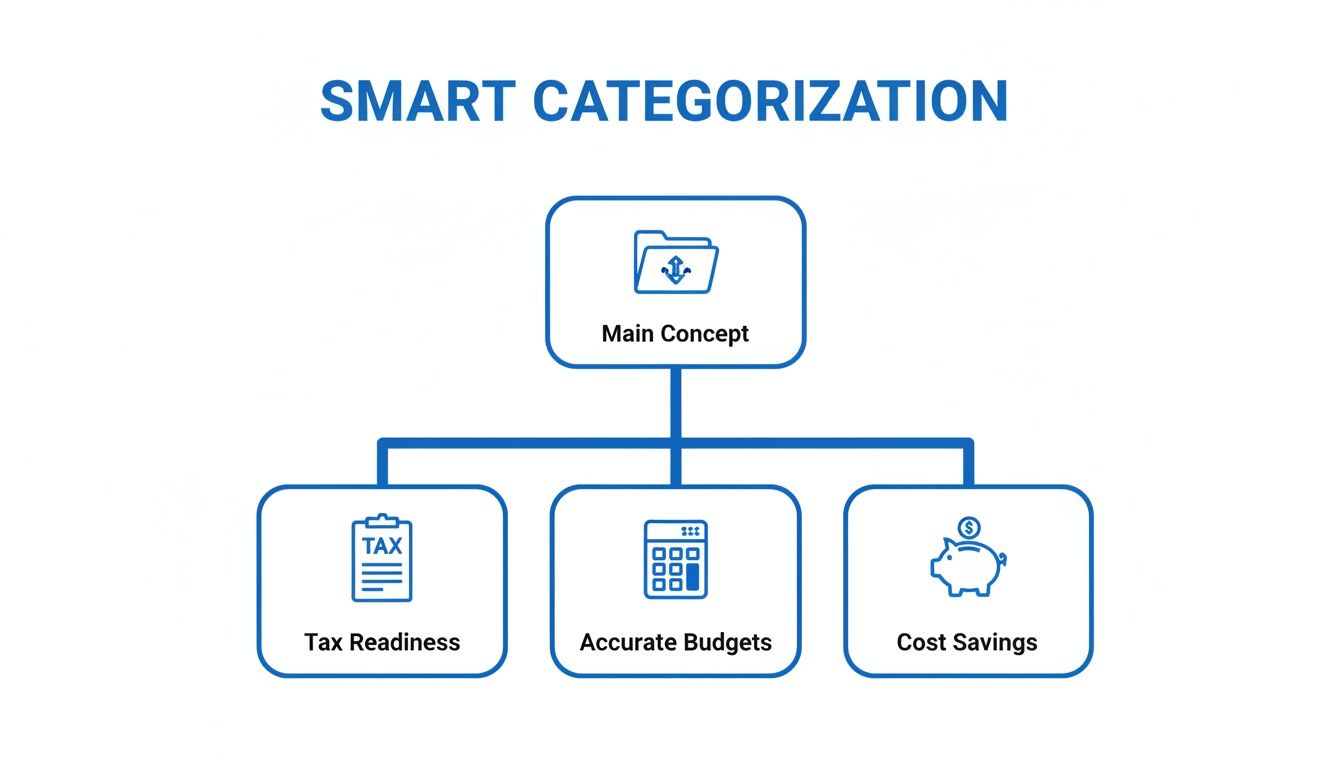
As you can see, a thoughtful approach to categorizing expenses isn't just an accounting chore. It's a strategic move that directly impacts your bottom line.
Finding the Right Level of Detail
One of the trickiest parts of this process is finding that perfect balance between too vague and way too specific. You need enough detail to spot meaningful trends, but not so much that bookkeeping becomes a full-time job in itself.
Here's my rule of thumb: if an expense is significant, recurring, or something you need to watch for budget reasons, it probably deserves its own category or sub-category.
Are you constantly dumping unrelated costs into a "Miscellaneous" or "General" bucket? That's a huge red flag. It’s a sign that your current categories are too broad. Instead of a single "Software" line item, for instance, try creating sub-categories like "CRM Software," "Accounting Software," and "Project Management Tools." Suddenly, you can see exactly where your tech budget is going and start asking tough questions about the ROI of each platform.
Building a Reliable Expense Tracking Workflow
Once you have your custom Chart of Accounts dialled in, the next step is building a system to catch every single transaction. This workflow is what connects the moment a purchase is made to the moment it's correctly filed away in your books. It’s all about consistently collecting receipts, processing invoices, and reviewing bank statements so nothing gets missed.
Think of it this way: a good process is what separates clean, insightful financials from a chaotic mess. The whole point is to create a repeatable system that you and your team can follow without even thinking about it.
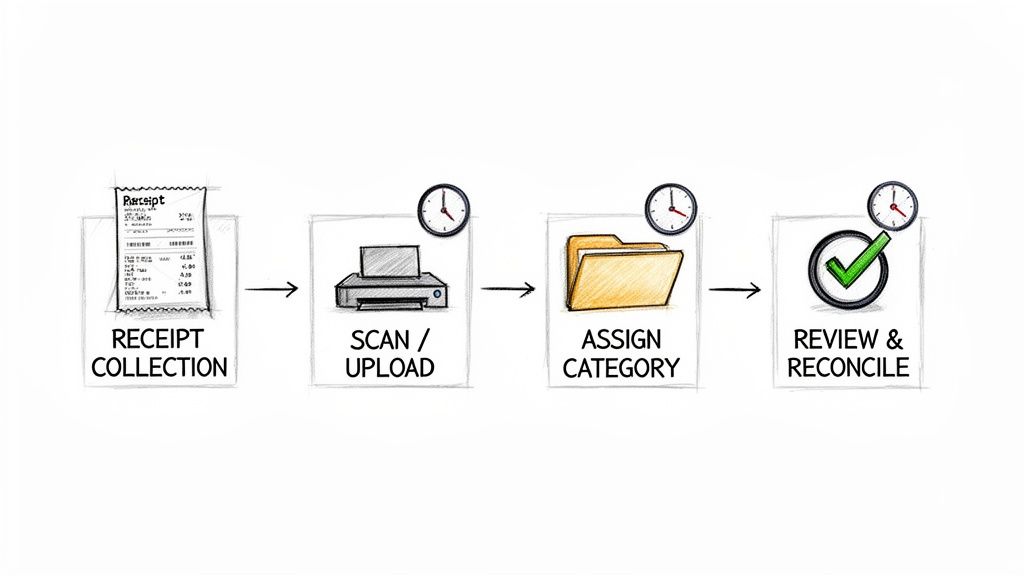
This diagram gives you a bird's-eye view of the key stages, from gathering receipts to the final reconciliation.
Choosing Your Tracking Method
You’ve really got two main options here: going the old-school manual route with spreadsheets or getting modern with specialized automation tools. Spreadsheets might seem like the easy, free choice, but they have some serious hidden costs.
Manual data entry is a minefield of human error. Just one typo or a misplaced copy-paste can wreck an entire month's budget, leading you to make bad decisions based on faulty numbers. And trust me, those little mistakes add up, turning your end-of-month reconciliation into a total nightmare.
This is where automated tools really shine. For a more detailed look at the different methods out there, our complete guide on how to track business expenses is a great place to start.
Capturing and Processing Every Transaction
Your workflow has to account for all the different ways money leaves your business. We're not just talking about big invoices from suppliers. It’s also the small coffee shop receipts, the recurring software subscriptions, and the simple bank transfers.
To make sure you catch everything, your process needs to include:
- Receipt Management: Make it a non-negotiable rule for everyone on the team. Every single receipt for a business purchase—physical or digital—gets submitted right away. They can snap a photo with their phone or simply forward the email.
- Invoice Processing: Create a central hub for all incoming vendor invoices. This could be a dedicated email inbox (like
invoices@yourcompany.com) or a shared cloud folder where every bill lands before it gets processed. - Bank Statement Review: Block off time in your calendar for a regular review of your business bank and credit card statements. This is your safety net, helping you spot any transactions that might have slipped through your receipt or invoice systems.
A consistent workflow is your best defense against missing deductions and inaccurate financial data. The discipline you build here directly impacts the quality of your business insights and your readiness for tax season. It transforms expense management from a reactive headache into a proactive, strategic function.
I once worked with an operations manager who was spending nearly 10 hours a week just typing data from vendor invoices into a spreadsheet. After switching to an automated tool that pulled the data directly from PDFs, that time dropped to less than an hour. But it wasn't just about saving time; it was about freeing him up to do more valuable analysis and planning.
Tools like DocParseMagic are built to solve this exact problem. They automatically capture and read the data from invoices, receipts, and other documents, pushing clean, accurate numbers right into your system. This completely gets rid of the manual entry step where most mistakes happen, ensuring your categorization is based on solid, trustworthy information. Your team can then spend their time verifying the categories, not squinting at crumpled receipts or fixing typos.
Automating Expense Categorization with Smart Tools
Manually sorting through hundreds of transactions is a massive time sink and, frankly, where most of us get bogged down. This is the exact point where you stop doing things the hard way and let smart automation take over. Modern tools can categorize your expenses based on simple, powerful rules you define, turning a multi-hour chore into a completely hands-off process.
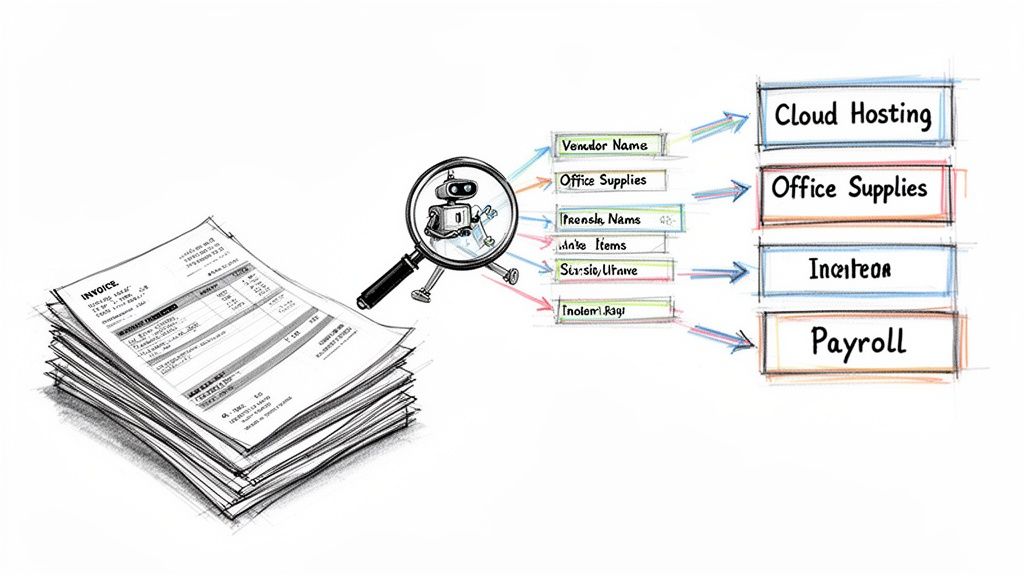
Imagine setting a rule that says any payment to "AWS" or "Google Cloud" should automatically fall under your "Cloud Hosting" category. You set it once, and that's it. Every future transaction gets categorized correctly without you lifting a finger, which keeps your books consistent and frees up your time for more important things.
How Smart Parsing Works
The real magic behind this kind of automation is its ability to read and understand documents that aren't structured neatly, like PDF invoices and scanned receipts. This is where a tool like DocParseMagic becomes a game-changer. Instead of you having to squint at an invoice and type the vendor name, line items, and descriptions into a spreadsheet, the software does it for you. It parses the document and pulls out the key information.
Think of an operations manager who gets 50 different vendor invoices in a single week, each with its own quirky layout. An intelligent tool can extract all the crucial data points from every single one, getting them ready for categorization without any tedious copy-pasting. For any business that wants to grow, this isn't just a nice-to-have; it's a necessity. You can get a much better sense of the full impact by learning more about how to automate data entry and what it can do for your team's workload.
This capability does more than just save you countless hours. It drastically cuts down on the human errors that can mess with your financial data and lead to bad business decisions.
Setting Up Your Automation Rules
Getting started with automation is probably simpler than you imagine. Most systems rely on a mix of vendor names, specific keywords, and even spending amounts to apply categories on their own.
Here are a few practical examples of rules you could build right away:
- Vendor-Based Rules: Any transaction with the vendor name "Staples" or "Office Depot" gets automatically categorized as Office Supplies. Simple.
- Keyword-Based Rules: If a transaction description contains the word "airfare" or "hotel," the system knows to assign it to the Business Travel category.
- Amount-Based Flags: You could set a rule to flag any expense over a certain amount, like $1,000, for a quick manual review. This gives you an extra layer of control over significant purchases.
The goal of automation isn't to completely replace people. It's to free them from the repetitive, low-value work. By letting software handle the bulk of the categorization, your team can focus on what matters: reviewing exceptions, analyzing spending trends, and offering real financial insights.
Manual vs. Automated Expense Categorization
When you see the two approaches side-by-side, the difference between a manual spreadsheet and an automated system is night and day. It’s not just about doing things faster; it’s about accuracy, the ability to scale, and the overall quality of your financial data.
The table below really highlights the contrast.
| Feature | Manual Spreadsheet Method | Automated with DocParseMagic |
|---|---|---|
| Speed | Painfully slow. Every single transaction has to be entered one by one. | Lightning fast. It can process hundreds of documents in just a few minutes. |
| Accuracy | Prone to human error. Typos, misinterpretations, and copy-paste mistakes are common. | Reaches 99%+ accuracy by pulling data directly from the source document. |
| Scalability | Quickly becomes a bottleneck as your business and transaction volume grow. | Scales without breaking a sweat, handling thousands of transactions with no drop in performance. |
| Consistency | Categorization can be all over the place, depending on who is doing the data entry that day. | Enforces the same rules every time, ensuring your data is completely uniform. |
Ultimately, by switching to an automated system, you’re not just speeding up a single task. You are fundamentally improving your entire financial workflow, making it far more reliable, efficient, and ready for growth.
Keeping Your Financial Data Clean and Compliant
Getting your expense categories set up is a fantastic first step, but the job isn't quite done. Think of your financial data like a garden. You can’t just plant the seeds and walk away; it needs regular attention to flourish. Without it, you’ll end up with a mess of weeds—or in this case, miscategorized expenses that can quietly sabotage your budget and create serious compliance headaches down the road.
A simple, ongoing maintenance routine is your best defense against this kind of chaos.
Make Reconciliation a Habit
The single most important maintenance task is regular reconciliation. This is where you sit down and match your internal records against your bank and credit card statements, making sure every single number lines up. It's your chance to catch small mistakes before they snowball into major problems.
I’ve found the best way to do this is to block out time on the calendar. Whether it's weekly or bi-weekly, make it a non-negotiable appointment to review all new transactions. This consistent check-in helps you spot and fix miscategorized items right away. To keep everything airtight, it’s a great idea to incorporate best practices for internal controls into your expense tracking workflow.
Tackling Tricky Expense Scenarios
Let's be honest, real-world transactions are often messy. They don’t always fit neatly into one box, and these are the situations that can trip up even the most organized systems if you aren't prepared.
Here are a few common curveballs I see all the time and how to handle them:
- The All-in-One Hotel Bill: A hotel invoice is rarely just for the room. It often bundles charges for meals, Wi-Fi, and parking. Instead of just dumping it all under "Travel," you need to split the transaction. The room cost goes to Lodging, the dinner goes to Business Meals, and the internet charge could go to Utilities.
- Employee Reimbursements: These require their own clear process. When an employee submits an expense, make sure it’s coded to the correct category (like "Client Meals" or "Office Supplies") just as if the company had paid for it directly from its own account.
- Out-of-Policy Purchases: A well-organized system makes enforcing spending policies much simpler. When an out-of-policy purchase gets flagged during your reconciliation, you can address it with the employee immediately. This reinforces your guidelines and helps you maintain control over the budget.
A clean, compliant financial system isn't just about avoiding trouble. It's about building trustworthy financial reports that give you, your investors, and your lenders total confidence in your numbers.
Modern tools are making this much easier. The global expense management software market is projected to hit $17 billion by 2032, largely because businesses are adopting tools that can automatically apply policies and spending limits. This automation is a game-changer for maintaining data quality as you grow.
Of course, all of this starts with a solid foundation. That's why we recommend exploring our guide on the best practices for document management to make sure your entire system is built to last.
Common Questions About Categorizing Expenses
Even with a solid plan, questions always pop up once you start putting a system into practice. When you’re learning how to categorize business expenses, a few key distinctions can easily trip you up. Let's clear up some of the most common ones.
How Many Expense Categories Should My Business Have?
There’s no magic number here, but a good rule of thumb for most small to medium-sized businesses is somewhere between 20 and 50 categories.
The goal is to find that sweet spot: detailed enough to give you real insights but not so granular that you're drowning in options. Start with the standard categories you need for taxes, then branch out with custom sub-categories for expenses that are either significant or unique to what you do. Your list can—and should—evolve as your business does.
What's The Difference Between COGS and Operating Expenses?
This is a big one. Getting this right is fundamental to understanding your company's core profitability.
-
Cost of Goods Sold (COGS): These are the direct costs of making your product or delivering your service. Think raw materials if you're a manufacturer or the direct labor costs for a service-based business.
-
Operating Expenses (OpEx): These are the costs of keeping the lights on—things that aren't tied to a specific product. This bucket includes expenses like rent, marketing campaigns, and administrative salaries.
Why does it matter? Separating them properly lets you calculate your gross profit, which tells you exactly how efficiently you’re producing and selling your core offering.
You can absolutely change your expense categories later on. Your Chart of Accounts should be a living document that evolves with your business. It's smart to review it annually and make adjustments as needed.
How Do Modern Tools Handle All The Different Invoice Formats?
This is where AI-powered parsing technology is a game-changer. I remember the old days when you had to build a specific template for every single vendor's invoice layout. It was an absolute nightmare.
Modern tools, on the other hand, can intelligently spot key information—like the vendor, invoice number, and total amount—from pretty much any document you throw at them. This means you can process invoices from hundreds of different suppliers without any manual setup, getting all your data in one place for quick and accurate categorization.
Ready to stop wrestling with manual data entry and inconsistent categories? DocParseMagic turns messy invoices and receipts into clean, organized spreadsheets automatically. Try it for free and see how much time you can save.