Data Capture Solutions: Turn Docs Into Clean Data (data capture solutions)
At its core, a data capture solution is like a hyper-efficient digital clerk for your business. It’s a smart tool that reads, understands, and organizes all the information trapped in your business documents, from invoices and receipts to contracts and forms.
Think of it as the bridge between messy, physical paperwork and the clean, organized data your systems need to run smoothly.
What Are Data Capture Solutions and Why They Matter
Imagine hiring a new team member who can process thousands of documents in minutes, never gets tired, and never makes a typo. That's what a good data capture solution brings to the table. These tools don't just scan a document; they automatically find and pull out the key information, finally breaking the cycle of tedious, error-prone manual data entry.
The move from manual keying to automated capture is a massive leap forward for any company. It’s the difference between an accountant spending hours typing out invoice details and having all that same information appear in your system—validated and ready for approval—just seconds after the document is received. This isn't just about saving time; it's about boosting accuracy, handling more work without hiring more people, and letting your team focus on what really matters.
The Shift From Manual Labor to Smart Automation
The fundamental problem that data capture solves is turning messy, “unstructured” information into something your software can actually use. To a computer, a scanned invoice is just an image file. But a data capture tool sees the document for what it is: a collection of important facts.
It instantly recognizes and separates key details like:
- Invoice Number: INV-2024-881
- Due Date: 10/25/2026
- Total Amount: $4,510.75
- Vendor: Apex Supplies Inc.
This is the transformation that powers real-world efficiency. The demand for this capability is exploding—the global data capture market, valued at $15 billion in 2025, is expected to surge to $87 billion by 2033 as more businesses move to digitize their operations.
A Clear Before-and-After Comparison
To really see the difference, it helps to put the old way and the new way side-by-side. The "before" is a familiar story of slow, manual work filled with hidden costs and risks. The "after" is a picture of speed, precision, and a much more agile business.
Here's how the real-world impact of switching from manual processes to an automated data capture solution breaks down:
Manual Data Entry vs. Automated Data Capture
| Metric | Manual Process (Before) | Automated Data Capture (After) |
|---|---|---|
| Processing Time | Hours or even days per batch of documents. | Seconds or minutes per individual document. |
| Accuracy Rate | Typically 85-95% due to inevitable human error. | 99%+ with built-in validation rules. |
| Labor Cost | High, requiring dedicated staff for data entry. | Low, with staff only needed for exceptions. |
| Scalability | Poor. Handling more volume means hiring more people. | Excellent. Easily handles sudden spikes in volume. |
| Data Visibility | Delayed. Information is stuck on paper until entered. | Instant. Data is available for use immediately. |
This table shows a clear win for automation across the board. It's not just about doing the same work faster; it's about fundamentally changing how work gets done.
A data capture solution doesn't just copy text; it understands context. It knows the difference between a date and a dollar amount, a PO number and a customer ID, turning a static document into dynamic, actionable information.
This transition is a foundational step for building truly efficient operations. For example, it’s the technology that makes modern paperless accounting software possible. By automating that very first step of getting information into your systems correctly, you set off a positive chain reaction that benefits the entire organization.
The Technologies Behind Smart Data Capture
It’s easy to think of smart data capture as a kind of black-box magic. You feed it a pile of messy documents, and clean, organized data comes out the other side. But what’s actually happening under the hood? It all comes down to a few core technologies working together, starting with the “eyes” of the system.
Those eyes are a technology called Optical Character Recognition (OCR). At its heart, OCR is pretty straightforward: it looks at an image of a document—like a scanned invoice or a PDF—and converts the text it sees into actual, editable characters that a computer can understand.
But just reading the text is only half the battle. OCR can tell you what an invoice says, but it has no clue what any of it means. This is where the real intelligence comes in.
From Reading Text to Understanding Documents
To get from simply reading words to actually understanding a document, we need to add a layer of brains to the operation. This is where Intelligent Document Processing (IDP) comes into play. IDP takes the raw text from OCR and uses Artificial Intelligence (AI) to figure out the context.
Think of it this way:
- OCR is like a person reading a sentence out loud: "The total is $542.80, due on October 31st." It's just reciting the words.
- IDP is like a person who understands that sentence. It knows "$542.80" is the invoice total and "October 31st" is the payment deadline.
This is the key that unlocks modern data capture solutions. Instead of forcing you to build rigid templates for every single document layout, the AI learns to spot key information just like a person would—by looking for clues, keywords, and context. It’s what allows the software to process invoices from a dozen different vendors without breaking a sweat. If you want to get into the nitty-gritty, you can learn more about OCR technology in our detailed guide.
This simple chart shows how it all comes together, turning a chaotic stack of paperwork into useful, structured data.
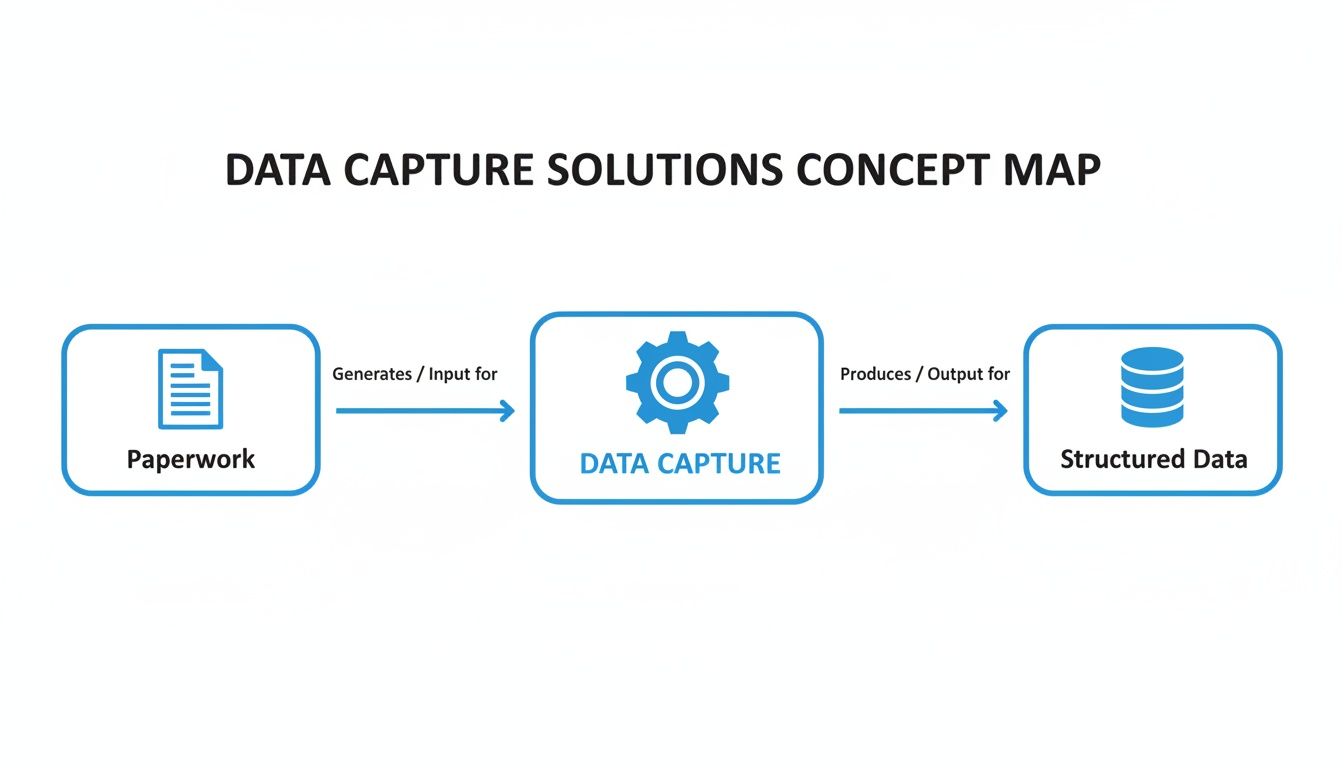
Ultimately, these tools act as an intelligent translator, converting messy, real-world information into something your systems can work with instantly.
The Bigger Picture: AIDC
OCR and IDP are both part of a much larger field known as Automatic Identification and Data Capture (AIDC). This category includes everything from the familiar barcode scanners and QR codes to RFID tags. The goal is always the same: get information from the physical world into a digital system automatically.
And businesses are betting big on it.
The AIDC market hit a staggering $69.77 billion in 2024 and is on track to reach $212.28 billion by 2034. This explosive growth is driven by a single, powerful need across retail, logistics, and manufacturing: the need to automate processes and get rid of costly manual errors.
This isn't some futuristic trend; it's happening right now. Companies are pouring money into tools that can turn physical information into digital assets without someone having to type it all in by hand. AI-powered data capture is no longer a luxury—it’s becoming the new standard for running an efficient and accurate business.
Key Features of a Winning Data Capture Solution
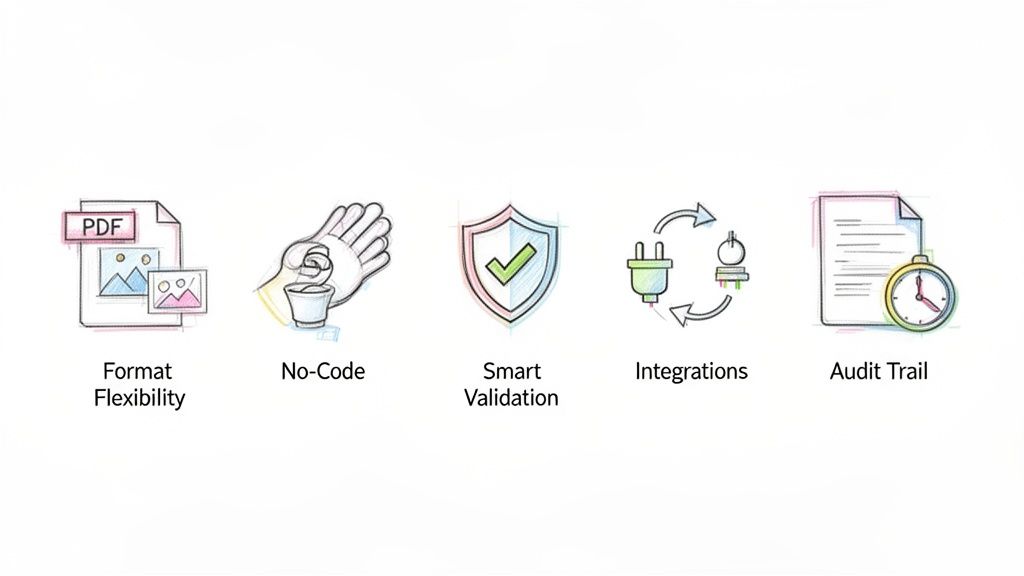
When you start shopping for a data capture tool, it's easy to get lost in a sea of marketing jargon and technical specs. My advice? Forget the buzzwords and focus on what the software actually does for your team.
A great solution isn't the one with the longest feature list. It's the one with the right features—the ones that solve real-world problems. Think of the following as a no-nonsense checklist. These are the non-negotiables that separate a truly helpful tool from one that just gives you more busywork.
Flexibility with All Document Formats
First thing's first: can the tool handle the chaos of your real-life documents? Business information rarely arrives in a neat, uniform package. You're dealing with crisp PDFs from one vendor, grainy scans from another, and even blurry smartphone photos of receipts from your team in the field.
A top-tier platform doesn't flinch at this variety. It should effortlessly digest whatever you throw at it, including:
- PDFs (both digital and scanned): The bread and butter of business documents like invoices and contracts.
- Image Files (JPG, PNG, TIFF): Crucial for capturing anything documented with a camera.
- Office Files (Word, Excel): For pulling information directly from reports or partner spreadsheets.
The key is that the tool adapts to your reality, not the other way around. If you have to manually convert files before you even start, the system is already failing you.
A True No-Code Interface
One of the biggest roadblocks to adopting new software is the constant dependency on the IT department. A genuine no-code interface is built to smash that barrier. It puts the power directly into the hands of the people who need it most—the accountants, clerks, and managers who work with the documents every day.
A no-code platform empowers your team to solve their own problems. If someone in finance can create a new rule to capture a specific field from a new vendor's invoice using a simple drag-and-drop menu, you've found a winning solution.
This self-service approach completely changes the game. Instead of filing an IT ticket and waiting two weeks for a simple change, your team can adjust workflows in minutes. That’s the kind of agility you need to keep up with the day-to-day pace of business.
Seamless Integrations and Smart Validation
Getting the data off the page is only half the battle. That information is useless unless it gets where it needs to go. A quality solution must offer smooth integrations that plug directly into the software you already use, whether that's your ERP, accounting platform, or even a simple Google Sheet. The goal is to create an automated pipeline for your data, completely eliminating the manual step of downloading and re-uploading files.
Just as important is smart data validation. The software shouldn’t just grab text; it should act as a first line of defense against errors. This means it actively checks the data for you by:
- Format Checking: Making sure a date is actually a date or that a PO number follows the right pattern.
- Cross-Referencing: Verifying that an invoice total matches the sum of its line items.
- Rules-Based Logic: Automatically flagging an invoice that's over a pre-set spending limit or past its due date.
These checks are what ensure the data flowing into your systems is clean and trustworthy. It's how you prevent costly mistakes before they ever have a chance to happen.
How Different Industries Use Automated Data Capture
A feature list tells you what a data capture tool can do, but the real story is in the problems it solves day-to-day. Theory is fine, but what really matters are tangible results. Across all sorts of industries, businesses are finally tackling their most tedious, error-prone workflows and turning them into strategic advantages.
Let's move past the abstract and look at how people in finance, insurance, and manufacturing are using these tools to see a real return on their investment. These examples show how data capture isn't a one-size-fits-all solution, but a specific fix for unique industry headaches.
Finance: Taming the Three-Way Matching Beast in Accounts Payable
Think about an accounting manager at a typical distribution company. Her team was practically drowning in the manual three-way matching process. For every single invoice, they had to dig up the matching purchase order and receiving report just to confirm that the quantities, prices, and terms were all correct before cutting a check.
This was a painstaking, line-by-line comparison across three separate documents that could easily take 15-20 minutes per invoice. With hundreds of invoices piling up each week, the team was stuck in low-value work, which led to late payment fees and frustrated vendors.
Once they brought in an automated data capture solution, their entire process changed.
- Step 1: Invoices, POs, and receiving reports are all ingested automatically as they arrive.
- Step 2: The AI reads each document and pulls out all the key data points, including individual line items.
- Step 3: The system instantly performs the three-way match and flags only the exceptions for a human to review.
The impact was immediate. Invoices that matched perfectly were sent straight for approval. The team’s job shifted from manual data entry to exception handling—focusing only on the 5-10% of invoices that actually had a problem. This simple change cut their invoice processing time by over 80%, got rid of late fees, and gave them time back for more important financial analysis. A great parallel in the financial world is technology like Remote Deposit Capture (RDC), which similarly automates and speeds up check processing.
Insurance: Delivering Faster, More Accurate Client Proposals
Now picture an insurance brokerage that handles commercial policies. To win new business, the team has to build detailed proposal comparisons for every potential client. This used to mean manually combing through dozens of pages from multiple carriers—each with its own confusing format—to pull out critical details like coverage limits, deductibles, and premiums.
Just creating one comparison spreadsheet could take hours of mind-numbing copy-pasting. It was slow, prone to costly human error, and a huge bottleneck in their sales cycle. This is a classic pain point where intelligent data capture solutions make a world of difference.
With their new platform, brokers can upload all the carrier proposals at once. The AI, which has been trained on insurance documents, immediately finds and extracts the relevant policy details from every file, no matter how different the layouts are.
The system doesn't just read the text; it understands the context. It knows "Limit of Liability" and "Coverage Amount" are the same thing and organizes everything into a clean comparison table in minutes.
This automation means the brokerage can get back to clients faster with far more accurate information, helping them close more deals. They effectively turned hours of administrative drudgery into a powerful tool for their sales team.
Manufacturing: Making Sense of Complex Commission Statements
Finally, let's look at a manufacturer's representative firm. These firms often represent dozens of different manufacturers, and their income comes from commissions. Every month, a flood of commission statements arrives, each in its own unique format—some are PDFs, some are messy Excel files, and a few still come on paper.
Trying to reconcile all these statements to track sales and verify payments was a complete nightmare. The firm's owner would spend days manually piecing together data from all these different sources into a single master spreadsheet just to get a clear picture.
By implementing a no-code data capture solution, the firm built a simple but incredibly effective workflow. Now, every commission statement gets uploaded to one place. The AI intelligently extracts the key information—sales rep, customer, product, quantity, and commission—from every single statement, regardless of the format. The result is one consolidated, clean spreadsheet. This didn't just save days of work each month; it gave them clear, real-time insight into sales performance across their entire business.
You can see how this technology is adapted for all kinds of different business needs by exploring these industry-specific use cases for data capture.
How DocParseMagic Offers a Smarter Solution
We've talked about the theory, but let's get practical. Turning a mountain of paperwork into useful data isn't just a hypothetical benefit—it's a real-world necessity for teams in accounting, insurance, and procurement. This is exactly where a tool like DocParseMagic comes in, offering a direct answer to these daily headaches.
Instead of fighting with rigid software or getting stuck in an IT ticket queue, imagine a tool that’s simple enough for anyone on your team to use. DocParseMagic was built on a no-code platform specifically to handle the messy, inconsistent documents that are a part of everyday business. Think of it less like a piece of software and more like a trained assistant who already knows how to read your paperwork.
Template-Free AI That Actually Understands Your Documents
If you've ever used older data capture software, you know the biggest pain is the setup. You have to create a specific "template" for every single invoice or form. The moment a vendor changes their invoice layout—even just a tiny bit—the template breaks. Your whole process grinds to a halt.
DocParseMagic does away with that frustration entirely. Its AI doesn't need rigid, pre-defined templates. Instead, it reads and understands a document's context, much like a person would.
It figures out that the number next to a phrase like "Total Due" is the amount you need to pay. It sees a table with "Description," "Quantity," and "Price" columns and knows those are line items. This built-in intelligence allows it to process a huge variety of document formats without needing you to constantly tweak settings.
DocParseMagic is engineered for the real world, where no two documents are exactly alike. Its template-free approach means you can start extracting data from day one, without a lengthy setup process.
So what does that really mean? You can give it a stack of invoices from ten different suppliers, and it will pull the right information from every single one. That kind of flexibility is what makes it so useful for any team buried in diverse paperwork.
From Complex Data to Clean Spreadsheets
Modern business documents are often more than just a few simple fields. Invoices have detailed line items, commission statements include complex tables, and insurance policies have layers of coverage details. Many basic tools fall short here, struggling to pull out this structured information accurately.
DocParseMagic was built to handle this exact challenge.
- Extract Line Items: It doesn't just grab the total amount from an invoice; it intelligently identifies and pulls entire tables of data from purchase orders and invoices.
- Perform Calculations: The system automatically checks the math, ensuring the sum of the line items matches the grand total. It's a simple but powerful layer of validation.
- Handle Any Field: Whether it's a policy number on an insurance form or a SKU code on a sales report, you can teach it to find and extract virtually any piece of data you need.
This turns a jumbled PDF or a scanned image into a clean, organized spreadsheet that's ready for you to work with. The platform's simple drag-and-drop interface makes this process incredibly clear.
This screenshot gets to the heart of what DocParseMagic does. You upload a document on the left, and just moments later, you see the structured data pop up in a clean table on the right. It’s a perfect visual of turning an unstructured file into actionable information.
Accessible Automation for Every Team
At the end of the day, a tool is only valuable if your team can actually use it. We designed DocParseMagic to be as simple and intuitive as possible. There’s no code to write and no complicated software to install. If you can drag and drop a file, you have all the skills you need to automate your document processing.
When you combine that simplicity with straightforward, credit-based pricing, DocParseMagic becomes a practical partner rather than just another piece of enterprise software. It's a clear-cut solution for a critical business problem, designed to give your team back hours of manual work so they can focus on what really matters.
Your Step-by-Step Implementation Guide
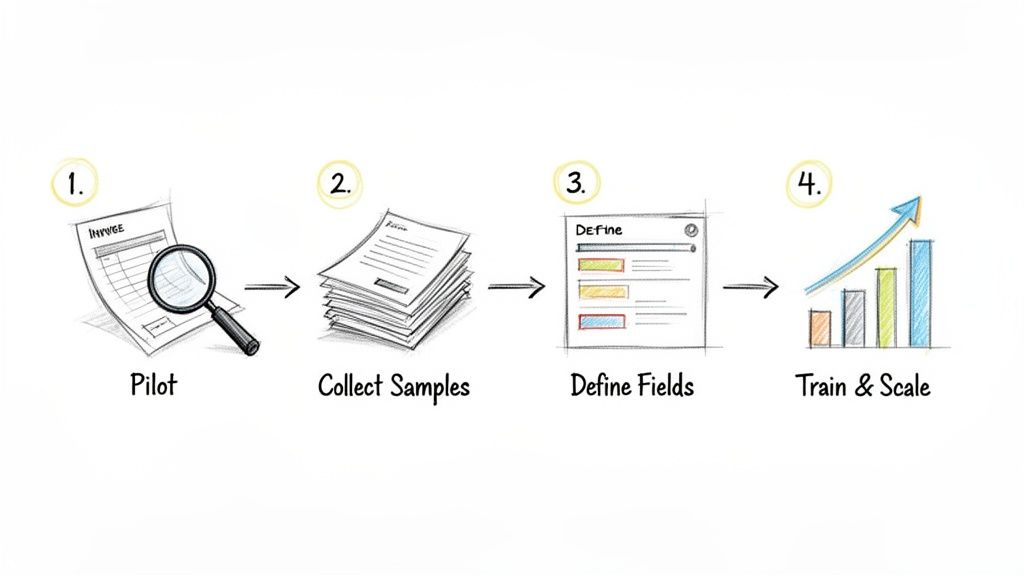
Rolling out new software can feel like a huge project, but getting a data capture solution up and running is simpler than you think. The secret is to start small, prove the value, and build from there.
This four-step plan is all about getting a quick win. The goal isn’t to automate everything overnight. It's to nail one workflow perfectly and then expand your success.
1. Identify a Pilot Project
First things first, pick one process that's a real headache for your team but isn't overly complex. The biggest mistake we see is people trying to automate everything at once, which just leads to frustration.
A great place to start is with invoices from one of your top three vendors. This gives you a consistent set of documents to learn with, making it easy to see the before-and-after impact.
2. Gather Sample Documents
Next, pull together a small but realistic batch of these documents—around 10 to 15 recent examples should do the trick. If you get them in different formats, like digital PDFs and scanned paper copies, be sure to include a mix of both.
Think of these samples as your training ground. You'll use them to teach the software what to look for and make sure it can accurately pull the data you need from real-world documents.
Key Takeaway: A pilot project is all about proving the concept and building confidence. By starting with a manageable scope, you can show positive results fast and get your team excited about the possibilities.
3. Define Your Key Data Points
Now, get specific about what information you need to grab from each document. For that vendor invoice, your list might look something like this:
- Invoice Number
- Invoice Date
- Due Date
- Total Amount
- Vendor Name
- Purchase Order (PO) Number
Creating this simple checklist gives the software clear instructions. You're telling it to ignore the noise and pull only the data that matters, turning a cluttered document into clean, structured information.
This is where the industry is heading. Electronic Data Capture (EDC) systems are on track to become a $7.523 billion market by 2035, and cloud-based tools are leading the charge. With accuracy rates often exceeding 99%, they free up teams from hours of manual work.
4. Train, Test, and Scale
With your samples and data points ready, it's time to run them through the system. Check the results, make any tweaks, and then show your team the new, much easier workflow.
Once you’ve perfected this first process, you can scale with confidence. Start adding more vendors, tackle different types of documents, and roll out the solution to other parts of your department. For a closer look at this process, see our complete guide on how to automate data entry.
Got Questions About Data Capture? We've Got Answers.
Thinking about upgrading your document workflows? You probably have a few questions. That’s a good thing. Making a smart investment means getting clear answers first.
Let's walk through some of the most common questions I hear from folks trying to make sense of data capture technology.
Just How Accurate Are These Tools, Really?
Modern AI-powered tools are impressively accurate, often reaching 99% or higher. We're not talking about the old-school OCR software that just guessed at characters and left you with a jumbled mess.
Today’s Intelligent Document Processing (IDP) systems are much smarter. They don't just see letters; they understand context. They can check if a date is valid or if the line items on an invoice actually add up to the total. In many cases, they catch tiny errors a person might easily miss during a long day of manual entry.
Will I Need to Get My IT Team Involved to Set This Up?
For most modern tools, you absolutely won't. While massive, custom enterprise projects might need some IT support for deep integrations, the industry has shifted heavily toward no-code solutions.
These platforms are built for the people who actually use them every day—the accounting team, the operations managers, the folks in procurement. You can often use simple drag-and-drop interfaces to teach the system what information to pull from your documents. This puts the power right in your hands, so you can solve your own problems without getting in line for technical help.
Think of it this way: OCR is a single technology, while data capture is a complete solution. OCR simply converts an image of text into a digital text block. A full data capture solution uses OCR as a starting point and adds AI to understand what that text actually means.
What's the Difference Between OCR and Data Capture Anyway?
This is a great question, and the answer is key. OCR (Optical Character Recognition) is just one piece of the puzzle. It’s the part that looks at a document and turns the image of words into raw, editable text. That's it.
A true data capture solution does so much more. It takes that raw text, identifies the important bits (like an invoice number, customer name, or total amount), cleans it up, and organizes it into a structured format you can actually use—like a neat table ready for Excel or your accounting software. OCR gives you a block of text; data capture gives you ready-to-use information.
How Do I Know My Data Is Secure?
Any company worth its salt in this space puts security first. After all, they're handling your sensitive business documents. Reputable data capture solutions are built with bank-level security from the ground up.
When you're evaluating a provider, look for these non-negotiables:
- End-to-End Encryption: Your data should be locked down and unreadable both when it's being uploaded and when it's sitting on their servers.
- Compliance Certifications: Look for proof they meet standards like SOC 2 and GDPR. These aren't just acronyms; they're rigorous, third-party audits that prove a company is serious about protecting your information.
Don't be shy about asking for their security credentials. You need to trust that they’ll handle your data with the highest level of care.
Ready to stop copy-pasting and start automating? DocParseMagic turns your messy documents into clean, structured data in minutes. Sign up for free and see how it works.